This thread has been locked.

If you have a related question, please click the "Ask a related question" button in the top right corner. The newly created question will be automatically linked to this question.

LMX2592: Unlock, Post-R setting

Part Number: LMX2592
Other Parts Discussed in Thread: TICSPRO-SW

Hello team,

I have two questions about LMX2592. Could you please answer below questions?

1.

My customer observes unlock with LMX2592 when changing output frequency(VCO) from 5200MHz to 4800MHz.

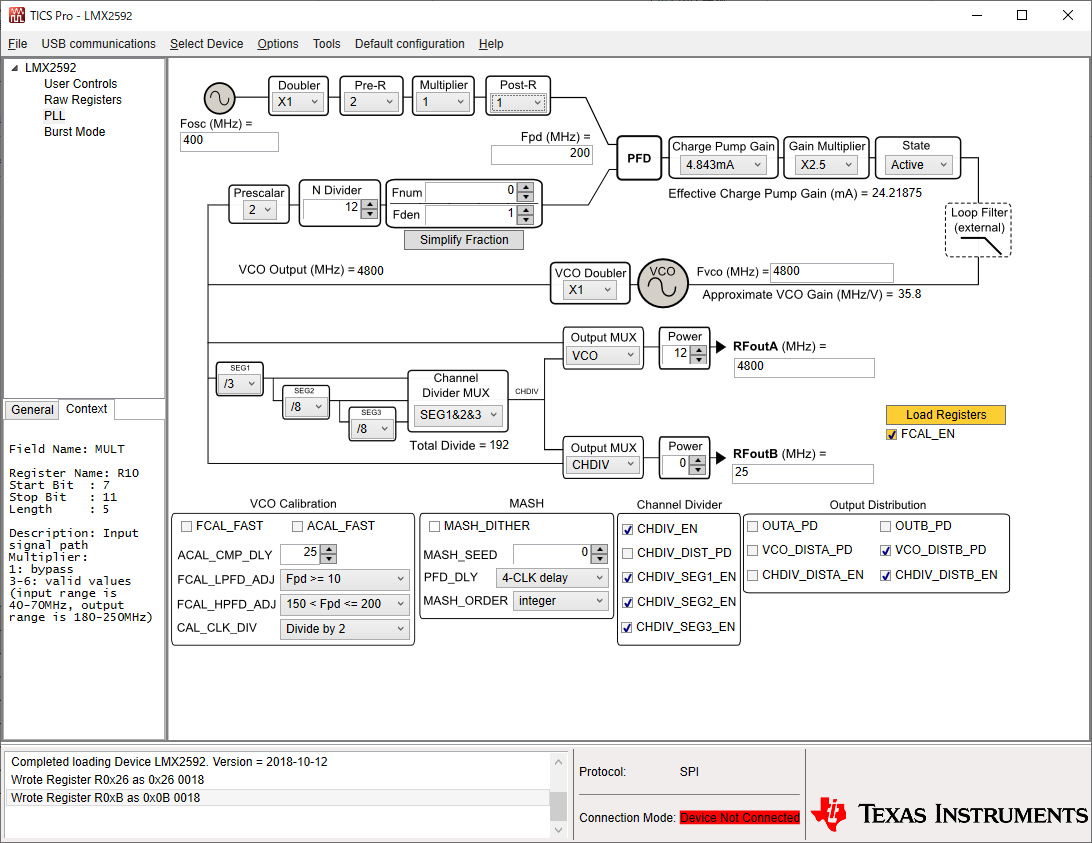
Customer changes the frequency by changing N divider value from 13 to 12 and then click "Load registers". For other setting, please refer to below TICS Pro capture.

Do you come up with any possible reason of the unlock behavior?
2.

We can select 0 as Post-R setting. In this condition, how will post-r divider work?

Can I think 1 is bypass mode? 

Best regards,

  • Hello Taketo-san,

    ACAL_CMP_DLY value must be adjusted. Please refer to the description for this register in "Table 8. R4 Register Field Descriptions" of the datasheet.

    If you mouse over the setting on TICSPRO-SW it will ask you to change this setting to 40. Can you please try this to see if it fixes the issue with the PLL not locking?

    Post-R setting 0 can be treated as reserved. For bypass please set this bit to 1.

    Thanks,

    Vibhu

  • Hello Vibhu-san,

    ACAL_CMP_DLY is set with "25" and CAL_CLK_DIV is set with "divide by 2". I don't think the setting violate the guideline written in Table 8 R4 description.

    Other setting may affect locking?

    Best regards,

  • Hi Sato-san,

    could you try set CAL_CLK_DIV = div/4? I think div/2 is still not enough, the calibration speed maybe too fast to be able to calibrate correctly.