This thread has been locked.

If you have a related question, please click the "Ask a related question" button in the top right corner. The newly created question will be automatically linked to this question.

DS90UB954-Q1: Understanding MAP results

Part Number: DS90UB954-Q1
Other Parts Discussed in Thread: ALP

Tool/software:

Hi TI team,

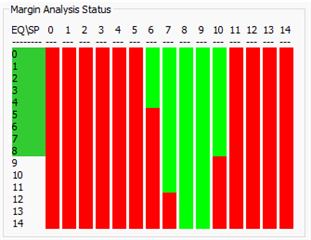
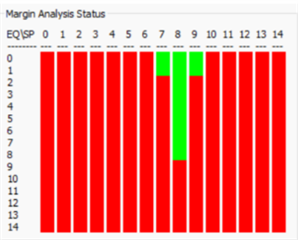
Currently we have carried out the MAP analysis for our target board deserializer and serializer(3 variants). We are seeing for one variant the results are and for another variant the results are fail. Below are the results.

Variant 1:
Variant 2:

Variant 3:
We have below questions:

1. We are not able to get the same results for the same setup. Can we consider this is as an issue with the ALP tool?

2. For our variant 2 and 3 we are seeing that the results are not meeting the pass criteria, can you please let me know how to start the debugging for these failures(currently we have reduced the cable length and checked the performance, still the performance remains the same)

3. Need to know whether these results holds good for the forward channel alone or for the back channel also(because the FPD link support bidirectional communication)

4. Is it must to run the EQ and SP settings for the full scale or can we do it for a shorter range, current issue that we are seeing is none of the EQ settings above 7 are able to get 4 consecutive SP settings as pass.

5. Is there any need to modify the register settings in actual scenario based on these link margin results? If we need to modify what is the process? 

  • Hello Sai,

    1. You can try to run the MAP script directly in the Scripting tab in ALP. Please open the Scripting tab in ALP and run the script located here, to see if you get differing results.
      1. C:\Program Files (x86)\Texas Instruments\Analog LaunchPAD v1.57.0010\PreDefScripts\DS90UB954\ub954_margin_analysis_script
    2. In each variant of the SER board, were there significant differences in the PCB design?
      1. The MAP tool is a high-level analysis tool used to gauge the general performance of the high-speed link. For a deeper analysis, you can simulate or measure the Insertion Loss or Return Loss of your SER PCBs.
    3. MAP tool only evaluates the Forward Channel.
    4. We only recommend you get a continuous area of 3 EQ levels and 4 strobe positions anywhere in the MAP results. It does not need to specifically be in the higher EQ range.
    5. The DES has an adaptive AEQ. You do not need to modify the AEQ settings. The MAP tool runs the AEQ at fixed settings, in order to provide a general overview of the AEQ performance in your current cable link. The MAP tool is for debug/diagnostics purposes only.

    Best,

    Justin Phan