This thread has been locked.

If you have a related question, please click the "Ask a related question" button in the top right corner. The newly created question will be automatically linked to this question.

TMDS1204: GBL_CTLE_CTRL Register

Part Number: TMDS1204


Hello,

I have a device based on TMDS1204. I am going to use that as liner re-driver and have as much manual control as posible. 

I can see in Table 7-6 that EQ gain depends on 3/6/12Gbps CTLE.

I don't undersatnd how I can set some CTLE.

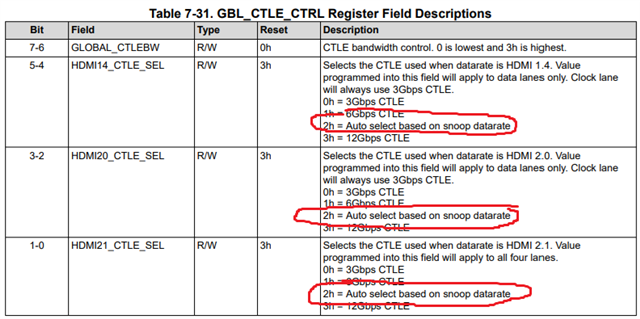
Register GBL_CTLE_CTRL has 3 fieled for setting CTLE: HDMI1.4, 2.0, 2.1. But if i dnot's use automatic of the TMDS1204 who consider what kind of HDMI in use? Should I set for instance 12 CTLE for all 3 fields?

And does GLOBAL_CTLEBW related with 3/6/12Gbps CTLE settings somehow?

Thank you

BR
Nikita

  • Hi Nikita,

    If you do not use the automatic value selected by TMDS1204 you will need to select the appropriate CTLE setting. Typically this would mirror the highest data rate you intend to support. You can set this to 12Gb CTLE for all fields, but if you are only running a lower speed signal I recommend setting it closer to the signal speed you anticipate.

    GLOBAL_CTLEBW can be left at the default value. This will adjust the CTLE bandwidth.

    Best,

    Shane

  • Thank you for your reply!
    Do you mean that even if I don’t use the automatic functions of the redriver, it will still automatically detect the rate and apply the CTLE corresponding to that rate?
    For example, if I select:
    HDMI 1.4 – 3G CTLE
    HDMI 2.0 – 6G CTLE
    HDMI 2.1 – 12G CTLE
    then, without changing the settings, the redriver will automatically use 3G CTLE for HDMI 1.4 and 12G CTLE for HDMI 2.1?

  • Hi Nikita,

    For example, if I select:
    HDMI 1.4 – 3G CTLE
    HDMI 2.0 – 6G CTLE
    HDMI 2.1 – 12G CTLE
    then, without changing the settings, the redriver will automatically use 3G CTLE for HDMI 1.4 and 12G CTLE for HDMI 2.1?

    Yes you have the right idea, that is how it would work.

    Keep in mind that HDMI2.1 can support multiple data rates. For example you may have an HDMI2.1 signal running at 12G or an HDMI2.1 signal running at 6G. By setting the HDMI21_CTLE_SEL register manually, the device will default to the chosen CTLE setting for all HDMI2.1 signals. 

    • If you want TMDS1204 to automatically select the corresponding CTLE based on the detected data rate (not just the detected HDMI standard) you need to set the CTLE_SEL registers to 'auto select based on snoop datarate'. 

    Best,

    Shane

  • HI Shane, thank you for the explanation. Let me clarify one point.

    If I am not going to connect DDC to the re-driver, I suppose it will not be able to detect the HDMI version. So, what will happen in that case? What CTLE will it use?

    I can also see registers:
    TMDS_CLK_RATIO
    FRL_RATE

    which are marked as RH/W. If I overwrite them, will it work? 

  • Hi Nikita,

    Thank you for clarifying. Yes you should set the TMDS_CLK_RATIO and FRL_RATE registers to the HDMI data rate you plan to use. This will let TMDS1204 know what data rate is passing through if you do not snoop the DDC lines.

    Best,

    Shane