This thread has been locked.

If you have a related question, please click the "Ask a related question" button in the top right corner. The newly created question will be automatically linked to this question.

DS160PT801: DS160PT801 G3 x8 link fail

Part Number: DS160PT801
Other Parts Discussed in Thread: USB2ANY

Hello, here is the topology of our system: RC is a PC, and EP is our FPGA device.
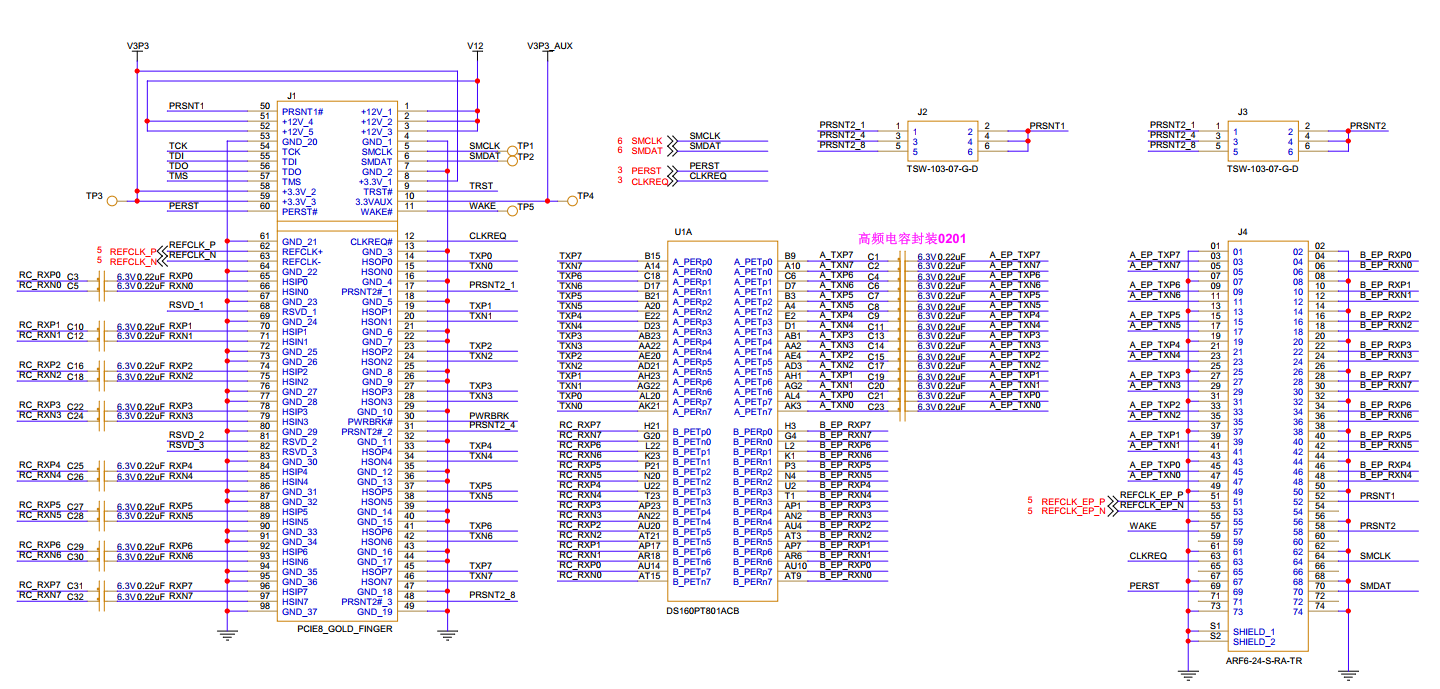
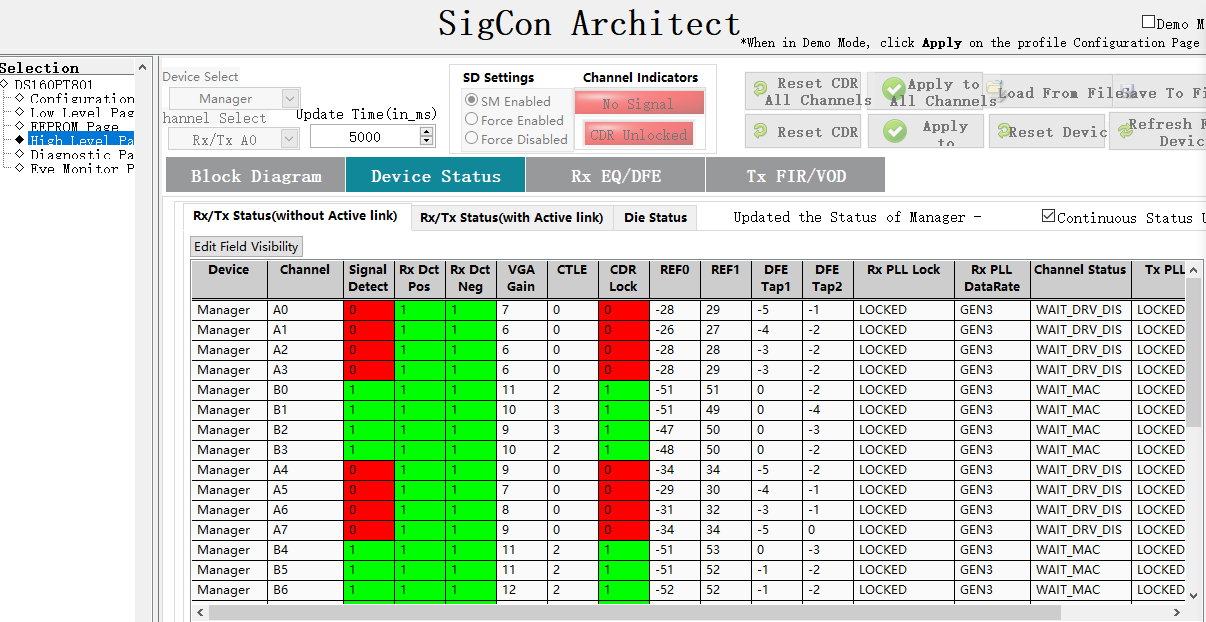
5d5db5be-b4db-444f-b96e-eae96cb30cee.pngThe EEPROM image is programmed with the DS160PT801.hex file provided on the official website. Link establishment is successful when the FPGA device is instantiated as G1 and G2, but it fails when instantiated as G3. The GUI screenshots are attached below. How should we proceed with debugging in the next step? 
9beda95a49e3becdf23a825df96fe296.png

  • Hi Zhijun,

    1. Can I see the full schematic of the device? What is Mode pin (W2) strapped to? What is Width pin (V23) strapped to?
    2. Can you send me two register dumps:
      1. Register dump of device link-up in Gen2. 
      2. Register dump of failed device link-up in Gen3
      3. steps for register dump:

    Best, 

    Charles

  • PCIE_RETIMER_CARD_11281750.pdfGEN2-REGS 1.cfgGEN3-REGS 1.cfg

    Hi Charles,

    Thank you for your reply. Our PCIe retimer card is designed with reference to your company's demo board. The MODE is set to Level-0 (1KΩ to GND) and the WIDTH is set to Level-3 (10KΩ to PWR).


  • Hi Charles,

    The license for the previously made FPGA PCIe Gen3 example design had some issues. I have now recreated one, and the link training result shows that Gen1 x8 is working properly.

    The register dump is attached. Please help analyze why Gen3 link training fails. Thank you.
  • Hi Zhijun,

    Can you also provide me with a link fail register dump with the new FPGA image? In the mean time, I'll take a look at the register dumps you've sent and respond back by Wednesday. 

    Best,

    Charles

  • Hi Charles,

                    The register dumps is attachment.

  • Gen1-EP-fail.cfgGen1-EP-ok.cfg 

    Hi Charles

    Pls check these registers, we used the broken hex file previously.

    EP is FPGA device that is instantiated as Gen1, Sometimes it can reach to MAC_FWD, sometimes it doesn't.

  • Any update for this issue? thanks!

  • Hi Xianbin,

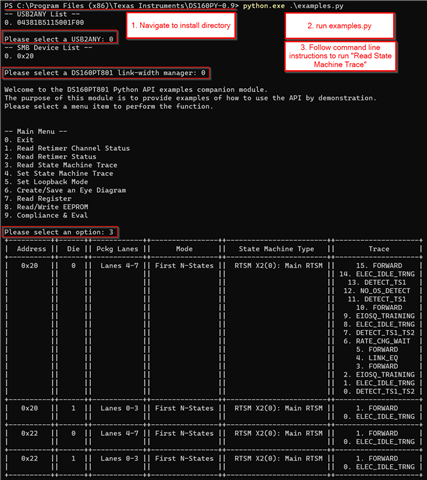
    I am analyzing the register dump. I will have a response by end of day tomorrow. In the meantime, could you install DS160PT801 Python API from the secure resources folder. Run examples.py and take a state machine trace. I've provided a screenshot for how to do this below.  

    Sorry for my delay. 

    Best,

    Charles

  • thanks, i wiil try it.

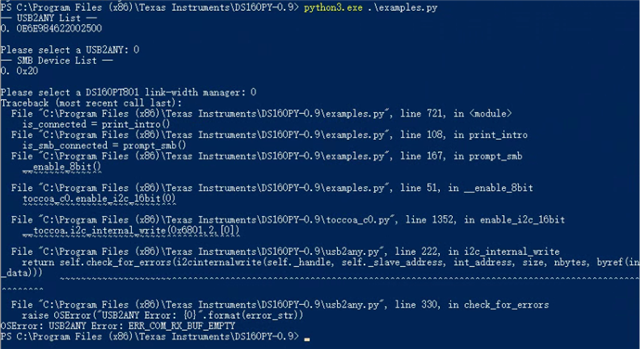
  • -- USB2ANY List --
    0E6E984622002500
    Please select a USB2ANY: 0
    ERR_COM_RX_BUF_EMPTY
    Could not connect to USB2ANY.

    example.py can not be run correctly.

  • Hi Charles,

    Where is the dp_cfg_port_orient_ov bit field?

  • Hi Xianbin,

    Please ensure your setup with USB2ANY and DS160PT801 is the same as the one you use for Sigcon Architect GUI. Also close out of Sigcon Architect when running PythonAPI. Thank you for trying to get the PythonAPI to work. This is important in seeing where the link-training process stops.

    From what datasheet are you finding dp_cfg_port_orient_ov?  

    EP is FPGA device that is instantiated as Gen1, Sometimes it can reach to MAC_FWD, sometimes it doesn't.

    Can you help me understand the situation? Previously you said the the device could link-up to Gen2 and fails at Gen3. From the quote above, you are saying that the new hex file installed on DS160PT801 causes the device to instantiate in Gen1? Which hex file are you using to see this behavior?

    Best,

    Charles

  • Please ensure your setup with USB2ANY and DS160PT801 is the same as the one you use for Sigcon Architect GUI.

    What does "setup" refer to? I used the same computer.

    Also close out of Sigcon Architect when running PythonAPI.

    yes.

    From what datasheet are you finding dp_cfg_port_orient_ov?  

    I can not find it from datasheet, it is mentioned in Sigcon Architect GUI - Low Level page - Diex Shared Regs 0xde 0xdf.

    I found 0x90(DATA_DIRECTION) is not correct when failed, I want try to set override

    Can you help me understand the situation? Previously you said the the device could link-up to Gen2 and fails at Gen3. From the quote above, you are saying that the new hex file installed on DS160PT801 causes the device to instantiate in Gen1? Which hex file are you using to see this behavior?

    PC(server) -- Retimer -- FPGA(instantiated as Gen1), maybe we did not executed enough tests, now we focus on Gen1 EP. hex we used is DS160PT801.hex.

    The issue is that the link cannot be established reliably; it can only be established occasionally.

    Additionally, I found that the width pin is not working. the "Bifurcation options" iSigcon change depending on the hex file. Is this a serious problem?

  •  I tried again. Is a specific Python version required?

  • reg.cfg

    Windows PowerShell
    版权所有 (C) Microsoft Corporation。保留所有权利。
    
    尝试新的跨平台 PowerShell https://aka.ms/pscore6
    
    PS C:\Users\admin> cd  c:\
    PS C:\> cd '.\Program Files (x86)\Texas Instruments\DS160PY-0.9\'
    PS C:\Program Files (x86)\Texas Instruments\DS160PY-0.9> python3.13.exe .\examples.py
    -- USB2ANY List --
    0. 0E6E984622002500
    
    Please select a USB2ANY: 0
    PS C:\Program Files (x86)\Texas Instruments\DS160PY-0.9> python3.13.exe .\examples.py
    -- USB2ANY List --
    0. 0E6E984622002500
    
    Please select a USB2ANY: 0
    -- SMB Device List --
    0. 0x20
    
    Please select a DS160PT801 link-width manager: 0
    
    Welcome to the DS160PT801 Python API examples companion module.
    The purpose of this module is to provide examples of how to use the API by demonstration.
    Please select a menu item to perform the function.
    
    
    -- Main Menu --
    0. Exit
    1. Read Retimer Channel Status
    2. Read Retimer Status
    3. Read State Machine Trace
    4. Set State Machine Trace
    5. Set Loopback Mode
    6. Create/Save an Eye Diagram
    7. Read Register
    8. Read/Write EEPROM
    9. Compliance & Eval
    
    Please select an option: 3
    +----------++------++------------++----------------++------------------------++--------------------+
    |  Address ||  Die || Pckg Lanes ||      Mode      ||   State Machine Type   ||        Trace       |
    +----------++------++------------++----------------++------------------------++--------------------+
    |   0x20   ||   0  ||  Lanes 4-7 || First N-States ||  RTSM X2(0): Main RTSM ||   15. DETECT_TS1   |
    |          ||      ||            ||                ||                        || 14. EIOSQ_TRAINING |
    |          ||      ||            ||                ||                        || 13. ELEC_IDLE_TRNG |
    |          ||      ||            ||                ||                        ||   12. DETECT_TS1   |
    |          ||      ||            ||                ||                        ||  11. NO_OS_DETECT  |
    |          ||      ||            ||                ||                        ||   10. FW_EIE_PAT   |
    |          ||      ||            ||                ||                        ||   9. NO_OS_DETECT  |
    |          ||      ||            ||                ||                        ||  8. SEND_EIEOS_PAT |
    |          ||      ||            ||                ||                        ||  7. ELEC_IDLE_TRNG |
    |          ||      ||            ||                ||                        ||    6. DETECT_TS1   |
    |          ||      ||            ||                ||                        ||   5. NO_OS_DETECT  |
    |          ||      ||            ||                ||                        ||    4. FW_EIE_PAT   |
    |          ||      ||            ||                ||                        ||   3. NO_OS_DETECT  |
    |          ||      ||            ||                ||                        ||   2. NO_OS_DETECT  |
    |          ||      ||            ||                ||                        ||  1. EIOSQ_TRAINING |
    |          ||      ||            ||                ||                        ||   0. NO_OS_DETECT  |
    +----------++------++------------++----------------++------------------------++--------------------+
    |   0x20   ||   1  ||  Lanes 0-3 || First N-States ||  RTSM X2(0): Main RTSM ||   15. DETECT_TS1   |
    |          ||      ||            ||                ||                        || 14. EIOSQ_TRAINING |
    |          ||      ||            ||                ||                        || 13. ELEC_IDLE_TRNG |
    |          ||      ||            ||                ||                        ||   12. DETECT_TS1   |
    |          ||      ||            ||                ||                        ||  11. NO_OS_DETECT  |
    |          ||      ||            ||                ||                        ||   10. FW_EIE_PAT   |
    |          ||      ||            ||                ||                        ||   9. NO_OS_DETECT  |
    |          ||      ||            ||                ||                        ||  8. SEND_EIEOS_PAT |
    |          ||      ||            ||                ||                        ||  7. ELEC_IDLE_TRNG |
    |          ||      ||            ||                ||                        ||    6. DETECT_TS1   |
    |          ||      ||            ||                ||                        ||   5. NO_OS_DETECT  |
    |          ||      ||            ||                ||                        ||    4. FW_EIE_PAT   |
    |          ||      ||            ||                ||                        ||   3. NO_OS_DETECT  |
    |          ||      ||            ||                ||                        ||   2. NO_OS_DETECT  |
    |          ||      ||            ||                ||                        ||   1. NO_OS_DETECT  |
    |          ||      ||            ||                ||                        ||   0. NO_OS_DETECT  |
    +----------++------++------------++----------------++------------------------++--------------------+
    
    
    -- Main Menu --
    0. Exit
    1. Read Retimer Channel Status
    2. Read Retimer Status
    3. Read State Machine Trace
    4. Set State Machine Trace
    5. Set Loopback Mode
    6. Create/Save an Eye Diagram
    7. Read Register
    8. Read/Write EEPROM
    9. Compliance & Eval
    
    Please select an option:

  • Any update for this issue? thanks!