This thread has been locked.

If you have a related question, please click the "Ask a related question" button in the top right corner. The newly created question will be automatically linked to this question.

TUSB1002A: 2 TUSB1002A System Check

Part Number: TUSB1002A

Hi TIer

I recived the issue about 2 TUSB1002A system check. I have provided some initial guidance to the customer and would like the product line to verify these points and provide further technical details.
Please review the following proposed responses and provide confirmation or corrections:
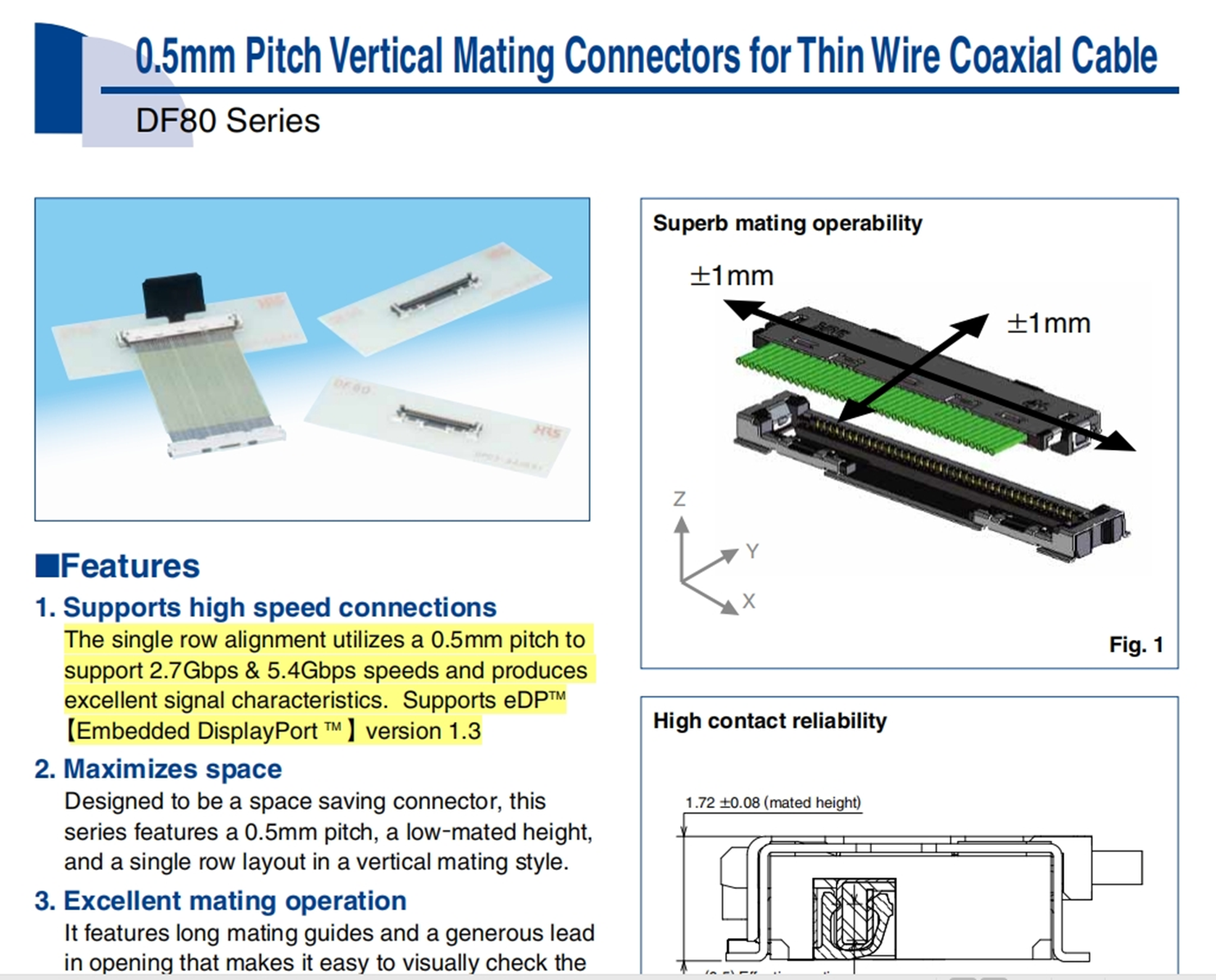
  1. According to the Hirose DF80 series datasheet, the connector is rated for up to 5.4Gbps. The customer is concerned whether 10Gbps USB 3.2 Gen2 signals can physically pass through this interconnect. Specifically, will the link automatically negotiate down to 5Gbps (Gen1) due to the connector's bandwidth limitation, or will it cause significant signal integrity failure :
    • Proposed Response: During the USB link training (LTSSM), the system initiates handshake sequences (Polling and Rx.Detect) to determine the highest mutually supported data rate. If the physical layer (interconnect/cable) introduces excessive signal integrity issues—such as high Bit Error Rate (BER) from a 5.4Gbps-rated connector handling 10Gbps—the link will likely fail the Gen 2 handshake and downshift to 5Gbps (Gen 1).
    • Request for Expert: Can you confirm if the PCH/TUSB1002A combination typically handles this downshift in high-loss environments?
  2. Redriver Placement (Board 2 vs. Board 3):
    • Proposed Response: The 
      TUSB1002A
      should ideally be placed on Board 2, as close as possible to the coaxial cable entry point from Board 1. Placing it on Board 3 after additional board-to-board loss may exceed the device's 16dB compensation capability, resulting in an unrecoverable signal.
    • Request for Expert: Does TI have a recommended maximum pre-channel loss threshold before the signal becomes un-recoverable for the TUSB1002A in this stacked configuration? Which board is perfer to place TUSB1002A?
  3. EQ Configuration Recommendations:
    • Proposed Response: Initial EQ settings should be based on the total insertion loss of the pre-channel (Board 1 + Connector + Coax Cable). Per SLLA406 (TUSB1002A Configuration Guidelines), we recommend choosing an EQ setting that closely matches the calculated dB loss at 5 GHz.
    • Request for Expert: Given a 32AWG coaxial cable (likely ~2-3dB/meter at 5GHz) plus two connectors, could you suggest a specific starting EQ setting from Table 1 of the datasheet? 
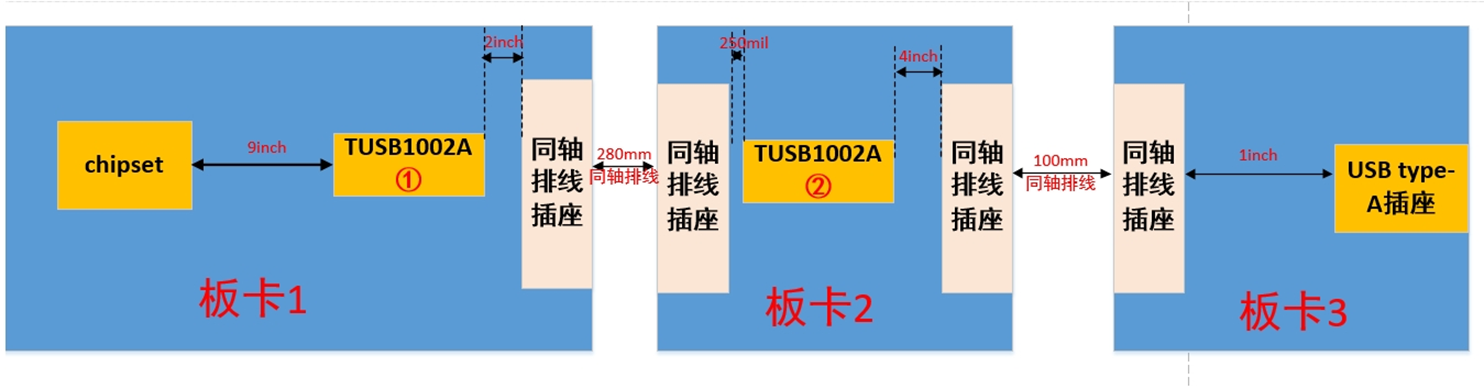
image.png
 
image.png
Best regards,
Tony Liu
  • According to the Hirose DF80 series datasheet, the connector is rated for up to 5.4Gbps. The customer is concerned whether 10Gbps USB 3.2 Gen2 signals can physically pass through this interconnect. Specifically, will the link automatically negotiate down to 5Gbps (Gen1) due to the connector's bandwidth limitation, or will it cause significant signal integrity failure :
    • Proposed Response: During the USB link training (LTSSM), the system initiates handshake sequences (Polling and Rx.Detect) to determine the highest mutually supported data rate. If the physical layer (interconnect/cable) introduces excessive signal integrity issues—such as high Bit Error Rate (BER) from a 5.4Gbps-rated connector handling 10Gbps—the link will likely fail the Gen 2 handshake and downshift to 5Gbps (Gen 1).
    • Request for Expert: Can you confirm if the PCH/TUSB1002A combination typically handles this downshift in high-loss environments?

    In this case, the DF80 is likely rated to 5.4Gbps due to its 3dB cutoff frequency. In the event that a 10Gbps signal is passed through this part, the signal will be attenuated past the point of compensation. This will limit the USB communication speed to 5Gbps. 

    Redriver Placement (Board 2 vs. Board 3):
    • Proposed Response: The 
      TUSB1002A
      should ideally be placed on Board 2, as close as possible to the coaxial cable entry point from Board 1. Placing it on Board 3 after additional board-to-board loss may exceed the device's 16dB compensation capability, resulting in an unrecoverable signal.
    • Request for Expert: Does TI have a recommended maximum pre-channel loss threshold before the signal becomes un-recoverable for the TUSB1002A in this stacked configuration? Which board is perfer to place TUSB1002A?

    I have a redriver training that should help the customer help pick the best location. 

    6724.Redriver Placement Training.pptx

    For the TUSB1002A (linear redriver), the main focus should be the pre-channel. The TUSB1002A has up to 15.3dB of equalization. We must determine what the equalization of the SoC is. The lower of the two equalization capabilities must be used as the maximum pre-channel loss. This is where the redriver should be placed. 

    I believe the pre-channel and post-channel lengths on board 2 should be swapped.

    EQ Configuration Recommendations:
    • Proposed Response: Initial EQ settings should be based on the total insertion loss of the pre-channel (Board 1 + Connector + Coax Cable). Per SLLA406 (TUSB1002A Configuration Guidelines), we recommend choosing an EQ setting that closely matches the calculated dB loss at 5 GHz.
    • Request for Expert: Given a 32AWG coaxial cable (likely ~2-3dB/meter at 5GHz) plus two connectors, could you suggest a specific starting EQ setting from Table 1 of the datasheet? 
    A rough approximation of the loss and EQ suggestions can be seen below: