TUSB7320: USB 2.0 HS Detection Handshake Issue

Part Number: TUSB7320
Other Parts Discussed in Thread: TUSB7340

Hello,

I am testing a design which uses the TUSB7320IRKM, and it is behaving unexpectedly.

When a USB 2.0 device is connected, the enumeration process fails. Windows 11 device manager indicates that a USB device is connected, but is not functioning correctly (device descriptor request failed).

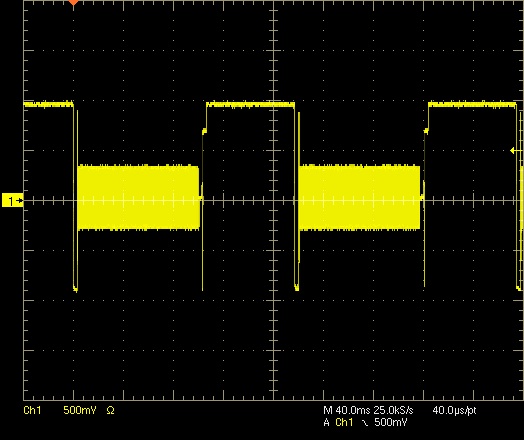
The USB high-speed detection handshake process appears to begin normally (see fist attached image), but the K-J chirping does not cease before the 10ms reset period is exceeded, and the process restarts after ~100ms (see second attached image).

I believe this to be caused by a hardware configuration problem, however, I have been unable to identify the cause of the issue.

What is the recommendation for next troubleshooting steps?


Additional details:

This TUSB7320 implementation is question is based on the TUSB73x0 datasheet (Rev Q) and TUSB7340EVM reference implementation (with preference to the datasheet for differing parameters), but without an attached EEPROM and with only the USB 2.0 signals connected. All USB 3.0 pairs are not connected in this design. The TUSB7320 initializes successfully as a PCIe endpoint, and is recognized under Windows 11 with the SLLC448 version 01.00.00.0A driver.

Attached figures:
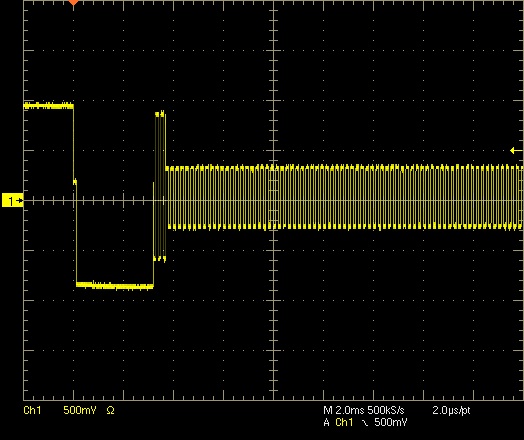
Handshake_Closeup.jpg

Handshake_MultiCycle.jpg

Note: Oscilloscope measurements are taken using a differential probe.

  • Hi,

    Are you able to capture a protocol trace of the USB communication using a protocol analyzer?

    Can you test on multiple USB 2.0 devices and reproduce the same issue?

    Can you probe both the D+ and D- separately, so both waveforms are shown?

    The HS enumeration process should follow these steps:

    1) HS host detects a FS connection

    2) HS device initiates HS handshake

    3) HS host responds with multiple JK chirps

    4) device detects these chirps and enables HS terminations

    5) HS communication begins

    I'd like to see this handshake as shown in the following slides:
    https://www.ti.com/content/dam/videos/external-videos/ko-kr/9/3816841626001/6305893689112.mp4/subassets/what-is-usb-2-0-high-speed-detection-handshake-presentation-quiz.pdf

  • Thank you for your guidance, Vishesh,
    I do not have a USB protocol analyzer, but one is now on order.


    I have repeated the testing with multiple USB 2.0 HS devices, however, all device communication failed in the same manner. I also tested a USB 1.1 LS device and the OS still failed to determine the device descriptor, which is concerning.
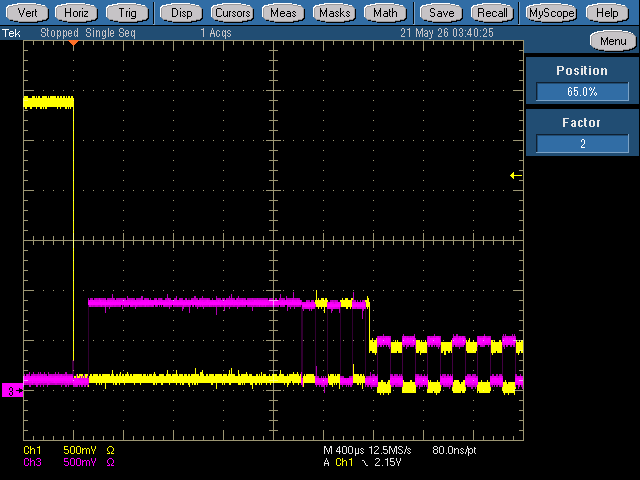
    I have reworked the measurement setup with two active probes similar to the presentation you linked. The first attached image should be analogous to page 4 of the presentation, and shows steps 1-4 being executed.

    First attached image

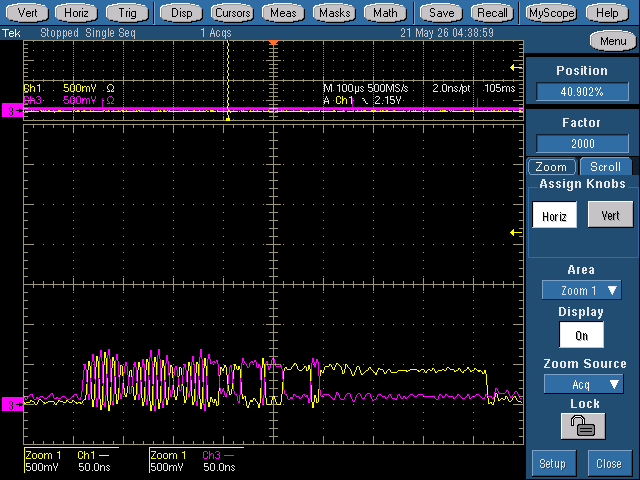
    The chirp K-J sequence still continues for ~100ms, however I discovered that the timeout/restart process shown in my first post only applies for the first few handshake attempts, after which the host does stop the chirp sequence after 104ms and begins sending microframes. As can be seen in the second and third attached images, there is data being transferred in the microframes, but I cannot decode it with my current measurement setup.

    Second attached image

    Third attached image

    Since the LS device also failed, and there are microframes (eventually) being successfully being sent, the communication problem may not be in the HS handshake process.

  • HI,

    I have repeated the testing with multiple USB 2.0 HS devices, however, all device communication failed in the same manner. I also tested a USB 1.1 LS device and the OS still failed to determine the device descriptor, which is concerning.
    I have reworked the measurement setup with two active probes similar to the presentation you linked. The first attached image should be analogous to page 4 of the presentation, and shows steps 1-4 being executed.

    Yes, it seems that both the host and device enable the high speed terminations, but afterwards we see no progress. I'm not sure its takes 104ms to begin SoF packets transfer. 

    Are you able to share a schematic of your TUSB7320 implementation. What OS driver are you using for this project?

    Seeing that a LS device fails we may need to wait for  the protocol analyzer to see exactly what's happening here.

  • The 104ms figure is the measurement from the start of the handshake (DP pulled up → SE0). The time between the terminations being enabled and the first microframe is 101.6ms. This timing seems to be relatively consistent so far.

    Due to client confidentiality, I cannot share the schematic publicly, but I can send it to you privately if there is a mechanism to do so.

    The OS is Windows 11 (build 26100.8246), and the driver is version 01.00.00.0A of the “TUSB73x0 xHCI Filter Driver for Win8/8.1/10” (SLLC448).

  • Hi,

    Can you test the default host controller driver from windows?

    I have requested friendship over E2E, you can send the schematics over through a private message.

  • I have sent you the schematic via a private message.


    I retested using the default Windows-11-provided host controller driver, however the results are unchanged.
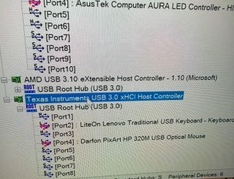
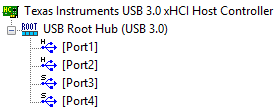
    This is an image of how the TUSB7320 and downstream device present in Windows device manager:

    Attached Image

    I will test using another host computer running Windows 10 (the latest officially supported OS on the SLLC448 driver description) over the next couple of days as well.

  • Hello, 

    We are OOO today for the U.S holiday. Expect a response by EOD tomorrow.

    Thanks,

    Ryan

  • Hi Jordan:

       Can you send Schematic for review? USB3 device works fine?

    Best

    Brian

  • Hello Brian,

    I have sent the confidential schematic to you via private message. 

    This implementation is USB 2.0 only; the USB 3.0 pairs are left NC. 

    Thanks

  • Hi Jordan,

    I shared the schematic with Brian internally. He will take over supporting this issue.

  • Hi Jordan:

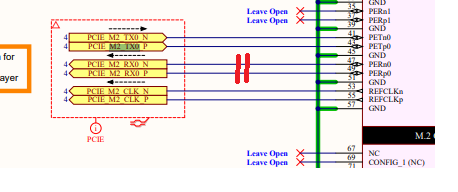
       Host PCIE_ TX should be connected to PCIe M2 PERX, I'm surprised you still can see USB2 enumeration data even with wrong connection.

       Did you see the TI host under device manager or USBtreeviewer?

       Can you measure signal amplitude for high speed signal? it looks more like host disconnected due to some reason.

    Best

    brian

  • Hi Brian,
    The signal direction annotations on the schematics is from an internal annotation scheme. I apologize for the confusion. The actual electrical connections are made in accordance to the M.2 Specification – this is illustrated in Annex Figure 6-2 (attached).

    M.2 Spec Signal Directions (Fig. Annex 6-2)

    Attached is an image from Windows device manager, as well as a PCIe root complex scan, that shows the TI device connected to the PCIe root complex. There does not seem to be any evidence (event logs, warnings, etc) that suggests a PCIe disconnection during operation.

    Windows Device Manager Image

    PCIe Root Complex Scan (Annotated)

    Regarding signals levels, I do not have the equipment to probe the PCIe signals, but the USB HS microframes have an amplitude of ~430mV on each data line – though with ~30% overshoot on 0-1-0 transitions.

    I will check the USB status using USB Tree Viewer and reply to this post with the results.

  • From device manager, it seems TUSB7340 host controller was detected by system.

    Are you able to zoom out overshort area and measure signal amplitude?

    Best

    Brian