This thread has been locked.

If you have a related question, please click the "Ask a related question" button in the top right corner. The newly created question will be automatically linked to this question.

DS90UB954-Q1: ALP with Multiple Deserializers on I2C Bus

Part Number: DS90UB954-Q1
Other Parts Discussed in Thread: ALP

Hello,

I have a customer with a board with several UB954 deserializers on the same I2C bus. The I2C addresses are set via the IDX pins/external resistors.

When connecting to the ALP with this setup via Aardvark, ALP automatically selects one of these deserializers to pair with. Is there a way to choose the deserializer I2C address that ALP pairs with? Is there an example script under Analog LaunchPAD -> PreDefScripts that can be modified to do this? 

Thanks,

Emma

  • Hello Emma,

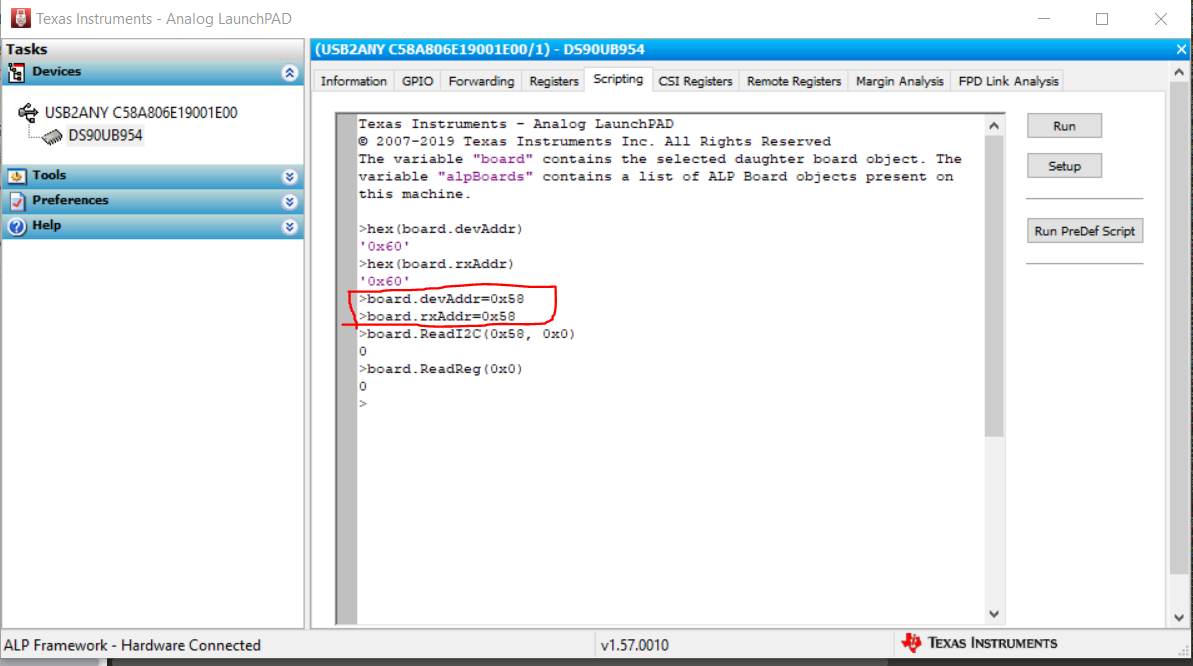
    In scripting tab customer can set "board.devAddr" and "board.rxAddr" to the address of the Deserializer he wants to access. See example screen shot below: 

    I have EVM connected to PC and my current address is 0x60 (shown by board.devAddr and board.rxAddr). I show how I change it to (say) 0x58 as shown.

    Since I don't have a 2nd device on my EVM, when I read with dev address 0x58 register 0x0,  I don't get 0x58 address. But customer should see the new device address he set when he makes a read to register 0x0.

    One important thing to note: after setting devAddr and rxAddr, user should not go to "Information" tab. If user goes to "Information" tab these variables will be reset as in this tab ALP does polling on the I2C bus and reassigns devAddr/rxAddr. So information tab is not usable but other tabs should work with the new address programmed.

    Hopefully, customer can execute his own scripts from the scripting tab and access. Let us know if this work around helps.

    Thanks,

    Vishy

  • Hi Vishy, 

    Thanks very much! This is exactly what we were looking for. 

    One follow up - when you say that the other tabs besides the information tab work, does this include the MAP GUI? Or would they need to modify the MAP script with the correct address and run it via the scripting tab? 

    Best, 

    Emma

  • Emma,

    Yes, the MAP GUI should work. After changing the device, user can check in Registers tab if he is reading from the correct selected Deserializer. Also, he can verify if the Serializer ID (Register 0x5B) is populated and correct. Then MAP GUI should work. Please try and let us know. 

    thanks,

    vishy