This thread has been locked.

If you have a related question, please click the "Ask a related question" button in the top right corner. The newly created question will be automatically linked to this question.

TPLD1202-DYY-EVM: Regarding Write Failures with the TPLD1202EVM

Part Number: TPLD1202-DYY-EVM
Other Parts Discussed in Thread: TPLD1202, TPLD-PROGRAM, TPLD2001, TPLD1201

Tool/software:

Hi team,

 [Observed Malfunction]

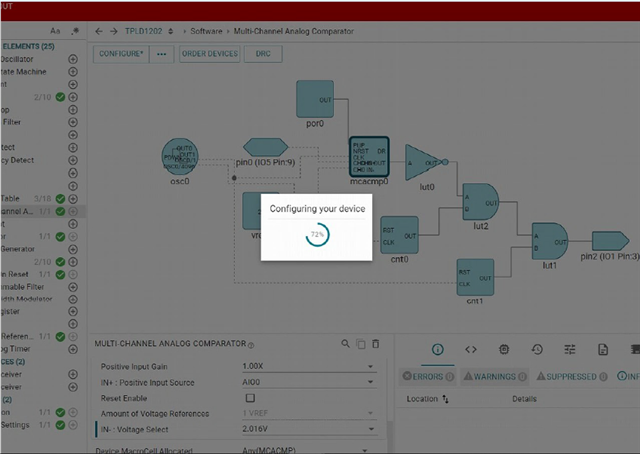
After starting the PC, the first write operation completes successfully, but from the second attempt onward, the application either freezes or displays an error message.
Once this issue occurs, write operations cannot be performed again unless the PC is restarted.


 [InterConnect Studio Version]

1.5.1_1087


[Screenshots of Error Occurrence]

  1. Screen showing the application freezing during the write process
2. Screen displaying the “Oh Snap!” error message
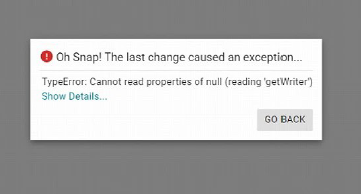
3. Screen showing detailed error information
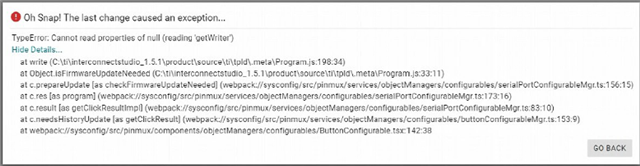
The driver updates and firmware upgrades have already been completed.

Best regards,

Kyohei

  • Hi Kyohei,

    Thank you for the detailed error description. Our team will look into what is causing these errors. 

  • Hi Kyohei,

    We were able to reproduce the bug, and I was able to confirm this only happens with TPLD1202 devices. It seems the programmer is reaching a state that when trying to overwrite the program causes it to not be able to write to the device the second time. This is exacerbated by a bug where our read timeout is failing causing the user to be stuck forever.

    A simpler fix than restarting the computer is simply disconnecting and reconnecting the programmer. This will cause the current run to fail, but the next subsequent run will succeed. We will look for fixes, and I will let you know if an updated firmware is released that solves this issue.

    Regards,

    Owen

  • Hi Owen,

    Thank you for your support.

    I understand that this issue is a bug caused by a firmware change and is only observed with the TPLD1202.

    However, according to the customer, although they were initially able to resolve the issue by reconnecting the TPLD-PROGRAM or restarting the PC, these measures no longer work, and the programmer is no longer recognized even when connected.

    As the evaluation is currently completely halted, please let us know if there are any other possible countermeasures.

    Best regards,

    Kyohei

  • Has there been any progress on this matter? The evaluation seems to be on hold on the customer side, so could you please check?

  • Hi Kyohei,

    We have an updated firmware version that fixes the initial issue we are planning to ship out alongside the updated InterConnect Studio on Tuesday. This version will not allow for configurations of the TPLD1202, but they can update the firmware with the latest FW version of the programmer, and then reutnr to version 1.5.1 of InterConnect Studio.

    They can also update themselves following the instructions Firmware Update Issue 1.docxTPLD 1.0.0 BSL Batch File.zip

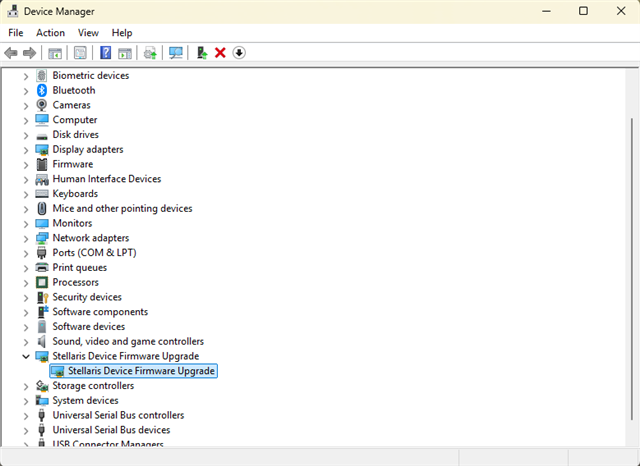
    If the device is no longer reachable I would look into device manager to see if it is still being recognized as 

    Or if it has already entered into a device firmware update mode. 

    Regards,

    Owen

  • Hi Owen,

    Thank you for your support.

    I have a few questions I'd like to clarify.
    Is my understanding correct that the firmware update for TPLD-PROGRAM can be performed by following the procedure in the attached file?
    Will this firmware update restore the connection with the TPLD-PROGRAM?
    I also heard that this firmware version does not support configuration of the TPLD1202.
    Does that mean the current issue at the customer site—where the second write operation cannot be performed—will not be resolved by this update?

    Best regards,

    Kyohei 

  • Hi Kyohei,

    Is my understanding correct that the firmware update for TPLD-PROGRAM can be performed by following the procedure in the attached file?

    Yes the Firmware update issue 1.docx file is an instruction set for performing the firmware update without going through InterConnect Studio.

    Will this firmware update restore the connection with the TPLD-PROGRAM?

    I do not know what the issue here is I suspect the device has entered into the bootloader mode if it is unreachable. That is why I asked to verify in the device manager.

    Does that mean the current issue at the customer site—where the second write operation cannot be performed—will not be resolved by this update?

    InterConnect Studio will not support the TPLD1202 in the coming update. The firmware in the programmer will support the TPLD1202 better, and will not repeat the listed problem.

    Regards,

    Owen

  • Hi Owen,

    Thank you for your support.

    I have distributed a Word document to my customer and asked them to try updating the firmware.

    However, it seems they are having trouble executing the following step in the document:

    --------------------------------------------------------------------

    2. Enter device Bootloader mode (Command b)
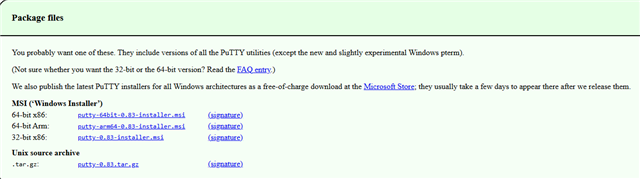
    a. Download puTTY
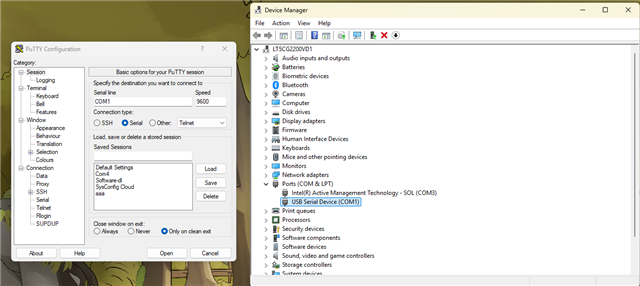
    b. Open the correct Serial/COM port
    c. Enter & ensure programmer communication
    d. Enter b

    --------------------------------------------------------------------

    It would be greatly appreciated if you could provide screenshots or additional instructions to help clarify the operation.

    BR

    Kyohei

  • Hi Kyohei,

    a. Download puTTY

    from https://www.chiark.greenend.org.uk/~sgtatham/putty/latest.html 


    b. Open the correct Serial/COM port

    If the device is not detected as a USB serial device (COM#)

    Check for something labeled firmware update device. If the firmware update device is there these steps can be skipped.
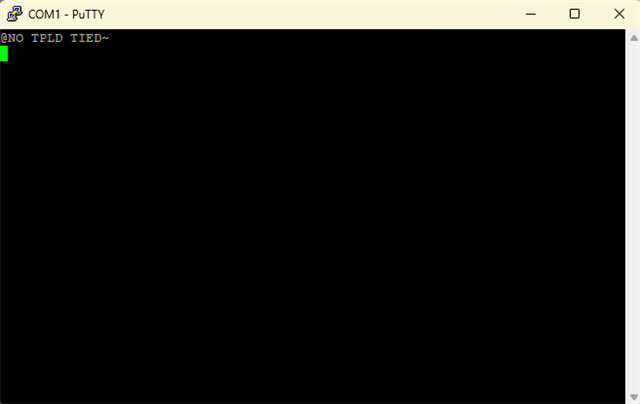
    c. Enter & ensure programmer communication

    I press "&" on my keyboard with the terminal open. and receive from the programmer


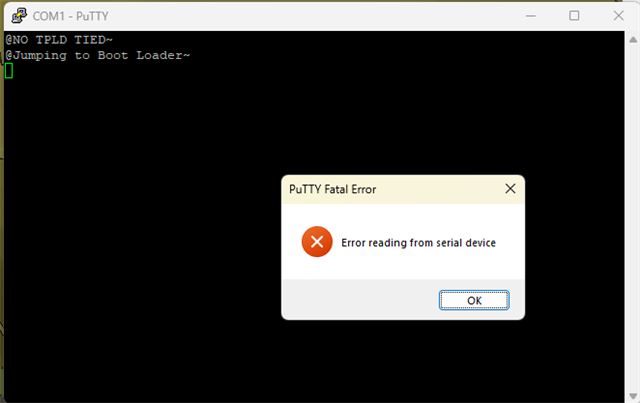
    d. Enter b

    I press "b" on my keyboard with the terminal open. and receive from the programmer

    Once I disconnect the programmer and reconnect it my device manager shows

    Showing the next steps can be executed.

  • Hi Owen,

    Thank you for your support.

    After confirming with the customer, they completed the firmware update. As a result, the COM port is now recognized. However, during the writing process using TPLD-PROGRAM, the configuration stops progressing at around 72%, and the system becomes unresponsive.

    Currently, they are evaluating the TPLD1202, but suspecting a device dependency on the EVM, we attempted writing to the TPLD2001EVM. In this case, the configuration completed successfully, but the behavior of the device differs from what was written, indicating that the writing process did not work correctly.

    Is this phenomenon a known bug on TI’s side, or could it be a system-dependent issue on the customer’s end? Please confirm.

    Note: Since there is a possibility that this issue is device-dependent on the TPLD-PROGRAM itself, we are considering lending one of our TPLD-PROGRAM units for evaluation.

    Best regards,

    Kyohei

  • Hi Owen,

    After updating Inter Connect Studio to version 1.6.0, we noticed that TPLD1202 has disappeared from the device selection list. We understand that future firmware updates will no longer support TPLD1202, but would like to confirm: is our understanding correct that TPLD1202 will no longer be released going forward?

    Additionally, when attempting to write to TPLD1202 using Inter Connect Studio version 1.5.0, we receive the following warning and are unable to proceed with the write operation.

    Currently, the customer is evaluating TPLD1202. Should we consider switching to TPLD2001 for further evaluation?

    Best regards,

    Kyohei

  • Hi Kyohei,

    The TPLD1202 will come back to InterConnect Studio in the next release in November.

    Have you checked the device seating in socket and is the EVM in the mode listed in it's user guide to read the device ID correctly?

    Evaluating the TPLD1202 is fine, it is simply not supported in the current version of InterConnect Studio.

    Regards,

    Owen

  • Hi Owen,

    Thank you for your support.

    We understand that support for TPLD1202 will resume in the next firmware update.
    We will ask the customer again to confirm the device placement and mode settings.

    Just to confirm, is it correct to assume that updating the firmware of the TPLD-PROGRAM will resolve the connection and write failures with TPLD1202?

    Also, after updating InterConnect Studio, TPLD1202 can no longer be selected for programming.
    In that case, how should we proceed with evaluation?

    Best regards,

    Kyohei

  • Hi Owen,

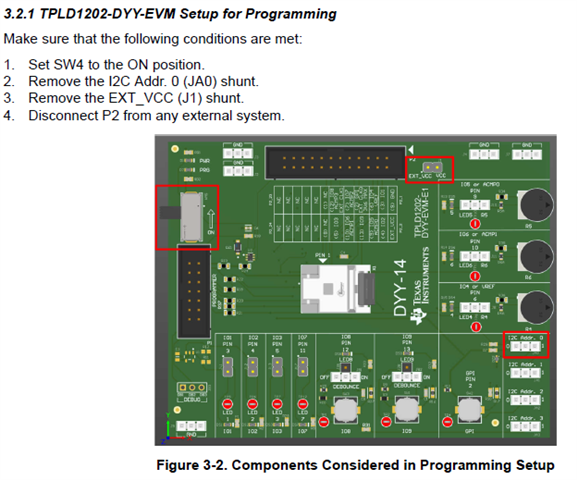
    Using our TPLD1202EVM under the same conditions as the customer’s environment, we attempted to write to the TPLD1202 using ICS version 1.5.0. However, the screen shown below appeared, and an error occurred indicating that the device ID could not be read, preventing the configuration from completing.

    We have confirmed that the device orientation in the socket is correct, based on the image you provided. We also tried several different devices, but the configuration still could not be completed.

    Writing to the TPLD1201 using ICS version 1.6.0 works successfully.
    However, under the customer’s environment using TPLD2001 and ICS version 1.6.0, the same issue occurs where writing cannot be completed.
    (Since we do not own a TPLD2001EVM, we are unable to verify this on our side.)

    It seems that there is still a bug in the system. Could you please check and confirm?

    Best regards,

    Kyohei

  • Hi Kyoehi,

    We see no issues programming either the TPLD1202 or the TPLD2001 on the same versions of firmware and InterConnect Studio on our side.

    Would it be possible to send an image of the EVM when a failure is occuring? If you can also get an image of the device in socket I can suggest more potential solutions.

    Regards,

    Owen

  • Hi Owen,

    Thank you for your support.

    We have summarized the results of TPLD-PROGRAM writing status in our environment based on the versions of TPLD-EVM and ICS as follows:

    • TPLD1201-EVM + ICS 1.5.0: Writing successful
    • TPLD1201-EVM + ICS 1.6.0: Writing successful
    • TPLD1202-EVM + ICS 1.5.0: Writing failed

    Therefore, we have attached a photo of the evaluation environment using TPLD1202-EVM + ICS 1.5.0 (writing failed).


    The error encountered during writing in this setup is as follows:

    If you have any comments or suggestions regarding the issue where writing to TPLD1202 using TPLD-PROGRAM is not possible, we would appreciate your feedback.

    Best regards,

    Kyohei