


Part Number: LP-AM243
Dear TI support team,
I have a question relate to ethernet support.
Today i flashed the firmware of the ethernet sample with the link on Resource Explorer:
lwip:
- enet_lwip_CPSW
- enet_lwip_ICSSG
They ran well but i saw that the IP is always are: 0.0.0.0

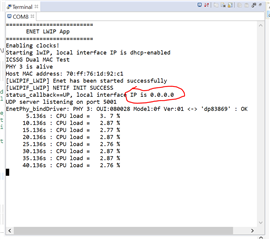
Here is the guide line from e2e.ti.com: software-dl.ti.com/.../EXAMPLES_LWIP_ENET.html
- If you see a valid, non-zero MAC address but IP address is
0.0.0.0then- Make sure you see
link_callback==UPmessage, if not check the ethernet cable - Check the local network and check if the DHCP server is indeed running as expected
- When using a home broadband/wifi router, its possible to check the clients connected to the DHCP server via a web browser. Check your router user manual for more details.
- Make sure you see
-> You can see above image: "link_callback==UP"
-> DHCP server is OK via check gate way by web browser: http://192.168.1.1/
-> LAN Cable is OK
->I also double check the IP range and LAN connection. every thing is ok.
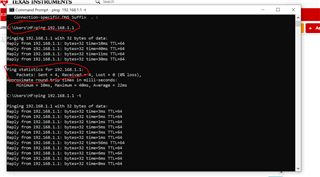

Can you explain for me: why ip always 0.0.0.0 instead 192.x.x.x
So i cannot ping anything to LP-AM243x for test.
I am sorry because i just start with program firmware for TI IC in a short time.
thanks and best regards,
