


Part Number: MSP432-DEBUGGERS
Other Parts Discussed in Thread: TM4C1294NCPDT
Hi everyone
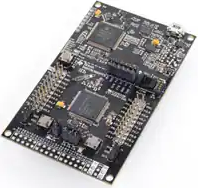
I am using this board.
I am creating a new project in CCS as:
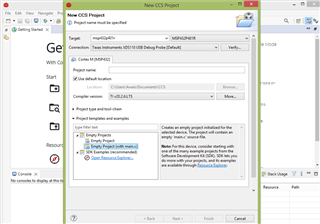
When I click Verify, I get this error:
[Start]
Execute the command:
%ccs_base%/common/uscif/dbgjtag -f %boarddatafile% -rv -o -S integrity
[Result]
-----[Print the board config pathname(s)]------------------------------------
C:\Users\Awais\AppData\Local\TEXASI~1\CCS\
ccs1200\0\0\BrdDat\testBoard.dat
-----[Print the reset-command software log-file]-----------------------------
This utility has selected a 100/110/510 class product.
This utility will load the adapter 'jioxds110.dll'.
The library build date was 'Jun 17 2022'.
The library build time was '22:30:41'.
The library package version is '9.8.0.00235'.
The library component version is '35.35.0.0'.
The controller does not use a programmable FPGA.
An error occurred while hard opening the controller.
-----[An error has occurred and this utility has aborted]--------------------
This error is generated by TI's USCIF driver or utilities.
The value is '-260' (0xfffffefc).
The title is 'SC_ERR_XDS110_OPEN'.
The explanation is:
An attempt to connect to the XDS110 failed.
The cause may be one or more of: no XDS110 is connected, invalid
firmware update, invalid XDS110 serial number, or faulty USB
cable. The firmware and serial number may be updated using the
xdsdfu utility found in the .../ccs_base/common/uscif/xds110
directory of your installation. View the XDS110SupportReadMe.pdf
file there for instructions.
[End]
After running >xdsdfu -e
USB Device Firmware Upgrade Utility
Copyright (c) 2008-2019 Texas Instruments Incorporated. All rights reserved.
Scanning USB buses for supported XDS110 devices...
Found 0 devices.
After consulting the document present in /ccs_base/common/uscif/xds110
I short-circuited the pin 97 of TM4C1294NCPDT to GND, Unplug -> Plug board and run again xdsdfu -e. Again: No device found.
But during short circuiting, if I press S2 then red LED2 turns on. If I do not short circuit, then switch S2 doesn't respond.
Anybody, please help.
I am facing this problem after failed firmware update attempt.

