This thread has been locked.

If you have a related question, please click the "Ask a related question" button in the top right corner. The newly created question will be automatically linked to this question.

EK-TM4C1294XL: spi loopback example does not exist anymore

Part Number: EK-TM4C1294XL


Hi Experts,

Our customer imported the SPI loopback example 4 months ago in his CCS, with the DK-TM4C123G board. He compiled and used the code without issue back then.
But today he use another computer and tried to open the example project again from the resource explorer, but the spi loopback example does not exist anymore. He cannot find it in the resource explorer.

To his surprise, opening up CCS in the computer where he first had downloaded/imported. 

Is this example removed?

He downloaded V2.16.01.14 (for tiva-c) from the TI-RTOS Product Releases and Download Links: http://downloads.ti.com/dsps/dsps_public_sw/sdo_sb/targetcontent/tirtos/index.html 

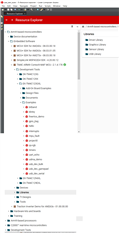
But the resource explorer will not update and include the files he just downloaded. You can see the attached picture, there is no "SPI" folder examples.
Please see the attached picture "issue", there is no option for spi examples
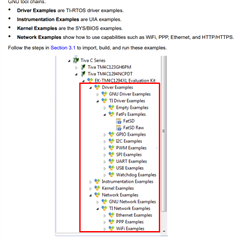
See the attached picture "issue2", this screenshot is from pdf: https://www.ti.com/lit/ug/spruhu5d/spruhu5d.pdf?ts=1666006295345&ref_url=https%253A%252F%252Fwww.google.com%252F which the customer followed, and there are no such folders in the resource view.
I hope you can help us. Thank you.

Kind regards,

Gerald

  • Hi,

      I will forward the question to the CCS team. In the meantime, please use 'View' -> 'Resource Explorer Offline'. I can still see the SPI examples directory like before when I use the offline mode of Resource Explorer. 

  • Hi Charles,

    I am using CCS 10.3.1 but I cannot see SPI examples in Resource Explorer Offline. I hope you can help us further. Thank you.

    Kind regards, 

    Gerald
  • Hi,

      I'm using CCS 10.3 and the screenshot I showed was from CCS 10.3 Resource Explorer Offline. I will forward your question to our CCS experts. 

  • Hi Charles,

    Thank you. We will wait for further advise.

    Regards,

    Gerald

  • Gerald,

    TI-RTOS for TM4C is not visible in Resource Explorer by default.  You can enable it by clicking on the little 3 horizontal line icon at the top right of Resource Explorer and select package manager.  From there you can scroll down to TI-RTOS for TM4C.  Click the arrow on the right and check the box to show it.

    It will now be visible in Resource Explorer.  Oddly it is under Arm based processors instead of Arm-based microcontrollers.

    Regards,

    John

  • Hi John,

    Please be informed of our customer feedback with Charles response above:

    "When I go view/resource explorer offline, it initially did not show me the examples. I had to click the "click to connect to cloud" button on the top right to go online... and then I found the example(s), I right click/install them, and it downloaded all the examples for TI-RTOS for TivaC - vxxxx. It also installed XDCtools. It asked for restart of the CCS. After the restart, I can see the examples in the resource explorer offline. But when I click "import to CCS" for the spiloopback example, I get the error: No TI Arm compilers installed (see screenshot). I have never get this error before in CCS... Why is this showing up now?

    I saw this forum question: e2e.ti.com/.../ccs-v6-does-not-see-installed-arm-compiler where they say to re-run the CCS installer and select the Sitara compiler(s), I selected both Siatara compilers to install. (Both MCU and MPU), but the problem persists after the installation

    I figured it out. I am uploading the pdf/solution. You may close the issue but I still want to know what is wrong with the online resource explorer."

    issues.zip

    Best regards,

    Gerald

  • Gerald,

    Thank you for posting the pdf with your steps.  

    I do not recommend running the offline version of Resource Explorer and then clicking the cloud button.  Instead I would suggest running the regular Resource Explorer from the view menu.  The offline version does have the ability to connect to the cloud to get data but it is actually a different version of Resource Explorer so you could have different behaviour.  

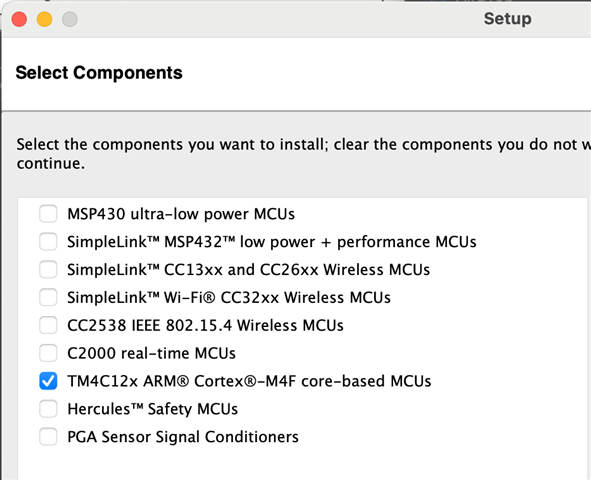
    When installing CCSv12.1 you should only have to select that you are using "TM4C":

    I just did a fresh install now with only TM4C selected to see if I can reproduce what you are seeing.

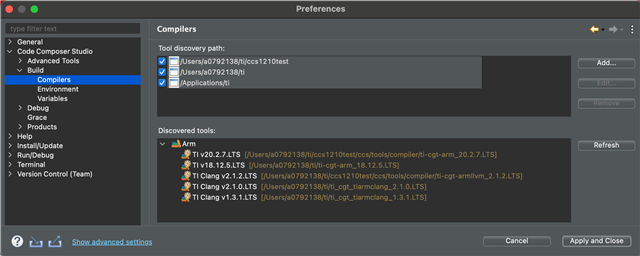
    For me it discovered the compiler that shipped with CCSv12.1.0 as well as a couple of others on my machine.

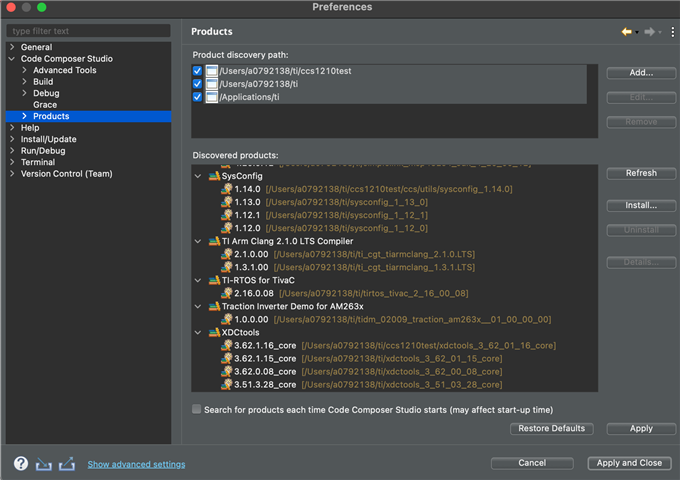
    To get it to show xdctools I had to hit refresh in this dialog:

    For me when I try to import the SPI example I get a message regarding XDCTools but not the one about the compiler.  This is because I don't have the old 3.32 version it is looking for.

    I hit an error when I try to build but that is an XDCTools compatibility issue with newer macOS versions.  I can get past that by copying in a different gmake into XDCTools.  After I do that it builds fine.

    Note that this TI-RTOS package is very old and would not be validated with the compiler that ships with CCSv12.1.  You will want to take a look at the release notes and see which version is recommended and then install that one.  I am pretty sure this TI-RTOS package recommends the old 5.2.x compiler.

    I am not sure why your install did not detect the compiler that shipped with CCS, that is not expected.

    Regards,

    John