This thread has been locked.

If you have a related question, please click the "Ask a related question" button in the top right corner. The newly created question will be automatically linked to this question.

LAUNCHXL2-570LC43: Manual for the HET

Part Number: LAUNCHXL2-570LC43
Other Parts Discussed in Thread: HALCOGEN

Is there any reference manual for programming the high end timer in TMS570? I have read through some of the TI documentations; all they do is to show you some code that has no resemblance with any programming language I know of, don't describe in any details what they mean or even how to compile and incorporate it into an executable image in the host CPU.

  • Hi Durga,

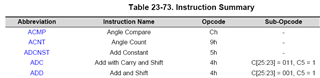
    The 30 instructions for time and angle functions are listed in technical reference manual (TRM). 

    23.6 Instruction Set
    23.6.1 Instruction Summary

    Each instruction is made up of a 32-bit program field, a 32-bit control field and a 32-bit data field. The N2HET execution unit fetches the complete 96-bit instruction in one cycle and executes it. All instructions include a 9-bit field for specifying the address of the next instruction to be executed. Some instructions also include a 9-bit conditional address, which is used as the next address whenever a particular condition is true. This makes controlling the flow of an N2HET program inexpensive; in many cases a separate branch instruction is not required.

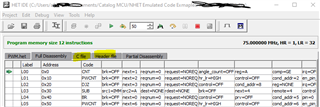
    The HET IDE is a windows based application that provides an easy way to get started developing and debugging code for the HET. Here is the link to download HET IDE: 

    https://www.ti.com/tool/HET_IDE

    The HET IDE user manual:

    https://www.ti.com/lit/ug/spnu483a/spnu483a.pdf?ts=1669860439151&ref_url=https%253A%252F%252Fwww.ti.com%252Ftool%252FHET_IDE

  • The HET assembler generates a .h and a .c file that are compiled and linked within your code.

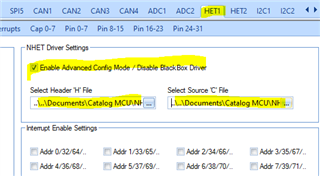
    The preferred way we recommend when starting from scratch is to generate a simple HALCoGen project, and import the .c and .h files generated by the HET IDE using the HALCoGen feature under the HET configuration listed as "Enable Advanced Config Mode".

    To program the High End Timer you will need to use our HET assembly code - the instructions can be reviewed with the IDE under the "Insert Instructions" menu.

    For the algorithm library, please select "Insert Algorithm" from the Edit menu, this will show the library with comments as for the algorithm parameters or functionality.

  • Hello QJ

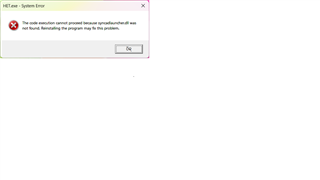
    Thanks for the PDF document; that was exactly what I was looking for. However, launching the HET IDE was not very successful; it says 'syncadlauncher.dll was not found'; please see the attached screen shot. The OS is Windows 11.

    Please help.

    Best, Durga

  • However, launching the HET IDE was not very successful; it says 'syncadlauncher.dll was not found'; please see the attached screen shot.

    A search found TMS570LS3137: Not able to open HET IDE application which contains the suggestion:

    This may not apply to you, but I just spoke with my colleague who mentioned they had seen this issue before when the .zip file was not unzipped before running the installer.

  • That actually did not help; what did help was to manually add C:\SynaptiCAD\bin\win32 to my system PATH. This directory has the dll the executable is looking for. Also point to note that using the 64bit path (x64 instead of win32) also did not work. I'd have expected TI to come up to the modern age of 64 bit apps (and Linux OS)