This thread has been locked.

If you have a related question, please click the "Ask a related question" button in the top right corner. The newly created question will be automatically linked to this question.

MSP432E401Y: NETWORK DETECTION ISSUE

Part Number: MSP432E401Y
Other Parts Discussed in Thread: MSP-EXP432E401Y, UNIFLASH

Tool/software:

Hello TI Members,

We are facing network detection issue in our msp432e401y custom board.

The schematic for the same is attached.
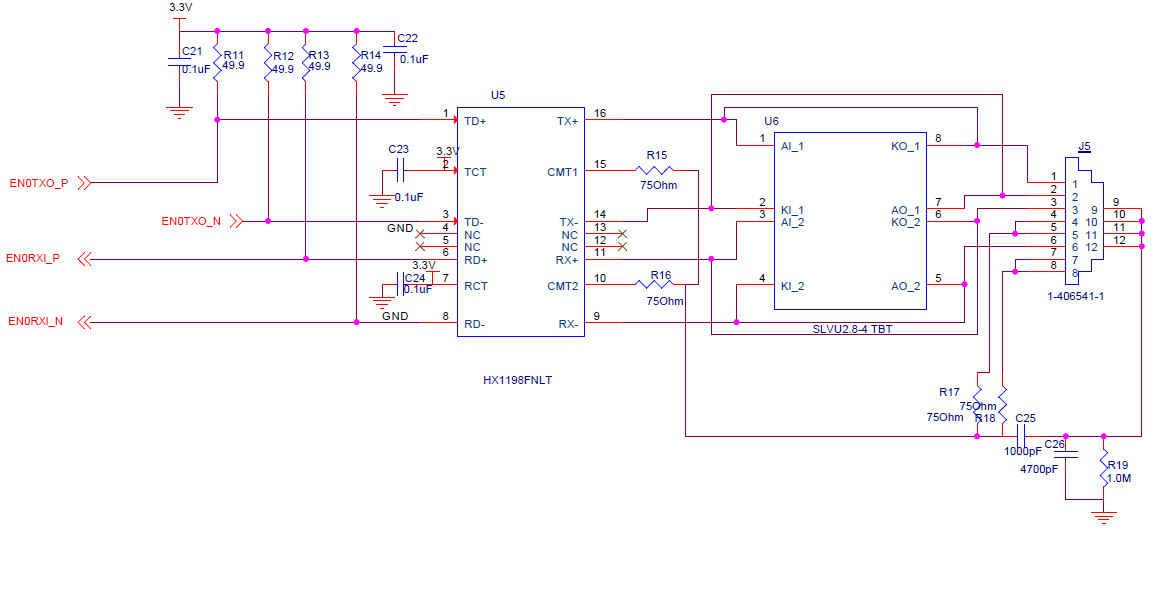
and we connected the RBIAS pin to GND through a 4.87kohm resistor.

What could be the reason for the issue.

Thanks.

Regards

Kalyan.

  • Hi,

      At a high level, I don't really see an issue with your schematic. 

      Do you have a 25Mhz OSCIN? The PHY requires a 25MHz reference clock. 

      Do you have the MAC address programmed in the device? Unlike the LaunchPad (MSP-EXP432E401Y) where the device is preprogrammed with a MAC address, a virgin device on your custom board will not a MAC address. Please check if you have the MAC address programmed. 

      Have you tried to run a stock Ethernet example from MSP432E SDK? You can try C:\ti\simplelink_msp432e4_sdk_4_20_00_12\examples\nortos\MSP_EXP432E401Y\lwip\ethernet_with_lwip. When you run it, where does it stop? Also run the same example on a LaunchPad using the same PC and Ethernet cable. This way you can compare the results. You can also use Wireshark to gain additional insights on the issue. 


  • Hello Charles,

    Thank you for the response.

      Do you have a 25Mhz OSCIN? The PHY requires a 25MHz reference clock. 

    -- 25Mhz OSC is available.

    Do you have the MAC address programmed in the device? Unlike the LaunchPad (MSP-EXP432E401Y) where the device is preprogrammed with a MAC address, a virgin device on your custom board will not a MAC address. Please check if you have the MAC address programmed. 

    -- I have flashed tcp echo rtos program on to the device and it is not detecting any network. Where as with the same setup, launchpad working properly.

    Have you tried to run a stock Ethernet example from MSP432E SDK? You can try C:\ti\simplelink_msp432e4_sdk_4_20_00_12\examples\nortos\MSP_EXP432E401Y\lwip\ethernet_with_lwip. When you run it, where does it stop? Also run the same example on a LaunchPad using the same PC and Ethernet cable

    -- I checked as you mentioned above, my custom board is not detecting any network. Where as with the same setup, launchpad detecting the network.

    Regards

    Kalyan

  • Hi,

      You have not answered me if you have a MAC address. Where did the program stop when you run the example on your custom board?

  • Hello Charles,

    if you have a MAC address. Where did the program stop when you run the example on your custom board?

    I need one clarification. 

    For example, I have flashed the board with tcpecho code or lwip code, does it not mean that the board is having the MAC address? 

    And after running the program, I'm getting the garbage data like ""222౩౩౩౩-- in display uart terminal.

    Com port settings are: 115200, 8,N,1.

  • For example, I have flashed the board with tcpecho code or lwip code, does it not mean that the board is having the MAC address? 

    These examples assume a MAC address is present and stored in the non-volatile USER registers. You can check them in the Flash Control Registers. If USER0/1 are all F's then you do not have the MAC address. As I mentioned, they were preprogrammed on the LaunchPad but not on a virgin chip. 

    The lwip example would have code as bellow to read the MAC address from the USER registers. 

    //
    // Configure the hardware MAC address for Ethernet Controller filtering of
    // incoming packets. The MAC address will be stored in the non-volatile
    // USER0 and USER1 registers.
    //
    MAP_FlashUserGet(&ui32User0, &ui32User1);
    if((ui32User0 == 0xffffffff) || (ui32User1 == 0xffffffff))
    {
    //
    // We should never get here. This is an error if the MAC address has
    // not been programmed into the device. Exit the program.
    // Let the user know there is no MAC address.
    //
    UARTprintf("No MAC programmed!\n");

    while(1)
    {
    }
    }

  • If USER0/1 are all F's then you do not have the MAC address.

    I have checked the USER registers and it is showing all F's.

    Please guide me to write the MAC address into my custom board.

    Thanks 

    Kalyan.

  • You can use Uniflash to program the MAC address. 

  • You can use Uniflash to program the MAC address. 

    I written MAC address using uniflash and it is working now.

    Thank you for the support.