This thread has been locked.

If you have a related question, please click the "Ask a related question" button in the top right corner. The newly created question will be automatically linked to this question.

AM2634: Doubts in mcrc code

Part Number: AM2634


Tool/software:

Hi Jagadish,

I observed something during testing. I called the CRC calculation API twice with different values—first with 35, and then with 0. My expected results were 160 (in decimal) for the first call and 161 for the second.

This is because, in my case, I expect the initial value to be 0 for the first call, and for the second call, the initial value should be the CRC result from the first call. Since I'm calculating the final CRC cumulatively based on various factors like Data ID, counter, and CAN data, the previously generated CRC should act as the initial value for the next call—provided no reset occurs in between.

However, I noticed that for every CRC call, the initial value is always set to 0.

The results I have observed using mcrc are 160 and 0.

  • Hi Sravya,

    Whenever we call the "sdl_mcrc_full_cpu_test" API the order is as follows:

    1. First it reset the existing CRC calculation, that means signature registers will becomes zero.

    2. And here it configures the size and algorithms again for new CRC generation.

    3. Here it will calculate the CRC for your new inputs.

    So, if you call "sdl_mcrc_full_cpu_test" this function multiple times each time CRC will becomes the zero and then it again calculates the CRC from initial value (that is zero). If you want to call multiple times this API and want to preserve the values each time, then create another API for CRC calculation and keep only "SDL_MCRC_computeSignCPUmode" API and call the reset and initialization API's only once after reset. And now you can call SDL_MCRC_computeSignCPUmode API to preserve old value and again you can add more data to the previously generated signature. And you can do this as long as you want once your CRC calculation completed then try to call the "SDL_MCRC_channelReset" to reset the existing CRC and to restart the CRC generation again.

    --
    Thanks & regards,
    Jagadish.

  • Hi Jagadish , 
     

    I tried the same approach you mentioned above, but I'm getting incorrect results on the second call to the MCRC function SDL_MCRC_computeSignCPUmode. To understand what exactly MCRC is doing, I want to check its register values. However, as I mentioned earlier, I can only see a few registers during debugging. How can I view the complete set of MCRC register values?

    Here’s what’s happening:

    • Polynomial value = 0x1D

    • Data bit size = 8 bits

    • Size = 1

    • pMCRCData = 35

    For the first call, I get an output of 160 in sectSigVal.L, which is correct.
    For the second call, I provide pMCRCData = 0. The expected output is 161, but I’m getting 188.

  • Hi Sravya,

    Here’s what’s happening:

    • Polynomial value = 0x1D

    • Data bit size = 8 bits

    • Size = 1

    • pMCRCData = 35

    For the first call, I get an output of 160 in sectSigVal.L, which is correct.
    For the second call, I provide pMCRCData = 0. The expected output is 161, but I’m getting 188.

    Actually 188 is expected result only because,

    The minimum data width size possible in this device is 16-bit:

    And we configured the same in our code as well:

    That means actually even though we are writing just 8bit data, in the background it will take 16-bit (0x00 is appended for each input byte) data for CRC generation.

    So, as we give two bytes 0x23 and 0x00 that means the actual CRC generation will happen like below:

    The data will take for CRC generation is 0x00 0x23 0x00 and 0x00.

    So, you can see the generated CRC it is 0xBC (i.e. 188). This is the reason you got 188 in your result.

    --
    Thanks & regards,
    Jagadish.

  • Hi Jagadish, 

       If we select 16-bit as the CRC data length and provide 3 bytes of data, how will it be handled?
    Will it discard the last byte from the 3-byte input, or will it add an extra byte at the beginning to make it 4 bytes (a multiple of 2), and then perform the calculation?

    Since the CRC data length is 16 bits, does it internally form data in 2-byte (16-bit) blocks?


    Is there any what that we can change the crc length to 8 bit ?? Because in my case it should consider input data as 23 00 not 00 23 00 00 . 

  • Hi Sravya,

    Will it discard the last byte from the 3-byte input, or will it add an extra byte at the beginning to make it 4 bytes (a multiple of 2), and then perform the calculation?

    Each byte of our input data will be appended with one dummy byte of 0x00.

    For example, consider the below input data:

    As you can see here my input data is 3 bytes that is 0xF2, 0x01 and 0x83. And i moved them into our 32bit buffer like as shown above.

    Now for this type of input data the CRC will generate be in following order of 16-bit: 0x00F2, 0x0001 and 0x0083. This will be the input to the CRC generator.

    Is there any what that we can change the crc length to 8 bit ?? Because in my case it should consider input data as 23 00 not 00 23 00 00

    For this device it seems like not possible.

    As you can see the TRM, there is no configuration for 8-bit word length and the minimum size is only 16-bit:

    --
    Thanks & regards,
    Jagadish.

  • Hi Jagadish,

    I understood from your explanation that a CRC length of 16 bits works fine with 8-bit data size only when you perform the CRC calculation once and then reset the MCRC before the next use. However, when you call the CRC function twice, adding a zero before the byte data — as in your case 00 23 00 00 instead of 23 00 — is a significant mistake. I think having an 8-bit CRC length option would be a better fit in such scenarios. But that’s okay.

    I have one more doubt. When using:

    • crcType = SDL_MCRC_CTRL0_CH1_CRC_SEL_E2EProfile4

    • crc length = 32 bits

    • data size = 32 bits

    My data is 16 bytes:
    00 00 00 00 00 00 00 00 18 00 00 0A 0B 0C 0D 00

    I grouped the entire data into the pmcrc buffer as shown below:

    CopyEdit
    pmcrc[0] = 0x00000000 pmcrc[1] = 0x00000000 pmcrc[2] = 0x1800000A pmcrc[3] = 0x0B0C0D00

    What will be the CRC output value? My main intention is to understand how the data is being grouped internally.


  • Hi Sravya,

    I understood from your explanation that a CRC length of 16 bits works fine with 8-bit data size only when you perform the CRC calculation once and then reset the MCRC before the next use. However, when you call the CRC function twice, adding a zero before the byte data — as in your case 00 23 00 00 instead of 23 00 — is a significant mistake. I think having an 8-bit CRC length option would be a better fit in such scenarios. But that’s okay.

    Your understanding is totally correct.

    I have one more doubt. When using:

    • crcType = SDL_MCRC_CTRL0_CH1_CRC_SEL_E2EProfile4

    • crc length = 32 bits

    • data size = 32 bits

    My data is 16 bytes:
    00 00 00 00 00 00 00 00 18 00 00 0A 0B 0C 0D 00

    I grouped the entire data into the pmcrc buffer as shown below:

    In this case our buffer data will be typecasted to 32_bit pointer only, like as shown in below screenshot and then the data was going to written in lower PSA signature register.

    So, input data to the CRC generator is 0x00000000, 0x00000000, 0x1800000A and 0x0B0C0D00.

    And for this input the CRC should be as follow in E2E Profile 4 CRC generator:

    Online CRC Calculation - GHS Infrotronic

    And you can see i got the same output from our controller as well:

    --
    Thanks & regards,
    Jagadish.

  • Hi Jagadish,

    I found one more issue related to selecting the data bit size as 32-bit. Here's the case:

    • crcType = SDL_MCRC_CTRL0_CH1_CRC_SEL_E2EProfile4

    • CRC length = 32 bits

    • Data size = 32 bits

    • mcrcData.size = 1

    My data is just 1 byte:
    0x01
    So, pmcrcData[0] = 1;

    What will be the CRC output in this case?
    What I observed is that the output value is 0. This seems to be because data is loaded into the MCRC registers inside the API only when the size is a multiple of 4.

    1. This could be a limitation, as CRC calculations are often required even for data sizes smaller than 4 bytes.


    and more doubt , 

    This is the online calculator which you provided as refernce earlier , In this it's showing result which is different from the result you mentioned above.


  • Hi Sravya,

    What I observed is that the output value is 0. This seems to be because data is loaded into the MCRC registers inside the API only when the size is a multiple of 4.

    1. This could be a limitation, as CRC calculations are often required even for data sizes smaller than 4 bytes

    Your observation was correct. I mean as we select our data size as 32-bit:

    So, the API will expect the data count to be in multiple of 4 only.

    However, for even for single byte also you can just keep the number of bytes as 4 like as shown below:

    This will give the correct result only, because anyway the higher bytes of our data are 0x00 only, right?

    So, what i want to convey is if your data is not multiple of 4 then give the next multiple value of 4.

    For example, we need to give number of bytes as 8 for the data byte sizes 5, 6, 7, or 8 and similarly so on.

     --
    Thanks & regards,
    Jagadish.

  • Hi Jagadish , 

       There is one more query I mentioned in previous e2e , once check it .

    Thank you .

  • Hi Sravya,

    I don't see any of your open e2e issues.

    Could you please point out the exact e2e which requires to answer?

    --
    Thanks & regards,
    Jagadish.

  • This is the online calculator which you provided as refernce earlier , In this it's showing result which is different from the result you mentioned above.


    Could you provide me a standard one as a reference. So that I can consider output of that value is correct and compare with the results.

  • Hi Sravya,

    Could you provide me a standard one as a reference. So that I can consider output of that value is correct and compare with the results.

    There is no standard one for all the polynomials, because i found that some of the polynomials working good with some of the online tools.

    This is the online calculator which you provided as refernce earlier , In this it's showing result which is different from the result you mentioned above

    Here it is giving wrong results because if you compare the polynomial in this tool with the actual polynomial with E2E Profile 4 in TRM:

    As you can see there is no x32 in E2E Profile 4, but this tool is adding x32 and i tried many ways to remove this x32 but that is not working.

    So, my suggestion would be use below tool for this E2E profile 4.

    Online CRC Calculation - GHS Infrotronic

    --
    Thanks & regards,
    Jagadish.

  • Hi Jagadish,

    Could you please provide me with a reference online calculator for E2E Profile 5, where the CRC polynomial type is SDL_MCRC_CTRL0_CH1_CRC_SEL_16bit?

    I compared the MCRC result with several online calculators using 16-bit CRC length, 16-bit data bit size, and the input shown below, but none of them match the mcrc result:


    pMCRCData[0] = 0x1000
    pMCRCData[1] = 0x0000
    pMCRCData[2] = 0x0000

  • Hi Sravya,

    Could you please provide me with a reference online calculator for E2E Profile 5, where the CRC polynomial type is SDL_MCRC_CTRL0_CH1_CRC_SEL_16bit?

    I don't see E2E profile 5 in supported polynomials:

    Can you please clarify it to provide further support?

    --
    Thanks & regards,
    Jagadish.

  • Hi Jagadish, 

    In  previous E2E query I'm mentioning about CRC-16 bit polynomial .   

     Can you please tell me what is the polynomial value you consider in calculation for CRC-16bit . Either it's 0x1021 or 0x011021 ?? Because in trm document mentioned x^16 but for 16bit polynomial there will be upto x^15 .

    And also provide me the reference online calculator link for this.


  • Hi Jagadish , 

      Since this is my first time working with the MCRC module, I’m still trying to get a clear understanding of how it behaves, and I have a few doubts along the way.

      Here’s one such case: I’m trying to calculate the CRC for the input data 23 00 10 00 00 00 00 00 00, where the total input length is 9 bytes. 
      You can see below I loaded this data in a temp_data_buffer character array.


    The CRC configuration I’m using is as follows:

    • CRC Type: SAE J1850

    • CRC Length: 16 bits

    • Data Bit Size: 16 bits (I chose 16-bit mode to avoid the MCRC module inserting an extra 00 byte in front of every input byte , if databit size is 8 bit).


    Also, since the module only considers even byte counts in 16-bit mode, I’ve updated the input size to 10 bytes accordingly.


    Here’s how the input data is structured:
    pMCRCData[0] = 0x0023
    pMCRCData[1] = 0x0010
    pMCRCData[2] = 0x0000
    pMCRCData[3] = 0x0000
    pMCRCData[4] = 0x0000


    According to the expected behavior, the CRC result should be 0x2A, but I’m consistently getting 0x50 instead.

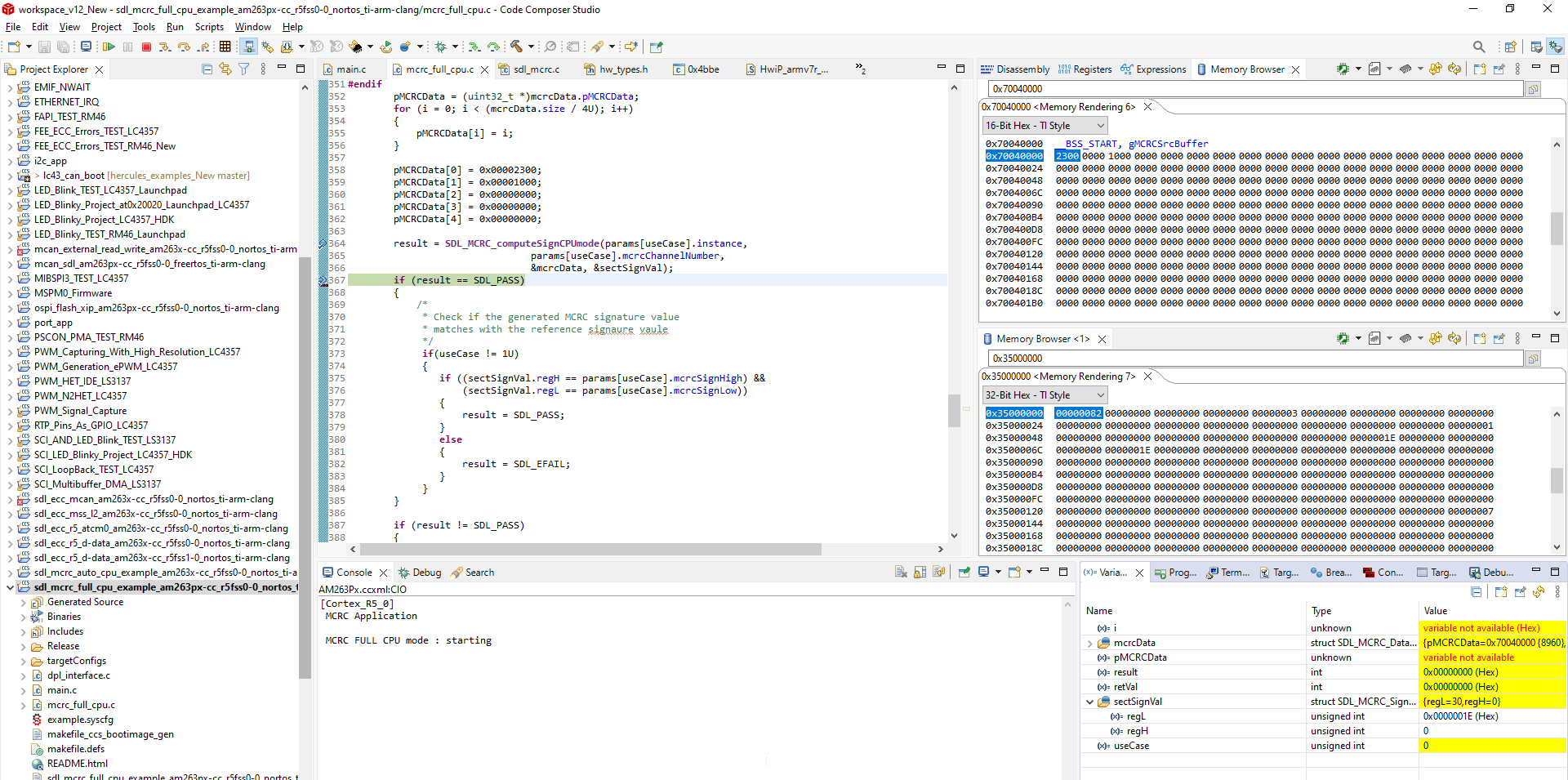
    To debug this, I tried checking how the input data is actually loaded into the MCRC module’s registers, but I couldn’t locate the specific register or address where this can be verified. Could you please guide me on which register or memory location I should check to trace this?

    I'm mentioning below video recording of my code.


  • Hi Sravya,

    According to the expected behavior, the CRC result should be 0x2A, but I’m consistently getting 0x50 instead.

    I gave same data as you mentioned and i got proper result only i.e. 0x2A.

    I am attaching my project for your reference, please check it once:

    sdl_mcrc_full_cpu_example_am263px-cc_r5fss0-0_nortos_ti-arm-clang (2).zip

    --
    Thanks & regards,
    Jagadish.

  • Hi Jagadish,

       I understand why you are getting the correct answer.For pmcrc[0]  you are giving input as 0x00100023.  My input data is in format of 23 00 10 00. So, I tried giving data as 0x23001000. 

    My question is why you gave data to pmcrc in reverse order?? instead of 0x23001000 to pmcrc[0]??

    Is it same applicable for databitsize = 16bit ?

  • Hi Sravya,

    My question is why you gave data to pmcrc in reverse order?? instead of 0x23001000 to pmcrc[0]??

    Actually, this is not the reverse order.

    I’m trying to calculate the CRC for the input data 23 00 10 00 00 00 00 00 00

    You mentioned your input order as above, right? That means 0x23 should be processed first, according to your requirement, in that case you should give the 0x23 as lower byte only because this device is a little-endian device.

    So that means the lower byte will store in lower address, so which ever data you want to process should always be at lower byte only right?

    --
    Thanks & regards,
    Jagadish.

  • Hi Jagadish,

       Thanks for the previous response but

        The CRC configuration I’m using is as follows:

    CRC Type: SAE J1850

    CRC Length: 16 bits

    Data Bit Size: 16 bits 

     Length: 10

    Input data: 00 23 00 10 00 00 00 00 00 00 .

    In your previous e2e response you have tried with databitsize 32bit. So, explain me how it's actually loaded data in *pData?? If my input data is as shown below.

    This is what I'm asking about from the past 4days.

    Thankyou 

  • Hi Sravya,

    The example i shared to you also based on databitsize of 16-bit only:

    So, i tested with data bit size of 16-bit only not 32-bit.

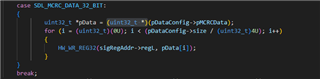
    Here my input buffer is 32-bit but it doesn't matter because here in data write function our data will be type casted to 16-bit pointer and access the 16-bit data only.

    If you give your input as below:

    This will be stored in the memory in below order of bytes right?

    As you can see after type cast the data will be like below:

    For example, now once we write the first 16-bit data 0x2300 to the register then the compression will be done by byte by byte as 0x23 0x00. So if we write all the 20 bytes that we stored in the pMCRCData buffer then the resultant compression will be as follow.

    So, you will get final compressed CRC for above 20-bytes is as "0x1E":

    --
    Thanks & regards,
    Jagadish.

  • Hi Jagadish,

    Now I understand — regardless of whether it's 16-bit, 8-bit, or 32-bit data, we always group the data into 4-byte chunks and load it into pMCRCData in little-endian order. That’s why, in the loop shown below, it always executes up to mcrcDataSize / 4.


    Generally, if we have data like 0x100023 and typecast it to 16-bit, it would only consider 0x0023. But here, it is splitting the value as 0x0010 and 0x0023, placing them into separate locations. That’s where I got confused initially.

    Thank you.

  • Hi Jagadish,

        Consider the same data input as above and crc databitsize of 32bit instead of 16bit . Then after performing type casting to 32bit how it will consider the final input data.

    For 16bit type casting it form input as mentioned below.How it will form input data for 32bit type casting??

    Crc polynomial type= crc 32bit bit 

    Crc length =32bit

    Crc databitsize=32bit

  • Hi Jagadish , 

      I have observed with polynomial crc 16 bit with value 0x1021 it considering initial value as 0xFFFF by default internally. Once confirm it.

  • Hi Sravya,

      I have one more doubt . For the polynomial crc 16bit with polynomial value 0x1021 ,Do it perform xor with 0xFFFF in the end ? Because I am getting the output in the crc registers xor of 0XFFFF of my expected value

    On my testing i don't see performing of xor with 0xFFFF.

    My result is matching with below configuration only:

    Initial value 0x0000 and output xor value also 0x0000.

    --
    Thanks & regards,
    Jagadish.

  • Hi Jagadish,

        Consider the same data input as above and crc databitsize of 32bit instead of 16bit . Then after performing type casting to 32bit how it will consider the final input data.

    For 16bit type casting it form input as mentioned below.How it will form input data for 32bit type casting??

    Crc polynomial type= crc 32bit bit 

    Crc length =32bit

    Crc databitsize=32bit

  • Hi Sravya,

    The configuration settings for 32-bit polynomial should be like below:

    As you can see now i got the correct signature for this:

    Try this and let me know:

    --

    Thanks & regards,
    Jagadish.

  • Hi Jagadish , 

     Thanks for sharing crc 32 bit . From that I understood for crc 32 bit it considers inital value and finial value 0xFFFFFFFF , also xor final value . 


      Can you please tell me how it works with E2E Profile 4 - polynomial value : 0xF4ACFB13 ???

      Because I don't know for this E2E profile4  polynomial whether you are considering reflect in , reflect out or initial value .

    Regards, 
    K.Sravya

  • Hi Sravya,

    For E2E profile 4 use the below online tool:

    Online CRC Calculation - GHS Infrotronic

    This is because if we enter the polynomial 0xF4ACFB13 in other tools they are considering X32 also like as shown below:

    But the fact is that it doesn't have X32 in its polynomial:

    If use the right tool, then it is matching with the generated CRC:

    --
    Thanks & regards,
    Jagadish.

  • Hi Jagadish,

    As of now, let's not focus on which one is giving the correct result, because according to your MCRC module, this online calculator online calc link is producing your expected result. However, according to the AUTOSAR standard for E2E Profile 4, the result shown by your MCRC module is not AUTOSAR-standard compliant.

    Even though I am setting the initial value in the software, reflecting the input data at the start, XORing the output with 0xFFFFFFFF, and finally reflecting the output data, the result still doesn't match the AUTOSAR standard.


    Additionally, I am getting my expected result using another online calculator. I believe they are not considering x^32, because if they did, the polynomial length would become 33 bits, which doesn't align with standard CRC-32 configurations.

    I am emphasizing this because you mentioned E2E Profile 4, and most implementations follow AUTOSAR-based standards.

    Can you please verify again if there's any possibility that we can generate an AUTOSAR-standard-compliant output?

  • Hi Sravya,

    Additionally, I am getting my expected result using another online calculator. I believe they are not considering x^32, because if they did, the polynomial length would become 33 bits, which doesn't align with standard CRC-32 configurations.

    Actually, they are considering the X^32. And i knew it is 33rd bit of the polynomial. However, some polynomials using this bit as well.

    As you can see all these polynomials also have an extra bit (which is more than their length).

    Let me also show it in practical:

    Consider i am giving 0xAABBCCDD data with below configurations, and as you can see i got the generated CRC as 0x66B24705 (note here x^32 is there in the generation)

    And now i am doing the same without X^32 and i got the result as 0x3F04047C:

    And in the same tool i am including x^32 and as you can see now i got the result as 0x66B24705.

    So, there is a significance for this bit, and its effect the generated CRC result.

    However, according to the AUTOSAR standard for E2E Profile 4, the result shown by your MCRC module is not AUTOSAR-standard compliant.

    And i will agree with you on this based on my testing, my testing is also showing that polynomial E2E Profile 4 is not according to AUTOSAR standard.

    Because of below differences:

    According to standard this polynomial should have these configurations:

    Initial value: 0xFFFFFFFF, Final value: 0xFFFFFFFF, Input data reflection: Yes, Result data reflection: Yes.

    And more importantly the polynomial should be: x32 + x31 + x30 + x29 + x28 + x26 + x23 + x21 + x19 + x18 + x15 + x14 + x13 + x12 + x11 + x9 + x8 + x4 + x + 1

    But on my testing i found that this device has below configurations for E2E Profile 4:

    Initial value: 0x00000000, Final value: 0x00000000, Input data reflection: No, Result data reflection: No.

    And more importantly the polynomial is: x31 + x30 + x29 + x28 + x26 + x23 + x21 + x19 + x18 + x15 + x14 + x13 + x12 + x11 + x9 + x8 + x4 + x + 1

    I think we can change the Initial Value, Final value, Input data reflection and output data reflection in the code, but i don't think it is possible to change the polynomial.

    Anyway, i want to check this with internal team once. I want to discuss with them on this, i want to know their thoughts on this.

    --
    Thanks & regards,
    Jagadish.

  • Hi Jagadish , 

       Thanks for the previous response . 

    I think we can change the Initial Value, Final value, Input data reflection and output data reflection in the code, but i don't think it is possible to change the polynomial.

    Anyway, i want to check this with internal team once. I want to discuss with them on this, i want to know their thoughts on this.

    Please check with the internal team and let me know whether it is possible to change the polynomial according to the AUTOSAR standard.

    Thank you

  • Hi Sravya,

    Our design team actively working on this e2e profile 4 polynomial and they are checking why it is not as per AUTOSAR standard. My understanding is that, even if they confirmed it is not as per AUTOSAR standard, there won't be any software workaround for it because it is deviation in polynomial bit.

    So, my suggestion would be, why don't we proceed with CRC32 polynomial that i highlighted below?

    This polynomial also given in Autosar CRC specification document

    Can you please check whether this polynomial meeting your requirements?

    --
    Thanks & regards,
    Jagadish.

  • Hi Jagadish,

    The CRC 32-bit polynomial is also defined as part of the AUTOSAR standard.
    Since we are implementing E2E Profile 4 based on that standard, the CRC polynomial used should be the one specified for E2E Profile 4, which is 0xF4ACFB13.


    Regards, 
    K.Sravya.

  • Hi Sravya,

    Thanks for sharing this information, i will discuss with the team on this.

    --
    Thanks & regards,
    Jagadish.

  • Hi Sravya,

    Still internal discussion is going on about this issue and i will share further updates soon.

    --
    Thanks & regards,
    Jagadish.

  • Hi Sravya,

    We are still having internal discussion on this and will try to provide our response as soon as possible.

    --
    Thanks & regards,
    Jagadish.

  • Hi Sravya,

    Apologies for the delay,

    Still, we are discussing on whether to add this to Errata or not with design team.

    --

    Thanks & regards,
    Jagadish.

  • Hi Sravya,

    Apologies for the delay!

    And still, we couldn't make any conclusion on this yet, i will again check team internally on what to do.

    --
    Thanks & regards,
    Jagadish.

  • Saranya,

    I am kept on sending weekly remainders for this and didn't get conclusion yet.

  • Apologies for delay Saranya!

    Still the conclusion is not made yet!