This thread has been locked.

If you have a related question, please click the "Ask a related question" button in the top right corner. The newly created question will be automatically linked to this question.

MCU-PLUS-SDK-AM243X: OSPI Flash Not Working as Expected

Part Number: MCU-PLUS-SDK-AM243X


Tool/software:

Hello!

With a new board, I am currently working on once again trying to run the USB CDC Echo example project. Currently, I am on the step of flashing the module after setting up the UART terminal. I have confirmed multiple times that COM5 is the UART port (as noticed by the 'cccs' being printed out on the terminal) and was able to successfully flash (with the success message). However, after powering down/removing all connections from the board to change the bootmode to OSPI, then repowering the board, COM5 does not print out the expected message- it just remains flat/still. Is there a step that is missing here, or some other command I should have run? Thank you!

For reference, this is what I am looking at: 

Thank you! 

  • Hi,

    You must be doing the right steps, but I am assuming you are doing so for the AM243 EVM, and not for AM243-LP?

    Please tell me the name of the flash have on the board.

    Thanks,

    Vaibhav

  • Yes, I am using the AM243x EVM (which I believe is also the name of the flash to the board)!

    Thank you,

    Jieun Lim

  • Hi,

    (which I believe is also the name of the flash to the board)!

    Since you are using this evm, hence the flash on board is S28HS512T.

    Can you confirm what part of the expected log message you are seeing not coming?

    Is the whole thing not coming at all?

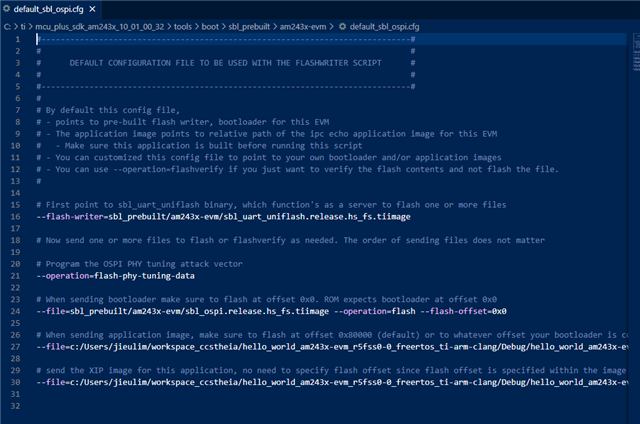
    Also, please share your .cfg file screenshot, I would like to see the files and the bootloader you have flashed.

    Thanks,

    Vaibhav

  • Hello!

    Yes, I am not seeing the entirety of the expected log message (nothing is being printed on the UART terminal when I set to the OSPI bootmode).

    As a quick update, I have pivoted temporarily to trying to run the hello_world example as it is a bit simpler/there are more clear instructions, though I believe similar steps (if not the same) should apply for the USB CDC Echo Example.

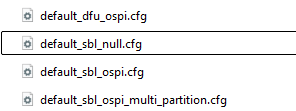
    For the .cfg files, I have flashed I the null as well as the ospi.cfg

    Here is the screenshot of the null.cfg file as requested:

    As well as my ospi.cfg:

    I have successfully flashed both (I don't have a screenshot of the null.cfg but the success message was the same as for the ospi.cfg below):

    Thank you!

    Best,

    Jieun Lim

  • Hi,

    Can you please open CCS, and after flashing successfully as you have done it, please set bootmode as shown here:

    For reference, this is what I am looking at: 

    Now launch target configuration for AM243 and connect to the R500 core.

    After this give me a screenshot of the place where it is stuck at, basically once you connect it will show the address where it is stuck at.

    The reason for this is: To check if it is stuck at ROM or Bootloader. Please note, do so for both the files flashed that is SBL null cfg file and SBL OSPI cfg file.

    Looking forward to your response.

    Thanks,

    Vaibhav

  • Hello!


    This is my screenshot, as a quick update I did get Hello World to function properly despite the bootloader logs not showing up, I am still struggling with the USB CDC echo, but if Hello World worked correctly, would it be a different issue? Thank you!

    Sincerely,

    Jieun Lim

  • Hi,

    I did get Hello World to function properly despite the bootloader logs not showing up

    If hello world functioned properly, then did you see the logs for hello world?

    If so, then on which of the UART COM Ports? See the list of available UART Com ports:  RE: [FAQ] SK-AM62: Purpose Of Different UARTs 

    Thanks,

    Vaibhav