This thread has been locked.

If you have a related question, please click the "Ask a related question" button in the top right corner. The newly created question will be automatically linked to this question.

MSPM0L1306: Using MSPM0 with PuTTY and MSP Zero Code Studio

Part Number: MSPM0L1306

Tool/software:

Hello,

I am trying to use the MSPM01306 to write and read SPI commands and show that I wrote the correct data over UART.

This seems like it should be possible with the MSP Zero Code Studio and a PuTTY terminal while my MSPM0 launchpad is connected to a computer and J16 and J17 set to the XDS feedback pins.
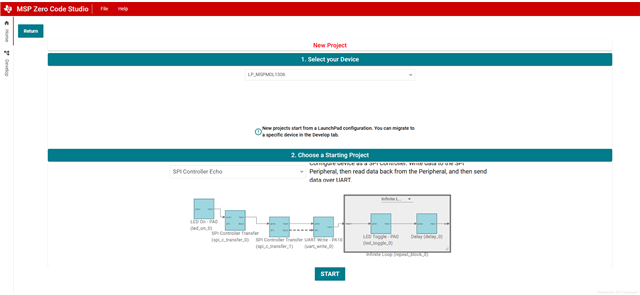
However, when I try to run just the above example I get a Putty terminal that looks like the below:

I checked baud rate of PuTTY and the code and both are 9600. 

How can I resolve this issue?

  • Hello Zach,

    This example is "SPI controller send data to SPI peripheral and read back the data which is sent back by SPI peripheral. Then UART will send out them". Please confirm you didn't misunderstand the function of this demo.

    Please make sure that the PuTTY can work with XDS110. In your system, the XDS110 will be seen as USB-UART, the UART data will be sent to PC and shown on PuTTY through XD110. So you need to check whether PuTTY can work with XDS110 together,

    Best Regards,

    Janz Bai

  • Hello, Janz,

    I want to simply write and read the SPI bus to ensure correct messages will be sent on the SPI bus.

    I can see the XDS110 USB-UART show up in device manager and believe it should work with PuTTY.

    Thanks,

    Zach

  • Hello Zach,

    As I mentioned in last response, this demo is for SPI controller, and the data it read back and UART send out is the data which is sent back by SPI peripheral. For example, SPI controller send data to SPI peripheral, and SPI peripheral send back data, and then SPI controller get the data and then send out by UART. So please confirm the transmission between your SPI controller and SPI peripheral is normal. Maybe you can use logic analyzer to catch the SPI waveform and check whether it is normal.

    Best Regards,

    Janz