AM263P4-Q1: AM263P4-eCAP Module integration

Part Number: AM263P4-Q1

H iteam,
     Could you please provide a following detail on eCAP integration. Consider a two MCU A and B.
MCU A generating a PWM for driver and MCU B should monitor a PWM generated by MCU A .Can i do with this use of eCAP and how can be it done.Consider if eCAP is monitoring , if any fail/fault or PWM is mismatch occurs can i raise a flag to MCU A through SPI ?

  • Hi Jayakeerthana,

    The eCAP module can accurately capture PWM characteristics. If a mismatch or fault is detected, MCU B can notify MCU A via SPI.

    Refer to the information in the example at the link below:

    EXAMPLES_DRIVERS_ECAP_CAPTURE_PWM.html

    Implementation:

    1. Signal Routing: Connect MCU A’s PWM output to an eCAP input pin on MCU B. Route the signal through the Input X-BAR to the eCAP module's CAP_IN input, configuring the 256:1 input multiplexer (ECCTL0.INPUTSEL).

    2. eCAP Configuration: Configure the eCAP module in capture mode:

      • Use the 32-bit time base counter for timestamping PWM edges.
      • Capture both rising and falling edges for precise timing.
      • Utilize the four event time-stamp registers.
      • Enable signal monitoring for fault detection.
    3. Fault Detection: The eCAP module's signal monitoring functionality detects PWM mismatches. Configure it to define what constitutes a fault.

    4. Fault Reporting via SPI:

      • Trigger: Use the eCAP’s TRIP_OUT signal or CAP_INT interrupt when a fault is detected.
      • SPI Communication: In the ISR (triggered by interrupt or TRIP_OUT), initiate an SPI transaction. MCU B acts as the controller initiating communication with MCU A (the peripheral).
      • Data Transmission: Send a fault flag or status code to MCU A through SPI. For example: SPI_Send_Fault_Flag(FAULT_CODE).
      • Error Handling: Implement SPI error checks to ensure successful transmission.

    Component Summary:

    Component
    Function
    Configuration
    MCU A
    PWM Generation
    Standard PWM output
    MCU B - eCAP Input
    Signal Reception
    GPIO configured for eCAP via Input X-BAR
    MCU B - eCAP Module
    PWM Monitoring
    Capture mode, signal monitoring enabled
    MCU B - SPI
    Fault Reporting
    Initiates SPI transaction to MCU A

    Key Considerations:

    • Timing: Ensure the PWM signal meets the eCAP’s timing requirements for reliable capture.
    • Synchronization: Synchronize eCAP capture events with SPI transmission.
    • SPI Latency: Account for SPI latency in the fault response time.
    • Input Line State: Consider pull-up/pull-down resistors on the eCAP input pin.

    Best Regards,

    Zackary Fleenor

  • Hi Zackary,
           Thanks for your response.

    1. Signal Routing: Connect MCU A’s PWM output to an eCAP input pin on MCU B. Route the signal through the Input X-BAR to the eCAP module's CAP_IN input, configuring the 256:1 input multiplexer (ECCTL0.INPUTSEL).
         

      We have three PWM pairs (total 6 signals). Currently, they are mapped to ePWM A[0:2] and B[0:2] on MCU B.And how many signals can be monitored on eCAP?

    2. For routing these signals through the Input XBAR, is any additional hardware configuration required?

      Also, is the Input XBAR configurable on all GPIO pins


      Regards
      Jayakeerthana P

  • Hi Jayakeerthana,

    I am looking into this for you and will provide an update tomorrow.

    Best Regards,

    Zackary Fleenor

  • Hi Jayakeerthana,

    Each ECAP only hosts a single counter so support capturing a single CAP_IN signal.

    Hardware Configuration: No additional hardware like jumpers or physical connections (beyond the trace between the MCU A PWM output and the MCU B eCAP input pin) are needed. The connections are made through software configuration of the Input XBAR.

    The Input XBAR is configurable, but not all GPIO pins are available for routing. The specific pins suitable for routing through the XBAR to the eCAP module are defined in the chip's Technical Reference Manual (TRM) – specifically, look for the eCAP module’s input multiplexing description. You'll need to identify which GPIO pins can be bound to the eCAP CAP_IN inputs. The TRM dictates exactly which pins are available for this purpose.

    Best Regards,

    Zackary Fleenor

  • Hi  Fleenor,

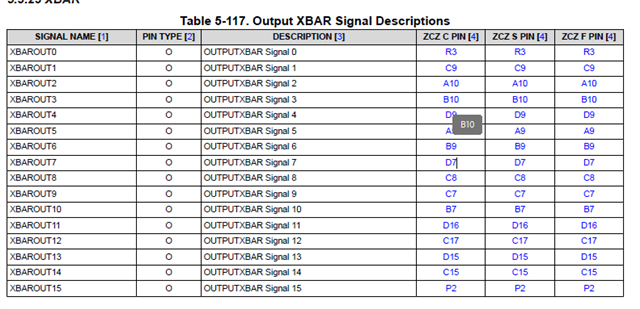
    In the TRM, on page 917, it is mentioned that the Input XBAR can be configured to all GPIOx pins. However, I am unable to find the specific pin attributes that indicate which pins are suitable for eCAP routing.

    Could you please confirm this or share the relevant reference page in the TRM where these details are described?