This thread has been locked.

If you have a related question, please click the "Ask a related question" button in the top right corner. The newly created question will be automatically linked to this question.

Error loading program ( FaultISR ) because of Flash Memory

Other Parts Discussed in Thread: EK-TM4C123GXL, TM4C123GH6PM

Good day.

After findind the cause of the problem of this thread:

http://e2e.ti.com/support/microcontrollers/tiva_arm/f/908/t/286294.aspx

The partner   suggested to create a new post to solve the issue.

The problem is that the new CMSIS library uses more FLASH memory than previous version, and my Launchpads (both Stellaris and Tiva) fail at loading one every two times, getting a FaultISR interrupt .

The difference of the map files (new CMSIS left, old CMSIS right)  is here:
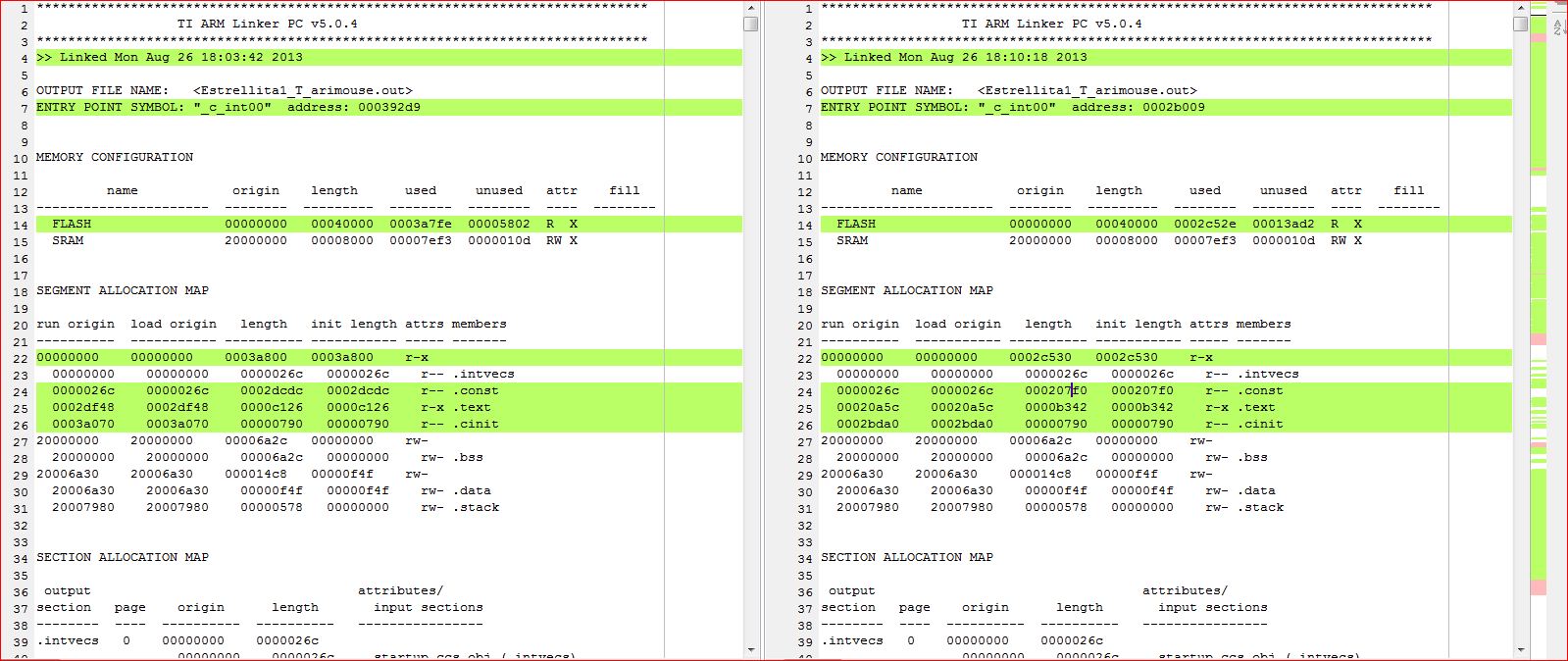

If I free some memory, the FaultISR interrupt dissappears and everything goes back to normal.

However, this shouldn't happen since I do not overflow Flash memory at any point.

Is there a limit on flash memory for Tivaware? Is this an issue with the bootloader?

Thank you


  • PAk SY said:
    Is there a limit on flash memory for Tivaware?

    So far have failed to re-create a limit on the flash memory. Started with an empty TivaWare 1.1 project and used the following code to try and fill the flash memory (started with an arbitrary array size and increased according to the amount of unused flash memory):

    const char initialised_data[0x3a7fe + 0x52b8] = {1};
    
    int
    main(void)
    {
    	return initialised_data[0];
    }

    The linker map file reported only 8 bytes of unused flash code space:

    ******************************************************************************
                      TI ARM Linker PC v5.1.1                     
    ******************************************************************************
    >> Linked Mon Aug 26 20:17:01 2013

    OUTPUT FILE NAME:   <tiva_flash_size.out>
    ENTRY POINT SYMBOL: "_c_int00"  address: 0003feb5


    MEMORY CONFIGURATION

             name            origin    length      used     unused   attr    fill
    ----------------------  --------  ---------  --------  --------  ----  --------
      FLASH                 00000000   00040000  0003fff8  00000008  R  X
      SRAM                  20000000   00008000  00000214  00007dec  RW X

    I have been able to use CCS to download this program to a EK-TM4C123GXL without getting any FaultISRs or flash verification errors.
    PAk SY said:
    Is this an issue with the bootloader?
    Can you clarify if you are using the bootloader (in the Tiva device bootrom) or CCS to download the program when the FaultISR occurs.

    Also, can you post either the .out file which causes the failure, or your complete CCS project, so someone else can see if they can repeat the failure? [I can try on a Tiva or Stellaris Launchpad]

  • Thank you Chester. Can you send me a PM message?

    I don't want to just release the out file.

    On the other hand, our RAM footprints are quite different as well.

  • Out file sent via PM

  • PAk SY said:
    Out file sent via PM

    Confirm that out file received, and when downloaded to a EK-TM4C123GXL I have been getting entry into the FaultISR after some loads of the program from CCS.

    From viewing the device registers in the CCS debugger noticed that WATCHDOG0 is being enabled, and the Watchdog Reset Enable and Watchdog Interrupt Enable bits are being set in the Watchdog Control (WDTCTL) register.

    I think the enabled watchdog is causing the failures in that:

    1. If the program is not running at the time when the program is loaded, then the program is loaded into flash correctly and runs without entering the FaultISR.
    2. If the program is running with the watchdog enabled at the time when the program is loaded, then the download of the program can fail to program flash correctly. CCS wasn't reporting an error after failure to program the flash.  However, if manually select Run -> Load -> Verify Program a verification failure IS reported if the flash wasn't programmed correctly.The programming failure is that data at the "end" of flash has all ones, i.e. failure to have been programmed. Single stepping in the debugger showed that the FaultISR was entered when a pointer value of 0xFFFFFFFF was read from an un-programed address in flash and then de-referenced. i.e. the FaultISR was entered due to the entire program not being written to flash.

    Suspect that a watchdog reset is occurring part way through the programming of flash, and may explain the following repeated sequence of pass-fail-pass-fail:

    a) Start with the program not running, and successfully download and run the program.

    b) With the program running and the watchdog enabled attempt to download the program again, which fails to program all of the flash (due to a watchdog reset interrupting the programming??). Due to the partially programmed flash, the program enters the FaultISR and stops.

    c) With the program not running, the next download attempts programs the flash correctly, and the program runs.

    d) b) and c) repeat.

    Will attempt to create a simple program to demonstrate this [in the hope of getting a reproducible test case for TI].

  • Chester Gillon said:

    Out file sent via PM

    Confirm that out file received, and when downloaded to a EK-TM4C123GXL I have been getting entry into the FaultISR after some loads of the program from CCS.

    From viewing the device registers in the CCS debugger noticed that WATCHDOG0 is being enabled, and the Watchdog Reset Enable and Watchdog Interrupt Enable bits are being set in the Watchdog Control (WDTCTL) register.

    I think the enabled watchdog is causing the failures in that:

    1. If the program is not running at the time when the program is loaded, then the program is loaded into flash correctly and runs without entering the FaultISR.
    2. If the program is running with the watchdog enabled at the time when the program is loaded, then the download of the program can fail to program flash correctly. CCS wasn't reporting an error after failure to program the flash.  However, if manually select Run -> Load -> Verify Program a verification failure IS reported if the flash wasn't programmed correctly.The programming failure is that data at the "end" of flash has all ones, i.e. failure to have been programmed. Single stepping in the debugger showed that the FaultISR was entered when a pointer value of 0xFFFFFFFF was read from an un-programed address in flash and then de-referenced. i.e. the FaultISR was entered due to the entire program not being written to flash.

    Suspect that a watchdog reset is occurring part way through the programming of flash, and may explain the following repeated sequence of pass-fail-pass-fail:

    a) Start with the program not running, and successfully download and run the program.

    b) With the program running and the watchdog enabled attempt to download the program again, which fails to program all of the flash (due to a watchdog reset interrupting the programming??). Due to the partially programmed flash, the program enters the FaultISR and stops.

    c) With the program not running, the next download attempts programs the flash correctly, and the program runs.

    d) b) and c) repeat.

    Will attempt to create a simple program to demonstrate this [in the hope of getting a reproducible test case for TI].

    [/quote]

    That makes total sense!! I also tried to load different programs every time (with and without Watchdog Enabled) and then, everything loads without errors.

    I am using in my program:

    // Stall Watch-dog timer during debug
    WatchdogStallEnable(WATCHDOG0_BASE);

    which supposedly stops the Watchdog for debugging and loading(??).

    I think that the difference I saw freeing some flash memory is related to the time that it takes CCS to load the program in flash, so the watchdog time trigger was not reached.

    Which is your suggestion as a solution?

    Thank you Chester, this one was great help!!

  • PAk SY said:
    which supposedly stops the Watchdog for debugging and loading(??).

    From the available documentation it is not clear what the state the Watchdog is in during loading of a program.

    PAk SY said:
    Which is your suggestion as a solution?

    I modified the ccsv5\ccs_base\emulation\gel\tm4c123gh6pm.gel file in the CCS installation to add a OnPreFileLoaded function, which resets the WATCHDOG0 and WATCHDOG1 modules via a write to the Watchdog Timer Software Reset (SRWD) register.

    This has the effect of disabling the watchdog prior to CCS loading the program. With this modification, in a test of approx 10 loads I haven't seen amy more FaultISR problems.

    The modified file is attached 3531.tm4c123gh6pm.gel. To use:

    a) Save the modified file into the ccsv5\ccs_base\emulation\gel directory in your CCS installation (after making a back-up of the original).

    b) In your target configuration go to Advanced -> CORTEX_M4_0 and ensure ..\..\emulation\gel\tm4c123gh6pm.gel is selected as the initialization script.

  • Chester Gillon said:

    I modified the ccsv5\ccs_base\emulation\gel\tm4c123gh6pm.gel file in the CCS installation to add a OnPreFileLoaded function, which resets the WATCHDOG0 and WATCHDOG1 modules via a write to the Watchdog Timer Software Reset (SRWD) register.

    This has the effect of disabling the watchdog prior to CCS loading the program. With this modification, in a test of approx 10 loads I haven't seen amy more FaultISR problems.

    The modified file is attached 3531.tm4c123gh6pm.gel. To use:

    a) Save the modified file into the ccsv5\ccs_base\emulation\gel directory in your CCS installation (after making a back-up of the original).

    b) In your target configuration go to Advanced -> CORTEX_M4_0 and ensure ..\..\emulation\gel\tm4c123gh6pm.gel is selected as the initialization script.

    Worked like a charm!!!


    So is this a bug in the CCS gel files? Shout TI update?

    On the other hand, even if I change my target_config.ccxml file with the file you provided, when I load the program for debugging, the default gel file loaded is lm4f120h5qr.gel (which is a Stellaris file, not Tiva). I used the airmouse example as a base for my project.

    When the program is loaded, I I load your file manually (and remove the previous one) everything works fine.

    How can I default the gel file? Is there other place besides of the ccxml file?

    Thank you.


  • PAk SY said:
    How can I default the gel file? Is there other place besides of the ccxml file?

    On further inspection I release that there is a separate gel file for each Tiva and Stellaris device. All the device gel files include the "common" CortexM3_util.gel file.

    Therefore, I modified the attached 4718.CortexM3_util.gel. If you save the attached file as ccsv5\ccs_base\emulation\gel\CortexM3_util.gel in your CCS installation the modified file will be used for all Tiva and Stellaris devices, without having to modify the  target_config.ccxml files.

    I have changed the OnPreFileLoaded function to write to the Software Reset Control 0 (SRCR0) register to reset the WATCHDOG0 and WATCHDOG1 modules prior to loading a file. The change of register should be compatble with the gel files for Stellaris LM3S devices and Concerto Cortex-M3 cores which also include CortexM3_util.gel

    Edit: The suggested change to CortexM3_util.gel will cause the gel files for the M3 cores of Concerto devices to fail to load. Don't use if you need support for Concerto devices.

  • PAk SY said:
    So is this a bug in the CCS gel files? Shout TI update?

    On the CCS forum there is a thread with a similar problem - Watchdog prevents program load on LM3S device. As that other thread already has TI employees investigating, I added a reference to this thread.

  • Chester Gillon said:

    On further inspection I release that there is a separate gel file for each Tiva and Stellaris device. All the device gel files include the "common" CortexM3_util.gel file.

    Therefore, I modified the attached 4718.CortexM3_util.gel. If you save the attached file as ccsv5\ccs_base\emulation\gel\CortexM3_util.gel in your CCS installation the modified file will be used for all Tiva and Stellaris devices, without having to modify the  target_config.ccxml files.

    I have changed the OnPreFileLoaded function to write to the Software Reset Control 0 (SRCR0) register to reset the WATCHDOG0 and WATCHDOG1 modules prior to loading a file. The change of register should be compatble with the gel files for Stellaris LM3S devices and Concerto Cortex-M3 cores which also include CortexM3_util.gel

    Edit: The suggested change to CortexM3_util.gel will cause the gel files for the M3 cores of Concerto devices to fail to load. Don't use if you need support for Concerto devices.


    Excellent, now everything is working as it should!!!

    Thank you again Chester.
  • Hi Chester, sorry to bother you again.

    Will this gel fil work with the new TM4C129x devices?

    Thank you.

  • I haven't had any luck getting the previous .gel file to work with the TM4C129x devices, but I re-wrote it differently and now it is working for me again.

    // Disable WATCHDOG0 and WATCHDOG1 modules prior to loading a file, so that
    // the watchdog doesn't corrupt downloading to flash
    #define WDOG0_BASE 0x40000000
    #define WDOG1_BASE 0x40001000
    #define WDOG_O_LOCK 0x0C00
    #define WDOG_O_CTL 0x0008

    #define SYSCTL_RCGCWD 0x400FE600

    #define WR_MEM_32(addr, data) *(unsigned int*)(addr) = (unsigned int)(data)
    #define RD_MEM_32(addr) *(unsigned int*)(addr)

    OnPreFileLoaded()
    {
    if(RD_MEM_32(SYSCTL_RCGCWD) & 0x00000001)
    {
    // Watchdog0 is being used (clock is enabled)

    //Unlock the watchdog register
    WR_MEM_32 (WDOG0_BASE + WDOG_O_LOCK, 0x1ACCE551);

    //Clear the watchdog reset enable flag
    WR_MEM_32 (WDOG0_BASE + WDOG_O_CTL, RD_MEM_32(WDOG0_BASE + WDOG_O_CTL) & 0xFFFFFFFD);

    //Re-Lock the watchdog register
    WR_MEM_32 (WDOG0_BASE + WDOG_O_LOCK, 0x00000001);
    }

    if(RD_MEM_32(SYSCTL_RCGCWD) & 0x00000002)
    {
    // Watchdog1 is being used (clock is enabled)

    //Unlock the watchdog register
    WR_MEM_32 (WDOG1_BASE + WDOG_O_LOCK, 0x1ACCE551);

    //Clear the watchdog reset enable flag
    WR_MEM_32 (WDOG1_BASE + WDOG_O_CTL, RD_MEM_32(WDOG1_BASE + WDOG_O_CTL) & 0xFFFFFFFD);

    //Re-Lock the watchdog register
    WR_MEM_32 (WDOG1_BASE + WDOG_O_LOCK, 0x00000001);
    }
    }

  • Bradley Harris said:

    I haven't had any luck getting the previous .gel file to work with the TM4C129x devices, but I re-wrote it differently and now it is working for me again.

    // Disable WATCHDOG0 and WATCHDOG1 modules prior to loading a file, so that
    // the watchdog doesn't corrupt downloading to flash
    #define WDOG0_BASE 0x40000000
    #define WDOG1_BASE 0x40001000
    #define WDOG_O_LOCK 0x0C00
    #define WDOG_O_CTL 0x0008

    #define SYSCTL_RCGCWD 0x400FE600

    #define WR_MEM_32(addr, data) *(unsigned int*)(addr) = (unsigned int)(data)
    #define RD_MEM_32(addr) *(unsigned int*)(addr)

    OnPreFileLoaded()
    {
    if(RD_MEM_32(SYSCTL_RCGCWD) & 0x00000001)
    {
    // Watchdog0 is being used (clock is enabled)

    //Unlock the watchdog register
    WR_MEM_32 (WDOG0_BASE + WDOG_O_LOCK, 0x1ACCE551);

    //Clear the watchdog reset enable flag
    WR_MEM_32 (WDOG0_BASE + WDOG_O_CTL, RD_MEM_32(WDOG0_BASE + WDOG_O_CTL) & 0xFFFFFFFD);

    //Re-Lock the watchdog register
    WR_MEM_32 (WDOG0_BASE + WDOG_O_LOCK, 0x00000001);
    }

    if(RD_MEM_32(SYSCTL_RCGCWD) & 0x00000002)
    {
    // Watchdog1 is being used (clock is enabled)

    //Unlock the watchdog register
    WR_MEM_32 (WDOG1_BASE + WDOG_O_LOCK, 0x1ACCE551);

    //Clear the watchdog reset enable flag
    WR_MEM_32 (WDOG1_BASE + WDOG_O_CTL, RD_MEM_32(WDOG1_BASE + WDOG_O_CTL) & 0xFFFFFFFD);

    //Re-Lock the watchdog register
    WR_MEM_32 (WDOG1_BASE + WDOG_O_LOCK, 0x00000001);
    }
    }

    Thank you for sharing Bradley, this is a good one!!