This thread has been locked.

If you have a related question, please click the "Ask a related question" button in the top right corner. The newly created question will be automatically linked to this question.

TM4C123G Driver Problems with Windows 10

I upgraded to Windows 10 a week ago and it no longer recognizes my Launchpad. Under ports it shows only "USB Serial Device" and when I attempt to point it to the installed ICDI drivers, it returns a message saying that the best driver is already installed. No idea how to get around this or if these are even appropriate drivers anymore. (I also only show the one port connection to the board instead of the usual three.) Any help is appreciated. 

  • Hello Michael

    Windows 10 is pretty new and may be not fully tested. There have been similar posts on Windows 8. Can you search them out on the forum to see if it helps?

    Regards
    Amit
  • I can't find anything relevant. I found and updated the drivers for the JTAG and DFU, but the Virtual Serial Port doesn't show up anywhere. Under ports I just have a generic USB serial device with no way to change its driver. If I remember from Windows 8, under ports there was a third port, which is no longer there. My Launch Pad is as good as driftwood until I can get this sorted out.
  • Hello Michael,

    Check the following post. Also it would be a good idea to see what the Device Manager shows.

    e2e.ti.com/.../1500849

    If you check the LaunchPad on another machine (not Win 10) does it still install the drivers correctly?

    Regards
    Amit
  • I've disabled the driver signature requirement. That got me from the first post in this thread to the second, but no further, e.g. it recognized the ICDI and let me install two drivers but not the Virtual Serial Port. Works fine on my Win 7 machine, and I'd had the drivers successfully installed on this one before upgrading to Win 10. 

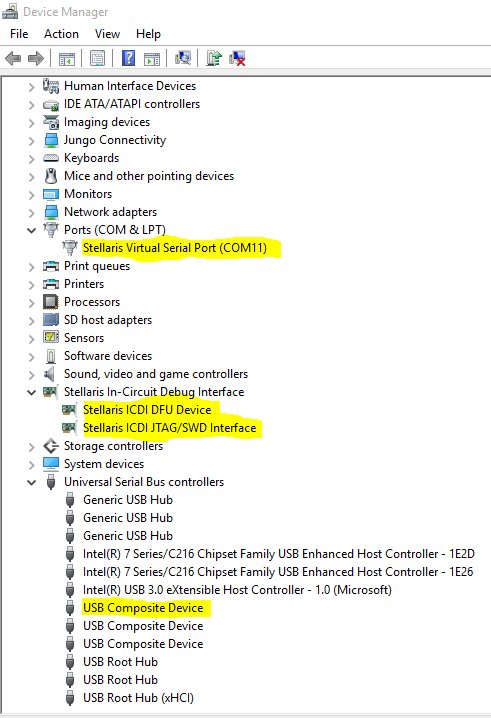
    Here is what my device manager shows: 

  • Hello Michael

    I would suggest checking with the MSDN Support as MS keeps on changing the manner in which it handles USB device drivers.

    Regards
    Amit
  • Is there a specific forum or contact there I should pursue?
  • Also, wouldn't this be something TI would be interested in investigating?
  • Hello Michael,

    That would be Microsoft Support Forum (nothing to do with TI E2E forums). Win 10 is very new and still in it's beta version. I don't think we do plan to move to Win 10 till it is formally approved for use within TI n/w

    Regards
    Amit
  • Nor before spy policy get removed from. Otherwise all sensitive data from your company get to other for free. Issue on security are well known but this deliberate M$ troian plus agreement on bypass privacy on new version need be the reason NOT to USE WIN10 !!!!

    http://www.techworm.net/2015/07/by-downloading-windows-10-you-are-allowing-microsoft-to-spy-on-you.html

  • Fair enough. I'll work from my Win 7 machine for the time being. Will verify.
  • I see similar issues with the ICDI drivers and Windows 10.  Using Keil uVision 5.16a, I can program the Launchpad, but it will not debug.  I've tried un-installing and re-installing the ICDI drivers with little success.

    In my case, the serial port shows up as expected.

  • FWIW, I upgraded to Windows 10 several weeks ago. I am able to use the ICDI interface on my DK-TM4C129X dev kit without any issues.

  • Curious if there are any updates here. I'm trying to program my launchpad on a new windows 10 device. When I try to point it to the stellaris icdi drivers folder, it says it could not find any appropriate drivers.
  • I did a clean install of win7, upgraded to win10.

    The drivers could be found, when I point them out. But it gives the error "Windows encountered a problem installing the driver software for your device. Windows found driver software for your device but encountered an error while attempting tot install it. Stellaris ICDI DFU Device. A problem was encountered while attempting to add the driver to the store."

    I have a launchpad TM4C123GXL Rev A.
  • I had to downgrade to Windows 7 in order to program my TM4C123GXL.

  • I had a similar issue - I had the Launchpad working on Win7/64 just fine. Upgraded to Win10. Now I have ONLY the USB Serial port, no ICDI. You seem to have gotten further.

    I am stuck - I don't have a Win7 machine to use.
  • I was able to get the drivers to install by turning off driver signing.

    e2e.ti.com/.../1653113
  • Suppurb, thanx. Worked for me too.


  • I tried installing Keil on a new PC with Windows 10 and that seemed to fix the problem. I will try to completely uninstall Keil and the ICDI drivers and see if that fixes the problem.
  • Is there any update on window 10 issue? I have just installed wndows 10 few weeks ago to a new laptop and the device is not recognized. I have just installed the TIVAware on the laptop and when I try to update the driver (that works fine with windows 7) i have the message : " A problem was encountered while attemting to add the driver to the store"." If you know the manufacturer of the Device, you can visit its website and check the support section for driver Software".

    Now, just to understand, is it possible to install Tivaware USB and develop using launchpad with Windows10 or not? For me this is big issue because I have to run a demo in few days, if the solution is to go back to windows 8 that is ok but I have to know it soon.

    Thanks for taking the time to read, please help.
  • I was able to get this working with Window 10.

    The message is very cryptic. It really should say that you are trying to install an un-signed driver.  

    I posted steps here:  

    https://e2e.ti.com/support/microcontrollers/tiva_arm/f/908/t/458661

    You have to jump through some hoops, but it does work, at least for now.  Microsoft changed the method several times during Win 10 beta.  

    Hope this helps

  • I managed to make ICDI drivers work on Windows 10. I am using Stellaris Launchpad Tiva C. Before I was working with Windows 8.1, but recently upgraded system to Windows 10 with automatic updates and lost communication with development board. Code Composer Studio started to display message "Frequency out of range..." error and LM Flash Programmer was unable to find the target. I noticed that driver is displayed differently in Device Manager: it was recognized as Stellaris Virtual Serial Port and USB Composite Device only.

    What I did?

    1. Determined which USB Composite Device is corresponding to the development board.
    2. Uninstalled and removed driver form Stellaris Virtual Serial Port.
    3. Uninstalled driver for particular USB Composite Device.
    4. Installed driver from CCS directory again.

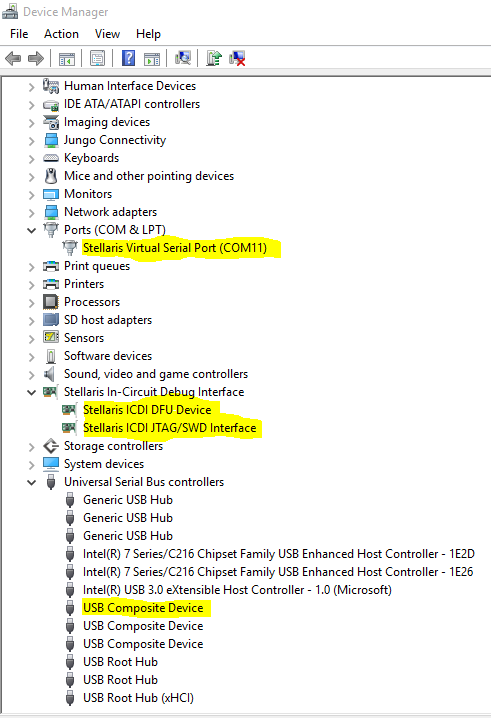
    After this development board was recognized differently with additional section Stellaris In-Circuit Debug Interface in Device Manager (see screenshot below).

    P.S.: I am not explaining how to install unsigned drivers in case if corresponding message appears - it is trivial task described on this and other forums.

  • I managed to make ICDI drivers work on Windows 10. I am using Stellaris Launchpad Tiva C. Before I was working with Windows 8.1, but recently upgraded system to Windows 10 with automatic updates and lost communication with development board. Code Composer Studio started to display message "Frequency out of range..." error and LM Flash Programmer was unable to find the target. I noticed that driver is displayed differently in Device Manager: it was recognized as Stellaris Virtual Serial Port and USB Composite Device only.

    What I did?

    1. Determined which USB Composite Device is corresponding to the development board.
    2. Uninstalled and removed driver form Stellaris Virtual Serial Port.
    3. Uninstalled driver for particular USB Composite Device.
    4. Installed driver from CCS directory again.

    After this development board was recognized differently with additional section Stellaris In-Circuit Debug Interface in Device Manager (see screenshot below).

    P.S.: I am not explaining how to install unsigned drivers in case if corresponding message appears - it is trivial task described on this and other forums.

  • Hello Pavel

    The additional section has been there on Win7 and Win8 as well.

    Regards
    Amit
  • Exactly. That's what I am talking about. But initially in Windows 10 it was not recognized this way.
  • Amit
    Is there any estimate on supporting Win 10? This is important to my product development schedule.

    Thanks
  • Hello Dan,

    Not immediately as we are still checking why even after signing it for Win 10, the PC does not recognize it. However during the test phase we did find that if CCS is installed on Win 10 and drivers are used from CCS, then the LaunchPad does get recognized. I am keeping this as a long WA till we can figure out the actual issue for Win 10.

    Regards
    Amit
  • I have installed the debugger and serial port under Win10 OK for the evaluation kit.

    The key issue is getting the composite serial device to load. (2 serial ports). My design requires getting 3 serial ports to run. If there is not a solution, I will have to design in other chips, so getting attention and solution is really important to me.

    Thanks
  • Hello Dan

    The foremost issue was for the ICDI and COM port to be recognized by the Win 10 OS. Having said that the next is to get the entire USBLIB to work correctly, and that is what we are working on to understand where the issue is arising. I cannot give a firm date on when a solution will be available, but this is the highest priority debug for us.

    Regards
    Amit
  • Hi, I think I have a similar problem. I just installed Windows 10 (on a new computer) and the device manager recognises the Launchpad as 2 In-Circuit Debug Interfaces and a USB serial device. I want to try your solution, but I don't know what the CSS directory is (I'm not that experienced). Also, when I uninstall the USB Composite Device all devices associated with the Launchpad disappear, but reappear as soon as I reconnect the Launchpad. Is this normal? How would I reinstall the drivers if I can't see the devices in the device manager?
    I would really appreciate more detail to your solution as it is the only one I found.

    Kind Regards,
    Lukas
  • Hello Lukas

    CCS is the IDE from Texas Instruments. You would need to download the same from www.ti.com

    Regards
    Amit
  • Hello All,

    Update on the issue: The driver issue has been fixed for Debug, COM and DFU ports. Other USB examples would soon follow.

    e2e.ti.com/.../485157

    Regards
    Amit
  • Dear Amit,

    Now almost about 10 month gone, and now Windows 10 is fully tested and released worldwide, Driver has to be updated and supports Windows 10 as we are facing difficulties in customer support. Our Products are already in the market and We got s many complaints regarding Windows 8 and higher compatibly. Our Products with TIVA Serial USB is not being detected with Windows 8 and Windows 10.

    Texas should come-out with the compatible drivers for entire Lineup micro controllers.

    Please do need full ASAP.

    Is there any other patch for the existing drivers then please update ASAP.

    Others Third Party vendors like FTDI , and other USB driver vendor are upto date with Windows 10.Why not TEXAS????
  • Hello Smit,

    We will correspond on the other thread you have opened

    Regards
    Amit