This thread has been locked.

If you have a related question, please click the "Ask a related question" button in the top right corner. The newly created question will be automatically linked to this question.

TM4C123G DevBoard + CC2564MODNEM: Build Demo Problem

Hello,

I'm having a TM4C123G DevBoard and now I'm trying to build + download Bluetooth demo(SPP, for example) into this board. But I have a build problem on both CCS and Keil.

I have followed the instruction of "CC256x Tiva TI Bluetooth Stack" on processors.wiki.ti.com. When I try to build demo, there is a report error:

" .\Debug - DK-TM4C123G\SPPLEDemo.axf: error: L6002U: Could not open file driverlib.lib: No such file or directory "

Although I added file driverlib.lib from ...TivaWare_C_Series-2.1.2.111\driverlib\rvmdk or ccs(depend on which IDE I'm using) but  it' s not working.

But when I try a example in TivaWare_C_Series-2.1.2.111\examples\boards\dk-tm4c123g\hello, there is no error report about driverlib.lib.


So what should I do to solve this problem?!


Thanks in advance,

Best regard!

Ngoc Nguyen Anh

  • Hello Ngoc,

    Can you have a look at your linker command file and make sure you are linking the driver.lib in the same was as the example project "hello" although there may need to be adjustments to the path to compensate since your project may not have the same directory structure.
  • Hello Chuck,

    Thanks for your response.
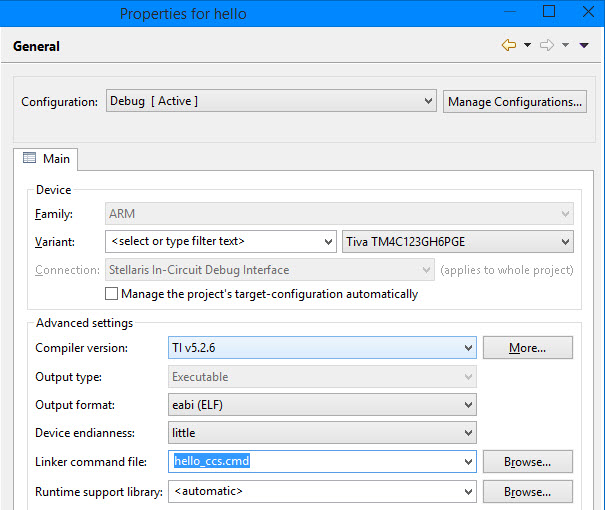
    1. You mean the linker command file in the Project -> Properties -> General -> Main tab -> Linker command file?
    I look in the Hello demo, linker command file is “hello_ccs.cmd” (navigate to C:\ti\TivaWare_C_Series-2.1.2.111\examples\boards\dk-tm4c123g\hello)

    But in the SPPLDemo, it is blank. I went to SPPLEDemo folder but didn’t see any “.cmd” file like in Hello demo(except file “linker_ccs.cmd” at …\SPPLEDemo\NoOS\startup\dk_tm4c123g, but it also appear in the SPPLEDemo in Project Explorer).

    So now I still don’t know how to link the driverlib.lib with the SPPLEDemo. Hope you can instruct me a bit clearer. Thanks a lot.

    2. Anyway, I solved the problem by using a trick, I think.
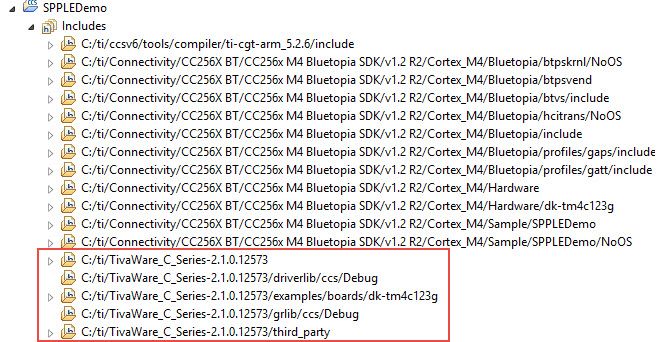
    I took notice of the “Include” path of SPPLEDemo and thought the demo was linking to C:\ti\TivaWare_C_Series-2.1.0.12573.

    And in the TivaWarePath_DK_TM4C123G_CCS.txt in C:\ti\Connectivity\CC256X BT\CC256x M4 Bluetopia SDK\v1.2 R2\Cortex_M4\BuildScripts, paths are also TivaWare_C_Series-2.1.0.12573.

    I tried to change them to "TivaWare_C_Series-2.1.2.111"(current version) and build, but it still report error. After that, every path I have just changed was back to initial state(old version). I don’t know why and how to change this totally.

    Finally, I decided to create a new folder name “TivaWare_C_Series-2.1.0.12573”, and copy several folders(including driverlib, examples, grlib, inc, third_party and utils) from TivaWare_C_Series-2.1.2.111 folder into it. Luckily there is no error report when I build SPPLEdemo again. I download this demo into TM4C123G DevBoard and it’s work.(oh yeah!)

    But I still want to know the way to solve my problem more effectively than create a new “fake” folder.

    Best regards,

    Ngoc Nguyen Anh

    P.s: Sorry if my English is not really good

  • Hello Ngoc,

    Please have a look at this thread on setting up a project in CCS. It is specifically discussing a UART project, but includes step by step instructions that apply generically to similar TM4C projects.

    e2e.ti.com/.../297536

    Of key interest is setting the include paths clicking on the menus described as follows in the post I reference:

    "Prior to the above make sure that you have added driverlib.lib in properties->arm linker->include library
    Navigate to driverlib->CCS->Debug->driverlib.lib"