This thread has been locked.

If you have a related question, please click the "Ask a related question" button in the top right corner. The newly created question will be automatically linked to this question.

CCS/TM4C123GH6PM: SPI Master And Slave Read Funcitons Not Work

Part Number: TM4C123GH6PM


Tool/software: Code Composer Studio

Hi everyone,

I need communication between two TM4C123GH6PM board. İ read this codes,everythink is ok but read functions doesnt work. What can i do ?

Master Code ;

#define NUM_SSI_DATA 3
char char_deger;
int durum;

uint32_t Data_Alinan[NUM_SSI_DATA];
uint32_t Data_Gönderilen = 1;
uint32_t Data_Onay = 4;
uint32_t ui32Index;

void int_to_char(uint32_t number)
{
	if(number==0) char_deger='0';
	if(number==1) char_deger='1';
	if(number==2) char_deger='2';
	if(number==3) char_deger='3';
	if(number==4) char_deger='4';
	if(number==5) char_deger='5';
	if(number==6) char_deger='6';
	if(number==7) char_deger='7';
	if(number==8) char_deger='8';
	if(number==9) char_deger='9';

}

void SSI_KONTROL(void)
{
	if(Data_Alinan[0] != 0){ ///Veri Başarıyla alındı

		SSIDataPut(SSI0_BASE, Data_Onay);

		int_to_char(Data_Alinan[0]);
		UARTCharPut(UART0_BASE, char_deger);

		int_to_char(Data_Alinan[1]);
		UARTCharPut(UART0_BASE, char_deger);

		int_to_char(Data_Alinan[2]);
		UARTCharPut(UART0_BASE, char_deger);

	}
}
void SSI_DATA_AL(void)
{
	while(SSIBusy(SSI0_BASE)){}; //SPI müsait mi

	for(ui32Index = 0; ui32Index < NUM_SSI_DATA; ui32Index++)
	{
		SSIDataGet(SSI0_BASE, &Data_Alinan[ui32Index]);
		Data_Alinan[ui32Index] &= 0x00FF;
		while(SSIBusy(SSI0_BASE)){};

	}
}
void SSI_DATA_BAS(uint32_t SSI_NUMBER,uint32_t DATA)
{
	SSIDataPut(SSI_NUMBER, DATA); //// Veri isteğinde bulunuluyor
}

void btn_kesme(void)
{
	durum = GPIOIntStatus(GPIO_PORTF_BASE, true);
	GPIOIntClear(GPIO_PORTF_BASE, GPIO_PIN_0);

	while(SSIDataGetNonBlocking(SSI0_BASE, &Data_Alinan[0])) ///SPI müsait mi ????
	{
	}

	SSI_DATA_BAS(SSI0_BASE, Data_Gönderilen); //// Veri isteğinde bulunuluyor

	while(SSIBusy(SSI0_BASE)) ////İşlemin bitmesi bekleniyor
	{
	}
}

void InitConsole_UART(void)
{
	SysCtlPeripheralEnable(SYSCTL_PERIPH_UART0);
	SysCtlPeripheralEnable(SYSCTL_PERIPH_GPIOA);

	GPIOPinConfigure(GPIO_PA0_U0RX);
	GPIOPinConfigure(GPIO_PA1_U0TX);
	GPIOPinTypeUART(GPIO_PORTA_BASE, GPIO_PIN_0 | GPIO_PIN_1);
	UARTDisable(UART0_BASE);
	UARTClockSourceSet(UART0_BASE, UART_CLOCK_PIOSC);
	UARTConfigSetExpClk(UART0_BASE,SysCtlClockGet(),115200,UART_CONFIG_WLEN_8|UART_CONFIG_STOP_ONE|UART_CONFIG_PAR_NONE);
	UARTEnable(UART0_BASE);
}

void InitConsole_SPI(void)
{
	SysCtlPeripheralEnable(SYSCTL_PERIPH_SSI0);
	SysCtlPeripheralEnable(SYSCTL_PERIPH_GPIOA);

	GPIOPinTypeSSI(GPIO_PORTA_BASE, GPIO_PIN_5 | GPIO_PIN_4 | GPIO_PIN_3 |GPIO_PIN_2);
	GPIOPinConfigure(GPIO_PA2_SSI0CLK);
	GPIOPinConfigure(GPIO_PA3_SSI0FSS);
	GPIOPinConfigure(GPIO_PA4_SSI0RX);
	GPIOPinConfigure(GPIO_PA5_SSI0TX);
	GPIOPinTypeSSI(GPIO_PORTA_BASE, GPIO_PIN_5 | GPIO_PIN_4 | GPIO_PIN_3 |GPIO_PIN_2);
	SSIConfigSetExpClk(SSI0_BASE, SysCtlClockGet(), SSI_FRF_TI,SSI_MODE_MASTER, 1000000, 8);
	SSIEnable(SSI0_BASE);

}

void InitConsole_BUTTON(void)
{
	SysCtlPeripheralEnable(SYSCTL_PERIPH_GPIOF);

	HWREG(GPIO_PORTF_BASE+GPIO_O_LOCK)=GPIO_LOCK_KEY;
	HWREG(GPIO_PORTF_BASE+GPIO_O_CR)=0x01;
	HWREG(GPIO_PORTF_BASE+GPIO_O_LOCK)=0;
	GPIOPinTypeGPIOInput(GPIO_PORTF_BASE , GPIO_PIN_0);
	GPIOPadConfigSet(GPIO_PORTF_BASE, GPIO_PIN_0, GPIO_STRENGTH_4MA, GPIO_PIN_TYPE_STD_WPU);
	GPIOIntRegister(GPIO_PORTF_BASE,btn_kesme);
	GPIOIntTypeSet(GPIO_PORTF_BASE,GPIO_PIN_0,GPIO_FALLING_EDGE);
	GPIOIntEnable(GPIO_PORTF_BASE, GPIO_PIN_0);
	IntEnable(INT_GPIOF);

}

int main(void)
{
	SysCtlClockSet(SYSCTL_SYSDIV_4 | SYSCTL_USE_OSC | SYSCTL_OSC_MAIN |SYSCTL_XTAL_16MHZ);

	InitConsole_UART();
	InitConsole_SPI();
	InitConsole_BUTTON();

	Data_Alinan[0]=0;

	while(1){

		SSI_DATA_BAS(SSI0_BASE, Data_Gönderilen); //// Veri isteğinde bulunuluyor
		while(SSIBusy(SSI0_BASE)){};
		SSI_DATA_AL();
		while(SSIBusy(SSI0_BASE)){};
		SSI_KONTROL();
		while(SSIBusy(SSI0_BASE)){};

	}
}


Slave Code ;

#include <stdio.h>
#include <stdint.h>
#include <stdbool.h>
#include <string.h>
#include <math.h>
#include "inc/hw_memmap.h"
#include "inc/hw_types.h"
#include "inc/hw_can.h"
#include "inc/hw_ints.h"
#include "inc/hw_gpio.h"
#include "driverlib/debug.h"
#include "driverlib/sysctl.h"
#include "driverlib/systick.h"
#include "driverlib/gpio.h"
#include "driverlib/uart.h"
#include "driverlib/interrupt.h"
#include "driverlib/pin_map.h"
#include "driverlib/pwm.h"
#include "driverlib/rom.h"
#include "driverlib/i2c.h"
#include "driverlib/rom_map.h"
#include "driverlib/watchdog.h"
#include "driverlib/adc.h"
#include "driverlib/can.h"
#include "driverlib/eeprom.h"
#include "driverlib/timer.h"
#include "driverlib/ssi.h"

bool isAdcReadOk;

#define NUM_SSI_DATA 3
uint32_t ui32ADC0Value[3];
uint32_t ui32Index;
uint32_t ulindex;;
uint32_t Data_Alinan[3];

void adckesme(void)
{
	ADCIntClear(ADC0_BASE, 3);
	ADCSequenceDataGet(ADC0_BASE , 3, ui32ADC0Value);
}

void SSI_DATA_BAS(uint32_t SSI_NUMBER,uint32_t *DATA)
{
	for(ui32Index = 0; ui32Index < NUM_SSI_DATA; ui32Index++)
	{
		SSIDataPut(SSI_NUMBER, *DATA); //// Veri isteğinde bulunuluyor
	}
}

void data_receive(void)
{
	while(SSIBusy(SSI0_BASE)){};

	for(ulindex = 0; ulindex < NUM_SSI_DATA; ulindex++) /// SPI Datasını Al
	{
		SSIDataGet(SSI0_BASE, &Data_Alinan[ulindex]);
		Data_Alinan[ulindex] &= 0x00FF;
		while(SSIBusy(SSI0_BASE)){};

	}
}

void InitConsole_SPI(void)
{
	SysCtlPeripheralEnable(SYSCTL_PERIPH_SSI0);
	SysCtlPeripheralEnable(SYSCTL_PERIPH_GPIOA);
	GPIOPinConfigure(GPIO_PA2_SSI0CLK);
	GPIOPinConfigure(GPIO_PA3_SSI0FSS);
	GPIOPinConfigure(GPIO_PA4_SSI0RX);
	GPIOPinConfigure(GPIO_PA5_SSI0TX);
	GPIOPinTypeSSI(GPIO_PORTA_BASE, GPIO_PIN_5 | GPIO_PIN_4 | GPIO_PIN_3 |GPIO_PIN_2);
	SSIConfigSetExpClk(SSI0_BASE, SysCtlClockGet(), SSI_FRF_MOTO_MODE_0,SSI_MODE_SLAVE, 1000000, 8);
	SSIEnable(SSI0_BASE);

}

int main(void)
{
	SysCtlClockSet(SYSCTL_USE_PLL|SYSCTL_OSC_MAIN|SYSCTL_XTAL_16MHZ|SYSCTL_SYSDIV_5);

	SysCtlPeripheralEnable(SYSCTL_PERIPH_ADC0);

	ADCHardwareOversampleConfigure(ADC0_BASE,64);

	ADCSequenceDisable(ADC0_BASE, 3);
	ADCSequenceConfigure(ADC0_BASE , 3, ADC_TRIGGER_PROCESSOR, 0);
	ADCSequenceStepConfigure(ADC0_BASE, 3, 0 , ADC_CTL_TS|ADC_CTL_IE|ADC_CTL_END);
	ADCSequenceEnable(ADC0_BASE, 3);

	ADCIntEnable(ADC0_BASE, 3);
	ADCIntRegister(ADC0_BASE, 3, adckesme);

	IntEnable(INT_ADC0SS3);

	InitConsole_SPI();

	while(1)
	{
		ADCProcessorTrigger(ADC0_BASE , 3);

		data_receive();

		if(Data_Alinan[0]==1){ ///// SPI dan Veri Talebi Geldi mi ?

			if(ui32ADC0Value[0] != 0 ){ //// ADC de gönderilecek bir veri var mı ???

				SSI_DATA_BAS(SSI0_BASE , ui32ADC0Value);

			}
		}
	}
}


  • Hello Fatih,

    You are using different SSI configurations for the SPI Mode.

    On your master you have TI mode:

        SSIConfigSetExpClk(SSI0_BASE, SysCtlClockGet(), SSI_FRF_TI,SSI_MODE_MASTER, 1000000, 8);

    On your slave you have Mode 0:

    SSIConfigSetExpClk(SSI0_BASE, SysCtlClockGet(), SSI_FRF_MOTO_MODE_0,SSI_MODE_SLAVE, 1000000, 8);

    That SSI Mode mismatch will not work, they need to be configured the same. I recommend using SSI_FRF_MOTO_MODE_0 for both.

    Here is an example for TM4C129x MCU's with SSI exchange by the way, might be helpful to reference even though it's a slightly different device family! ssi_master_slave_xfer.zip

  • Greetings Ralph,

    We wish to thank you for this (combined) Master & Slave SPI code example.    It is expected to prove useful to many.

    We noted a minor "Code Sequence" which may be "out of order."    (Pasting here - but not via "Insert Code" as we lose our ability to edit/comment then...)

    // Initialize the data to send.
    //
    pui32DataTx[0] = 'T';
    pui32DataTx[1] = 'I';
    pui32DataTx[2] = 'V';
    pui32DataTx[3] = 'A';
    pui32DataTx1[0] = 'Q';
    pui32DataTx1[1] = 'S';
    pui32DataTx1[2] = 'S';
    pui32DataTx1[3] = 'I';

    //
    // Display indication that the SSI0/SSI1 is transmitting data.
    //
    UARTprintf("SSI0 Sent:\n ");    //  The position of this print function (up top here) suggests that SSI0 (Master) is "first to Send!"
    UARTprintf("'T' 'I' 'V' 'A' \n");
    UARTprintf("SSI1 Sent:\n ");   //  And SSi1 (Slave) sends (after) the Master!
    UARTprintf("'Q' 'S' 'S' 'I' \n");

    //
    // Send 4 bytes of data.
    //
    for(ui32Index = 0; ui32Index < NUM_SSI_DATA; ui32Index++)
    {
    //
    // Prepare data to send from the slave.
    //
    MAP_SSIDataPut(SSI1_BASE, pui32DataTx1[ui32Index]);    //  The Slave sends first - unusual, is it not?   

    //
    // Send the data using the "blocking" put function. This function
    // will wait until there is room in the send FIFO before returning.
    // This allows you to assure that all the data you send makes it into
    // the send FIFO.
    //
    MAP_SSIDataPut(SSI0_BASE, pui32DataTx[ui32Index]);   //  And the Master sends (after) the Slave!
    }

    Earlier "UARTprintf()" suggests that SSI0 (Master) sends first.   And sends "TIVA."    And similarly SSI1 follows SSi0 in sending - sends "QSSI."   (again - according to "printf().")    Note that the "initialized data" is divided into both "Tx" (for Master) & "Tx1" for Slave.    (it is suspected that many will miss this fact as it is not commented...)

    Poster employs a '123 device - do they (all) support the "QSSI" function?    (it is assumed that (all) '129 devices do...)

    Thanks again Ralph for this useful code example...   Our aim here is to (further) clarify - prevent user's confusion...

  • Hi cb1,

    I will have to ask Charles about that, he helped put the example together!

    There isn't QSSI on TM4C123x but very little difference in configuration and use for standard SSI operation. The example doesn't actually use the full QSSI functionality, I think Charles just picked that term another four letter term.

    The biggest difference is pin names for configuration are different, like these are TM4C129x specific with the name of DAT0 and DAT1 at the end (because of QSSI):

    GPIO_PA4_SSI0XDAT0
    GPIO_PA5_SSI0XDAT1

  • Hi cb1,

    As usual, Charles was right on point with the setup. The code is to show a master-slave exchange, and the master is responsible for the clock cycles.

    The MAP_SSIDataPut API is used to prepare data in the slave FIFO. It is not used to start the transmission yet. The slave must wait for the SPI CLK from the master before the shift registers will start the TX/RX. Therefore, if one were to reverse the order of those API's then the slave would see the clocks from the master before having any data prepared in the FIFO to actually send to the master!

  • Hi Ralph,

    Some of that detail is "unexpected" - key embedded, "line comments" (likely) would have increased understanding.

    Again - do note this (direct quote) from the code:

    // Prepare data to Send from the slave.
    //
    MAP_SSIDataPut(SSI1_BASE, pui32DataTx1[ui32Index]);    //  The Slave sends first - unusual, is it not?   (comment by cb1)

    That (unexplained) "Prepare" is (most likely) to be LOST in favor of the "SEND."    And if the Slave was "Real World" (i.e. a separate device) - and as "NO Master SPI clocks have yet to be emitted- "HOW is this "PREPARATION" achieved?   (Via this "SSIDataPut()" [SSI1])      That's a "reasonable" question - is it not?      (Don't you agree that (bit more) tech detail IS required?

    Our concern well notes (both) the "SPI Master & Slave" being contained w/n the (same) MCU.     Such is (not) a realistic, "Real-World" application!   

    And - (strangely) fails to (directly) address the (original) poster's requirement, "I need communication between two TM4C123GH6PM boards."    (i.e. again - a "REAL-WORLD" Application!)

    IS IT ASSURED - that this "right on point" code performs properly during a "REAL Application?"      (i.e. Master addressing a separate chip Slave!

    As time allows we'll run our own tests - see if we can (positively) add necessary detail and/or confirm.   

    It is hoped that the (long promised/pending) Tivaware update would produce a "More direct, (Real-World capable) SPI SLAVE example!"

    The current API examples reveal:


    Not a "hint" of the MCU when commanded into SPI Slave Mode!      (thus a "REAL-WORLD" SPI Slave example would be HIGHLY DESIRABLE!

    Thank you for your timely responses - much appreciated...    This is "NO ATTACK" upon code's author ... it is simply a, "Request for Clarity" - as many (unusual) elements reside (inadequately explained) w/in this unique code listing. 

  • Hello cb1,

    Appreciate your feedback - we can adjust the comments a bit to clarify that. Comment adjustment is about the only thing we can do right now given where it is on the release process.

    There isn't a TM4C in SSI slave mode example included for this, as when we did our internal analysis on requests etc. from customers, we did not see that come up enough to make an example for it, I honestly don't even remember seeing such a request. That said, the plan is to make more examples outside of TivaWare as needed when such requests come in, and either release them via E2E or app notes for now as we wouldn't want to wait for the next update to spread more useful code around!

  • Hello Ralph,

    Thank you for your response - it was (and remains) my small group's intent to, "Assist your (also) small team in the (coming) update."

    To that end - we offer up several related points - hopefully of value to you (& other forum users):

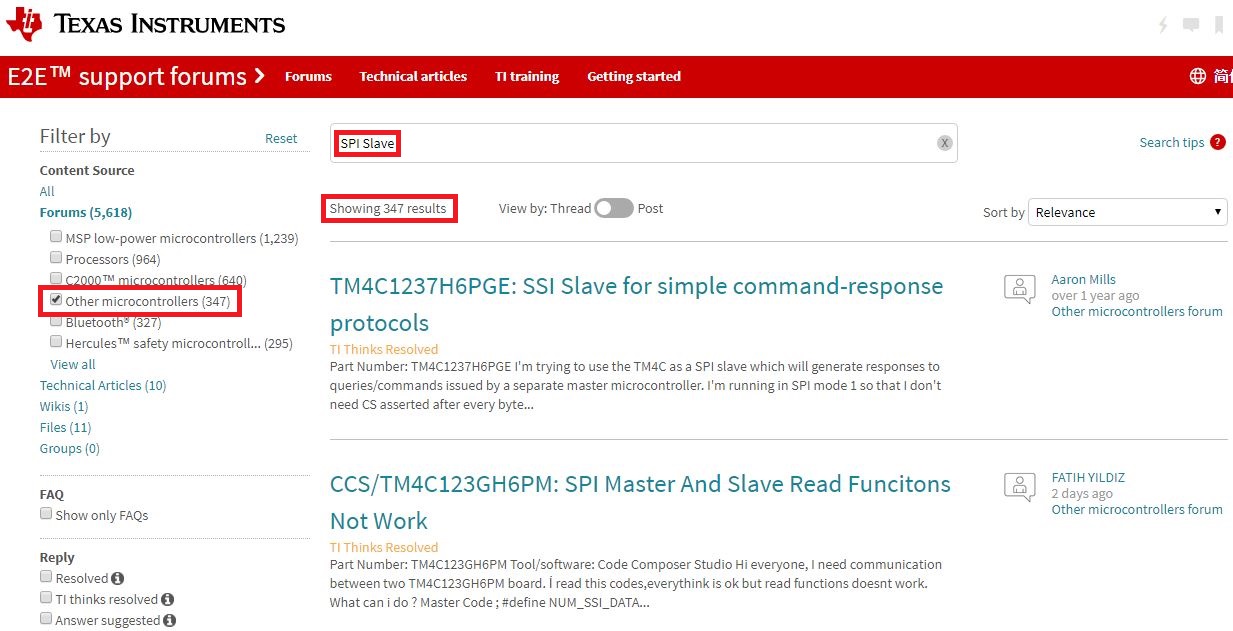
    • My team does agree that "SPI Slave Mode" does not arrive at "High Frequency."    However a basic forum search revealed "347 Hits" to the keywords: "SPI Slave (and) TM4C!"    Thus - this (may) well qualify as a "known & persisting" TM4C issue.    (scroll down to view support for our finding.)
    • Our group is "fearful of" & also "rejecting of" the use of, "Lookbacks and/or (near) loopbacks!"    ("Near loopbacks" - as the code here employed - by constraining the Slave SPI to reside w/in the SAME MCU as the Master!)    Such is an "Artifical Construct" - usually employed for "connection ease" or the "unavailability of a Real (independent) Slave Device!"   Too often such code, "Fails to adequately transfer to and/or satisfy the (differing) demands" of an "Independent" (i.e. Normal) real-world Slave device!
    • The code my group challenged (noted as "right on point") may not have reached that level.      Our poster asked specifically for a "TWO Device interconnect solution" - (Not loopback/near) solution!
    • It remains "Unknown" as to, "How the independent Slave SPI device" may "Prepare Data" without the arrival of (any) SPI clocks from the Master!    That proves the basis for our questioning of the "Slave Device" to be the first one commanded to, "SSIDataPut()."    How CAN the "Real World" independent, SPI Slave device possibly "know" (what) data it is to "Prepare?"   (should this not (somehow) be explained?)
    • An additional "weakness" of "loopback/near" is the, "Failure to exercise the real-world Connection Medium."    SPI - especially at high speed - has distance & connection demands - which are "totally removed" via loopback!    (thus creating a "false" sense of security...)

    Here's staff's result from our earlier search:

    In addition - a past "SPI Slave Difficulty" was resolved by a (somewhat familiar) forum member - may (also) prove instructive!

    https://e2e.ti.com/support/microcontrollers/other/f/908/t/726168?tisearch=e2e-sitesearch&keymatch=SPI%252525252520Slave

  • Hello cb1,

    We can assess that level of example for the future then but content for the current release is locked.

    RE: the 'loopback' issue, we don't want an SSI example where a customer has to purchases added hardware they don't necessarily need in order to evaluate how it works. The 'loopback' solutions avoid this. Also for SSI, all the SSI driven BoosterPacks I can think of are needlessly complex (wireless transceivers, graphics displays etc.) to show off simple SSI functionality.

    I'll stow away all of these excellent points for follow-up with the team post-release.

  • Hi Ralph,

    Appears that we will have to "disagree" re: the "Real World Value" provided by the (so restricted & artificial) "loopback."   

    You may note that any such "Loopback exchange" of data (be it SPI, I2C, CAN etc.) is (essentially) worthless!     (such proves true as the MCU has "NO Need" to 'exchange data' with itself!)    Real World Apps (always) demand a separate, independent Slave device - along w/a suitable communication medium - and as well illustrated here - user's of "loopback" may be too often, "Over-Challenged" when "graduating" to a "Real World" (not artificial/faked) 'vapor' Connection!" 

    On multiple occasions our small tech team has had to "RESCUE" clients - who "Bought into the "ease & value" of such, "Loopback Implementations."   Yet - when the (NECESSARY) transition to a "REAL SPI (or other serial) DEVICE" was made - "MULTIPLE FAILURE MODES (ONLY THEN) REVEALED!"   And the (unsuspecting) client was then, "Caught by Surprise - Often 'out of time' - and Desperate!"

    Such is well worth noting - team/I are sure that you agree...   Good luck on completing the API upgrade...   Our team really has, "Tried our best to Assist!"    [10k+ similar postings!   (most carefully thought - logically justified & highly detailed)... ]

  • Hi ;

    Thanks for message , i change it but not work yet . I debug step by step and SSIDATAGET() function error and programme stopped. (in Slave Codes - void data_receive(void) ). What can i for this ?

  • Hello Faith,

    As you opened a new topic and received an answer on it, please continue the discussion for that question on that thread: https://e2e.ti.com/support/microcontrollers/other/f/908/t/880859