This thread has been locked.

If you have a related question, please click the "Ask a related question" button in the top right corner. The newly created question will be automatically linked to this question.

TM4C123GH6PM: cannot read data from rx fifo spi

Part Number: TM4C123GH6PM


hi , i am building my own spi drivers i am using micro vision 

every time i write to the DR register the data is sent correctly and the desired received data is written in the DR register (i know because it appears in the debugging mode)
when i try to get that data into a variable it reads zero 

my  code 

#define sram 0x20000000

int main(void){
SYSCTL_Type* pSYSCLC;
	pSYSCLC=SYSCTL;
	pSYSCLC->RCGCSSI |= (1<<2);
	pSYSCLC->RCGCGPIO |= (1<<1);
	GPIOA_Type* pGPIO;
	pGPIO = GPIOB;
	pGPIO->DIR |= (1<<4);
	pGPIO->DIR |= (1<<5);
	pGPIO->DIR &= ~(1<<6);
	pGPIO->DIR |= (1<<7);
pGPIO->DATA |= (uint32_t)(1<<5);
	pGPIO->AFSEL |= (1<<4);
	pGPIO->AFSEL |= (1<<5);
	pGPIO->AFSEL |= (1<<6);
	pGPIO->AFSEL |= (1<<7);
	pGPIO->PCTL |= (0x2222<<16);
	pGPIO->PUR |= (0xF<<4);
	pGPIO->DEN |= (0xF<<4);
 
	
	SSI0_Type *pSSI;
	pSSI = SSI2 ;
	pSSI->CR1 &= ~(uint32_t)(1<<1);
	pSSI->CR1 &= ~(uint32_t)(1<<2);
	pSSI->CR0 |= (0x7<<8);
	pSSI->CPSR = (0x2);
	pSSI->CR0 |= (1<<6);
	pSSI->CR0 |= (1<<7);
	pSSI->CR0 |= (0x7<<0);
	pSSI->CR1 |= (1<<1);
	
pGPIO->DATA &= ~(uint32_t)(1<<5);
	

	pSSI->DR |=(0x80);
	while((pSSI->SR & (1<<4))) ;
	*((uint32_t *) sram) = 	pSSI->DR  ;// = 	pSSI->DR ;
	 pGPIO->DATA |= (uint32_t)(1<<5);
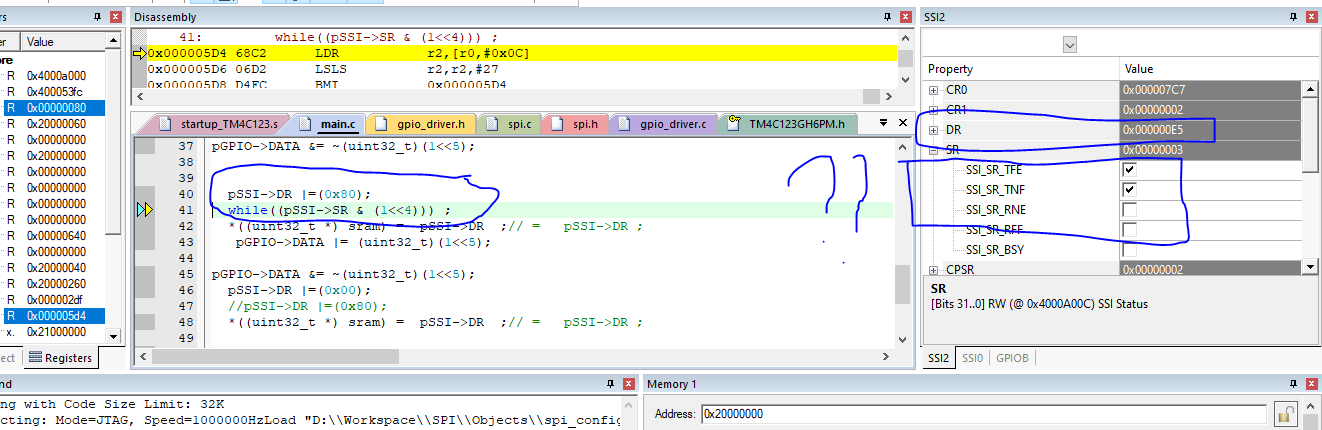
  • Hi,

      First of all, please refer to note #4 in this FAQ https://e2e.ti.com/support/microcontrollers/other/f/908/t/695568. Basically, we do not support DRM style of coding as it is very prone to mistakes. We provide TivaWare library with proven APIs to develop your application. Please use the TivaWare or at least look at the source code of the APIs on how they are coded to read the SPI FIFO. 

      With that said, I think the a likely problem is that there are residual data already in the RXFIFO and you are reading the residual data instead of the real data. What you want to do is like this.

      1. Flush the RXFIFO by reading all the data in the RXFIFO until the RXFIFO is empty.

      2. Send your data 

      3. Read your data

  • Why do you reject the answer without elaborating what is still not working?

    I will suggest you reference the TivaWare ssi example which you can find in <TivaWare_Installation>/examples/peripherals/ssi. Below is a snippet of code that depicts the sequence I mentioned in my last reply. 

        //
        // Read any residual data from the SSI port.  This makes sure the receive
        // FIFOs are empty, so we don't read any unwanted junk.  This is done here
        // because the SPI SSI mode is full-duplex, which allows you to send and
        // receive at the same time.  The SSIDataGetNonBlocking function returns
        // "true" when data was returned, and "false" when no data was returned.
        // The "non-blocking" function checks if there is any data in the receive
        // FIFO and does not "hang" if there isn't.
        //
        while(SSIDataGetNonBlocking(SSI0_BASE, &pui32DataRx[0]))
        {
        }
    
        //
        // Initialize the data to send.
        //
        pui32DataTx[0] = 's';
        pui32DataTx[1] = 'p';
        pui32DataTx[2] = 'i';
    
        //
        // Display indication that the SSI is transmitting data.
        //
        UARTprintf("Sent:\n  ");
    
        //
        // Send 3 bytes of data.
        //
        for(ui32Index = 0; ui32Index < NUM_SSI_DATA; ui32Index++)
        {
            //
            // Display the data that SSI is transferring.
            //
            UARTprintf("'%c' ", pui32DataTx[ui32Index]);
    
            //
            // Send the data using the "blocking" put function.  This function
            // will wait until there is room in the send FIFO before returning.
            // This allows you to assure that all the data you send makes it into
            // the send FIFO.
            //
            SSIDataPut(SSI0_BASE, pui32DataTx[ui32Index]);
        }
    
        //
        // Wait until SSI0 is done transferring all the data in the transmit FIFO.
        //
        while(SSIBusy(SSI0_BASE))
        {
        }
    
        //
        // Display indication that the SSI is receiving data.
        //
        UARTprintf("\nReceived:\n  ");
    
        //
        // Receive 3 bytes of data.
        //
        for(ui32Index = 0; ui32Index < NUM_SSI_DATA; ui32Index++)
        {
            //
            // Receive the data using the "blocking" Get function. This function
            // will wait until there is data in the receive FIFO before returning.
            //
            SSIDataGet(SSI0_BASE, &pui32DataRx[ui32Index]);
    
            //
            // Since we are using 8-bit data, mask off the MSB.
            //
            pui32DataRx[ui32Index] &= 0x00FF;
    
            //
            // Display the data that SSI0 received.
            //
            UARTprintf("'%c' ", pui32DataRx[ui32Index]);
        }