This thread has been locked.

If you have a related question, please click the "Ask a related question" button in the top right corner. The newly created question will be automatically linked to this question.

MSP-FET: Issue while flashing

Part Number: MSP-FET
Other Parts Discussed in Thread: MSP430F1611, UNIFLASH, MSP-FLASHER

Hi Experts,

Seeking your assistance on this query:

We have an issue with our MSP-FET(Flash Emulation Tool). When trying to program a device we get always the same error that the device couldn't be initialized. We tried using a spare device on a different computer but we received an identical error message. Due to this we presume that it is an issue with the driver for the MSP-FET, likely due to a Windows update, but we are not sure.

The precise error message is: "Error initializing emulator: Interface Communication error". We checked the device manager and the MSP-FET is shown correctly and there are no error indications there.

Is there a way to check if the driver for the MSP-FET is working correctly?
Target device: MSP430F1611.


Here is the WIndows version:
Edition Windows 10 Pro
Version 21H2
Installiert am ‎25.‎07.‎2022
Betriebssystembuild 19044.2251
Leistung Windows Feature Experience Pack 120.2212.4180.0

Thank you.

Regards,
Archie A.

  • Follow-up:

    We checked with different computers(both run the same version of Windows), different MSP-FETs and different targets. The error remains the same, even when there is no target connected. We ascertained that the COM ports are not in use. On the second PC(also Windows 10) we did a fresh install of the drivers as well as CCS. Unplugging the debugger and plugging it back in didn’t change the symptoms either. I will check the forum though to see if anyone else has similar issues.

    I have relayed to the customer THIS forum, and responded:

    I regret to inform you that all debug options mentioned in the forum didn’t help. We tried following solutions which recommended:

    1. Reinstalling the driver, Problem remains unchanged
    2. Trying a different MSP-FET, Problem remains unchanged
    3. Using a different PC, Problem remains unchanged under Windows 10, on Windows 7 however the problem does not occur and the MSP-FET works normally
    4. Changing COM-Port assignments, Problem remains unchanged.

    The only option we didn’t try was to perform a fresh install of Windows 10 since we currently have no PC free. The fact that the MSP-FET works flawlessly on Windows 7 indicates that the problem is related to Windows 10. Is there any way, aside of trying to program a device through CCS, to check if the driver itself is working properly?

    Shared these forums but no avail also:

    For your assistance please.

    Regards,
    Archie A.

  • Hi Archie,

    I know you said you looked through previous forums for debugging suggestions, but have they tried an HID Cold Boot referenced in this e2e thread? This is typically the last option if the MSP-FET has not responded to s/w or firmware updates, and the procedure is described in 5.6.5.3 of the User's Guide.

    Best,
    Amruta

  • Hello Amruta,

    Customer reiterated the situation as follows:

    • We have TWO MSP-FET devices, one active and one spare
    • BOTH devices show the same issue, despite the spare having never been used before aside of a short test to verify it as operational
    • The issue only appears on computers running Windows 10
    • On Windows 7 BOTH devices operate nominally
    • Reinstalling the drivers and CCS did not change the issue 

    Since all our Windows 7 computers are out in the field, I don’t want to risk using the recovery option described in section 5.4.5.3 of the User Guide. As long as we do not know what causes the issue to appear under Windows 10 and NOT under Windows 7 there is also no guarantee that performing a recovery will resolve the issue. Though I will consider performing the recovery procedure once one of our Windows 7 computers becomes available.

    ---

    For your further assistance. Thank you.

    Regards,
    Archie A.

  • Hi Archie,

    Has the customer run any program in Windows 10 successfully? Also, what CCS version are they using?
    I will try programming a device with the MSP-FET on my end as well, but if they could keep me updated when they perform the recovery procedure on the Windows 7 computer that would be great.

    Best,
    Amruta 

  • Hello Amruta,

    Customer responded:

    Aside of the issue with the MSP-FET not being usable under Windows 10 there have been no other issues with this computer. As for the version of CCS used, here is the build information:

    Code Composer Studio
     Version: 12.1.0.00007
    OS: Windows 10, v.10.0, x86_64 / win32
    Java vendor: Eclipse Adoptium
    Java runtime version: 11.0.13+8
    Java version: 11.0.13 

    I hope this information will be of help. Going forward we will try to set a Windows 7 computer aside for using the MSP-FET as it works flawlessly there.

    Thank you.

    Regards,
    Archie A.

  • Hi Archie,

    The MSP-FET is working with Windows 10 on our end; one more thing we can check--what is their MSP-FET's serial number? Some older versions of the MSP-FET are not compatible with Windows 10 without an extra download or h/w.

    Best,
    Amruta

  • Hello Amruta,

    The serial numbers of our MSP-FETS are:

    19010130B
    190101319

    With regard to your suggestion of performing a recovery operation using Win7, client reported that by next week one of Win7 PC will be available again. Customer can try to perform the recovery then if you have no other suggestions or solutions.

    Thank you.

    Regards,
    Archie A.

  • Hi Archie,

    I have forwarded this thread to the SDTO team, I will get back to you as soon as I hear back.

    Best,
    Amruta

  • Hello Amruta,

    Looking forward to hearing an update soon.

    Thank you very much.

    Regards,
    Archie A.

  • Hi Archie,

    A few follow up questions:

    - Are they using the exact same hardware for the MSP430F1611 when trying both Windows 7 and 10?
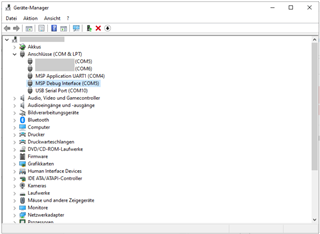
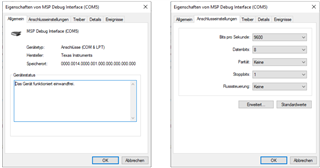
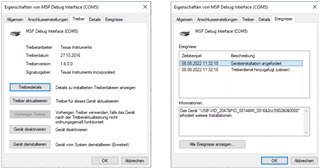
    - Can they send a screenshot of the device manager and the properties of the "MSP Debug Interface"? In order to check if both ports are being listed correctly in the device manager.
    - Seems rudimentary but have they tried restarting the PC? Seemed to work for a customer having a similar issue in this thread.

    Please let me know,
    Amruta

  • Hello Amruta,

    Thanks for your guidance. Refer to Cx responses below

    Are they using the exact same hardware for the MSP430F1611 when trying both Windows 7 and 10?

    We use the exact same device both on Windows 7 and Windows 10, Serial 19010130B.

    Can they send a screenshot of the device manager and the properties of the "MSP Debug Interface"? In order to check if both ports are being listed correctly in the device manager.

    Device Manager:

    Properties of MSP Debug Interface:

    Seems rudimentary but have they tried restarting the PC? Seemed to work for a customer having a similar issue in this thread.

    The issue persists through restarts of the PC; switching to other PCs with different hardware configurations and a reinstall of all software.

    I hope this information will help with finding the issue. If you need the details from the device properties, we can send them to you as well.
    ---

    Also, the customer will check the thread you have linked to see how far it applies here.

    Thanks for your efforts.

    Regards,
    Archie A.

  • Ok, so it seems to be showing up in the device manager. Have they tried UniFlash and MSP-Flasher? 

  • Thanks, Amruta.

    Cx responded:

    We have tried MSP-Flasher, but that errors out in general. I suspect that is due to the hardware design of our target devices since they require an unconventional RESET scheme in their operations. We haven’t tried UniFlash so far. We will have to see how that works. 

    There has been an interesting development though. On one of the PCs we tested the MSP-FET is now working again. We are unable to discern why as that PC has no differences to the others. One item we noticed though is that the MSP-FET always gets assigned the same COM-Ports(COM4 and COM5), independent whether these COM-ports are already in use or not. This may cause issues if we try it on some of our Windows 7 PCs since COM1 through COM8 are reserved for communication with some of the other equipment we use with these PCs.

    73,
    Archie A.

  • Hi Archie,

    Yes, let me know when they try UniFlash. Glad to hear it is working with one of the Windows 10 PCs and the COM port might be the issue. Are they connecting the target device directly to the computer?

    Best,
    Amruta 

  • Hello Amruta,

    Apology for the delayed update due to Holidays. Refer to my Cx respond:

    We were able to test UniFlash on the one Windows 10 PC where the MSP-FET is working again. Aside of it not being able to read some of the older Hex-Files there were no issues. 

    Regarding the COM-Ports, on one of the PCs where the MSP-FET isn’t working there are NO COM-Ports aside of those assigned to the MSP-FET. Though some other hardware issues that cropped up since the first occurrence of this issue suggest that the problem lies with Windows and not the drivers. We will have to investigate that matter separately. 

    On the remaining PCs the possible solution would be to assign the MSP-FET to other COM-Ports. Please note that COM1 through COM8 are reserved for specific applications and the respective standards governing these do not allow us to reassign them. Due to this I want to ask you if it is possible to assign the MSP-FET to COM-Ports outside of that range.

    Please advise.

    Regards,
    Archie A.

  • Hi Archie,

    Let me look into this and get back to you by tomorrow.

    Amruta 

  • Hi Archie,

    You can adjust the COM ports but it needs to be done on the Windows side. You can adjust this in the device manager.

    Best,
    Amruta 

  • Hello Amruta,

    Cx responded:
    The issue isn’t adjusting the COM-Ports of the MSP-FET, the issue is that it is assigned the COM-Ports without checking if those are already in use. But that issue can be mitigated on our end by adding some handling instructions.

    73,
    Archie A.

**Attention** This is a public forum