This thread has been locked.

If you have a related question, please click the "Ask a related question" button in the top right corner. The newly created question will be automatically linked to this question.

EVM430-FR6047: UART via USB / EZ-FET

Part Number: EVM430-FR6047

I've got a EVM430-FR6047 for which eventually I'm going to build an ultrasonic project (_not_ flow sensing), and I want to control it and get data via the UART (not with the water flow USS GUI).  I would really like for the UART to come out via the on-board USB, part of the integral EZ-FET.

I see by the "EVM430-FR6047: Help on UART example code" question that there appears to be an issue with what UART should actually be used to talk to the EZ-FET - UCA0 ("COMM_RX/TX", which goes to the Communications HID Bridge device, U200) or UCA1 ("JTAG_RX/TX", which goes to the EZFET-LITE, U100).  I can go with whatever works.

But when I plug in the EVM, there are no COM ports that register.  Just a "MCU COMM HID to Serial Bridge" device, and a "MSP Tools Driver".  This is on Windows 10 Pro.

Code programs onto the EVM just fine - the blinky and the LCD examples work.  I also got down the Flow Meter project, built it, and programmed it.  Said it worked (even though I can't verify it).

Is it actually possible to talk to the 6047 device over UART via the on-board USB?

  • Hi David,

    Yes, on-board USB can be used as communication with PC. Can you share what your connection of EVM with UART, some figure is better for the situation?

    It should be connected on-board jumper with the specific UART you used in software firstly. You can check the details in PCB projects file: https://www.ti.com/lit/zip/slar139.

    Best Regards

    Sal

  • Okay.

    Preliminary: Consult EVM320-FR6047 schematic.  As normally jumpered,
    U1 p16; P2.0 (UCA0TXD) -> COMM_RXD -> J1-7 -> jumper to J1-8 -> HID-BRIDGE_RXD -> U200 p38; P3.4 (UCA0RXD)
    U1 p17; P2.1 (UCA0RXD) -> COMM_TXD -> J1-9 -> jumper to J1-10 -> HID-BRIDGE_TXD -> U200 p37; P3.3 (UCA0TXD)
    U1 p19; P1.3 (UCA1RXD) -> JTAG_RXD -> J3-6 -> jumper to J3-5 -> EZFET_UART_TXD -> U100 p37; P3.3 (UCA0TXD)
    U1 p18; P1.2 (UCA1TXD) -> JTAG_TXD -> J3-8 -> jumper to J3-7 -> EZFET_UART_RXD -> U100 p38; P3.4 (UCA0RXD)

    Starting with example "msp430fr60x7_euscia0_uart_01.c".

    (There do not appear to be any examples for the EVM430-FR6047 other than the Water Flow program, downloaded from the Water Flow page and not available from inside Code Composer via Project Wizard.)

    Build it, program it.  Prior to burning the actual program is a "Configuring Debugger" step which AFAIK is programming the EZ-FET.

    1. No change in jumpers.  J1 and J3 have all points jumpered across.

    My Windows 10 Pro Device Manager looks like this:

    The indicated devices disappear and reappear as the EVM is disconnected and connected.  COM17 is an external TTL UART to USB device.

    So, no COM ports.

    2. Following the advice of "EVM430-FR6047: Help on UART example code" (https://e2e.ti.com/support/microcontrollers/msp-low-power-microcontrollers-group/msp430/f/msp-low-power-microcontroller-forum/1108654/evm430-fr6047-help-on-uart-example-code), I get some female-to-female jumper wires and repatch the board as:

    U1 P2.0 (UCA0TXD) -> COMM_RXD -> J1-7 -> jumper to J3-7 -> EZFET_UART_RXD -> U100 P3.4 (UCA0RXD)
    U1 P2.1 (UCA0RXD) -> COMM_TXD -> J1-9 -> jumper to J3-5 -> EZFET_UART_TXD -> U100 P3.3 (UCA0TXD)

    Power it up, no change to Device Manager.  No COM ports.

    3. External UART

    Disconnect the jumpers per above and repatch as:

    U1 p16; P2.0 (UCA0TXD) -> COMM_RXD -> J1-7 -> jumper to external USB device RXD
    U1 p17; P2.1 (UCA0RXD) -> COMM_TXD -> J1-9 -> jumper to external USB device TXD
    EVM Ground -> J31-1 -> jumper to external USB device GND

    Attach PuTTY terminal to COM port assigned to external device (COM17) and set baud to 9600.  Terminal echoes keypresses; the program on the MSP430 is working.

    4. Switch active UART in example program to UCA1.

    Disconnect the jumpers from #3 and repatch as:

    U1 p18; P1.2 (UCA1TXD) -> JTAG_TXD -> J3-8 -> jumper to external USB device RXD
    U1 p19; P1.3 (UCA1RXD) -> JTAG_RXD -> J3-6 -> jumper to external USB device TXD
    EVM Ground -> J31-1 -> jumper to external USB device GND

    Again, the PuTTY terminal echoes the keypresses, so UCA1 has correctly been assigned.

    5. Put the J3 jumpers back in to connect UCA1 to the EZ-FET.

    No change to the Windows 10 Pro Device Manager.  Only "MCU COMM HID to Serial Bridge" and "MSP Tools Driver" come and go.  No COM ports.

    ------------------------

    Am I lacking suitable drivers on the Windows end, or is the EZ-FET (and the HID bridge) not being programmed to register UARTs?

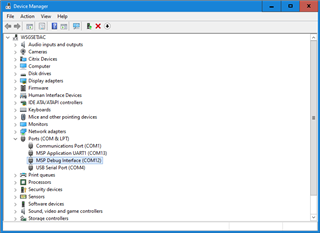
  • Open the actual Device Manager (devmgmt.msc) instead of the Windows 10 settings panel. I have my EVM430-FR6047 plugged in and the two COM ports do not appear in the Windows 10 settings panel but do in Device Manager.

    You should see "MSP Application UART1" and "MSP Debug Interface". You'd be using the Application UART port for communication with your software. Remove the RXD and TXD jumpers on J5 and connect/populate the RXD and TXD jumpers on J2.

    EDIT: I'm using a rev 2.0 board, and the jumpers are not numbered the same. Based on your picture, disconnect the RX/TX jumpers on J1, make sure they're connected on J3.

**Attention** This is a public forum