This thread has been locked.

If you have a related question, please click the "Ask a related question" button in the top right corner. The newly created question will be automatically linked to this question.

MSP-EXP430F5529LP: Use LP to adapt TDC7200EVM for evaluating my application

Part Number: MSP-EXP430F5529LP
Other Parts Discussed in Thread: TDC7200EVM, , TDC7200

To evaluate TDC7200 performance, the only TDC7200 evaluation board I can get is TDC7200EVM. To run it has to have MSP-EXP430F5529LP (according to user's guide). As connect two boards and start TDC7200EVM software, it shows " Connect Failed! Check hardware. Exiting...", but com3 & com4 can appear in "Serial Port (I/O)" window. Therefore, I cannot update firmware making LP connection to 7200EVM, and fault to run TDC 7200 evaluation.

1. What's my missing here?

2. I only have CCS Version: 12.2.0.00009 , not IAR. Am I able to run any example project came with "MSP430WARE", cause example projects I've seen in this package are *.eww which id IAR project. 

3. If I'm wrong in Q2, which example should I pick to run TDC7200 evaluation then?

  • I've been able to load TDC7200EVM project which is supposed to adapt my target board to TDC7200 test program on PC. But it's fail to compile, reports: "fatal error #1965: cannot open source file "cstring" (which defines some constants, such as TDC720x_TDC1).

    Where can I get this file ("cstring")?

  • Hi Amruta,

    Thank you for the advice.

    I noticed that there are two <cstring> files identical located two different path. Added any of their path to "build option", I've still got other errors. Is that any reason related to compiler version?

    Here is some info regarding to I using,

    two path of <cstring>: "C:\ti\ccs1220\ccs\tools\compiler\ti-cgt-msp430_21.6.1.LTS\lib\src\libcxx" and "C:\ti\ccs1220\ccs\tools\compiler\ti-cgt-msp430_21.6.1.LTS\Include\libcxx

    errors after added path to "biuld option":

    TDC7200_EVM source code from package "snac068e"

    What am I missing here?

    Thanks,

    Roger

  • Hi Roger,

    Take a look at this CCS User's Guide Section 6.1.2.2. Let me know if your set up is the same as described here, it looks like the paths are not being added correctly.

  • Hi Amruta,

    Thank you for the suggestion, I'll read it and give it a try.

    One thing I should mention here, I use "import project" to bring project "TDC7200EVM" in CCS. Do I missing setting as you mention above? I'm assuming the project file included in TDC7200EVM package has all information project needed. 

    Also if link the libraries by adding the path "C:\ti\ccs1220\ccs\tools\compiler\ti-cgt-msp430_21.6.1.LTS\Include\libcxx" to "Include Options" as

    then I'll get other errors as

    so, I'm assuming there are something related setting or project files that I'm missing. I also checked the header file "cstring" and noticed they are identical at both locations. 

    Thanks,

    Roger

  • Hi Roger,

    Yes, if you use Project > Import CCS Project, it should be fine. You will just need to link the libraries you are using and everything else should be included. Let me know if you see any issues, I will close the thread for now.

    Best,
    Amruta 

  • Hi Amruta,

    Please refer to my info  update above, all my problems is after I used Project > Import CCS Project, not base on new project created by me. Any further issues or unclean happen I'll let you know.

    With TDC7200EVM package "snac068e", there are two projects included after setup, as below,

    Did I import right project "TDC7200EVB_USB" here? Is it for micro on MSP-EXP430F5529LP board or for the micro on obsolete EVM board?

    Back to my original question, is the "snac068e" right package should I use for running evaluation TDC7200 with "MSP-EXP430F5529LP" as a platform? Because included execution file and firmware cannot be properly running after I setup.

    If you need further info about this issue please let me know which info do you like me to summit. If any other sources I can get software pack to fit my experiment, please send me links or a copy of it.

    Thanks,

    Roger

  • Hi Roger, 

    You will need to go to your workspace in file explorer and delete the project first before you can import it again, let me know if this works. Let me get back to you regarding your other questions.

    Best,
    Amruta 

  • Hi Amruta,

    It still fail to compile after I reinstalled CCS1220, clean workspace, reimport project and add "cstring" to project by "drag and drop". here is my workspace looks like,

    You can see errors are still there. Also noticed that other than "Drag & Drop", I cannot "add" or "link" this file in "Project Explorer" by click "Project --> Add Files..", and I get fail report says,

    For my understanding, the compiler cannot open this file ("cstring") some how. Is this file for C compiler to use C++ definition words?

    What do I miss including CCS settings?

    Thanks,

    Roger

  • Hi Roger,

    You should not add the cstring file directly to the project. To confirm, you should only have the path  "...\include\libcxx" added in Include Options. If you re-import the project, and simply add the path it still does not work? Are you downloading the code directly from the ti website? Are you using the project with the GUI or using your own firmware?

    https://e2e.ti.com/support/tools/code-composer-studio-group/ccs/f/code-composer-studio-forum/715607/ccs-msp430f5529-cannot-open-source-file-cstring

    Amruta 

  • Hi Amruta,

    I added <cstring> to project fold only after the compiler report error "cannot open file <cstring>" to give it a try. You may also seen it by referring to my previous post that a screen shot shows the compiler "Include Option" settings.

    By playing with reinstallation and reimporting project, somehow destroyed my system, then I tried it on a PC desktop. With this system (same OS as previous version of Windows on laptop), I'm able to compile "Debug build" but not "Release build" after I commented out all "#define <cstring>" definitions from project source code files.

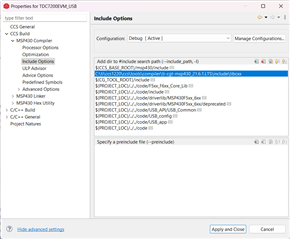
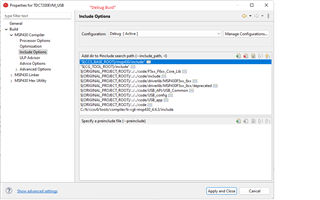
    At this point I noticed that the compiler "Include Option" settings are different between "Debug" and "Release" (refer to below screen shots).

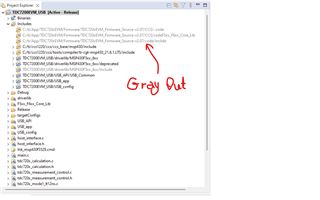
    Then I still cannot get the "Release build" compiling without errors after edit the compiler "Include Option" to make it same as "Debug build". Also after switching compile build, on "Project Explorer" "grayed out include paths" are different between two compile build options, refer to screen shots.

    By results gotten from laptop and PC, these worry me that different environment (PC) as a variable to use CCS and software packages somehow.

    At this point, what do you think I'm missing to cause problems I met? How do I avoid this issue to develop codes with TI's CCS down the road?

    Best,

    Roger

    -----------

    updates:

    I've figured out that I did not set path properly by typo. I'm able to get same result with "Debug" after fixed "Include Option" with PC. After get laptop OS fixed, I'll try it again to see if there are any differences from PC.

    -----------

**Attention** This is a public forum