This thread has been locked.

If you have a related question, please click the "Ask a related question" button in the top right corner. The newly created question will be automatically linked to this question.

MSP430FR6047: Configurations offset not working at higher flow rates

Part Number: MSP430FR6047
Other Parts Discussed in Thread: MSP430WARE

I am using the MSP430FR6047 in my design. I have the latest uss design center 02.40.00.00 and I am using the 02.40.00.00 image on the chip when connecting to the uss design center. 
 
My understanding of the design is that, there will be fluctuation within the TOF with changes in temperature but the algorithm help to filter that out with the look up table that we are supposed create based on the testing that we do with the transducer/flow tube.
 
I am trying to use the look up table to configure the offsets at different flow rate/tempuratures and it does not seem to be correctly Off Setting for the values I am inputting. 
 
I'm seeing great accuracy >=99% at lower flow rates around 100 LPH to 200 LPH but when I get up to higher flow rates around 1500 LPH to 2100 LPH it tracks below the actual by well over 5%. I have been using the USS GUI to configure the device following the tutorials but it's not allowing me to off-set the configuration enough to come close to the 2%-3% accuracy that I am hoping for. 
 
I tried configuring the device based solely on the volume flow rate, and the offset I needed. I am  seeing that at higher flow rate the device is recording below the actual. 
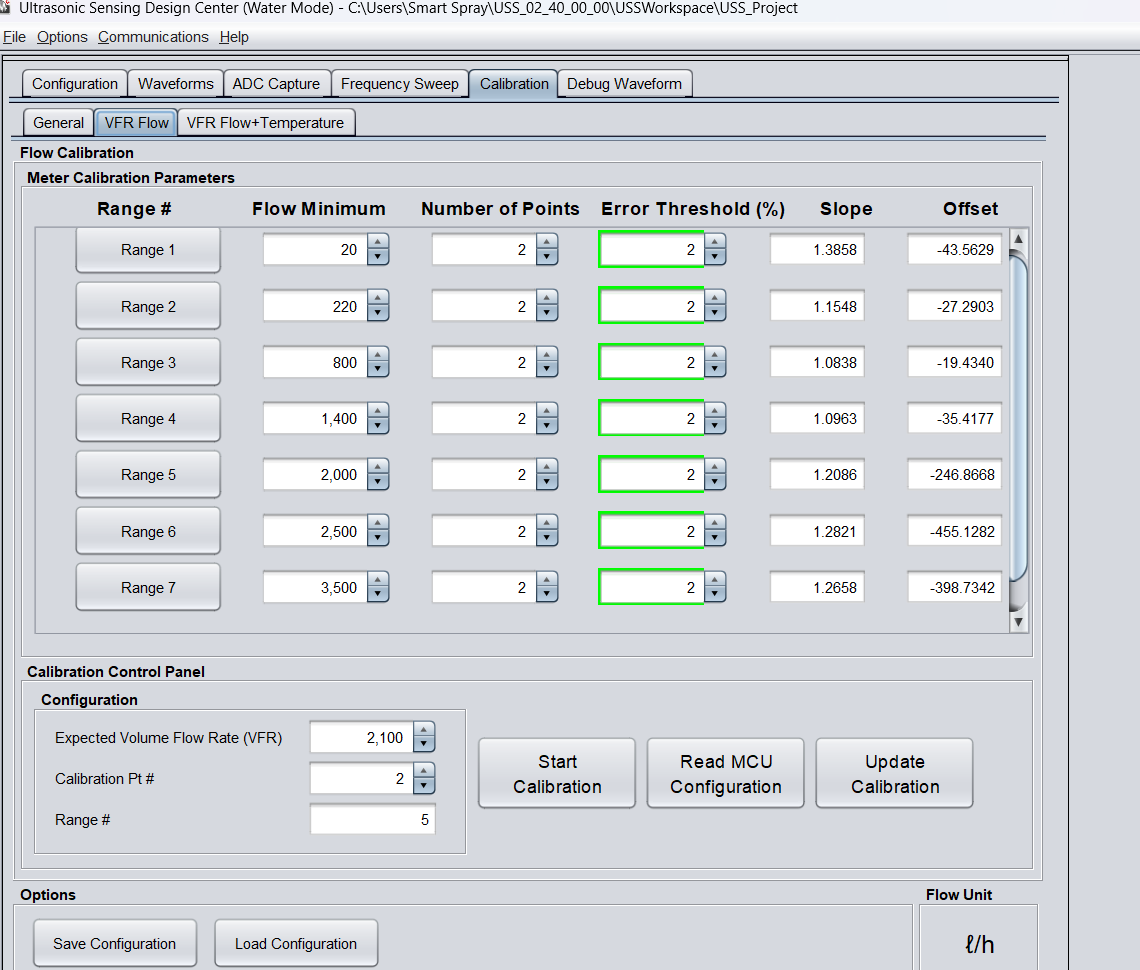
flow rate.png
 
 
Here is what I have been mostly trying to get to work. Here is a screenshot of the volume flow + temperature look up table configuration that I tested have for higher flow rates. I am seeing about the same reading for both this configuration and when it is just the volume flow configuration. It is not offsetting for different flow rate values.  
 
graph.png
 
 
  • Hi Toby,

    Let me forward the thread to the USS expert in my team.

    The reply will have some delay, thanks for your patience.

    B.R.

    Sal

  • Hi Toby,

    Do you refer to the  Ultrasonic Sensing Design Center User Guide 02.40.00.00 for calibration process? If not please refer to that firstly. Since the error is large in the high flow rate range, can you try to increase number of points to see if will get a better result.

    Best Regards,
    Peter

  •  , yes I had gone through that tutorial as well, but I believe that where I am having the issue is at steps 8 through 10 of section "Collecting Meter Calibration Data" 

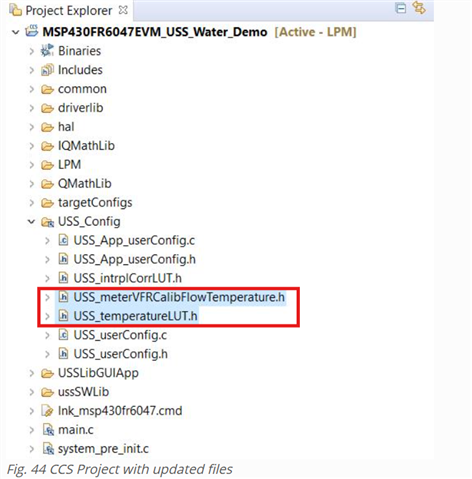
    When I connect to the EVM via the USS design tool, I use the MSP430FR6047EVM_USS_Water_Demo_LPM_02_40_00_00 compiled image that comes with the software download, but when I am using any custom code( e.g. updating the Header file like in step 8

    ) am forced to use the FR6047_USSSWLib_template_example project inside of the msp430ware_3_80_14_01 software package. If I am using that example I cannot connect the board to the USS design center. 

    Is there a way to get the USS design center to work with the msp430ware example project? 

    I have attached a screenshot my graph and the exported configuration .xml file that I created for you to look at. I had assumed that because there was not a way to update the image that came with the 02_40_00_00 software download, that I just needed to click the "request update" button on the main configuration page. 


    <?xml version="1.0" encoding="UTF-8"?>
    <ussFlowTemperatureCalibration>
    	<version>1.00</version>
    	<configCalibParams>
    		<numberOfFlows>9</numberOfFlows>
    		<flowValues>10.000000,20.000000,50.000000,70.000000,200.000000,400.000000,800.000000,1400.000000,2400.000000</flowValues>
    		<numberOfTemperatures>4</numberOfTemperatures>
    		<temperatureValues>0.100,10.000,22.000,55.000</temperatureValues>
    	</configCalibParams>
    	<measurement>
    		<meterID>Meter#1</meterID>
    		<flowID>10.0</flowID>
    		<tempID>55.0</tempID>
    		<refFlow>6.331101</refFlow>
    		<refTemp>44.2</refTemp>
    		<measFlow>6.515878</measFlow>
    	</measurement>
    	<measurement>
    		<meterID>Meter#1</meterID>
    		<flowID>10.0</flowID>
    		<tempID>22.0</tempID>
    		<refFlow>14.87</refFlow>
    		<refTemp>20.0</refTemp>
    		<measFlow>28.14</measFlow>
    	</measurement>
    	<measurement>
    		<meterID>Meter#1</meterID>
    		<flowID>10.0</flowID>
    		<tempID>10.0</tempID>
    		<refFlow>15.57</refFlow>
    		<refTemp>11.3</refTemp>
    		<measFlow>27.44</measFlow>
    	</measurement>
    	<measurement>
    		<meterID>Meter#1</meterID>
    		<flowID>20.0</flowID>
    		<tempID>55.0</tempID>
    		<refFlow>19.039658</refFlow>
    		<refTemp>50.9</refTemp>
    		<measFlow>20.748562</measFlow>
    	</measurement>
    	<measurement>
    		<meterID>Meter#1</meterID>
    		<flowID>20.0</flowID>
    		<tempID>22.0</tempID>
    		<refFlow>20.37</refFlow>
    		<refTemp>19.5</refTemp>
    		<measFlow>32.97</measFlow>
    	</measurement>
    	<measurement>
    		<meterID>Meter#1</meterID>
    		<flowID>20.0</flowID>
    		<tempID>10.0</tempID>
    		<refFlow>24.85</refFlow>
    		<refTemp>11.0</refTemp>
    		<measFlow>39.05</measFlow>
    	</measurement>
    	<measurement>
    		<meterID>Meter#1</meterID>
    		<flowID>50.0</flowID>
    		<tempID>55.0</tempID>
    		<refFlow>46.971823</refFlow>
    		<refTemp>53.3</refTemp>
    		<measFlow>48.880959</measFlow>
    	</measurement>
    	<measurement>
    		<meterID>Meter#1</meterID>
    		<flowID>50.0</flowID>
    		<tempID>22.0</tempID>
    		<refFlow>51.49</refFlow>
    		<refTemp>25.0</refTemp>
    		<measFlow>58.42</measFlow>
    	</measurement>
    	<measurement>
    		<meterID>Meter#1</meterID>
    		<flowID>50.0</flowID>
    		<tempID>10.0</tempID>
    		<refFlow>51.19</refFlow>
    		<refTemp>11.0</refTemp>
    		<measFlow>66.64</measFlow>
    	</measurement>
    	<measurement>
    		<meterID>Meter#1</meterID>
    		<flowID>70.0</flowID>
    		<tempID>55.0</tempID>
    		<refFlow>88.492991</refFlow>
    		<refTemp>54.2</refTemp>
    		<measFlow>89.853775</measFlow>
    	</measurement>
    	<measurement>
    		<meterID>Meter#1</meterID>
    		<flowID>70.0</flowID>
    		<tempID>22.0</tempID>
    		<refFlow>71.57</refFlow>
    		<refTemp>20.3</refTemp>
    		<measFlow>75.0</measFlow>
    	</measurement>
    	<measurement>
    		<meterID>Meter#1</meterID>
    		<flowID>70.0</flowID>
    		<tempID>10.0</tempID>
    		<refFlow>69.48</refFlow>
    		<refTemp>12.0</refTemp>
    		<measFlow>85.44</measFlow>
    	</measurement>
    	<measurement>
    		<meterID>Meter#1</meterID>
    		<flowID>200.0</flowID>
    		<tempID>55.0</tempID>
    		<refFlow>231.426835</refFlow>
    		<refTemp>54.9</refTemp>
    		<measFlow>204.438728</measFlow>
    	</measurement>
    	<measurement>
    		<meterID>Meter#1</meterID>
    		<flowID>200.0</flowID>
    		<tempID>22.0</tempID>
    		<refFlow>222.43</refFlow>
    		<refTemp>23.0</refTemp>
    		<measFlow>198.0</measFlow>
    	</measurement>
    	<measurement>
    		<meterID>Meter#1</meterID>
    		<flowID>200.0</flowID>
    		<tempID>10.0</tempID>
    		<refFlow>246.64</refFlow>
    		<refTemp>9.9</refTemp>
    		<measFlow>224.86</measFlow>
    	</measurement>
    	<measurement>
    		<meterID>Meter#1</meterID>
    		<flowID>400.0</flowID>
    		<tempID>55.0</tempID>
    		<refFlow>403.0</refFlow>
    		<refTemp>55.1</refTemp>
    		<measFlow>390.91</measFlow>
    	</measurement>
    	<measurement>
    		<meterID>Meter#1</meterID>
    		<flowID>400.0</flowID>
    		<tempID>22.0</tempID>
    		<refFlow>420.06</refFlow>
    		<refTemp>27.0</refTemp>
    		<measFlow>407.4582</measFlow>
    	</measurement>
    	<measurement>
    		<meterID>Meter#1</meterID>
    		<flowID>400.0</flowID>
    		<tempID>10.0</tempID>
    		<refFlow>392.58</refFlow>
    		<refTemp>10.0</refTemp>
    		<measFlow>380.8026</measFlow>
    	</measurement>
    	<measurement>
    		<meterID>Meter#1</meterID>
    		<flowID>800.0</flowID>
    		<tempID>55.0</tempID>
    		<refFlow>800.141719</refFlow>
    		<refTemp>54.8</refTemp>
    		<measFlow>752.1334</measFlow>
    	</measurement>
    	<measurement>
    		<meterID>Meter#1</meterID>
    		<flowID>800.0</flowID>
    		<tempID>22.0</tempID>
    		<refFlow>800.27</refFlow>
    		<refTemp>20.5</refTemp>
    		<measFlow>753.49</measFlow>
    	</measurement>
    	<measurement>
    		<meterID>Meter#1</meterID>
    		<flowID>800.0</flowID>
    		<tempID>10.0</tempID>
    		<refFlow>790.9</refFlow>
    		<refTemp>9.8</refTemp>
    		<measFlow>743.446</measFlow>
    	</measurement>
    	<measurement>
    		<meterID>Meter#1</meterID>
    		<flowID>1400.0</flowID>
    		<tempID>10.0</tempID>
    		<refFlow>1405.0</refFlow>
    		<refTemp>9.8</refTemp>
    		<measFlow>1300.0</measFlow>
    	</measurement>
    	<measurement>
    		<meterID>Meter#1</meterID>
    		<flowID>1400.0</flowID>
    		<tempID>22.0</tempID>
    		<refFlow>1395.81</refFlow>
    		<refTemp>20.0</refTemp>
    		<measFlow>1274.5</measFlow>
    	</measurement>
    	<measurement>
    		<meterID>Meter#1</meterID>
    		<flowID>1400.0</flowID>
    		<tempID>55.0</tempID>
    		<refFlow>1390.0</refFlow>
    		<refTemp>55.9</refTemp>
    		<measFlow>1300.0</measFlow>
    	</measurement>
    	<measurement>
    		<meterID>Meter#1</meterID>
    		<flowID>2400.0</flowID>
    		<tempID>10.0</tempID>
    		<refFlow>2430.0</refFlow>
    		<refTemp>9.0</refTemp>
    		<measFlow>2235.0</measFlow>
    	</measurement>
    	<measurement>
    		<meterID>Meter#1</meterID>
    		<flowID>2400.0</flowID>
    		<tempID>22.0</tempID>
    		<refFlow>2423.0</refFlow>
    		<refTemp>19.5</refTemp>
    		<measFlow>2229.16</measFlow>
    	</measurement>
    	<measurement>
    		<meterID>Meter#1</meterID>
    		<flowID>2400.0</flowID>
    		<tempID>55.0</tempID>
    		<refFlow>2380.0</refFlow>
    		<refTemp>56.0</refTemp>
    		<measFlow>2189.6</measFlow>
    	</measurement>
    	<measurement>
    		<meterID>Meter#1</meterID>
    		<flowID>10.0</flowID>
    		<tempID>0.1</tempID>
    		<refFlow>13.97</refFlow>
    		<refTemp>0.1</refTemp>
    		<measFlow>27.7</measFlow>
    	</measurement>
    	<measurement>
    		<meterID>Meter#1</meterID>
    		<flowID>20.0</flowID>
    		<tempID>0.1</tempID>
    		<refFlow>21.78</refFlow>
    		<refTemp>0.01</refTemp>
    		<measFlow>33.62</measFlow>
    	</measurement>
    	<measurement>
    		<meterID>Meter#1</meterID>
    		<flowID>50.0</flowID>
    		<tempID>0.1</tempID>
    		<refFlow>42.36</refFlow>
    		<refTemp>0.2</refTemp>
    		<measFlow>57.52</measFlow>
    	</measurement>
    	<measurement>
    		<meterID>Meter#1</meterID>
    		<flowID>70.0</flowID>
    		<tempID>0.1</tempID>
    		<refFlow>77.91</refFlow>
    		<refTemp>0.02</refTemp>
    		<measFlow>94.68</measFlow>
    	</measurement>
    	<measurement>
    		<meterID>Meter#1</meterID>
    		<flowID>200.0</flowID>
    		<tempID>0.1</tempID>
    		<refFlow>213.52</refFlow>
    		<refTemp>1.0</refTemp>
    		<measFlow>230.7</measFlow>
    	</measurement>
    	<measurement>
    		<meterID>Meter#1</meterID>
    		<flowID>400.0</flowID>
    		<tempID>0.1</tempID>
    		<refFlow>413.65</refFlow>
    		<refTemp>0.2</refTemp>
    		<measFlow>401.2405</measFlow>
    	</measurement>
    	<measurement>
    		<meterID>Meter#1</meterID>
    		<flowID>800.0</flowID>
    		<tempID>0.1</tempID>
    		<refFlow>804.56</refFlow>
    		<refTemp>0.3</refTemp>
    		<measFlow>755.321</measFlow>
    	</measurement>
    	<measurement>
    		<meterID>Meter#1</meterID>
    		<flowID>1400.0</flowID>
    		<tempID>0.1</tempID>
    		<refFlow>1410.0</refFlow>
    		<refTemp>-1.0</refTemp>
    		<measFlow>1309.0</measFlow>
    	</measurement>
    	<measurement>
    		<meterID>Meter#1</meterID>
    		<flowID>2400.0</flowID>
    		<tempID>0.1</tempID>
    		<refFlow>2409.0</refFlow>
    		<refTemp>-0.1</refTemp>
    		<measFlow>2288.55</measFlow>
    	</measurement>
    </ussFlowTemperatureCalibration>
    
    <?xml version="1.0" encoding="UTF-8"?>
    <ussCalibration>
    	<version>1.00</version>
    	<dataFlowUnit>ℓ/h</dataFlowUnit>
    	<calibrationRanges>7</calibrationRanges>
    	<range>
    		<id>1</id>
    		<minFlow>20.000</minFlow>
    		<errorThreshold>2.00</errorThreshold>
    		<calibrationPoints>2</calibrationPoints>
    		<data>
    			<id>1</id>
    			<expectedVFR>20.0000</expectedVFR>
    			<meanVFR>45.8661</meanVFR>
    			<id>2</id>
    			<expectedVFR>90.0000</expectedVFR>
    			<meanVFR>96.3771</meanVFR>
    		</data>
    	</range>
    	<range>
    		<id>2</id>
    		<minFlow>220.000</minFlow>
    		<errorThreshold>2.00</errorThreshold>
    		<calibrationPoints>2</calibrationPoints>
    		<data>
    			<id>1</id>
    			<expectedVFR>221.0000</expectedVFR>
    			<meanVFR>215.0000</meanVFR>
    			<id>2</id>
    			<expectedVFR>400.0000</expectedVFR>
    			<meanVFR>370.0000</meanVFR>
    		</data>
    	</range>
    	<range>
    		<id>3</id>
    		<minFlow>800.000</minFlow>
    		<errorThreshold>2.00</errorThreshold>
    		<calibrationPoints>2</calibrationPoints>
    		<data>
    			<id>1</id>
    			<expectedVFR>838.4900</expectedVFR>
    			<meanVFR>791.5947</meanVFR>
    			<id>2</id>
    			<expectedVFR>1218.9000</expectedVFR>
    			<meanVFR>1142.5938</meanVFR>
    		</data>
    	</range>
    	<range>
    		<id>4</id>
    		<minFlow>1400.000</minFlow>
    		<errorThreshold>2.00</errorThreshold>
    		<calibrationPoints>2</calibrationPoints>
    		<data>
    			<id>1</id>
    			<expectedVFR>1407.3500</expectedVFR>
    			<meanVFR>1316.0779</meanVFR>
    			<id>2</id>
    			<expectedVFR>1730.2200</expectedVFR>
    			<meanVFR>1610.5965</meanVFR>
    		</data>
    	</range>
    	<range>
    		<id>5</id>
    		<minFlow>2000.000</minFlow>
    		<errorThreshold>2.00</errorThreshold>
    		<calibrationPoints>2</calibrationPoints>
    		<data>
    			<id>1</id>
    			<expectedVFR>2003.3100</expectedVFR>
    			<meanVFR>1861.8076</meanVFR>
    			<id>2</id>
    			<expectedVFR>2113.8800</expectedVFR>
    			<meanVFR>1953.2938</meanVFR>
    		</data>
    	</range>
    	<range>
    		<id>6</id>
    		<minFlow>2500.000</minFlow>
    		<errorThreshold>2.00</errorThreshold>
    		<calibrationPoints>2</calibrationPoints>
    		<data>
    			<id>1</id>
    			<expectedVFR>2500.0000</expectedVFR>
    			<meanVFR>2305.0000</meanVFR>
    			<id>2</id>
    			<expectedVFR>3000.0000</expectedVFR>
    			<meanVFR>2695.0000</meanVFR>
    		</data>
    	</range>
    	<range>
    		<id>7</id>
    		<minFlow>3500.000</minFlow>
    		<errorThreshold>2.00</errorThreshold>
    		<calibrationPoints>2</calibrationPoints>
    		<data>
    			<id>1</id>
    			<expectedVFR>3500.0000</expectedVFR>
    			<meanVFR>3080.0000</meanVFR>
    			<id>2</id>
    			<expectedVFR>4200.0000</expectedVFR>
    			<meanVFR>3633.0000</meanVFR>
    		</data>
    	</range>
    </ussCalibration>
    

    If there is anything else that you need clarification on with my set up please let me know. 

    Thanks,

  • Hi Toby,

    Is there a way to get the USS design center to work with the msp430ware example project? 

    The USS template code in msp430ware use UART to transmit data, but GUI require USB comm and we achieve that by I2C-USB bridge in the water meter demo project, so you need to do a necessary porting by yourself referring to the water demo code if want to build up communication with GUI.

    Following document would be helpful for you in understanding the demo project structure.

    MSP Ultrasonic Sensing Library Users Guide 02_40_00_00.

    Best Regards,
    Peter

  • Peter, 

    Thanks for the input. I saw those example originally and I still see them but I don't see a way to compile any of the examples inside of that 02_40_00_00 software package. 

    Am I missing something?

    Thanks for the help so far. 

  • Hi Toby,

    Sorry, what do you mean by not see a way to compile the example in the 02_40_00_00 software package? If want to compile the code, just use CCS to import this folder's project is fine.

    Best Regards,
    Peter

  • It was bit confusing, but I was able to get the I2C project imported. 

    I am following the instructions and I have been able to get the headers created, compiled in project, and tested for both the Flow + Temp headers and just Flow headers, but I am still having the same issue as before.

    In the Image below it is showing the flow rate at about 1250 lph, but the actual is 1400 lph.  

    Is there still something I am not doing correctly? Would it be possible to set up a meeting and look at this issue, and find what I am doing wrong? 

  • Hi Toby,

    Already sent you a friend request in this E2E forum.

    Best Regards,
    Peter

**Attention** This is a public forum