This thread has been locked.

If you have a related question, please click the "Ask a related question" button in the top right corner. The newly created question will be automatically linked to this question.

CCS/MSP-EXP430F5529: Warnings when importing User Experience Demo from MSP-EXP430F5529

Part Number: MSP-EXP430F5529
Other Parts Discussed in Thread: MSP430F5529, MSP430WARE,

Tool/software: Code Composer Studio

Hi,

I am using ubuntu 16.04 and I have CCS v.7.1.0 and have downloaded/installed the out of the box example from MSP-EXP430f5529 and while importing CCS project at CCS IDE it comes an error and a warning just saying:

Error:

File connections\TIMSP430-USB.xml does not exist. Was included by file /home/sara/Downloads/MSP-EXP430F5529_UE/src/CCS/MSP430F5529.ccxml MSP430F5529.ccxml /MSP-EXP430F5529 User Experience line 0 Problem

Warning:


This project was created using a version of compiler that is not currently installed: 3.3.2 [MSP430]. Another version of the compiler will be used during build: 16.9.1.LTS. See 'Help > Check for Updates' or visit <a href="liveaction:OpenAppCenter">CCS App Center</a> to get the latest compilers. See 'Help > Install New Software...' to install older compilers. Alternatively, migrate the project to one of the available compiler versions by adjusting project properties. MSP-EXP430F5529 User Experience properties Problems

PS: I have checked for updates, there is no one available!

Thanks!

Sara

  • Hello Sara,

    I have not seen this error, but i did have some issues when importing this project into CCSv8. When importing did you click both the check boxes that "automatically import referenced projects in the same directory" and "copy projects into workspace" ?

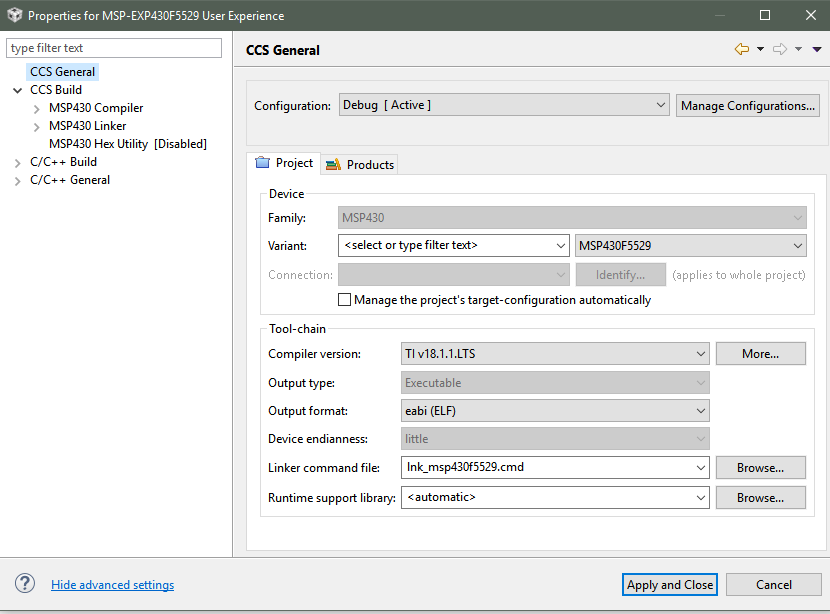
    the warning you are getting as the original project was made with an old compiler in a different format.  Try changing your compiler settings to look like the picture below. that actual number of your compiler may vary since you are on CCSv7.1 . Even after doing this, you may get the message that the project won't fit. Again this is a discrepancy between the older version of CCS this project was created with and the newer format. I had to copy over a newer version of the MSP430F5529 linker file from an up to date example code to this project for it to work

     .

  • Hello Sara,

    Jace question to you: When importing did you click both the check boxes that "automatically import referenced projects in the same directory" and "copy projects into workspace" ?
    Just to clarify, these check boxes are available when using Resource Explorer Classic.
    Please, try to import using a classic version.
    Also you may try to upgrade CCS v7.1 to v7.4.
    As I remember v7.1 was the first CCS release with a new Resource Explorer and I had some issues with it.

    On Win10, CCS v8.0 I did had no issues with both import and build of the OutofBox examples.
  • Tomasz,

    To clarify, these buttons are available whenever you use the CCS Project importer. I imported the F5529 EXP User Experience project from the SW download page, not from Resource Explorer. ( software-dl.ti.com/.../index_FDS.html )
  • Hi Jace I really did not checked the boxes and I changed the version of my compiler to v16.9.1. Now I am able to find the files and the version error doesn't appear anymore.

    But it continues to say that

    "File connections\TIMSP430-USB.xml does not exist." as if my project were importing it and CCS couldn't find even I checking the box.. More problems has come after I rebuild, but I think I can solve placing all files at one unique folder or changing the directory address in the include part of my code. Take a look:

  • I was thinking about changing to a newer version but when I go at help->Check for updates there's no update to be done! Can't understand.
  • Sara,

    You'll need to go back and re-import the project with those boxes checked as not everything was linked correctly. Basically, the importer didn't bring in everything it needs from a project standpoint as the project is references other files in the structure.
  • I did it! Re-imported with the boxes checked, but CCS is not linking correctly!
  • Sarah,

    I would maybe try again in a new (clean) workspace. If that doesn't work, I would try the newest version of CCS. You won't be able to upgrade tot eh newest version from the "Check for Updates" panel as its a new major release. you'll have to go to our CCS website for the newest installer. As i stated above, I was able to get the project imported with the newest version of CCS. I'll take your feedback here as an action to update this project to the newest version of CCS to try to eliminate issues int he future.
  • Ok! I'll do it now and give you feedback here soon!

    Thanks
  • HI Jace,
    I just installed the CCS v8 and imported the out of the box example in a new workspace, checked the boxes, and had exactly the same problems!
    best regards,
    Sara
  • Sara,

    Are you getting the User Experience Code from the download I linked above? If so you should of opened an installer .exe that placed the appropriate files on your PC. You would then only have to select the top level folder on the importer and select CCS Project import and it should find the right project.
  • Yes Jace.

    I have dowloaded from this link. When importing to CCS I choosed the folder "MSP-EXP430F5529_UE_1_31_00_00" which gave me 3 CCS projects and them I checked "MSP-EXP430F5529 User Experience".

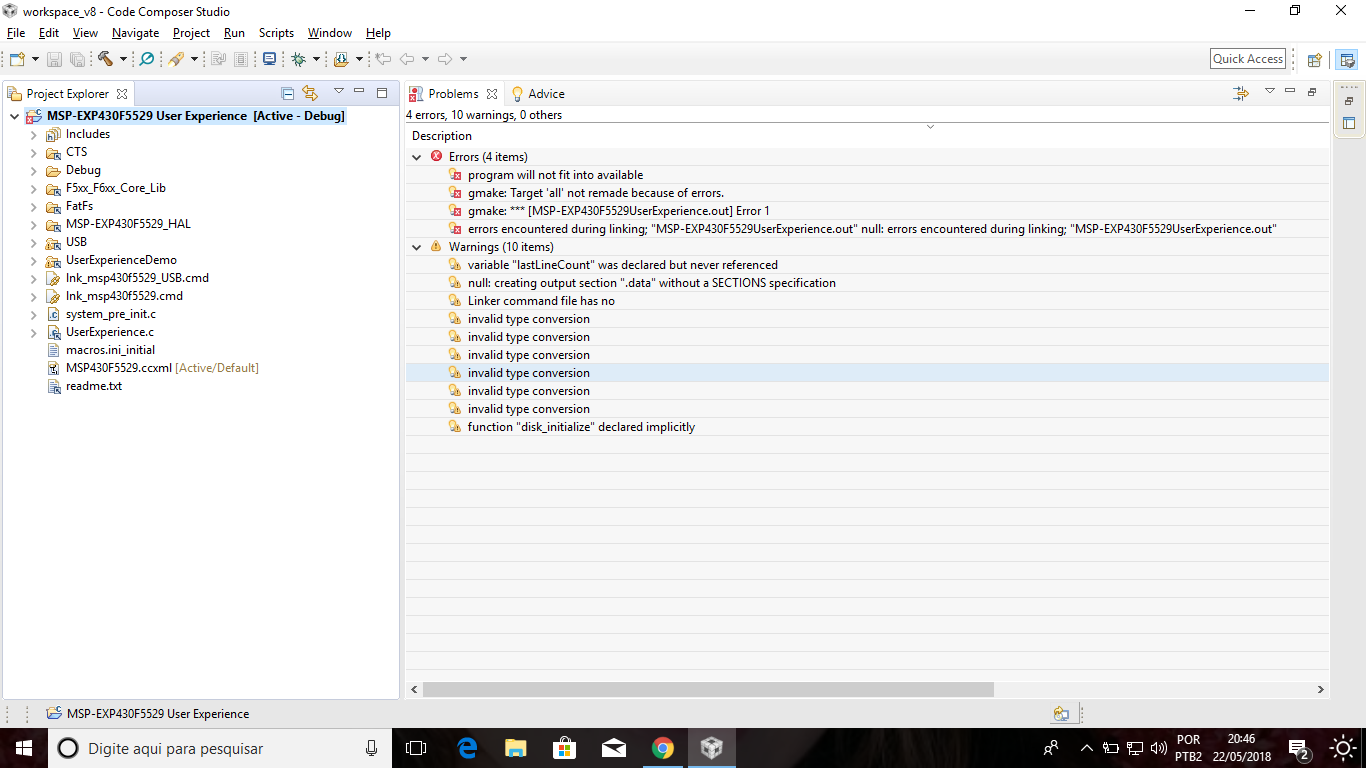
    Now I also tried at Windows 10 SO, CCS v8, compiler v18.1.1. And had other errors as follow:

  • Sara,

    This is the error I was seeing. Change out the Linker Command file included in the project with one from an MSP430Ware example. This should fix this issue along with possibly upping the optimization settings.
  • Hello Sara,

    do you use MSP-EXP430F5529 or MSP-EXP430F5529LP?
  • Hi Jace

     you mean the file "lnk_msp430f5529.cmd"?

    I would llike to add that now I am using Windows but that old problems that I mentioned at the beginning when I was using Linux remains in Linux. (Just say in order to Texas fix it).

    Thanks

  • Hi Tomasz!

    I am using MSP-EXP430F5529.

    Best regards,

    Sara
  • Sara,

    Yes. If you take a newer version of that file from one of the MSP430Ware examples, and replace the version in the User Experience code, you should be able to compile then.
  • Hi Jace,

    I'd like to say that I finally got to build and upload the code without no errors using Windows 10. Here follow the steps I took since the beginning (can help others too):

    1.Download and install CCSv8.0.0

    2.Download the "MSP-EXP430F5529 Experimenter Board User Experience Demo Software Package" from this link: http://software-dl.ti.com/msp430/msp430_public_sw/mcu/msp430/MSPEXP430F5529UE/latest/index_FDS.html

    3.Run the installer. This installer provides the "out of the box" project.

    4.Imported the out of the box example at CCS using project -> import CCS projects -> select the folder the installer download -> check the MSP-EXP430F5529 User Experience -> check the both box to copy the project to the workspace and make the file references. 

    5.After imported, I clicked at the project -> properties -> changed the compiler version to v 18.1.1 and the output format to eabi (ELF).

    6. I installed the MSP430Ware from the own CCS.

    7. Imported the more basic example (blink led) from the MSP430Ware at the own CCS. Deleted the file "lnk_msp430f5529.cmd" from the "out of the box" example, copied the same file from the blink led example and them pasted at the "out of the box" project. And finally no error, 1 warning, built it and uploaded to the board, it runned! 

    So, thanks Jace for your recommendations that solved my problem in Windows, but this did not solve my problem at Linux (which I followed exactly the same instructions).

    best regards,

    Sara!

  • Sara,

    Thanks for the update here. Unfortunately, I currently can't text Linux, but as stated before I have added a refresh of this project to our backlog.

**Attention** This is a public forum