This thread has been locked.

If you have a related question, please click the "Ask a related question" button in the top right corner. The newly created question will be automatically linked to this question.

MSP430FR6989: fast timers on MSP430

Part Number: MSP430FR6989

Dear, 

I am a student working on my master thesis. for this thesis I am working for a space related company, and they want to check how to optimize C code (the use a MSP430, so I will use that as a benchmark). They want to use the compiler (gcc with several flags, most notably -O2 and -O3), but they are also adamant that optimization can be done in the C code (looking for changes in how algorithms are written, but also how C-code in itself is written). I am going to test this. 

For this reason I want to time code running on the MSP430 (I have the MSP430FR6989). This board works on 16MHz, but the fastest timer would be the Timer using the SMCLK, at 1MHz. This would mean that the accuracy would not be extremely great. Are there other ways of timing this? Is there a faster CLK or timer that can be used (or other board that can be recommended)?

PS: I also thought about toggling a pin an timing it with a Logic Analyzer, which would be much more accurate I think. There is however a problem with this, the tests need to be run a lot of times (probably at least 50 times for every example of code and its benchmark), this would be a lot of manual intensive work that can be avoided by using a UART connection with my PC. Expecially since I want to manipulate the data using Python, my preference would be going to just sending the timings through via USB and not using a logic analyzer. 

Thanks and with kind regards, 
Yannick

  • Yannick,

    you can also let the Timer run with 16 MHz why you limit it to 1 MHz.

    If you really need a high resolution timer I recommend MSP derivates with TimerD like the F5132 but this is from different device family Flash F5xx.

  • Aah yes indeed, I was looking at the wrong things... My apologies. I am a MSP430 novice

    Another, rather small question. I am using a UART connection to send data through to the PC.  I used some example code from the MSP430FR6989. In it there is this piece of code: 

    // Startup clock system with max DCO setting ~8MHz
      CSCTL0_H = CSKEY >> 8;                    // Unlock clock registers
      CSCTL1 = DCOFSEL_3 | DCORSEL;             // Set DCO to 8MHz
      CSCTL2 = SELA__VLOCLK | SELS__DCOCLK | SELM__DCOCLK;
      CSCTL3 = DIVA__1 | DIVS__1 | DIVM__1;     // Set all dividers
      CSCTL0_H = 0;                             // Lock CS registers
    
      // Configure USCI_A1 for UART mode
      UCA1CTLW0 = UCSWRST;                      // Put eUSCI in reset
      UCA1CTLW0 |= UCSSEL__SMCLK;               // CLK = SMCLK
      // Baud Rate calculation
      // 8000000/(16*9600) = 52.083
      // Fractional portion = 0.083
      // User's Guide Table 21-4: UCBRSx = 0x04
      // UCBRFx = int ( (52.083-52)*16) = 1
      UCA1BR0 = 52;                             // 8000000/16/9600
      UCA1BR1 = 0x00;
      UCA1MCTLW |= UCOS16 | UCBRF_1 | 0x4900;
      UCA1CTLW0 &= ~UCSWRST;                    // Initialize eUSCI
      UCA1IE |= UCRXIE;                         // Enable USCI_A0 RX interrupt

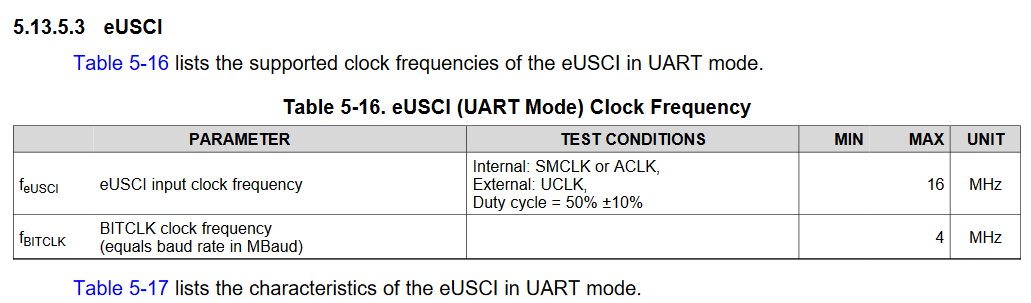
    Where the clock is being set at 8MHz, for the UART. Can I set it at 16MHz, or would the UART not work anymore then (of course also do the calculations again for the baud rate), so as to use the same clock for my other timer? Since this would enlarge the resolution. 

    With kind regards, 
    Yannick

  • Yannick,

    if you want to run UART with 16 MHz similiar to Timer this is no problem according spec below. But take care if you run MCLK with 16 MHz as well you need to set the wait states for FRAM accesses correctly:

    If you're new to MSP430 I strongly recommend to have the family user guide open and study the block diagrams for the blocks you're using. This helps to get a quick understanding what the modules can deliver. The details on currents, timing,... can be found in the corresponding datasheet. Besides this also the ERRATA sheet should be checked if you application is affected by any of them.

**Attention** This is a public forum