This thread has been locked.

If you have a related question, please click the "Ask a related question" button in the top right corner. The newly created question will be automatically linked to this question.

MSP430FR2675: How to save the calibration value when nothing is touched

Part Number: MSP430FR2675
Other Parts Discussed in Thread: CAPTIVATE-FR2676, CAPTIVATE-FR2633

Hi experts,

This question is about the software for CapTIvate.

Q: Is it possible to record the information from a call to the "CAPT_calibrateUI()" function when nothing is touched, and call it on the next startup?
If it is possible, could you share some reference material or sample code on how to do this?

My customer is using the MSP430FR2675 to create their own boards. They are evaluating a system to measure the water level in a tank using a self-capacitance method. They are able to measure the water level without any problem when they start the device with the tank empty. However, when they start the device with the tank filled with water, it is unable to measure the water level." The "CAPT_calibrateUI()" function uses the presence of water as a reference, so when the water level is lowered (drained), a "Negative Touch Flag" will cause the device to recalibrate.

In my customer's system, they have no idea what the water level in the tank is when the device starts up. They want to measure the water level in the tank at device startup and correctly measure the increase or decrease of the water level from that state.

As you can see below, this case is considered to be "Reverse Touch", and we would appreciate any information on how to deal with a device model that assumes "Reverse Touch".
:http://software-dl.ti.com/msp430/msp430_public_sw/mcu/msp430/CapTIvate_Design_Center/latest/exports/docs/users_guide/html/CapTIvate_Technology_Guide_html/markdown/ch_library.html#capt-calibrateui

Best regards,
O.H

  • You can't record the CAPT_calibrateUI()

    1. The code is not open to customer

    2. You can not make sure when the parameters can work under different condition like temperature.

    3. I advice you to use the internal Cap to calculate the real cap. Maybe it can do some help. Remember, internal cap is not so accurate, you may need to calibrate for every device. The code is attached, you can find CAPT_calculateBaseCap() in the code.

    FR2633_CaculateBaseCap.zip

  • Hi Eason Zhou,

    Sorry for the late reply. Thank you for your answer. I understood that it is not possible to record the information of "CAPT_calibrateUI()". Also, I understood that "CAPT_calibrateUI()" needs to be executed every time because there is no guarantee that one parameter will work correctly every time due to temperature and other factors.

    I tried to run the sample code you shared on CAPTIVATE-FR2676, but I couldn't imagine how to use it to solve this problem, so please let me check.

    Q2-1: In "CAPT_calculateBaseCap()", "baseCap" is calculated. Is it correct that this is the current capacitance value of the electrode?
    The "baseCap" value seemed to change between touching and not touching, but the value was unstable.

    Q2-2: If the above is correct, for example, when "baseCap" exceeds the threshold value set by the user, it is used to determine the state of being touched. Is this correct?

    Q2-3: The sample code you provided can measure the current capacitance value and store it in FRAM, but can it avoid negative touch ("Reverse Touch")?
    I tried to enable "CAPT_setThrehold()", but it calibrated based on the touched state.

    I am new to the sample code you gave me. And I am new to what to do when I start the device in the touched state. Also, since the customer is new to CapTIvate products(MSP430), any information such as application notes would be very helpful.

    We apologize for any inconvenience this may cause, but we would appreciate your support.

    Best regards,
    O.H

  • Hi O.H,

    This is an internal solution. So I can't give you the materials. Let me consult my colleague first.

    Q2-1: In "CAPT_calculateBaseCap()", "baseCap" is calculated. Is it correct that this is the current capacitance value of the electrode?
    The "baseCap" value seemed to change between touching and not touching, but the value was unstable. 

    [Eason]: Yes, you know the exact ref cap value and the change caused by including the ref cap. Then you can calculate the base cap between CAP I/O to GND, 

    Q2-2: If the above is correct, for example, when "baseCap" exceeds the threshold value set by the user, it is used to determine the state of being touched. Is this correct?

    [Eason]: It will not affect the base CapTIvate function. The detection of touch is handled by CAPT_appHandler() 

    Q2-3: The sample code you provided can measure the current capacitance value and store it in FRAM, but can it avoid negative touch ("Reverse Touch")?

    [Eason]: No, it just detect the value of base cap between CAP I/O to GND, it will not do anything to the change of base cap. All this part is handled in CAPT_appHandler() 

    Eason

  • Hi Eason,

    Thank you for your support. I hope you can share the information from your colleague.

    After reviewing the sample code along with "MSP430CapTivateSoftwareLibraryAPIGuide", I'm starting to understand it a little better.

    Q3:What is the unit of measure for the capacitance value in "baseCap"? pF? uF?

    I'm thinking that by recording the "baseCap" of each electrode while the tank is filled with water, I can check how much water is in the tank when the device is turned on.

    However, this is only to check the current water level. So in order to measure the correct water level, I think it is necessary to drain the water(or remove the tank) and calibrate it when it is not filled with water.

    Best regards,
    O.H

  • Hi OH,

    You can find more about ref cap at here: software-dl.ti.com/.../ch_technology.html

    I think this is what you want. Save the calibration data.

    how_to_save_calibration_in_fram.zip

    My advice would be, you need to consider the calibration data will be different at different temperature. I think you should save more than one calibration data in FRAM.

    Eason

  • Hi Eason,

    Thank you for your support. Please let me confirm the expected usage of the "how_to_save_calibration_in_fram.zip" you shared.

    Q4-1:Is it correct to use it in the following way?

    1. Start the device without touching the electrodes.
    2. Measure the calibration data at this time using "MAP_CAPT_calibrateUI(&g_uiApp);".
    3. Save the data to FRAM by "writeSensorCalibrationToFRAM(&BTN00,g_ElementTuning_FRAM);".
      (Using three sensors BTN00_E00~02 in self-capacitance method. )
    4. Start to detect touch normally by "CAPT_appHandler();".
    5. Hard reset the device once, and start it up with the finger touching the electrode.
    6. By "readSensorCalibrationFromFRAM(&BTN00,g_ElementTuning_FRAM);", the "calibration data with no finger touching the electrode" will be read from the FRAM.
    7. If "CAPT_appHandler();" is passed while a finger is touching, it is judged as having touch.
      (The count value with the finger touching is measured.)
    8. When the finger is released, it is judged as no touch, and then the touch is detected as usual.
      (The count value is measured when the finger is not touched.)

    However, as a result of my checking on the evaluation board, the judgment result of "7" is no touch. Although there is a slight variation, the count value in the state where the finger is not touched is measured. When the finger was removed, the "Negative Touch" flag was set and the device was recalibrated. After that, the touch can be detected normally.

    By "writeSensorCalibrationToFRAM(&BTN00,g_ElementTuning_FRAM);", we have confirmed that the following three values are saved in the FRAM. However, there was no difference between the three values when the finger was touching the electrode and when it was not.

    • ui16OffsetTap
    • ui8CoarseGainRatio
    • ui8FineGainRatio

    Q4-2:I believe that there should be a difference, is that correct?

    My advice would be, you need to consider the calibration data will be different at different temperature. I think you should save more than one calibration data in FRAM.

    I understood that the above can be solved by increasing the storage area of FARM.

    Best regards,
    O.H

  • Can you give more details about "However, as a result of my checking on the evaluation board, the judgment result of "7" is no touch. Although there is a slight variation, the count value in the state where the finger is not touched is measured. When the finger was removed, the "Negative Touch" flag was set and the device was recalibrated. After that, the touch can be detected normally." I can understand is clearly. Is there any problem.

    For the Calibration, it related to these three parameters. It should be normal, when the finger touch and not touched. You can think it as that it defines the gain of an OPA. You should not change the gain because of the input signal comes.

  • Hi Eason,

    Checked the operation of "how_to_save_calibration_in_fram.zip" using CAPTIVATE-FR2633 and CAPTIVAET-BSWP.
    (In order to use Design Center, only "CAPT_BSP.c and .h" are copied from "FR2633_CAPTIVATE-BSWP-Demo".)

    The result was the same as the behavior I confirmed with the electrodes I used and CAPTIVATE-FR2676. In other words, there is no difference in behavior caused by the electrode.

    Below is an illustration of the expected behavior and the actual behavior.

    My customer wants to detect a touch when power is supplied to the device while the electrode is touched. I thought this could be avoided by recalling the calibration data of the state in which the electrodes are not touched when the device is started.
    Is this thinking wrong in the first place?

    Best regards,
    O.H

  • Hi O.H,

    Can you post the code for me to review.

    1. The picture helps me know your problem quite clear.

    2. Can you tell me how long you keep touch and it start calibration

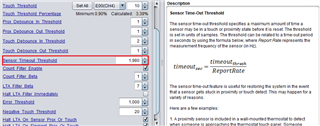
    3.  Please check this parameter. Maybe it is the reason. If it is not 65535,this function will be enabled. The related parameter in source code is ui16TimeoutThreshold.

    Eason

  • Hi Eason,

    Can you post the code for me to review.

    This is the project.
    How_to_save_calibration_in_FRAM_BSWP.zip

    2. Can you tell me how long you keep touch and it start calibration

    It was also about 60 seconds from the actual measurement results.("Active Mode Scan Rate ms"=33, "Sensor Tiime Out Threshold"=1980.)

    3.  Please check this parameter. Maybe it is the reason. If it is not 65535,this function will be enabled. The related parameter in source code is ui16TimeoutThreshold.

    It was 1980 before I changed it from the project you gave me. I changed the "ui16TimeoutThreshold" directly to 65535 in the project you gave me, but there was no change in the behavioral results.

    Best regards,
    O.H

  • Hi OH,

    Sorry, I didn't review the code from my colleague.

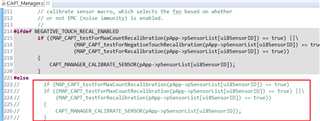
    1. You need to disable the calibration  function at here. The reason why it happens, is that when you powered with touch, this function will be called as well. So the result is same as what you see without saving the calibration value.

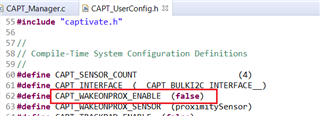
    2. To make the demo work with GUI, you also need to disable the wakeonpro function. Besides, you need to read the count directly.

    3. My advice is that it will be more stable to calculate the base cap by internal cap. If you remove the calibration function. The system will be out of control. Besides, the cap change doesn't have a liner relationship with count value.

    Eason 

  • Hi Eason,

    Thanks for the additional confirmation and suggestions. We have modified the sample code based on the feedback we received and confirmed the behavior.

    As a result, when the device was started for the second time or later, the calibration value without touch was reflected, and the current capacitance value could be measured correctly. However, the LTA was not reflected and could not be recognized as having touch. When the finger is removed, the negative touch flag is set, and after a certain period of time, the LTA follows the untouched state to perform normal operation.

    So I added a code to fix the LTA. (I added the following code after the CAPT_appHandler() function.)

    	while(1)
    	{
    		CAPT_appHandler();
    
            keypadSensor_E00.LTA.ui16Natural = 248; //LTA value when not touched

    The result is that the device is judged as touched even when it is started for the second time or later.

    Q:Are there any problems that can be expected by adding the code to fix the LTA?
    I don't think it's a good idea to set the LTA to a fixed value. If there is some other way to do this, I would appreciate it if you could let me know.

    3. My advice is that it will be more stable to calculate the base cap by internal cap. If you remove the calibration function. The system will be out of control. Besides, the cap change doesn't have a liner relationship with count value.

    When I checked the operation in DesignCenter, the count number seemed to follow the change in the capacitance value. Does this mean that there is no linear relationship?
    Also, I understood that I don't know what will happen because this is not the way it is supposed to be used.

    Best regards,
    O.H

  • No, because LTA is comes from counter number. In your design, you remove all the calibration function, I thought it may have some problem. when a large noise come or the environment changes, not comes from water, the system will be not stable. Any the way, all these are only my guess, I advice you to test them according to your standard.

    I think you should just add your function on count number, because the water level should not be one threshold.

    If you want to move back to test the base cap, please let me know. There are some  redundant code in the project.

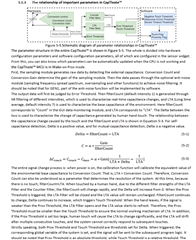
    You can refer to this to know the relationship between change of capacitance value and count change:

  • Hi Eason,

    Thanks for the information. I will let them know that the method of storing calibration data could be one of the solutions, but that they will have to evaluate it thoroughly.

    However, since the calibration function will be lost with the above method, we would like to consider the solution of measuring the base cap as you advised.

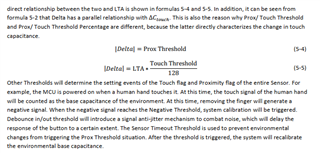
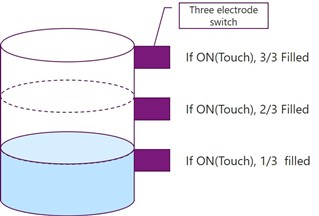
    Also, there was a part that I did not explain well enough. We are currently evaluating a rough method of measuring the water level in the tank, based on the presence or absence of touch. For example, as shown in the figure below, the tank is divided into three levels and three electrodes are used. The bottom one, with touch, means that one third of the tank is filled.

    In some cases, the device is turned on when the tank is filled with some water. In this case, we want to correctly measure the presence or absence of touch.

    Best regards,
    O.H

  • Get it. If you have any more problem. Please let me know.

  • Hi Eason,

    3. I advice you to use the internal Cap to calculate the real cap. Maybe it can do some help. Remember, internal cap is not so accurate, you may need to calibrate for every device. The code is attached, you can find CAPT_calculateBaseCap() in the code.

    FR2633_CaculateBaseCap.zip

    To make it easier to understand how to use "FR2633_CaculateBaseCap.zip", we rechecked its operation using CPATIVATE-FR2633 and CAPTIVAET-BSPW.

    I found some unclear points, so please let me check some of them.

    Q1: Is it correct to assume that commenting out the if() in the following code will not affect the measurement results?

            //
            // Iterate through ratios to find the correct calibration
            //for all elements in this cycle.
            //
            for (ui8Element=0; ui8Element<pSensor->pCycle[ui8Cycle]->ui8NrOfElements; ui8Element++)
            {
                if (ui8CompletionMask & ui8ElementMask) //Comment out here
                {
                    //
                    // Perform a cycle conversion and save the raw results
                    //

    When I check with CPATIVATE-FR2633 and CAPTIVAET-BSPW, ui8CompletionMask and ui8ElementMask remain 0 in the CAPT_calculateBaseCap() function. Therefore, the process in if is not performed. Temporarily, I commented them out for the sake of measurement.

    Q2:Is it correct to assume that each of the following functions processes the comment content?

        //Measuring the current counts without internal RefCap
        MAP_CAPT_applyCycleComp(ui8Freq, (tCycle *)pSensor->pCycle[ui8Cycle]);
        MAP_CAPT_startConversionAndWaitUntilDone(pbEndOfConversionFlag, LPM0_bits);
        MAP_CAPT_saveCycleRawResults(
                ui8Freq,
                pSensor,
                (tCycle *)pSensor->pCycle[ui8Cycle]
            );
        ui16BaseCnt = pSensor->pCycle[ui8Cycle]->pElements[ui8Element]->pRawCount[ui8Freq];
        
        //Measuring the current counts with internal RefCap
        MAP_CAPT_enableRefCap(pSensor->pCycle[ui8Cycle]->pElements[ui8Element], ui8RefCap);
        MAP_CAPT_startConversionAndWaitUntilDone(pbEndOfConversionFlag, LPM0_bits);
        MAP_CAPT_saveCycleRawResults(
                ui8Freq,
                pSensor,
                (tCycle *)pSensor->pCycle[ui8Cycle]
            );
        ui16CalCnt = pSensor->pCycle[ui8Cycle]->pElements[ui8Element]->pRawCount[ui8Freq];
        MAP_CAPT_disableRefCap();
        
        //  Calculate the Cap value
        buttonArray[count].baseCap = (ui16BaseCnt * ui16CalCnt)/(float)(100 * (ui16BaseCnt - ui16CalCnt));
        if(buttonArray[count].baseCap > 48)//  The largest cap value should less than 48.

    Q3:The buttonArray[] array was placed at 0x2396~0x2402. Is there any reason why it is not placed in the FRAM area?
    Although it is not directly related to the operation, I was curious because I think it will be placed in the FRAM area by writing "#pragma PERSISTENT(buttonArray)".

    Best regards,
    O.H

  • 1: Yes. You should remove it. That is what I described before, this is the redundant code.

    2: Yes

    3: You can do it. It is just a demo written by me, just for test. You can do it by yourself. 

  • Hi Eason,

    I'm sorry for the late reply. Thanks for the confirmation and answer.

    I will let the customer know what can be fixed and if there are any problems, we will give you feedback.

    Best regards,
    O.H

  • Hi Eason,

    I checked again and found a problem in "CAPT_Sandbox.c", so let me check it.

    Q1: Regarding the following formula for calculating the baseCap, I think that the correct calculation cannot be performed when the result of (ui16BaseCnt * ui16CalCnt) exceeds 65535. Is the formula correct?

    buttonArray[count].baseCap = (ui16BaseCnt * ui16CalCnt)/(float)(100 * (ui16BaseCnt - ui16CalCnt));

    Q2: Regarding the above formula for calculating baseCap, could you tell me why the capacitance value of the electrode can be measured from the number of counts?

    As a countermeasure to Q1, I changed the formula to the one shown below. As a result, even if the result of (ui16BaseCnt * ui16CalCnt) exceeds 65535, it was able to calculate without any problem.

    buttonArray[count].baseCap = ((float)ui16BaseCnt * (float)ui16CalCnt)/(float)(100 * (ui16BaseCnt - ui16CalCnt));

    However, there was no change in the baseCap between the states where the finger was touched and where it was not touched. I would like to discuss the reason why there was no change in baseCap, although there was a change in the number of counts, from the principle.

    In order to change the capacitance value of the electrode, we did the following. I have also attached the contents of CAPT_calculateBaseCap() and the code used for verification.

    void CAPT_calculateBaseCap(tSensor *pSensor,
        volatile bool *pbEndOfConversionFlag, uint8_t ui8Freq,
        uint8_t ui8RefCap)
    {
        uint16_t ui16BaseCnt;
        uint16_t ui16CalCnt;
        uint8_t ui8Cycle;
        uint8_t ui8Element;
        uint8_t ui8CompletionMask;
        uint8_t ui8ElementMask;


        MAP_CAPT_applySensorParams(pSensor);
        MAP_CAPT_applySensorFreq(ui8Freq, pSensor);
        MAP_CAPT_bypassFSM();
    
        for (ui8Cycle=0; ui8Cycle<pSensor->ui8NrOfCycles; ui8Cycle++)
        {
            //
            // Set up Captivate IO for this cycle
            //
            MAP_CAPT_setCycleIO(pSensor, (tCycle*)pSensor->pCycle[ui8Cycle]);
    
            //
            // Iterate through ratios to find the correct calibration
            //for all elements in this cycle.
            //
            for (ui8Element=0; ui8Element<pSensor->pCycle[ui8Cycle]->ui8NrOfElements; ui8Element++)
            {
    //            if (ui8CompletionMask & ui8ElementMask)
    //            {
                    //
                    // Perform a cycle conversion and save the raw results
                    //
    
                    //Measuring the current counts without internal RefCap
                    MAP_CAPT_applyCycleComp(ui8Freq, (tCycle *)pSensor->pCycle[ui8Cycle]);
                    MAP_CAPT_startConversionAndWaitUntilDone(pbEndOfConversionFlag, LPM0_bits);
                    MAP_CAPT_saveCycleRawResults(
                            ui8Freq,
                            pSensor,
                            (tCycle *)pSensor->pCycle[ui8Cycle]
                        );
                    ui16BaseCnt = pSensor->pCycle[ui8Cycle]->pElements[ui8Element]->pRawCount[ui8Freq];
    
                    //Measuring the current counts with internal RefCap
                    MAP_CAPT_enableRefCap(pSensor->pCycle[ui8Cycle]->pElements[ui8Element], ui8RefCap);
                    MAP_CAPT_startConversionAndWaitUntilDone(pbEndOfConversionFlag, LPM0_bits);
                    MAP_CAPT_saveCycleRawResults(
                            ui8Freq,
                            pSensor,
                            (tCycle *)pSensor->pCycle[ui8Cycle]
                        );
                    ui16CalCnt = pSensor->pCycle[ui8Cycle]->pElements[ui8Element]->pRawCount[ui8Freq];
                    MAP_CAPT_disableRefCap();
    
                    //  Calculate the Cap value
    //                buttonArray[count].baseCap = (ui16BaseCnt * ui16CalCnt)/(float)(100 * (ui16BaseCnt - ui16CalCnt));
                    //add change
                    buttonArray[count].baseCap = ((float)ui16BaseCnt * (float)ui16CalCnt)/(float)(100 * (ui16BaseCnt - ui16CalCnt));
                    //
                    if(buttonArray[count].baseCap > 48)//  The largest cap value should less than 48.
                    {
                        while(1){}
                    }
                    count++;
    //            } //  End of element adjustment
            } // End of element adjustment counting loop for this mesurment
            //
            // Done with this cycle, clear the Captivate IO
            //
            MAP_CAPT_clearCycleIO(pSensor, (tCycle*)pSensor->pCycle[ui8Cycle]);
    
        } // End of cycle counting loop
    }

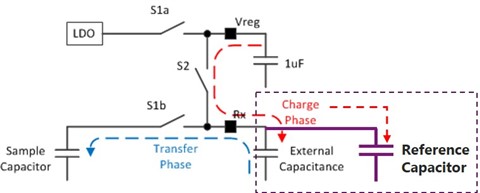
    Q3: Is it correct that when the Reference Capacitor is enabled, it is added to the External Capacitance as shown in the figure below?

    Best regards,
    O.H

    FR2633_CAPTIVATE-BSWP-CalcuBasCap.zip

  • Q1; You are right. It could be larger than 65535

    2084.captivate_refcap.pdf

    Q2: Here is the internal materials. You can refer to it.

    Q3: Yes. But the external cap is removed from the circuit.

  • Hi Eason,

    Sorry for the late reply. I was able to understand Q1~3 from the materials you provided. Thank you very much for your valuable information.

    However, there was one thing that bothered me about the following equation compared to the equation I derived from the materials you provided.


    buttonArray[count].baseCap = (ui16BaseCnt * ui16CalCnt)/(float)(100 * (ui16BaseCnt - ui16CalCnt));

    Q4: If I use my own gain value and Cref value (Internal Capacitor), do I need to change the coefficients in the equation?
    The sample code assumes that gain=100 and Cref=1, so I think the calculation will be correct. If I am wrong, please let me know.

    Best regards,
    O.H

  • Hi O.H,

    Yes, you are right. But you need to pay attention about 100 and 100%.

    Eason

  • Hi Eason,

    Thanks for the reply. I will pay attention to the above points and use the sample code.

    The current question has been cleared up, please let me check from a new thread if the problem occurs.

    Thank you very much for your kind support.

    Best regards,
    O.H

  • Hi, Eason

    I am a colleague of O.H.

    I investigated the difference between when I touched BSWP and when I didn't.

    As a procedure, I checked the value of baseCap.

    The results are as follows.

    ・When I touched BSWP  baseCap=7.67741919 (float)

    ・When I didn't touch BSWP with my hands  baseCap=7.7189188 (flaot)

    From this result, can I detect that my hand is touching the BSWP when I turn on the MCU?

    Best regards,

    Koki

  • 1. As I know, when you touch the sensor, the calculated Cap should be bigger. It seems different from your test.

    2. The way we detect human touch is not based on the detected cap but on the related signal, because we assume that the base Cap will change with the environment. You also need to change the threadhold to tell the system there is a touch. 

    3. Can you tell me what you want to do?

  • Hi, Eason

    1. As I know, when you touch the sensor, the calculated Cap should be bigger. It seems different from your test.

    →I'm sorry. What you are saying is correct.

     When I touched the sensor, I confirmed that the calculated cap became larger. Details are summarized in an Excel file.

    CalcBaseCap_measured value.xlsx

    3. Can you tell me what you want to do?

    →In fact, my customer wants to detect that the sensor is wet when the MCU is started with the sensor wet.

     However, auto-calibration is set and it is difficult to "recognize that water is on" when the MCU starts up.

       Could you give me specific advice to realize that?

    Koki

  • You can use another sensor as the wet detection. Maybe change the mechanical structure

  • Even if I use the information on this thread, it is difficult to " detect that the sensor is wet when the MCU is started with the sensor wet"?

    Koki

  • What do you mean of "Even if I use the information on this thread"

  • Hi, 

    I'm sorry, forget this description.

    It is difficult to detect the action of  " the sensor is wet when the MCU is started with the sensor wet", right?

    If so, consider a different sensor.

    Thanks,

  • Yes, the only thing you can use to judge different condition is the signal strength for one sensor. But I think it is quite hard unless the touch signal is strong and the wet water signal is small.

**Attention** This is a public forum