This thread has been locked.

If you have a related question, please click the "Ask a related question" button in the top right corner. The newly created question will be automatically linked to this question.

TDA4VM: In which layer lost RGB888 support in PSDKR?

Part Number: TDA4VM

Hi,

If I've a camera sensor which output mipi csi signals in RGB888 format only, then how can I intruduce it's video into TDA4 EVM board and then goto DP port?

Since there is a description from this thread: RGB output from VISS is not recommended to be used, I have to do some work to figure the reasons out at least.

Here is what I understanding now, If I'm wrong please correct me.

The data path: Sensor(RGB888) --> Ser --> Des --> PDK.CSIRx --> FVID2 Driver --> TIOVX.Capture --> Multi/Single Cam App --> TIOVX.Display --> DP port --> Monitor.

The RGB888 support in each layers.
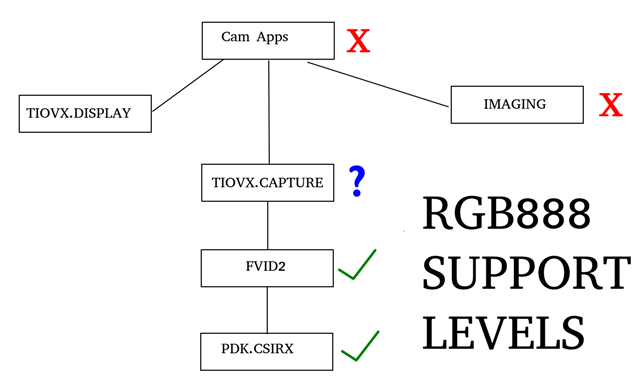
So, how many works need to be done to support RGB888? Or will it be supported in some version of PSDKR?

Thanks!

  • Hi,

    RGB24 is supported in PSDKRA. The path below seems to be fine. You could connect capture node directly to display node and can get RGB sensor output to the display directly. 

    Sensor(RGB888) --> Ser --> Des --> PDK.CSIRx --> FVID2 Driver --> TIOVX.Capture --> Multi/Single Cam App --> TIOVX.Display --> DP port --> Monitor

    Regards,

    Brijesh

  • Hi Brijesh,

    I'm trying it by setting tivx_raw_image_format_t to {VX_DF_IMAGE_RGB, 23} in IssSensor_CreateParams in my sensor driver.

    But then PDK.CSIRx driver failed: Invalid pitch! pTr->icnt0 = 7680, pTr->dim1=5760, pTr->icnt0=7680 as I'm tracing now:
    So {VX_DF_IMAGE_RGB, 23} is correct settings for RGB888 ?
    Thanks!
  • Hi Keelung Yang,

    We cannot use RGB format in raw_image, we have to vx_image data structure for RGB format. Also when CSIRX writes RGB format in memory, it writes in unpacked format, So can you use RGBX format with vx_image data structure? 

    I had written a faq which provides support for yuv format in in multi-cam example, which is available at https://e2e.ti.com/support/processors/f/791/t/931988. Can you make similar changes in the application and try it?

    Regards,

    Brijesh


  • Hi Brijesh,

    raw_image is also and only used in sensor_drv.
    VX_DF_IMAGE_RGBX works for RGB888 input. 
    YUV support has been added to PSDKR v7.2 at least, and we're using v7.2
    After adding rgb_cam_input & capt_rgb_image variables and following steps of adding yuv support in single cam app, I can see the output on display now.
    Finally, since RGB is also used in many camera as YUV, why not add RGB suport both in sensor_drv and vision_apps by Ti? That releases many Ti users who are using RGB input.
  • Hi  Keeluung Yang,

    ok, i will check about it.

    Can you use use yuv as input and change the format to RGBX? In this case, you could directly connect capture to display directly.

    You could refer to test_capture_display.c file for capture->display connection.

    Regards,

    Brijesh

  • Hi Brijesh,

    I've a YUV sensor indeed, but I'm out of office now. I'll try this after about one week.

  • Hi Brijesh,

    I tried to treat YUV input as RGBX in PSDKR v7.2, but no any display on monitor.

    Here is the dump of CSIRx registers:

    03:44:00.047 INFO:      CSI_RX_IF_SHIM_CSIRX_ID                           0x04500000    0x64706100
    03:44:00.053 INFO:      CSI_RX_IF_SHIM_VP0                                0x04500008    0x00000000
    03:44:00.056 INFO:      CSI_RX_IF_SHIM_VP1                                0x0450000C    0x00000000
    03:44:00.062 INFO:      CSI_RX_IF_SHIM_CNTL                               0x04500010    0x00000E01
    03:44:00.067 INFO:      CSI_RX_IF_SHIM_DMACNTX                            0x04500020    0x80000024
    03:44:00.072 INFO:      CSI_RX_IF_SHIM_PSI_CFG0                           0x04500024    0x00010000
    03:44:00.076 INFO:      CSI_RX_IF_SHIM_PSI_CFG1                           0x04500028    0x00000000
    03:44:00.080 INFO:      CSI_RX_IF_VBUS2APB_DEVICE_CONFIG                  0x04504000    0x8421164C
    03:44:00.083 INFO:      CSI_RX_IF_VBUS2APB_SOFT_RESET                     0x04504004    0x00000000
    03:44:00.086 INFO:      CSI_RX_IF_VBUS2APB_STATIC_CFG                     0x04504008    0x43210410
    03:44:00.089 INFO:      CSI_RX_IF_VBUS2APB_ERROR_BYPASS_CFG               0x04504010    0x00000000
    03:44:00.092 INFO:      CSI_RX_IF_VBUS2APB_MONITOR_IRQS                   0x04504018    0x00000000
    03:44:00.096 INFO:      CSI_RX_IF_VBUS2APB_MONITOR_IRQS_MASK_CFG          0x0450401C    0x00000000
    03:44:00.099 INFO:      CSI_RX_IF_VBUS2APB_INFO_IRQS                      0x04504020    0x00000002
    03:44:00.103 INFO:      CSI_RX_IF_VBUS2APB_INFO_IRQS_MASK_CFG             0x04504024    0x00000000
    03:44:00.106 INFO:      CSI_RX_IF_VBUS2APB_ERROR_IRQS                     0x04504028    0x00000000
    03:44:00.110 INFO:      CSI_RX_IF_VBUS2APB_ERROR_IRQS_MASK_CFG            0x0450402C    0x000F03B1
    03:44:00.113 INFO:      CSI_RX_IF_VBUS2APB_DPHY_LANE_CONTROL              0x04504040    0x0001F01F
    03:44:00.116 INFO:      CSI_RX_IF_VBUS2APB_DPHY_STATUS                    0x04504048    0x00333306
    03:44:00.120 INFO:      CSI_RX_IF_VBUS2APB_DPHY_ERR_STATUS_IRQ            0x0450404C    0x00000000
    03:44:00.123 INFO:      CSI_RX_IF_VBUS2APB_DPHY_ERR_IRQ_MASK_CFG          0x04504050    0x00000000
    03:44:00.126 INFO:      CSI_RX_IF_VBUS2APB_INTEGRATION_DEBUG              0x04504060    0x10000000
    03:44:00.130 INFO:      CSI_RX_IF_VBUS2APB_ERROR_DEBUG                    0x04504074    0x00000000
    03:44:00.133 INFO:      CSI_RX_IF_VBUS2APB_TEST_GENERIC                   0x04504080    0x00000000
    03:44:00.137 INFO:      CSI_RX_IF_VBUS2APB_STREAM0_CTRL                   0x04504100    0x00000001
    03:44:00.142 INFO:      CSI_RX_IF_VBUS2APB_STREAM0_STATUS                 0x04504104    0x80000133
    03:44:00.145 INFO:      CSI_RX_IF_VBUS2APB_STREAM0_DATA_CFG               0x04504108    0x00000000
    03:44:00.148 INFO:      CSI_RX_IF_VBUS2APB_STREAM0_CFG                    0x0450410C    0x00000100
    03:44:00.152 INFO:      CSI_RX_IF_VBUS2APB_STREAM0_MONITOR_CTRL           0x04504110    0x00000000
    03:44:00.155 INFO:      CSI_RX_IF_VBUS2APB_STREAM0_MONITOR_FRAME          0x04504114    0x00000000
    03:44:00.158 INFO:      CSI_RX_IF_VBUS2APB_STREAM0_MONITOR_LB             0x04504118    0x00000000
    03:44:00.163 INFO:      CSI_RX_IF_VBUS2APB_STREAM0_TIMER                  0x0450411C    0x00000000
    03:44:00.167 INFO:      CSI_RX_IF_VBUS2APB_STREAM0_FCC_CFG                0x04504120    0x00000000
    03:44:00.170 INFO:      CSI_RX_IF_VBUS2APB_STREAM0_FCC_CTRL               0x04504124    0x00000000
    03:44:00.174 INFO:      CSI_RX_IF_VBUS2APB_STREAM0_FIFO_FILL_LVL          0x04504128    0x00000000
    03:44:00.178 INFO:      CSI_RX_IF_VBUS2APB_ID_PROD_VER                    0x04504FFC    0x50220200
    

  • Hi Keelung Yang,

    I did not get it. what you mean by treating YUV as RGBx? 

    If the sensor is outputting YUV data, then please configure YUV422 as data format in CSIRX. 

    In addition to data type, please check virtual channel id, lane speed. They are important configuration, without it matching, CSIRX may not be able capture correctly. 

    Regards,

    Brijesh

  • Hi Brijesh,

    Treating YUV as RGBx means use yuv as input and change the format to RGBX, as you said in this thread about 10 days ago.

    If this trying is not important to you, please just ignore it.

  • Hi Keelung Yang,

    Yes, please ignore it, it might be for different context.

    The your sensor/deserializer is configured to output YUV422 format, with YUV422 as data type, then CSIRX should also be configured for YUV422 format.

    Regards,

    Brijesh