


Part Number: PROCESSOR-SDK-AM64X
Descripotion:
This post continues the privious question: processor-sdk-am64x-oe-layersetup-sh
Environment:
Device: AM64x SKEVM
System: Ubuntu 18.04 (build image) / macOS (monitor)
Documentation References:
[1] AM64x Starter Kit EVM Quick Starter Guide
[2] Processor SDK Linux for AM64X-07_03_01
Story Line:
This is how I build the image:
wget https://developer.arm.com/-/media/Files/downloads/gnu-a/9.2-2019.12/binrel/gcc-arm-9.2-2019.12-x86_64-arm-none-linux-gnueabihf.tar.xz
tar -Jxvf gcc-arm-9.2-2019.12-x86_64-arm-none-linux-gnueabihf.tar.xz -C $HOME
wget https://developer.arm.com/-/media/Files/downloads/gnu-a/9.2-2019.12/binrel/gcc-arm-9.2-2019.12-x86_64-aarch64-none-linux-gnu.tar.xz
tar -Jxvf gcc-arm-9.2-2019.12-x86_64-aarch64-none-linux-gnu.tar.xz -C $HOME

git clone git://arago-project.org/git/projects/oe-layersetup.git tisdk
cd tisdk
./oe-layertool-setup.sh -f configs/coresdk/coresdk-07.03.00.005-config.txt

cd build
. conf/setenv
export TOOLCHAIN_PATH_ARMV7=$HOME/gcc-arm-9.2-2019.12-x86_64-arm-none-linux-gnueabihf
export TOOLCHAIN_PATH_ARMV8=$HOME/gcc-arm-9.2-2019.12-x86_64-aarch64-none-linux-gnu
MACHINE=am64xx-evm bitbake -k tisdk-default-image
The image size and name seem good:
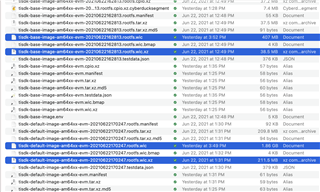
Meanwhile, prebuilt-default image from SDK can boot, I believe something wrong with the config.txt files
Thanks for the support from RonB & Jianzhong & others.
