This thread has been locked.

If you have a related question, please click the "Ask a related question" button in the top right corner. The newly created question will be automatically linked to this question.

CCSTUDIO: Missing Library

Part Number: CCSTUDIO
Other Parts Discussed in Thread: SYSCONFIG

Hi Guys,

Using an SK-AM64 with CCS (latest, 11.0) on Linux distro. Having trouble with Target Configuration, Test Configuration yields:
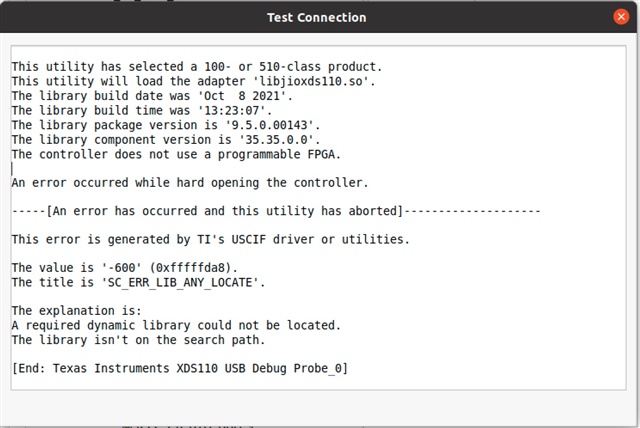
The CCS distribution seems to be missing the lib, "libjioxds110.so." Installed Full CCS distribution, including all JTAG interfaces. I've reinstalled with no difference. Is this lib available?

I've looked on my inux distro, but could not find this lib. Also, no locating it with Linux Package Manager

  • Hello,

    I tried this on Linux and had the same error. I also tried on Windows 10 and it worked fine without any problem. Let me loop in CCS expert to help.

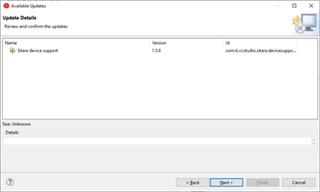
    Meanwhile, you'll need to update Sitara device support package to 1.5.6. Please go to CCS > Help > Check for Updates. It will show Sitara device support 1.5.6 as below:

    Follow the prompt to install the update. This will not fix the missing library problem, but just to give you a heads up.

    Regards,

    Jianzhong

  • Hello,

    There was a known issue with CCS 10.3.0 where this error would occur with the Test Connection feature. But it would only impact the Test Connection feature. You should still be able to start a debug session and connect to the target. This issue was resolved in 10.4.0 but seems like the issue has returned.

    Can you confirm that you are able to start a debug session and connect to the target fine?

    Thanks

    ki

  • Yes, Thank you. Updated everything. Including flashing the XDS110 emulator with xdsdfu with the latest. Sane result.


    Tried starting a Debug Session and got this result:
    “… a data verification error occurred, file load failed."
    Still looking for the answer.
    thanks,
    dave
  • Yes, Thank you. Updated everything. Including flashing the XDS110 emulator with xdsdfu with the latest. Sane result.

    The issue I mentioned will not get fixed with a firmware update. It only impacts the Test Connection feature.

    Tried starting a Debug Session and got this result:
    “… a data verification error occurred, file load failed."

    This is an unrelated error. Since you are trying to load a program, I assume you were able to connect to the target. Hence this would confirm my suspicion above.

    As for the data verification error, there are many potential causes for this. Please see:

    https://dev.ti.com/tirex/explore/node?node=APy2XbLelxyqBB2Yz0WR.w__FUz-xrs__LATEST

    Thanks

    ki

  • Thanks for the response once again.

    I'm running CCS 10.4 on Windows. I can download and step.

    I'm running CCS 11.0 on Linux, I get the "file load verification error". for the same code. The "code" used is a few of the example projects from TI Resource Explorer. Haven't gotten to my code yet.

    I read the document that you referenced, It mainly speaks to the Linker file memory allocation. I'm using the Linker file provided by the TI examples and have not modified it. Have you gotten the examples to work under CCS 11.0 on Linux?

  • Are you using the same exact board and target configuration between the Windows and Linux environment?

    Which examples are you trying to use?

    Have you gotten the examples to work under CCS 11.0 on Linux?

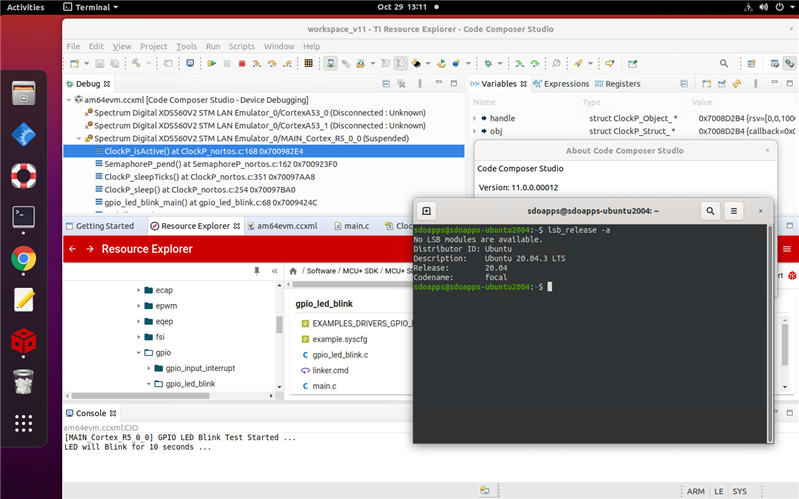
    I am able to successfully load and run the SDK examples on my AM64x EVM using CCS 11.0.0 on Ubuntu 20.04 LTS. In the screenshot below, I am using the gpio_led_blink example:

    https://dev.ti.com/tirex/explore/node?node=ABS8j0bysHPcpaTvmWPuhg__rN4Qml4__LATEST

    Thanks

    ki

  • ki,

    Thanks for your help and interest. It is greatly appreciated.

    We have the same setup -  with one exception:

    You are apparently using the XDS560 JTAG device. I am using the XDS110 emulator on board the TI SK-AM64 board.

    It is curious that the "missing" library file is named "libjioxds110.so." You may not need this file for your XDS560.I don't know if it is necessary for my XDS110 (beyond Test Configuration), but it is curious. What say you TI?

  • It is curious that the "missing" library file is named "libjioxds110.so." You may not need this file for your XDS560.I don't know if it is necessary for my XDS110 (beyond Test Configuration), but it is curious. What say you TI?

    Are you able to start a debug session and manually connect to a CPU on the AM64? If so, then the "missing" library issue is unrelated to the data verification issue. As mentioned earlier, the "missing library issue" should only impact the "Test Connection" feature.

  • Please provide a screenshot of the whole CCS IDE when the data verification error occurs.

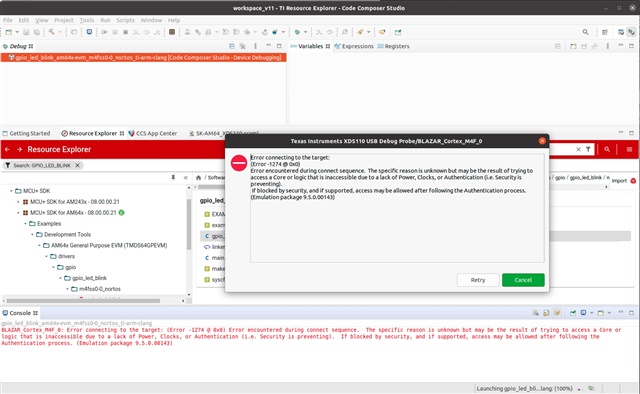
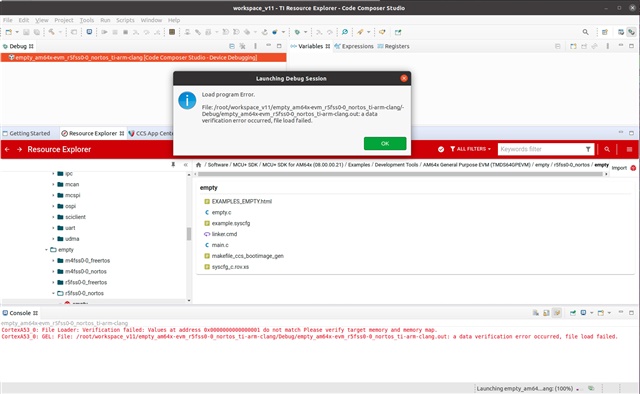
  • Here are some screenshots:

    First error dialog for "gpio_led_blink"

    Second error dialog for "gpio_led_blink":

    Error running unmodified "empty" code:

    Hop you can see these screen shots with the uploaded resolution.

    For these screen shots, tried loading both codes. Modified nothing. Didn't config Sysconfig. Just tried to download code to see if I could get that far.

  • Forgot to say that installed CCS on Linux using "sudo" and ran these tests as sudo CCS, in case there were permission issues.

  • More info:

    Found that lib (libjioxds110.so) in my installation (/opt.ti/ccs/ccs_base/common/uscif/libjioxds110.so). Don't know yet why CCS is not finding it. XDS110 is specified in Target Configuration.

  • Found that lib (libjioxds110.so) in my installation (/opt.ti/ccs/ccs_base/common/uscif/libjioxds110.so). Don't know yet why CCS is not finding it. XDS110 is specified in Target Configuration.

    As mentioned before, please disregard this error. It is unrelated to the data verification error. It only impacts the Test Connection feature.

    Please see my video below. I am using CCS v11 connected to  an AM64 GPEVM via onboard XDS110 on Ubuntu 18.04LTS. I get the same library error when I run the Test Connection feature. However it has no impact on my debug session. I can start a debug session, connect to the target cores, load a program, and run/debug without issue:

    At the 0:40 mark, you can see that I get the same library error when running Test Connection. However I just proceed to debug the project without issue.

    In your screenshots there are some errors regarding target connection and some regarding data verification. It is quite confusing.

    Can you start a manual debug session? basically, start a debug session by launching the ccxml file. Then see if you can manually connect to the M3 and R5. For an example, please see the video below:

    Did that work for you?

    Thanks

    ki

  • Ki, sorry for taking so long to reply.

    I finally got some time to work on this and I wanted to gather more data before responding..

    Got a small amount of good news and then some bad.

    The good: I followed your video (thank you very much). However, I didn't see anything different from what I had been doing. I followed each step. It worked! 

    The bad news; It only worked one time. I know this is difficult to believe. A few hours later with everything still powered up, I clicked on the "debug" button and I got "Error -1170" issues. could not clear this problem and thoroughly didn't understand.

    Decided to go back to Windows before attempting Linux.

    In Windows, I reinstalled everything. CCS and SDK.

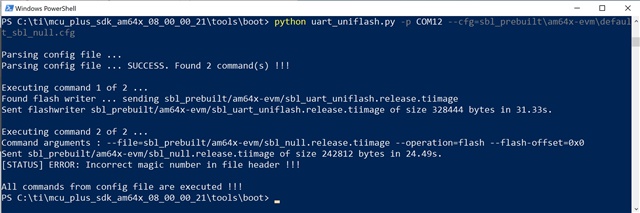
    I went to flash the SOC onboard.Got the following.

    I went through this procedure many times with same result. I have a second SK-AM64 board. I repeated everything on it. Same result. Didn't go any further cause if this doesn't work, there must be something basic at fault.

    Don't know what to do except buy another board. Maybe the TMD EVM.

    What do you think?

    thanks,

    dave

  • The good: I followed your video (thank you very much). However, I didn't see anything different from what I had been doing. I followed each step. It worked! 

    The bad news; It only worked one time. I know this is difficult to believe. A few hours later with everything still powered up, I clicked on the "debug" button and I got "Error -1170" issues. could not clear this problem and thoroughly didn't understand.

    First off, I think we can confirm that the "library" issue only impact "Test Connection". I filed a bug for this. Tracking link: https://sir.ext.ti.com/jira/browse/EXT_EP-10609

    This issue will not impact debug so we can set this aside for now.

    The DAP issue is is a fairly common one with many root causes. Please see the document below:

    https://software-dl.ti.com/ccs/esd/documents/ccs_debugging_jtag_connectivity_issues.html#cannot-access-the-dap

    What I find helpful on the AM boards is to do a System Reset before trying to connect. It helps put the board in a good state

    Decided to go back to Windows before attempting Linux.

    Can you try running the "Test Connection" on Windows? Does it succeed?

    I went to flash the SOC onboard.Got the following.

    I went through this procedure many times with same result. I have a second SK-AM64 board. I repeated everything on it. Same result. Didn't go any further cause if this doesn't work, there must be something basic at fault.

    I'm not sure what happened here. I will need to bring this issue to the attention of the device experts.

    Thanks

    ki

  • Ki,

    "Library Missing" is not an issue. Agree.

    Yes, Test Connection does work on Windows. Also, I can run Linux on the A53s booting from the SD Card.

    This SOC Flash error was a surprise. (DIP Switches set to UART boot.)

    thanks,

    dave

  • Hi Dave,

    The SOC flashing in the MCU+ SDK 8.0 doesn't support AM64x Starter Kit. There is a workaround documented in this thread. Please download version 7.3 from the link below which is at the end of the download page: https://www.ti.com/tool/download/MCU-PLUS-SDK-AM64X

    Previous versions

    Regards,

    Jianzhong

  • Hello Jianzhong,

    Did as requested. Got a successful execution of Python in 07.03.00.19 tools/boot.

    When switching to OSPI boot, via DIP Switches, cycling power o the board resulted in no output boot data on the terminal (just what looks like a few noise characters on the line when powering). TI docs note that boot data comments should be output.

    Tried this a couple times with the same result.

    Any other suggestions?

    dave.

  • Hello Dave,

    You need to set the boot mode to xSPI, not OSPI.

    Regards,

    Jianzhong

  • Hi Guys,

    In one word:

    ***** SUCCESS ******

    It's all working. on Windows and Linux!

    Now , just have to do a lot of doc reading to familiarize myself on how to Load Linux, R5s, M4 store on board, ... and the APIs

    Just one last question, if I may. I can't find a lot of info on xSPI. Is that a partition on the OSPI?

    Thank to everyone for the help.

    dave

  • Hello Dave,

    Very glad that everything is working for you now. Thanks for the update. 

    While there are a lot of docs for you to read, I'd like to bring these two webinars to your attention:

    Hope they can be helpful to you.

    Regarding OSPI partition, please refer to the attached document about how to flash Linux to OSPI. Hope it helps.

    Flash Linux to OSPI.pdf

    Regards,

    Jianzhong