This thread has been locked.

If you have a related question, please click the "Ask a related question" button in the top right corner. The newly created question will be automatically linked to this question.

TMDS243GPEVM: Processors forum

Part Number: TMDS243GPEVM
Other Parts Discussed in Thread: UNIFLASH

Hi,

I am having trouble with the ping response from an AM243x EVM board when executing examples\networking\lwip\enet_lwip_cpsw\am243x-evm.

For some background on this issue please see:

https://e2e.ti.com/support/processors-group/processors/f/processors-forum/1061564/tmds243gpevm-ddr-initialization-hangs/3934795?tisearch=e2e-sitesearch&keymatch=Hangs#3934795

In that thread the original problem was solved (DDR initialization) but when trying to run the enet_lwip_cpsw example I found that the example would compile, load and execute with the appropriate responses on the serial port but when pinging the EVM I found that many of the pings were lost.  I also have the AM243x-LP board which can run the same example (targeted to the LP board)  with no ping issue.  So, I tried a side by side comparison as described below. 

Please note that the following is cut and pasted from the original thread cited above. 

However, there may be a problem related to this workaround.  
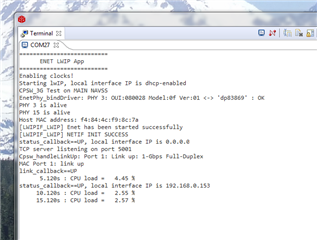
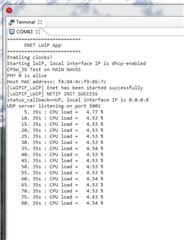
  • The example project 'enet_lwip_cpsw_am243x-lp_r5fss0-0_freertos_ti-arm-clang' runs as expect on the LP board

    However, when using the EVM board and the boot workaround as suggested above  I never get a local IP assigned or a link_callback == UP message.

    Could this be related to the using the AM64 boot code.  In other words is it possible that the LP boot code does some ENET initialization that the AM64-EVM boot code (workaround) does not? 

    Any other comments you may have about this issue would be greatly appreciated.

    Thanks,

           Joel

  • Offline  in reply to Jbec
    TI__Genius 13665 points

    Hi Joel,

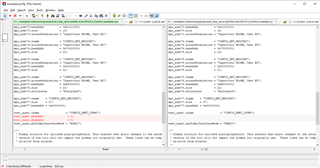
    I did not see any differences in SBL_NULL for AM64x EVM and AM243x EVM regarding to the ENET initialization, so I doubt that is the root cause. It is probably the ENET example differences caused the problem. I did the comparison of the example.syscfg between the AM243x EVM and the AM64x EVM. There are some differences:

    In fact, you may try the ENET example in MCU+ SDK for AM64x EVM. it should work on AM243x EVM, because the AM243x EVM is the same as the AM64x EVM.

    Best regards,

    Ming

  • Online  in reply to Ming Wei
    Prodigy 155 points

    Hi Ming,

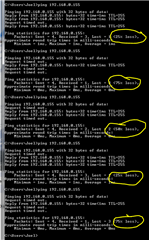
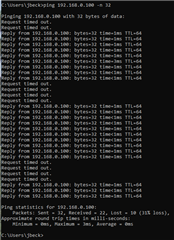
    I tried using the AM64x EVM example on the AM243x EVM board as you suggested.  Good news, it linked and DHCP assigned an IP address.  However there still seems to be a problem.  I tried pinging the EVM board with the following results:

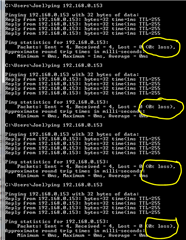
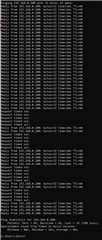
    For comparison I loaded up my LP board with the same example with the following results:

    Note that this was a side by side comparison.  I used the same cat6 cable connected to the same ethernet switch connection. Both boards were powered and executing the example code at the same time.  I just pinged the EVM board, moved the cable to the LP board and pinged it.

    Any ideas why the the erratic performance?

    Thanks,

         Joel

  • +1Offline  in reply to Jbec
    TI__Genius 13665 points

    Hi Joel,

    It is weird. I suggest you to start new thread for the ENET example issue, so that we can have the ENET expert to help you further.

    Best regards,

    Ming

  • Hi,

    Are you seeing ping responses missing? what's percentage of drop?

    Also I see you mentioned about issue not being observed on other board, is that correct? 

    Regards,

    Prasad

  • Hi Prasad,

    Thanks for your quick response.

    Yes, I am seeing missing pings when using the AM243x-EVM board.

    The percentage of dropped pings varies from 25 to 75 percent. (see the screen prints in my post above)

    Yes, I do not have dropped pings when using the AM243x-LP board when running the same example.

    Please note that I am using AM64-evm boot code as recommended by Ming because the AM243x-evm boot code does not initialize the DDR memory.  Below is a quote from Ming:

    "I finally figured out the root cause of the DDR initialization issue you reported.

    The SBL_NULL for AM243x EVM and AM64x EVM are different, while the sbl_null_am64x-evm_r5fss0-0_nortos_ti-arm-clang does have the DDR initialization included and the sbl_null_am243x-evm_r5fss0-0_nortos_ti-arm-clang DOES NOT have the DDR initialization. That is why the sbl_null.release.tiimage (tiboot3.bin) in C:\ti\mcu_plus_sdk_am64x_08_01_00_36\tools\boot\sbl_prebuilt\am64x-evm\ made the DDR working. The sbl_null.release.tiimage (tiboot3.bin) in C:\ti\mcu_plus_sdk_am243x_08_01_00_36\tools\boot\sbl_prebuilt\am243x-evm\ does not make the DDR working.

    I will file a bug against the SBL_NULL for AM243x EVM. At the same time, you can use the sbl_null.release.tiimage (tiboot3.bin) from MCU+ SDK 08.01.00.36 for OSPI or SD boot. This is a workaround and I have verified it on AM243x EVM."

    Also, the example code that I am running on the EVM board is the AM64-EVM version (also recommended by Ming). Below is another quote from Ming:

    In fact, you may try the ENET example in MCU+ SDK for AM64x EVM. it should work on AM243x EVM, because the AM243x EVM is the same as the AM64x EVM.

    Thanks

          Joel

  • What's the SDK version you are using?

  • mcu_plus_sdk_am243x_08_01_00_36 on the EVM board

  • Interesting. There was PHY configuration issue in earlier versions of SDK which caused packet drop but it is fixed in 08.01.

    Anyway, below are my suggestions -

    1. Please use AM243x EVM and binaries - Ming's suggestion might be for early versions of SDK where things were not stable

    2. Confirm the PHY config matches below -

    3. Share statistics (to check any delay issues)

    (+) [FAQ] MCU-PLUS-SDK-AM243X: How do I get CPSW diagnostic statistics using debug gels in MCU+ SDK Enet LLD? - Arm-based microcontrollers forum - Arm-based microcontrollers - TI E2E support forums

    Regards,

    Prasad

  • When you said to use AM243x EVM binaries are you suggesting that I use the pre-built boot in code in mcu_plus_sdk_am243x_08_01_00_36 and also import the example project from the same?

  • Sorry, I marked your response as "resolved" by mistake.

    Regarding your query - yes, please use boot binaries from 243x release and import project from same.

  • I have flashed the the OSPI flash with  C:\ti\mcu_plus_sdk_am243x_08_01_00_36\tools\boot\sbl_prebuilt\am243x-evm\sbl_null.release.tiimage.

    Imported    C:\ti\mcu_plus_sdk_am243x_08_01_00_36\examples\networking\lwip\enet_lwip_cpsw\am243x-evm\r5fss0-0_freertos\ti-arm-clang

    Renamed the project to ThirtySix_enet_lwip_cpsw_am243x-evm_r5fss0-0_freertos_ti-arm-clang (Avoid confusion with same example from other SDKs)

    Built and attempted to download to EVM board with the following result in the console window:

    MAIN_Cortex_R5_0_0: Trouble Writing Memory Block at 0x80000000 on Page 0 of Length 0x7ff0: (Error -1065 @ 0x80001000) Unable to access device memory. Verify that the memory address is in valid memory. If error persists, confirm configuration, power-cycle board, and/or try more reliable JTAG settings (e.g. lower TCLK). (Emulation package 9.4.0.00129)
    MAIN_Cortex_R5_0_0: File Loader: Verification failed: Target failed to write 0x80000000
    MAIN_Cortex_R5_0_0: GEL: File: C:\SSD\Elvare\Technical\DC-AC\AM243x_Controller\AM243x_WS_1\ThirtySix_enet_lwip_cpsw_am243x-evm_r5fss0-0_freertos_ti-arm-clang\Debug\ThirtySix_enet_lwip_cpsw_am243x-evm_r5fss0-0_freertos_ti-arm-clang.out: Load failed.

    Project will not load into EVM board because the DDR is not initialized by the boot code.  Ming confirmed this and said that he would file a bug report.  This is when he advised that I use the boot code for the AM64-EVM from mcu_plus_sdk_am243x_08_01_00_36.  This did fix the DDR init issue and I was able to load the example .out file.  However, when running the example the serial port terminal would never show a "link up" message and DHCP would never assign an IP.  Mings solution to this issue was to use the AM64 example project rather than the AM243x example.  This seemed to work except for the ping issue.

    Your thoughts?

    Thanks,  Joel

  • Hi Prasad,

    Has there been any progress at TI on this issue?

    Joel

  • Joel,

    As mentioned in the user guide, you need to configure DDR using gel scripts after SBL NILL is run and before loading the binary.

    Can you please try that?

    https://software-dl.ti.com/mcu-plus-sdk/esd/AM243X/latest/exports/docs/api_guide_am243x/EVM_SETUP_PAGE.html#DDR_INIT 

    Regards,

    Prasad

  • Hi Prasad,

    Tried the gel scripts but this did not solve the issue.  In fact, this only reproduced the same problem that prompted me to start the thread with Ming about a month ago.  Here is a link to that thread for your review:

    TMDS243GPEVM: DDR initialization hangs - Processors forum - Processors - TI E2E support forums

    Please note that this time I Reinstalled CCS with the latest version (CCS 11.1) and also reinstalled mcu_plus_sdk_am243x_08_01_00_36.

    After installing CCS and SDK I generated a new target configuration file (Targeting  AM243x_GP_EVM). 

    Next, I imported and built enet_lwip_cpsw_am243x-evm_r5fss0-0_freertos_ti-arm-clang from the SDK.

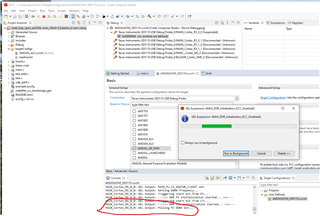
    Started a debug session using the new target configuration file, Connect to R5_0_0, Run AM24 Initialization script.  The following is a screen shot of the result:

    This is the same problem that eventually prompted Ming to advise me to use the AM64-EVM boot code and example code. (see the above link).

    So, What next?

    Thanks,

         Joel

  • Hi Joel,

    Sorry for confusion on my end. Seems issue with board causing DDR init failure.

    Before I dig dipper on finding way out, can you please try the SBL boot flow where DDR is initialized inside bootloader?

    Or if you have already tried that, does it work?

    Regards,

    Prasad

  • Hi Prasad,

    I loaded the OSPI boot loader and the post build .appimage using uniflash.  The .cfg file for uniflash is this:

      Looks like it was successful:

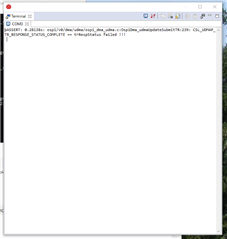
    Reset boot loader switches to OSPI boot and cycled power to EVM.  Here is what I see on the serial terminal:

    Not sure what this means, I hope you do.

    Thanks,

                 Joel

  • Hi Prasad,

    Has you made any progress with this issue?

    Joel

  • Again, have you made any progress?

         Joel

  • Replying so it helps if somebody else faces the issue -

    Ping drop issue was root caused to incorrect PHY delay setting in the example. This has been fixed in SDK 8.2 release (released March end 2022).

    Regards,

    Prasad

  • Hi Prasad,

    Sorry, I've been out of town for the past few days.  Here is the result of 2048 pings.  As you can see it did drop a few pings but still much much better performance.  

    However, when EVM link is UP other devices on the network will drop pings.  If I ping a NAS device in another building I get this result when EVM ethernet connector is unplugged:

    Note that in the above set of pings there were no dropped pings.

    Next test was pinging the same NAS device but with the EVM plugged into the network.  Note the loss of pings and long response times:

    Next test, ping the same NAS device 64 times starting with EVM unplugged from network.  After about 32 of the pings I will insert the ethernet cable into the EVM:

    Note that after the EVM is connected to the network the network becomes unstable and pings to the NAS are dropped.

    So, it appears that the patch fixes the problem with the EVM but once the EVM link is UP the rest of the network suffers.

    I'm afraid I cannot mark this issue as resolved.

    Thanks,

    Joel

  • Hi Prasad,

    I noticed SDK version 8.2 was available via CCS update on 21 March and so I tried it out then.  The patch for Gigabit ethernet was not in board.c at that time.  I did try the EVM lwip example and it failed.  I'm guessing that was because the patch just hadn't been added yet.  The version I tried was mcu_plus_sdk_am64x_08_02_00_28.

    Joel

  • SDK08.02.00.28 was taken down due to packaging issue. We did updated release 08.02.00.31 on 25th March. Can you please try that?

    MCU-PLUS-SDK-AM64X Software development kit (SDK) | TI.com

  • Another bit of information:

    I put a 100Mb switch between EVM and rest of network so as to force connection to 100Mb.  Everything seems to be ok with network and LwIP example.   So, problem is with 1Gb PHY or software.

    I will try the later release of SDK but it will have to wait till later.

    Joel

  • If you could provide a SW patch to force connection at 100Mb that would be a good work-around for now and would be very much appreciated.

  • Usually below change alone should work but i remember you mentioning it's not working on your side.

    linkCfg->speed = ENET_SPEED_100MBIT;

    linkCfg->duplexity = ENET_DUPLEX_FULL;

    Unfortunately our SW expert is out of office this full week so we would not be able to try it. My recommendation is to use latest SDK so you get 1Gbps fixes.

    We have validated ping drops on our end with the fix.