This thread has been locked.

If you have a related question, please click the "Ask a related question" button in the top right corner. The newly created question will be automatically linked to this question.

SK-AM64B: AM64 UART 8250 DMA / FIFO / Interrupt?

Part Number: SK-AM64B
Other Parts Discussed in Thread: SK-AM62B

Hi Champs:

Customer has their AM64 PCB made.

They are testing UART with speed 921600.

Tested on the "Same PCB" with Port 0 vs Port 1 (2 UARTs)

They confirmed the DMA / is enabled,

Just have some questions:

Q1. https://e2e.ti.com/support/processors-group/processors/f/processors-forum/1217728/am625-uart-receive-fifo-doesn-t-effect?tisearch=e2e-sitesearch&keymatch=AM64%20%20UART%20FIFO%20DMA#

       Based on the above link, may you guide us: What's the Maximum FIFO of the UART?

Q2. is the FIFO limited at 64 bytes,?

       If no, how to enlarge it?

Q3. Customer found the UART packet drop will make UART Halt?

       How to fix this?

BR Rio

  • Hi Rio,

    Q1. https://e2e.ti.com/support/processors-group/processors/f/processors-forum/1217728/am625-uart-receive-fifo-doesn-t-effect?tisearch=e2e-sitesearch&keymatch=AM64%20%20UART%20FIFO%20DMA#

           Based on the above link, may you guide us: What's the Maximum FIFO of the UART?

    Q2. is the FIFO limited at 64 bytes,?

           If no, how to enlarge it?

    Yes the maximum FIFO is 64 bytes. I found a diagram in TRM AM64x(SPRUIM2C – MAY 2020 – REVISED SEPTEMBER 2021) which states the same. Please have a look at the highlighted green text.

    Q3. Customer found the UART packet drop will make UART Halt?

           How to fix this?

    Can you elaborate this a little more ? My Understanding is that, lets suppose there are X characters to be transmitted and there is an instance where few packets of data are dropped because of which remaining characters are not getting transmitted. 

    Please correct me on my understanding of the issue. Post this, I can start looking into the third question.

    Regards,

    Vaibhav

  • Hi Vaibhav,


    Here is my test environment:


    There are two processes running on UART port 1 and port 2.

    The process running on port 2 is an echo server, which sends back anything it receives.

    The process running on port 1 has two threads: one thread sends test data to UART port 1 at full speed, and another thread receives data and verifies it for correctness.

    During testing, I noticed a huge increase in interrupts. In just 10 seconds, the number of interrupts increased on port 1 and port 2 to almost 17,000 each.

    Q1: Is this abnormal? Why are there so many interrupts occurring?

    I use the tool to query the hardware counters and here it shows that no overflow occurred during testing on each port.

    It is reasonable to suspect that a large number of interruptions caused the OS to be unable to process in time, resulting in data loss.

    Q2: Do you have any suggestions to avoid data loss during a stress test?

    Thanks,
    Sean

  • Hi Sean,

    I have a few questions.

    I noticed you mentioned two threads on port 1. Does the second thread receives data when the port 2 echoes back the data to port 1?

    I believe that this is a case of serial communication interrupt, can you send me the baud rates of the two ports you have configured. Basically all I am asking is the configurations of both the ports.

    Once I have the details, I can dive into a conclusion.

    Regards,

    Vaibhav

  • Hi Vaibhav,

    Yes, The second thread can receive data back from port1.

    Everything works fine at speed 115200. Packets will drop when the speed increases to 921600

    Here are the settings for serial port 1

    root@-i1234567:/home/i/serial# stty -F /dev/ttyS3
    speed 921600 baud; line = 0;
    intr = <undef>; quit = <undef>; erase = <undef>; kill = <undef>; eof = <undef>;
    start = <undef>; stop = <undef>; susp = <undef>; rprnt = <undef>;
    werase = <undef>; lnext = <undef>; discard = <undef>; min = 16; time = 100;
    -brkint -icrnl -imaxbel
    -opost -onlcr
    -isig -icanon -iexten -echo -echo -echok -echoctl -echoke

    Is it possible to increase DMA size to avoid packet drop?

    Thanks,

    Sean

  • Hi Vaibhav:

    drivers/tty/serial/8250/8250_omap.c

    https://lore.kernel.org/all/d55fc5bb-b56d-bed6-0753-574b12e2ee92@siemens.com/

    It seems we are trying to fix the interrupt storm.

    So, some questions:

    Q1. Will increasing the DMA buffer size help to fix this issue?

    Q2. If no, will the user be allowed decreasing the DMA buffer size?

    We need to show Sean the clear way and when will TI Fix this issue.

    Thanks.

    BR Rio

  • Hi Rio & Sean,

    I will communicate with the Linux team and figure out the two follow up questions you have.

    Please allow me a day or two to get back to you.

    Regards,

    Vaibhav

  • Vaibhav:

    Any feedback regarding this issue?

    This is the gating issue for the MP.

    BR Rio

  • Hi Rio,

    Q1. Will increasing the DMA buffer size help to fix this issue?

    Q2. If no, will the user be allowed decreasing the DMA buffer size?

    I will get the explanation to these questions within a day.

    Regards,

    Vaibhav

  • Any feedback?

  • Hi Rio,

    Is it possible to run a test (baud rate 921600) between two AM64 boards instead of two uart ports on the same board? Please try the test without DMA to see if UART data loss still happens.

    Can you please also provide more details of the data loss issue? Is it one or more bytes got dropped or just a few bits flipped?

  • Rio,

    I have some more questions 

    1. Have we confirmed that the Clock speed is not an issue, what's the clock frequency used on the custom board.

    Just wanted to be sure that the recommendations in TRM has been taken care

    1. is the packets getting dropped randomly or is it dropping from end of transmission burst/packet.

    Regards

    Anshu

  • Hi Bin,

    The test between two AM64 boards still loses data. When data is lost, only one byte is dropped randomly.

    I've noticed that the higher the rate, the more likely it is to lose data. So I run the test at 3,000,000 baud.

    Below is the physical topology I used during testing:

    The process on machine B prints every received data.

    The figure below shows that the last line is missing the "a" byte.

    Then I wanted to figure out whether the driver also lost data, so I modified the code as follows:

    The answer is YES. Data lost in driver 8250_port.c

    The figure below is the content of dmesg:

    In addition, turning off DMA does not solve this problem

    root@am64-B:/home/test# zcat /proc/config.gz | grep 8250_DMA
    # CONFIG_SERIAL_8250_DMA is not set
    root@am64-B:/home/test#

    Thanks,

    Sean

  • Hi Bin,

    The test between two AM64 boards still loses data. When data is lost, only one byte is dropped randomly.

    I've noticed that the higher the rate, the more likely it is to lose data. So I run the test at 3,000,000 baud.

    Below is the physical topology I used during testing:

    The process on machine B prints every received data.

    The figure below shows that the last line is missing the "a" byte.

    Then I wanted to figure out whether the driver also lost data, so I modified the code as follows:

    The answer is YES. Data lost in driver 8250_port.c

    The figure below is the content of dmesg:

    In addition, turning off DMA does not solve this problem

    root@am64-B:/home/test# zcat /proc/config.gz | grep 8250_DMA
    # CONFIG_SERIAL_8250_DMA is not set
    root@am64-B:/home/test#

    Because the amount of demsg messages is too large, I only print out the messages when I find that the data is not continuous. The modification is as follows:

    Here is another case of data loss:

    We lost the 'c' character

    The figure below is the content of dmesg:

    Also, the drivers/tty/n_tty.c states warning [ttyS ttyS4: 1 input overrun(s)]

    Thanks,

    Sean

  • Hi Bin,

    I am using another machine, Machine X, to test the AM64 PCB. Machine X has successfully passed the stress test. However, packet loss still occurs on the AM64 PCB.


    Additionally, please note the warning message [ttyS ttyS4: 1 input overrun(s)]. This message clearly indicates that an overflow error has occurred

    The AM64 serial port claims to support a baud rate of up to 3M. However, when operating at a baud rate of 921600, we observe packet loss. It is somewhat inconsistent with our expectations

    We would like to determine whether this limitation is due to hardware or software constraints of the AM64 PCB.

    Thanks,

    Sean

  • Hi Champs:

    Any feedback for this issue?

    Customer is facing the MP stage, this issue shall be aggressively treatment.

    please help asap.

    BR Rio

  • what is the MP timeline. 

    We will likely need a few more days to get back on this. There are a few additional issues ahead in the queue. Thank you for your patience. 

    BTW please make sure your cable seup etc is ok

    see the following post in case it helps

    https://e2e.ti.com/support/processors-group/processors/f/processors-forum/1124809/sk-am64-baud-rate-issue-with-uart

    REgards

    Mukul 

  • Hi Rio and Sean,

    I think I reproduced the issue on SK-AM62B. I will discuss this with our SW Dev team and keep you posted.

  • Hi Mukul,


    Our product launch is planned for Q3. Therefore, we expect the issue to be resolved by the end of June.

    The cable length we used in our tests was about 15cm.

    Thanks,

    Sean

  • Hi Anshu,

    I dumped the DLH and DLL registers in omap8250_restore_regs() at drivers/tty/serial/8250/8250_omap.c, and the values are correct.

    The graph below shows that the data signal (pulse width) for RS485 is good.

    UART Baud Rate set to 3M

    • Min. : 316.666us
    • Typ : 333.333ns
    • Max. : 350ns

    Thanks,

    Sean

  • Hi Bin/Anshu:

    Any feedback regarding this issue?

    BR Rio

  • Hi Rio,

    I am still looking into this issue and will keep you posted.

  • Hi Bin:

    Any feedback?

    BR Rio

  • Hi Rio,

    I am still working with the software dev team on this issue, no details to share with the customer yet.

  • Hi Rio,

    I left my test running over night last night, the char dropped only happened once in a few minutes after the test started, but never happened again afterwards.

    Does the customer see the same behavior? or do they see char drop issue multiple times if they leave the test running longer?

  • Hi Sean,

    I reviewed your test report again and have some questions please clarify:

    Also, the drivers/tty/n_tty.c states warning [ttyS ttyS4: 1 input overrun(s)]

    Since you mentioned there is just one char randomly got dropped, I would expect the 'pre_ch' and 'ch' should be next to each other, but the screenshot above seems showing more chars are lost between 'pre_ch' and 'ch', and there are even couple cases where 'pre_ch' is greater than 'ch'. Do you have explanation of this? 

    The ttyS "input overrun(s)" error is printed from kernel TTY layer, it basically means the UART hardware receives data faster than application reads from the TTY buffer. In such cases, you would need hardware flow control.

    The AM64x UART hardware supports up to 3M baud rate, but if applications do not read data fast enough, input buffer overrun would happen.

  • Hi Bin,


    I ran the test on 921600, and I lost character about ten minutes after the start of the test, and randomly lost words later.

    The result of the screenshot only displays the non-contiguous characters.

    The result of the screenshot shows only discontinuous characters. I added if condition in the code.

    Yes, you are right, I did not use hardware flow control in my test.

    But, Character loss occurs even when I use hardware flow control.

    During testing, the character loss rate increases with CPU usage. It is impossible for us to let the CPU only process the data of the serial port. I mean CPU spends too much time handling the interrupts event generated by the serial port.

    I believe the root cause of this issue lies with the 8250 UART driver, which generates too many interrupts. Interrupts can significantly make the system ineffective. It would be nice to improve the interrupt occurrence rate by design.

    Thanks,

    Sean

  • Hi Sean,

    But, Character loss occurs even when I use hardware flow control.

    This doesn't sound right. Have you checked the UART bus if the transmitter stops sending when the receiver drives the RTS pin high?

    I believe the root cause of this issue lies with the 8250 UART driver, which generates too many interrupts. Interrupts can significantly make the system ineffective. It would be nice to improve the interrupt occurrence rate by design.

    In this test case, streaming data with 921600 baud rate, 1000+ interrupts per second is expected.

    The UART has 64-bytes FIFO, each byte is 10 bits on the UART bus, so 921600/10/64 = 1440 interrupts in theory. Not to mention that the UART driver configures the UART module to generate RX interrupt when its RX FIFO reach to 48 bytes, to leave some room for coming data while the driver interrupt routine off-loading data from the FIFO.

    You mentioned offline that your previous projects use USB-Serial solution which has less interrupt rate. That is because USB controller has much bigger FIFO than UART has. Depending on what USB controller is used, its FIFO could be at least 512 bytes, or up to a few KBytes. So the interrupt rate would be much less.

  • Hi Bin,

    Hardware flow control works fine.

    Here is a diagram showing hardware flow control. It shows that even after deasserting the RTS pin, there are still some data in flight:

    vice versa, some data is sent after deasserting the CTS pin:

    Do you think it would be possible to resolve the issue by configuring the hardware to deassert the RST pin earlier (by lowering the FIFO threshold)?

    Thanks,

    Sean

  • Hi Sean,

    The scope screenshots seem indicating the hw flow control is indeed controlling the UART transmission. For example in the first picture, when RTS toggled, RXD received the reminding bits of the current byte, then RXD was idled for about 2-chars time until RTS toggled again, then RXD continued receiving bits.

    Do you think it would be possible to resolve the issue by configuring the hardware to deassert the RST pin earlier (by lowering the FIFO threshold)?

    The SDK 8.6 kernel configures the hw flow control (RTS) to be deasserted when the RX FIFO has 52 chars and asserted when the RX FIFO is lowered to 16 chars. Please see the driver code at line 327 & 328:

    git.ti.com/.../8250_omap.c

  • Hi Sean,

    I mentioned the UART test programs serialcheck and linux-serial-test in the meeting today. The following link provides some details of these tools and the source code download links. serialcheck binary is provided in the Processor SDK default root filesystem.

    https://dev.ti.com/tirex/explore/node?node=A__AOCaQ2cPFUshSLjGbfOBiQ__linux_academy_am62x__XaWts8R__LATEST

  • Hi Sean,

    Can you please test again with the kernel patch below to see if the UART char drop issue still happens? This patch basically removes the "UART_RX_TIMEOUT_QUIRK" flag.

    diff --git a/drivers/tty/serial/8250/8250_omap.c b/drivers/tty/serial/8250/8250_omap.c
    index 2bc6b982238f..842f3c19192e 100644
    --- a/drivers/tty/serial/8250/8250_omap.c
    +++ b/drivers/tty/serial/8250/8250_omap.c
    @@ -1337,7 +1337,7 @@ static struct omap8250_dma_params am33xx_dma = {
     static struct omap8250_platdata am654_platdata = {
            .dma_params     = &am654_dma,
            .habit          = UART_HAS_EFR2 | UART_HAS_RHR_IT_DIS |
    -                         UART_RX_TIMEOUT_QUIRK | UART_HAS_NATIVE_RS485,
    +                         UART_HAS_NATIVE_RS485,
     };
     
     static struct omap8250_platdata am33xx_platdata = {

  • Hi Bin,

    This patch seems to work.

    Data loss may occur after approximately 10 minutes without patch testing.
    The test has been running for 20 minutes after applying the patch, and everything appears to be normal.

    I'll run the test all night to see how it's performing.

    Thanks,

    Sean

  • Hi Sean,

    It looks promising. Thanks for the update. Looking forwards to the the final test result.

  • Hi Bin,


    The patch you provided is effective in fixing the data loss problem.

    This patch is equivalent to reverting the mainstream commit [b67e830d38fa9335d92].

    Is this your suggested final solution?

    Can you help me to understand why reverting the patch fixes the problem?

    Thanks,

    Sean

  • Hi Sean,

    I believe the commit [b67e830d38fa9335d92] has a race condition bug.

    serial_port_in(port, UART_OMAP_RX_LVL) == 0) {
            serial_port_in(port, UART_RX);

    During my debug, I found the missing char was dropped by the second line of the code snipet above. The intention was that the first line checks if the RX FIFO is empty, then the second does a dummy read to clear the RX TIMEOUT interrupt. However, there was a chance that a char arrived after the first line but before the second line, then this char would be dropped.

    I don't think the patch you just tested is the final solution. I am discussing the issue with our sw dev team to find the proper solution. I will keep you posted.

  • Hi Bin,

    Do you have any updates?

    The first version of the software will be ready on July 21st. It would be beneficial for me if a final solution could be found by then.

    Thanks,

    Sean

  • Hi Sean,

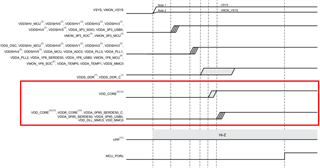
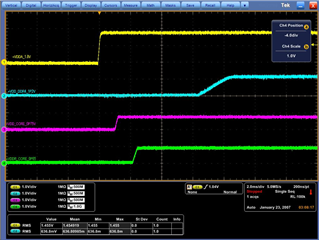
    What is the core voltage on your board, 0.75v or 0.85v?

  • Hi Bin,

    Core voltage is 0.75V.

    SERDES0 is 0.85V

    Power Sequence meets spec, is this the root cause of the problem?

    Taylor

  • Hi Taylor,

    Thanks for the information. No, this is not a problem.

    The kernel commit b67e830d38fa9335d92 (adding UART_RX_TIMEOUT_QUIRK and its handling) is to workaround the Errata i2310. However, as we found out, the implementation has a bug which could cause RX data loss which you are seeing.

    After discussed this with our sw dev team, the solution would be to revert commit b67e830d38fa9335d92, then implement the workaround described in i2310 - reading IIR register instead of RX FIFO. But until the implementation is added into the SDK, you could just revert commit b67e830d38fa9335d92 in your current software release. The i2310 issue is very difficult to reproduce, so far it was only observed with a few AM64x samples running with CORE voltage 0.80v, but not with 0.75v. 

  • Hi Sean:

    May you confirm if we can close this issue?

    BR Rio

  • Hi Bin 

    Can you confirm that the "CORE voltage 0.8V", and the pin name is VDD_CORE or VDDR_CORE?

    Thanks

    Taylor

  • Hi Taylor,

    Sorry, I meant VDD_CORE, not VDDR_CORE.

  • Hi Bin, 

    Thanks, our project VDD_CORE is 0.75V and VDDR_CORE is 0.85V, which means we are safe.

    By the way, we also need you provide a final solution.

    Taylor

  • Hi Talyor,

    Until the workaround which is described in the Errara i2310 is implemented (likely available in SDK9.1), the current solution is using the kernel patch I posted above on June 27, which removes UART_RX_TIMEOUT_QUIRK flag. You have tested it.