This thread has been locked.

If you have a related question, please click the "Ask a related question" button in the top right corner. The newly created question will be automatically linked to this question.

SK-AM62: upload relevent

Part Number: SK-AM62
Other Parts Discussed in Thread: UNIFLASH

Hi 

Priveos doubts and clear the link:

https://e2e.ti.com/support/processors-group/processors/f/processors-forum/1257463/sk-am62-how-to-enable-gpio-pins/4772412?tisearch=e2e-sitesearch&keymatch=%20user%3A545048#4772412

TI AM62x working on LED blink and all example program working in debug mode perfect no issue but power cable remove to insert the os only boot. But not blink led again I upload LED blink program working in debug mode perfect. How to store permanent my program in SK-AM62x Sitara board tell mee.

Thanks Regards,

Veerapandiyan V

  • Hello Veerapandiyan,

    Can you please tell me how you are loading code in debug mode, either from CCS or Linux?

    Typically, when you load the application from CCS, it won't write an application on external memories but will directly write an application on RAM memories.

    Can you please confirm you want to run GPIO on either the R5F, A53, or M4F cores?

    Regards,

    S.Anil.

  • Hi Anil,

    I upload one video link upload instruction i follow this video method

    1.M4F_1 Working Fine

    drive.google.com/.../view

    2.A53_0 Not Working showing error

    3.R5F_0 Not Working showing error

    How to upload progrmme u tell me. how to run progrmme permanently.

    Thanks Regards,

    V Veerapandiyan

  • Hello Veerapandiyan,

    I am in training, and you may get a reply by EOD.

    Regards,

    S.Anil.

  • Hello Veerapandiyan,

    I have looked at your video and noticed that you are trying to load M4F binaries on all cores.

    This is not valid since when you load the.out file, it has information about where code can be stored, either in the M4F memory or the DDR memory, which is defined in the linker command file.

    So, you are trying to load the M4F bin file on the A53 and R5F cores, and the R5F and A53 core memory spaces are different as compared to M4F memory. Hence, CCS does not allow it.

    Now, you have to do the steps below.

    Debugging and Loading R5F Applications from CCS:

    R5F core is used for application and DM core. As a result, the DM core is already running in the bootloader of AM62X devices.

    Now, when you want to run and debug an example of an R5F application, instead of loading the program, you have to load symbols from CCS.

    And clearly explained steps on how to debug and run R5F code from CCS.

    https://software-dl.ti.com/mcu-plus-sdk/esd/AM62X/latest/exports/docs/api_guide_am62x/DEVELOP_AND_DEBUG_DMR5.html

    Before loading binaries of R5F core from CCS make sure that you have to load example which you are going to debug and Run .

    Example : 

    You want to debug and run the GPIO LED blink example in the below path.

    C:\ti\mcu_plus_sdk_am62x_09_00_00_19\examples\drivers\gpio\gpio_led_blink\am62x-sk\r5fss0-0_freertos

    Step 1: Take the above example and compile

    Step 2: You will get the app image from the debug folder.

    Step 3: Please update the cfg file based on your boot mode and transfer the R5F example app image instead of the default app image presented in the config files.

    Path: C:timcu_plus_sdk_am62x_09_00_00_19toolsbootsbl_prebuiltam62x-sk

    Step 4: Please check the below steps to flash app images on the external memory.

     https://software-dl.ti.com/mcu-plus-sdk/esd/AM62X/latest/exports/docs/api_guide_am62x/GETTING_STARTED_FLASH.html

    Debugging and Loading A53 Applications :

    Currently, there are no RTOS examples running on A53.

    For that, you have to install the processor SDK for the A53 core.

    Please try to follow the Processor SDK documentation on how to run examples on A53 cores.

    https://www.ti.com/tool/PROCESSOR-SDK-AM62X

    Regards,

    S.Anil.

  • Hi Anil,

    I am getting error below and i attached video link also:

    drive.google.com/.../view

    MAIN_Cortex_R5_0_0: GEL Output: Running from R5
    MAIN_Cortex_R5_0_0: GEL Output:

    DDR not initialized with R5 connect.

    Go to menu Scripts --> AM62 DDR Initialization -> AM62_DDR_Initialization_ECC_Disabled to initialize DDR.

    ====

    MAIN_Cortex_R5_0_0: GEL Output:
    MAIN_Cortex_R5_0_0: GEL Output: DDR programming has already been attempted.
    MAIN_Cortex_R5_0_0: GEL Output: DDR Initialization GEL script is being skipped...
    MAIN_Cortex_R5_0_0: GEL Output: Either DDR is already successfully initialized or the board needs to be power cycled.
    MAIN_Cortex_R5_0_0: GEL Output: Only one DDR initialization should be attempted for each power cycle
    MAIN_Cortex_R5_0_0: GEL Output: 

    how to solve this error.

    Thanks Regards

    Veerapandiyan V.

  • Hello Veerapandiyan,

    After connecting to the debugger, you are again trying to run gel scripts to initialize DDR, and this step is not needed.

    Already, this is done by the bootloader.

    Directly, you can load symbols from CCS instead of loading a program.

    Please follow the steps below.

    May I ask what applications you are using for AM62X devices?

    Like in automotive, industrial, or other use cases.

    Example : 

    You want to debug and run the GPIO LED blink example in the below path.

    C:\ti\mcu_plus_sdk_am62x_09_00_00_19\examples\drivers\gpio\gpio_led_blink\am62x-sk\r5fss0-0_freertos

    Step 1: Take the above example and compile

    Step 2: You will get the app image from the debug folder.

    Step 3: Please update the cfg file based on your boot mode and transfer the R5F example app image instead of the default app image presented in the config files.

    Path: C:timcu_plus_sdk_am62x_09_00_00_19toolsbootsbl_prebuiltam62x-sk

    Step 4: Please check the below steps to flash app images on the external memory.

     https://software-dl.ti.com/mcu-plus-sdk/esd/AM62X/latest/exports/docs/api_guide_am62x/GETTING_STARTED_FLASH.html

    Regards,

    S.Anil.

  • Hi Anil,

     I do not understand. please you send  one video for helpful.

    Thanks Regards,

    Veerapandiyan V.

  • Hi Anil,

     I solved the gel script error.

    1. First i connect R5 core

    2. Second Connet TIFS core. solved the gel script problem

    Load symbols i try coming some error i attached video link:

    drive.google.com/.../view

    This Error:

    MAIN_Cortex_R5_0_0: Trouble Setting Breakpoint with the Action "Process CIO" at 0x9dc253a8: (Error -1066 @ 0x9DC253A8) Unable to set/clear requested breakpoint. Verify that the breakpoint address is in valid memory. (Emulation package 9.12.0.00150)
    MAIN_Cortex_R5_0_0: Trouble Removing Breakpoint with the Action "Process CIO" at 0x9dc253a8: (Error -2044 @ 0x9DC253A8) Internal error: Requested breakpoint does not exist. Restart the application. If error persists, please report the error. (Emulation package 9.12.0.00150)
    MAIN_Cortex_R5_0_0: Trouble Setting Breakpoint with the Action "Process CIO" at 0x9dc253a8: (Error -1066 @ 0x9DC253A8) Unable to set/clear requested breakpoint. Verify that the breakpoint address is in valid memory. (Emulation package 9.12.0.00150)
    MAIN_Cortex_R5_0_0: Breakpoint Manager: Retrying with a AET breakpoint

    Thanks Regards,

    Veerapandiyan V.

  • Hello Veerapandiyan,

    Can you please confirm which boot mode you are using?

    Either SD card, OSPI, or any boot mode?

    Regards,

    S.Anil.

  • Hi Anil.

    I use SD card boot Mode

    Thanks Regards,

    Veerapandiyan V

  • Hello Veerapandiyan,

    Please allow me one or two days to get back to you.

    Regards,

    S.Anil.

  • Hi Sunil,

    Ok.

    Thanks Regards,

    V.Veerapandiyan

  • Hello Veerapandiyan,

    May I know why you are using SD boot mode? You can use SBL_OSPI boot mode as well.

    Are you using AM62X in automotive or industrial applications?

    It would be extremely helpful if you could share the above information.

    Regards,

    S.Anil.

  • Hi Anil,

     Not solve issue.

     yes i use real time scooter cluster project.

    Thanks Regards,

    V Veerapandiyan.

  • Hello Veerapandiyan,

    Thanks for the project details.

    You have to follow below steps to flash R5F application on the external memory .

    1. Compile your R5F Application.

    2. Power OFF the SK and switch the SK boot mode to UART BOOT MODE.

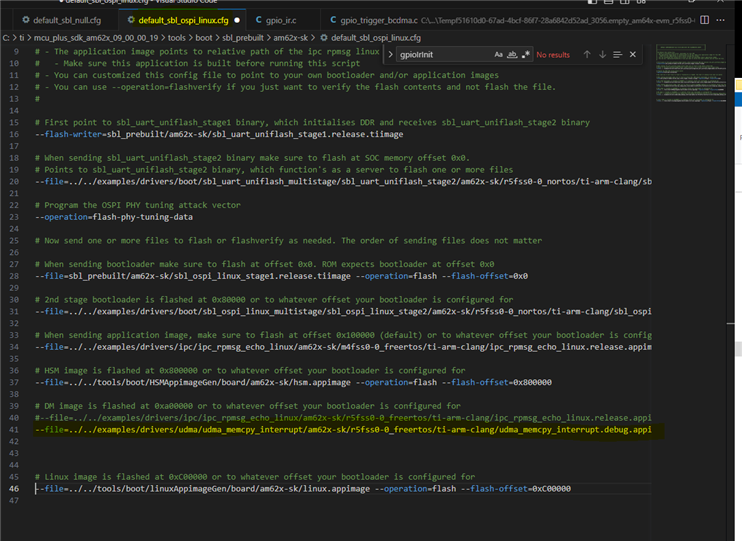
    3. Give your R5F application app image path in yellow marked area.

    In the marked yellow position, I have given my example app image file; here you should give your R5F app image path.

    Path: C:\ti\mcu_plus_sdk_am62x_09_00_00_19\tools\boot\sbl_prebuilt\am62x-sk

    4.  Power ON the EVM and open a command prompt and run the below command to flash the Application into the External Memory.

    python uart_uniflash.py -p COM8 --cfg=sbl_prebuilt/am62x-sk/ default_sbl_ospi_linux.cfg

    Here COM<x> is the port name of the identified UART port in Windows.

     After all the flashing is done, you will see success message in command prompt window.

    5. Power OFF the EVM and switch the EVM boot mode to OSPI mode as shown below.

    Note : The above procedure is explained for the OSPI bootloader, but loading app images on an SD card is a different procedure, and that information can be get from Linux experts. Since you are exploring the device now, try to use the above procedure, and later you can switch to an SD card.

    If you are facing any file missing error throwing in flashing time, you have to compile them. Make sure that you have compile all projects in the cfg file.

    Please use this link for more details.

    https://software-dl.ti.com/mcu-plus-sdk/esd/AM62X/latest/exports/docs/api_guide_am62x/GETTING_STARTED_FLASH.html

    Regards,

    S.Anil.

  • Hi Anil,

    1.This SD card boot mode to i change OSPI mode it's working fine M4F .appimage working startup.

    2.R5F .appimage not working startup.

    3.SD card boot mode Not working.

    how to solve this issue 2nd point.

    Best Regards,

    Veerapandiyan V

  • Hi Anil,

    1.This SD card boot mode to i change OSPI mode it's working fine M4F .appimage working startup.

    2.R5F .appimage not working startup.

    3.SD card boot mode Not working.

    how to solve this issue 2nd point.

    Best Regards,

    Veerapandiyan V

  • 2.R5F .appimage not working startup.

    Hello veerapandiyan,

    Based on the above comments, I understand that the R5F app image is not working in OSPI boot mode.

    Can you please confirm in the 3rd point image that you have updated any applications for the R5F or the default app image you are sending ?

    3. Give your R5F application app image path in yellow marked area.

    One more question: as mentioned above, debugging R5F code is different as compared to M4F. and you should follow the steps below.

    Please look at the documents and comments below to debug the R5F code.

    I have looked at your video and noticed that you are trying to load M4F binaries on all cores.

    This is not valid since when you load the.out file, it has information about where code can be stored, either in the M4F memory or the DDR memory, which is defined in the linker command file.

    So, you are trying to load the M4F bin file on the A53 and R5F cores, and the R5F and A53 core memory spaces are different as compared to M4F memory. Hence, CCS does not allow it.

    Now, you have to do the steps below.

    Debugging and Loading R5F Applications from CCS:

    R5F core is used for application and DM core. As a result, the DM core is already running in the bootloader of AM62X devices.

    Now, when you want to run and debug an example of an R5F application, instead of loading the program, you have to load symbols from CCS.

    And clearly explained steps on how to debug and run R5F code from CCS.

    https://software-dl.ti.com/mcu-plus-sdk/esd/AM62X/latest/exports/docs/api_guide_am62x/DEVELOP_AND_DEBUG_DMR5.html

    Before loading binaries of R5F core from CCS make sure that you have to load example which you are going to debug and Run .

    Example : 

    You want to debug and run the GPIO LED blink example in the below path.

    C:\ti\mcu_plus_sdk_am62x_09_00_00_19\examples\drivers\gpio\gpio_led_blink\am62x-sk\r5fss0-0_freertos

    Step 1: Take the above example and compile

    Step 2: You will get the app image from the debug folder.

    Step 3: Please update the cfg file based on your boot mode and transfer the R5F example app image instead of the default app image presented in the config files.

    Path: C:timcu_plus_sdk_am62x_09_00_00_19toolsbootsbl_prebuiltam62x-sk

    Step 4: Please check the below steps to flash app images on the external memory.

     https://software-dl.ti.com/mcu-plus-sdk/esd/AM62X/latest/exports/docs/api_guide_am62x/GETTING_STARTED_FLASH.html

    Debugging and Loading A53 Applications :

    Currently, there are no RTOS examples running on A53.

    For that, you have to install the processor SDK for the A53 core.

    Please try to follow the Processor SDK documentation on how to run examples on A53 cores.

    https://www.ti.com/tool/PROCESSOR-SDK-AM62X

    Regards,

    S.Anil