This thread has been locked.

If you have a related question, please click the "Ask a related question" button in the top right corner. The newly created question will be automatically linked to this question.

SIngle cam application ISX016 Cam

Other Parts Discussed in Thread: DS90UB964-Q1EVM, ALP

Hi TI

I am bringing up the camera (ISX016)with Deserializer DS90UB964-Q1EVM.

I'm able to see that my sensor is initialised and started.But there is no streaming as well as FPS is coming as 0.

Please find the application logs for your reference.

/cfs-file/__key/communityserver-discussions-components-files/791/new_5F00_cam_5F00_52.txt

The dump is coming as pinkish :

/resized-image/__size/320x240/__key/communityserver-discussions-components-files/791/Screenshot-from-2024_2D00_02_2D00_14-14_2D00_05_2D00_40.png

Camera Resolution : 1280x960

Is there anything that I'm missing?

How can i resolve this issue?

Also for Deserialiser config for  0x5D register address ,can you confirm if we pass 7 or 8 Bit I2C slave address of sensor.

Note :Using psdk ti-processor-sdk-rtos-j721e-evm-08_02_00_05

Regards

Sithara Tresa Chacko

  • Hello,

    Thank you for reaching out. Based on the application log it appears that you are using a 913 serializer is this correct? The log also states a few failed register writes, which may mean that initialization is not being completed fully. Would you be able to provide the register configuration that is being used for the 913 and 964 in your system? How did you determine that FPS is currently 0? What is the expected FPS and data type of the camera?

    To configure register 0x5D, load the 7 bit address into bits 7:1. Note that bit 0 is reserved, so the address value will need to be left shifted by 1 bit to ensure it is loaded in the proper bits. For example an address of 0x50 should be loaded as register 0x5D = 0xA0. This way 0x5D[7:1] = 0x50 and 0x5D[0] = 0x0.

    Regards,
    Darrah

  • Hi Darrah

    Thank You for the reply.

    Yes,I'm using 913 serializer. Please find the config used in the below txt file.

    /cfs-file/__key/communityserver-discussions-components-files/791/3858.config.txt

    How did you determine that FPS is currently 0?What is the expected FPS and data type of the camera?

    I used the interactive user option'p' and it was showing 0 fps.Expected fps is 30 and data format is UYVY.

    Thanks for the reply on 0x5D.

    Sithara Tresa Chacko

  • Sithara,

    Our team is current out of office due to the US public holiday and will resume operations on 2/20. Thank you for your patience during this time 

    Best Regards,

    Casey

  • Hello,

    Thank you for your patience during the holiday. Based on the register settings, the 964 is currently being programmed to operate in 8-bit mode using the lower 8 bits being received on the 913 with the frame valid signal being low during the duration of the video frame. Is this the correct configuration for your system? Could you provide a register dump of the 913? I'd like to check if there are any errors being logged from the camera.

  • Hi Darrah

    Thank You.Yes the 8 bit mode configuration is correct .

    Please  find the register dump for 913:

    /cfs-file/__key/communityserver-discussions-components-files/791/2084.register_5F00_dump.txt

    Sithara Tresa Chacko

  • Hello,

    Thanks for the register dump. There aren't any CRC errors logged so the back channel is functioning properly between the 913 and 964. All other registers look as expected as well. Would you be able to provide a register dump for the 964? The 964 registers may be able to offer a little more insight into the system. 

  • Hello,

    I took a look at the register dump and the deserializer does appear to be receiving data (registers 0x73-0x76). There is a buffer error logged in register 0x4E which could indicate that the bandwidth of the device is being surpassed. Is there a 913 on all four ports of the 964 or is only one port being used? It appears that this register dump was for port 3. Also I see that CSI output is not enabled currently, to enable CSI output set register 0x33[0] = 1.

  • HI

    Apologies for the confusion.I had connected other cameras also on other three ports.Also my register dump was not correct.So kindly ignore the old dumps.
    Please find the correct deserialiser dumps .This time i have connected only one camera in RIN0.

    /cfs-file/__key/communityserver-discussions-components-files/791/ti_5F00_shared_5F00_deseriliseer.txt

    Also i have set CSIRX_LANE_BAND_SPEED_800_TO_880_MBPS in IssSensor_CreateParams during this experiment.

    Looks like the data is not received.

    Regards

    Sithara Tresa Chacko

  • Hello,

    No worries. There are no errors logged in the correct register dump, but there also does not appear to be any data being received by the 964 either (0x73-0x76 = 0x0). Are there any registers on the camera that could be read to verify that output is enabled properly and active data is being transmitted? In the application log shared in the first post, there are some failed register writes flagged, if these register writes are necessary for proper operation the camera may not be outputting data as expected.

    When cameras were on the other three ports, was RIN0 still showing no data (0 fps)? If the other cameras are working, the issue may be specific to RIN0 or the camera on RIN0. Is the final application intended to have multiple cameras or only the single camera on RIN0?

    Is "CSIRX_LANE_BAND_SPEED_800_TO_880_MBPS" a configuration within the SDK? The Jacinto team actually creates and supports the SDK programs so I am not familiar with all the scripts and settings, but I am able to offer support on the FPD-Link devices themselves.

  • Hi Darrah

    Are there any registers on the camera that could be read to verify that output is enabled properly and active data is being transmitted?

    I m not much familiar with it.I will check on it.

    When cameras were on the other three ports, was RIN0 still showing no data (0 fps)? If the other cameras are working, the issue may be specific to RIN0 or the camera on RIN0. Is the final application intended to have multiple cameras or only the single camera on RIN0?

    Yes.Actually the cameras connected at other ports were not the exact cameras.Final application is 4 camera app.

    Is "CSIRX_LANE_BAND_SPEED_800_TO_880_MBPS" a configuration within the SDK?

    Yes.

    Also is there any other way to  debug using some tools like ALP or something?

    Sithara Tresa Chacko

  • Hello,

    If possible, it would be helpful to verify the camera has been enabled properly and is transmitting data. Another test that may provide some insight would be initializing the camera that is currently reporting 0fps on a different port. This will help identify if the issue is port dependent or travels with that specific camera board.

    ALP does offer some tools and features that can aide with debugging. Within the ALP environment registers can be configured and read back directly using either the registers or scripting tab. Within the 964 ALP profile there is also a tab specifically for the pattern generator. The pattern generator can also be programmed via registers, but the tab can be useful for changing parameters and generating the correct register values to be written. When enabled the pattern generator will create and transmit a test pattern that essentially takes the place of the data which would normally be sent by the camera. This can test the connection between the 964 and the processor. If the processor is able to detect the data sent from the 964 pattern generator successfully, it indicates that the issue is further up the system than the 964 - processor connection point.

  • Hi Darrah

    Thankyou for the reply.

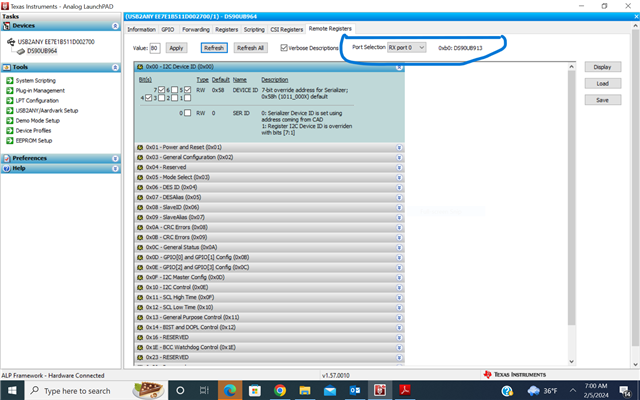
    While checking with ALP i have observed as shared in the below image. The partner information is not showing in the information tab. Is that okay?


    Sithara Tresa Chacko

  • Hello,

    That is strange, are all other features of ALP working as expected? It looks like access to the 913 registers is available. Can you try running the ALP Profile Update, available here, and see if that makes a difference? As long as you are still able to read and write registers, the information tab not populating this info should not be a problem. Listing the partner device info is not crucial to other functions.

  • Hi Darrah 

    Thankyou for the update on alp profile. I'm not able to see the partner information still.

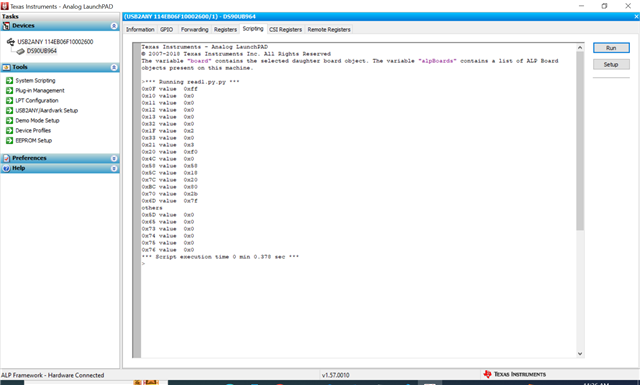
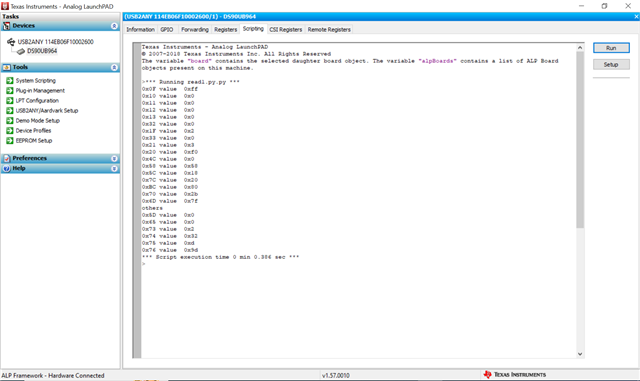
    Also as a part of debugging ,I just tried to read the register address with my cameras(without writing any reg values using the script). Used the below script to read the reg values in scripting tab.

    /cfs-file/__key/communityserver-discussions-components-files/791/readpythonfile.txt

    Camera1:Has been already bring up with sdk.(Also an ISX016 SONY Camera but not the same as Camera 2)

    Camera2:The same camera we are discussing in the this thread which from logs initializes and also starts but no streaming.

    Please find the register values read in both cases.

    CAMERA 1

    CAMERA 2

    The register values(0x73-0x76)values are present for CAMERA2 which is not streaming and no values for working CAMERA 1.

    Can this observation be used for further debugging

    Thankyou

    Sithara Tresa Chacko

  • Hello,

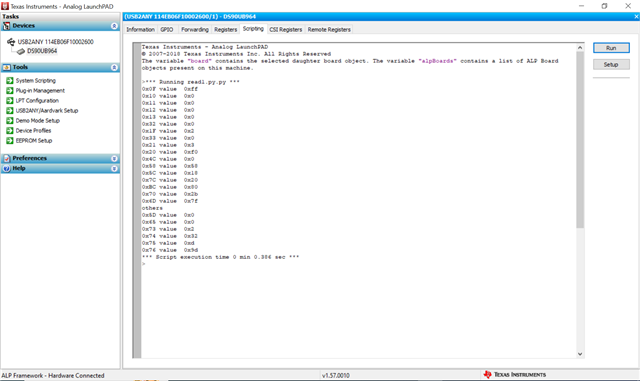
    The images and register reads look the same for both cameras. Was the same picture uploaded for both cameras perhaps? When you say "without writing any reg values using the script", do you mean the initialization script has not been run on the cameras, or do you mean after initialization the attached script is ran, which only contains reads?

  • Hi Darrah

    Apologies for the confusion . I have pasted the image incorrectly

    Camera1

    /resized-image/__size/640x480/__key/communityserver-discussions-components-files/791/2577.justread.PNG

    Camera 2

    /resized-image/__size/640x480/__key/communityserver-discussions-components-files/791/justread1.PNG

    I have tried to get this values before running the initialization script.

    Could you help me resolve my confusion?

    1.If  we are setting the same register configuration in the imaging folder. what exactly is the need of alp software scripting ?Is ALP used for debugging?

    2.Does the  run of  initialization script helps in setting any configuration permanently?

    3.Also if the i2c value provided to 0x5D is incorrect, will the sensor initialize or start?

    Sithara Tresa Chacko

  • Hello,

    This new image shows some data is being received. Without the initialization script, the sensor won't be programmed so it will be difficult to determine anything from the registers as the sensor will not be active. Additional details to answer your questions are listed below:

    1. You can think of the ALP scripting as an additional option for reading/writing registers. In general ALP is useful for debugging or system bring ups as it offers a GUI interface that many people find more straightforward than an entirely software based approach with scripts. However, if you are comfortable running the system configuration using a different method than ALP, that is okay as well.
    2. Any registers that are programmed in the 964 or 933 will remain set at the value defined in the initialization script. The only exception to this is read only registers, status registers, or self-clearing bits. An example of this would be the reset register, a device reset is issued by setting the reset bit to 1, but after the reset is complete this bit will automatically return to 0 for normal operation. However, from a configuration point of view, yes the configuration specific registers will remain permanently set until overwritten or reset. I can't speak to the behavior of the camera, but the registers will likely behave similarly.
    3. If the I2C address in 0x5D is incorrect then the I2C transactions will be directed to an incorrect address. In this case the sensor will likely not receive any of the register configurations since the transactions would be addressed to a different device. If any of these writes are crucial for operation, then the sensor will likely not start properly.
  • Hi Darrah

    Thankyou for the detailed explanation

    {0x70,0x1e, 0x10}, /*Assign RX0 data to VC-ID0 and Data Type YUV422 10bit*/
    {0x6d,0x7f, 0x10}, /*Configure RAW 10bit mode*/

    For 8 bit are we setting it as RAW_10 itself?How to determine the value of this register?

    Thanks &Regards

    Sithara Tresa Chacko

  • Hello,

    The device will be operating in RAW10 mode, but the mode of the device is not entirely the same as the data type being used. When operating in RAW10 mode this means that 10 bits of data are being transmitted. When operating in RAW10 mode it is possible to process only 8-bit data, this is controlled using register 0x7C. Depending on the chosen configuration, 2 bits will not be used by the 964 effectively going from 10-bit to 8-bit.

    Register 0x70 controls the virtual channel and data type being used when the 964 is operating in RAW10 mode. The data does not have to be the RAW10 data type, just a data type that uses the same packing structure. The data type is determined by the data code entered into the register, these data codes are set by the MIPI CSI standard. For example, RAW 10 is 0x2B and RAW8 is 0x2A.

  • Hi Darrah

    Thankyou .

    I was experimenting with changing the values of {0x6d} in deserialiser.

    Earlier when the value was set to 0x7f (0x6d,0x7f,0x10},the application was dumping pinkish output and the fps was 0.

    Now when i tried setting 0x6d to 0x77{0x6d,0x7f,0x10} even though the dumped frames is pinkish the fps is showing as 30.

    Does this helps in getting some idea how to resolve the  bring up.

    Application log:

    /cfs-file/__key/communityserver-discussions-components-files/791/77-_2800_1_2900_.txt

    Thanks &Regards

    Sithara Tresa Chacko

  • Hello,

    The difference between setting 0x6D = 0x7F and 0x6D = 0x77 is the bit 3 setting. When bit 3 is set high the first video line will be discarded if the FV to LV setup time is not met. So in your set up discarding the first line is resulting in 0 fps second. Since the line is discarded, this could potentially impact how the fps is calculated by the processor due to the missing frames. 

    If the pinkish output is also related to a timing issue, the FV to LV timing can be updated in register 0xBC. The polarity of the FV signal can also be controlled using register 0x7C. You may need to review the details of the camera to determine what the proper configuration of the data signal is.

  • HI Darrah

    Thanks for the input.I tried changing the value of 0x7c to e0 {07c,0xe0,0x10 } and set back{0x6d,0x7f,0x10}

    Display was like this:/resized-image/__size/320x240/__key/communityserver-discussions-components-files/791/Screenshot-from-2024_2D00_03_2D00_22-18_2D00_26_2D00_50.png

    The upper portion of the display was showing changes( even though the output is not proper )as i move the cameras but the lower portion was pink.

    I will confirm the proper configuration in the meanwhile if u get any ideas on why this situation arise,please guide.

    Regards

    Sithara Tresa Chacko

  • Hello,

    Can you try setting register 0x7C = 0xE4? This will enable auto detect of the signal polarity. The polarity and other configuration details can be configured manually once they are confirmed.