This thread has been locked.

If you have a related question, please click the "Ask a related question" button in the top right corner. The newly created question will be automatically linked to this question.

AM6422: EtherNet/IP Conformance Test Questions

Part Number: AM6422

Tool/software:

Hi Pourya Eskandari,

looking again at your logs, it seems that I/O configuration is wrong. Please make sure that for connection1 the Transfer format is set to "Modeless Format".

We have setting  the connection1 same format  as your suggested but we are getting same errors again, so i have attached  .stc file please check it once and  give the suggestion to resolve the issues.

Regards,

Roopa T

  • Hii Support team,

    Please any update on the above query.. 

    Regards

    Roopa T

  • Hi Roopa,

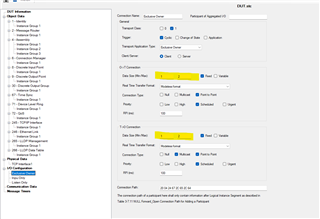
    I see in your SOC files the payload length under exclusive owner is set wrongly. For both Target and Originator, the data size must be 2 bytes.
    https://e2e.ti.com/cfs-file/__key/communityserver-discussions-components-files/791/DUT.stc.soc

    Regards
    Pourya

  • Hi Pourya Eskandari,

    I see in your SOC files the payload length under exclusive owner is set wrongly. For both Target and Originator, the data size must be 2 bytes.

    I have setting the data size of 2 bytes for both Target and Originator and tested but we are getting same errors..

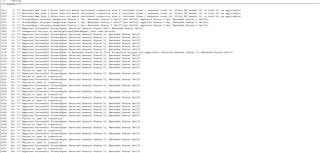
    PFA logs,

    Regards

    Roopa T

    CT20_DUT.STC-7-22.log

  • Hi Roopa,

    you mentioned earlier that you are using the default example for Discrete I/O device, correct?
    I don't understand then why the SOC file was modified? Have you done modification inside the App also?
    Please try a clean setup, in which you use the original SOC file and App without modifications, it should of course work. (you of course need to set the MAC address correctly inside the SOC file, but other than than no changes should be made)
    However, if you are trying to test your own App with your modifications, then mismatch can easily occur between your App and SOC, if that's the case, please explain in more details your changes/ use case.

    Best regards
    Pourya

  • Hi Pourya Eskandari,

    you mentioned earlier that you are using the default example for Discrete I/O device, correct?
    I don't understand then why the SOC file was modified? Have you done modification inside the App also?
    Please try a clean setup, in which you use the original SOC file and App without modifications, it should of course work. (you of course need to set the MAC address correctly inside the SOC file, but other than than no changes should be made)
    However, if you are trying to test your own App with your modifications, then mismatch can easily occur between your App and SOC, if that's the case, please explain in more details your changes/ use case.

    Yes, we are using Discrete I/O device.

    We are only modified soc file not inside the App and why we are modified the soc file is to map the Discrete I/O device EDS to soc file. 

    I have tried on original SOC file without any modification except MAC Address, but we are getting errors.

    PFA the attached logs and errors.

    Please could you help to resolve.

    Regards

    Roopa T

    CT20_Example_Device.31-07-2024.log1185.Errors.docx

  • Hi Roopa,

    Pourya is currently out-of-office.

    Here is the reply from our other EIP Stack expert:

    From your last error log CT20_Example_Device.31-07-2024.log I understand following:

    1. SOC file is correct and is related to Discrete IO device running on AM64x-EVM board.
    2. Device which is tested is with high probability not a TI device because it returns different Vendor ID, Product Name, …

    Means which device are you testing with our SOC file?

    Regards
    Archit Dev

  • Hi Archit Dev,

    1. Original soc file received from ODVA and example code is discrete IO device from TI 
    2. We are testing on AM64x-EVM board.

    Regards,

    Roopa T

  • Hi Roopa,

    Original soc file received from ODVA

    I am not sure if the original SOC file that you received from ODVA have the required configuration set for our example. Can you give the test another try but use the SOC file from the following path :

    "{INDUSTRIAL_COMMS_SDK_INSTALL_PATH}\examples\industrial_comms\ethernetip_adapter_demo\device_profiles\discrete_io_device\soc".

    Also, can you please provide a Wireshark Capture ran for the duration of the test?

    Regards
    Archit Dev

  • Hi Archit Dev,

    I have taken file from same path what your suggested and its working now, only minor error will pop up so could help to resolve those errors.

    PFA the log and error file

    Regards,

    Roopa T


    CT20_am64x-evm_tiEtherNetIP_freeRTOS-01-08-2024.log

  • Hi Roopa,

    In order for me to analyze these failures, can you provide me with the following:

    1. Wireshark Capture ran for the duration of the test

    2. The SOC file that you are using to run your tests?

    Regards
    Archit Dev

  • Hi Archit Dev,

    PFA the Document.

    Wireshark results and SOC file.zip

    Regards,

    Roopa T

  • Hi Roopa,

    1. Regarding the following error:

    "*** Attribute data value incorrect attr 3 = 1, Expected 0"

    This is part of the known issues for the Discrete IO Example. Please refer to the following link for more details: https://software-dl.ti.com/processor-industrial-sw/esd/ind_comms_sdk/am64x/09_02_00_08/docs/am64x/ethernetip_adapter/eip_releasenotes.html#eip_known_issues 

    2. Regarding the other errors, it seems to me that your test PC is not properly configured to run the CT20 Tests. Can you please try to set up your test PC correctly based on ODVA's suggestions and run the tests again?

    You can refer to the "Configuration" Section of the "CIP Conformance Test Suite CT20 User Manual" that comes with the test tool installation. 

    If you still face issues, please share the CT20 log along with the SOC file used and the Wireshark Capture ran for the duration of the test.

    Regards
    Archit Dev

  • Hi Archit Dev,

    Regarding the other errors, it seems to me that your test PC is not properly configured to run the CT20 Tests. Can you please try to set up your test PC correctly based on ODVA's suggestions and run the tests again?

    I have done the configuration based on the ODVA suggestions and then executed the conformance test but still we are facing same issues.

    PFA the CT logs, wire shark results and SOC file.

    wire shark results, CT logs and SOC file.zip

    Regards

    Roopa T

  • Hi Roopa,

    The SOC file that you attached in the ZIP file seems to be a different one from the one used for the test. This is because I see that the MAC Address configured in the SOC file is  : "F4:84:4C:F9:59:52", however in the Wireshark capture, I see this to be "1c:63:49:1a:d1:da".

    Can you please re-check the SOC file shared in the zip file?

    Also, can you please confirm the following points?
    1. Does your PC NIC has 2 IP addresses configured?
    2. Is the LLDP support disabled on the test PC network interface?

    Regards
    Archit Dev
  • Hi Archit Dev,

    Sorry, i have shared wrong SOC file please ignore that one and consider the below attached SOC file.

    1. Does your PC NIC has 2 IP addresses configured?
         Yes, we have configured 2 IP Address (192.168.1.4 and 192.168.1.5)
    2. Is the LLDP support disabled on the test PC network interface?
        Yes, LLDP support is disabled on the test PC.
    Regards
    Roopa T
  • Hi Roopa,

    Thank you for the confirmation.

    Please allow us some time to go through the logs. Your patience is really appreciated.

    Regards
    Archit Dev

  • Hi Archit Dev,

    Thank you for the response.

    Please perform the necessary action to resolve this issue. 

    Regards

    Roopa T

  • Hi Roopa,

    In the SOC file that you shared, the "LLDPSrcMAC" is configured incorrectly. This is why, you are getting the errors like "Received LLDP frame from unexpected Source MAC Address". Kindly change the "LLDPSrcMAC" to the MAC address of your DUT.

    Secondly, can you confirm if you have the application flashed onto the device?

    Moreover, it looks like the Test Suite is unable to change the IP Address of the DUT. Is your DUT configured in Static IP Mode? Or are you using a DHCP/BOOTP Server for your testing?

    Also, can you try this process manually - change the IP Address of the DUT via the TCP/IP Object Test and Perform a Type 0 reset of the device. Can you observe what the IP address is at this point?

    Regards
    Archit Dev

  • Hi Archit Dev,

    In the SOC file that you shared, the "LLDPSrcMAC" is configured incorrectly. This is why, you are getting the errors like "Received LLDP frame from unexpected Source MAC Address". Kindly change the "LLDPSrcMAC" to the MAC address of your DUT.

    After updating the LLDP Src MAC Address, the previous errors have been resolved, but new errors are now popping up. Could you please investigate and respond?

    Secondly, can you confirm if you have the application flashed onto the device?

    Yes, we have flashed (EtherNet IP Discrete IO Device).

    Moreover, it looks like the Test Suite is unable to change the IP Address of the DUT. Is your DUT configured in Static IP Mode? Or are you using a DHCP/BOOTP Server for your testing?

    Our DUT configured to DHCP Mode.

    Also, can you try this process manually - change the IP Address of the DUT via the TCP/IP Object Test and Perform a Type 0 reset of the device. Can you observe what the IP address is at this point?

    Could you help us to do the Type 0 reset of the device because we don't know how to do that.

    PFA the log and wire shark results for above query.

    Regards

    Roopa T

    STS and WIRE SHARK RESULTS.zip

  • Hi Roopa,

    I have some questions for you.

    Our DUT configured to DHCP Mode.

    1. How are you running the DHCP Server? Is it via the ODVA CT20 tool?

    Could you help us to do the Type 0 reset of the device because we don't know how to do that.

    2. You can use EthernetIP Explicit Messaging for this. The Identity Object (Class 1) in EIP supports the reset service. You need to send a message to this object requesting a Type 0 reset.

    You can use the ODVA CT20 Messaging Tools to do this.

    Regards
    Archit Dev

  • Hi Archit Dev,

    1. How are you running the DHCP Server? Is it via the ODVA CT20 tool?

    Yes, via ODVA CT20 tool.

    2. You can use EthernetIP Explicit Messaging for this. The Identity Object (Class 1) in EIP supports the reset service. You need to send a message to this object requesting a Type 0 reset.

    Okay, I will do that.

    Thank You

    Regards

    Roopa T

  • Hi Roopa,

    Let me know when you have an update.

    Regards
    Archit Dev

  • Hi Archit Dev,

    1. How are you running the DHCP Server? Is it via the ODVA CT20 tool?

    Sorry for miscommunication because our DUT configured to Static IP mode

    2. You can use EthernetIP Explicit Messaging for this. The Identity Object (Class 1) in EIP supports the reset service. You need to send a message to this object requesting a Type 0 reset.

    I have tried, but  i am still getting the same error. please find the attached document, which shows how i configured it.

    Regards

    Roopa T

  • Hi Roopa,

    Can you do the following:

    1. Flash the EIP application on the DUT.
    2. Confirm the IP Address once you power cycle the DUT and application is loaded 
    3. Use the EIP Messaging tools to set a different IP Address (you can use TCP/IP Object (0xF5), Instance 1, Attribute 5 (Interface config.) for this).
    4. Use the EIP Messaging tools to trigger a type 0 reset (Identity Object (0x01), Reset Type 0 Service).
    5. Confirm the IP Address after the reset.

    Can you please share BOTH Wireshark logs and UART logs for each step mentioned?

    You can also use the Hilscher Tool for EIP from the following link : https://hilscher.atlassian.net/wiki/spaces/EIS2V7/pages/123994946/Hilscher+EtherNet+IP+Tool .
    NOTE: This is not a TI Software. Please read the terms and conditions as required.

    Regards
    Archit Dev

  • Hi Archit Dev,

    1. Flash the EIP application on the DUT.

    Yes, we have done.

    2. Confirm the IP Address once you power cycle the DUT and application is loaded 

    DUT IP Address is 192.168.1.10

    3. Use the EIP Messaging tools to set a different IP Address (you can use TCP/IP Object (0xF5), Instance 1, Attribute 5 (Interface config.) for this).

    I have tried this, but no IP changes are being detected.

    4. Use the EIP Messaging tools to trigger a type 0 reset (Identity Object (0x01), Reset Type 0 Service).

    Here, we are not seeing a Type 0 reset checkbox, which means we are unable to trigger it.

    5. Confirm the IP Address after the reset.

    I have tried this, but no IP changes are being detected.

    PFA the wire shark results and UART Logs.

    Regards

    Roopa T

    Wire shark and UART Logs-8 Aug.zip

  • Hi Roopa,

    It looks like you're doing a Get Attribute Singe command. Instead of this, you should perform a "Set_Attribute_Single" command instead in order to set the new IP Address.


    Regards
    Archit Dev

  • Hi Archit Dev,

    I have tried in the "Set_Attribute_Single" command but we are getting the same results.

    Could you please check and clarify.

    Thank You

    Regards

    Roopa T

  • Hi Roopa,

    Do you get a success response from the DUT ? Can you check the Wireshark logs?

    You can also try using the EIP Tool from Hilscher, it has a GUI that tells you the return status from the DUT.

    Regards
    Archit Dev

  • Hi Archit Dev,

    Do you get a success response from the DUT ? Can you check the Wireshark logs?

    Yes, I am getting success response and it's working now.

    But

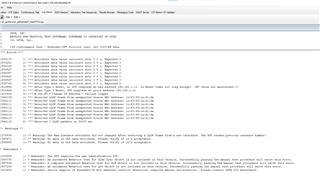
    We got 3 warning by Assembly object test and LLDP Data table test and needs to help figuring out the reason to cause the test warnings.

    Logs and Wire shark files.zip

    Regards

    Roopa T

  • Hi Roopa,

    I checked with our EIP Stack expert and here are the findings:

    1. The first 2 warnings in the Assembly object Attribute 3 and are expected.

    2. The last warning is expected from our older stack. We have a fix for it on our side and are testing it. 

    Regards
    Archit Dev