A related question is a question created from another question. When the related question is created, it will be automatically linked to the original question.
If you have a related question, please click the "Ask a related question" button in the top right corner. The newly created question will be automatically linked to this question.
6.3.5.4 VTM Thermal Alert Reset Reset Overview The VTM module outputs an alert signal (THERM_MAXTEMP_OUTRANGE_ALERT), when the device temperature goes beyond a maximum threshold. This reset signal creates a MCU domain warm reset. VTM alert will be active as long as the error condition (Device Temperature > Maximum Temperature Threshold) is still TRUE. When the error goes away, VTM alert will be de-asserted and device will come out of warm reset. Note This signal, when asserted HIGH, will cause a device warm reset similar to MCU_RESETz.
Please refer to above E2E FAQ for configuring thermal shutdown based on configuration of on die temp sensors. When you hit the temperature threshold, it will cause a thermal shutdown.
We have AM62xx-EVM board. We are doing some basic test on SK-EVM. Observed some temperature on that. If read temp from command it is showing like below cat /sys/class/thermal/thermal_zone0/temp 49042 if we convert that it is in 49.0C^ if I am right. This 49.0 C is abnormal which is we think. It should come at lease between 20 C to 30 C in normal temperature. Can we know what should output can come in normal if we test. Anything we need to change from themal side ? we are expecting below 30 C degree. Let me know if missed anything or need to check other way?
I think that temperature is accurate and well within range. As a reminder, that zone reads SOC temperatures. Even if it is idling, the operating temperature of the device should be close to 50C. If you wish to decrease the idle operating temperature, then look into adding a heatsink. To put this into perspective, most of the embedded boards I've used have tended to idle around 45-50C with a room temperature of 23C. The Raspberry Pi 3 for example idles around 48C, so this is not an abnormality. For more information about device thermal zones please see Section 6.2.5.5 Voltage and Thermal Manager (VTM) in the Technical Reference Manual for AM62x
AM62A7 VTM thermal shutdown based on which temperature zone temperature?
The VTM also has a hardware alert signal that indicates a fault when any of the below sensors detect the device is nearing the maximum temperature allowed.
In AM62A, the numbering is: Temp Sensor 0: c7x Temp Sensor 1: A53 Temp Sensor 2: DDR controller
This alert can be used to reset the device or part of the device to reduce the temperature. This alert is not a standard interrupt and so it does not include the usual set, clear, and enable features. It does include an overall enable MMR bit
Table 14-7450. MMR_VBUSP_CFG2, MMR_VBUSP_CFG2 Registers, Base
VTM_MISC_CTRL
along with enables per sensor
14.2.2.2 VTM Registers Table 14-7449. MMR_VBUSP_CFG1, MMR_VBUSP_CFG1 Registers, Base
The VTM module outputs an alert signal (THERM_MAXTEMP_OUTRANGE_ALERT), when the device temperature goes beyond a maximum threshold. This reset signal creates a MCU domain warm reset. VTM alert will be active as long as the error condition (Device Temperature > Maximum Temperature Threshold) is still TRUE. When the error goes away, VTM alert will be de-asserted and device will come out of warm reset. Note This signal, when asserted HIGH, will cause a device warm reset similar to MCU_RESETz.
Please refer to above E2E FAQ for configuring thermal shutdown based on configuration of on die temp sensors. When you hit the temperature threshold, it will cause a thermal shutdown. You will need configure the PMIC to restart the device as a system level solution as there is no restart mechanism associated with thermal shutdown that can be initiated after the thermal shutdown takes place.
We set the SDK to primary market for each SoC.. Am62x is industrial. AM62a and am62p were launched for auto only and then industrial parts added.. We havent done any formal kick off or support for industrial package. Expecting customers to modify the values offline
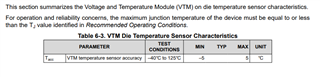
We now are specifying an accuracy of +/- 5C
There are no additional margins included in the max operating temp to account for the sensor error. The shutdown point needs to be set 5C degrees lower than the max operating temp to ensure the limit is not exceeded.
When trip point is set to 120C there is a likely chance that the SOC trips at 115C which is 10C less that the specified.
Customer should be considering this variation in their design.
Its important to note that the Linux SDK is designed to enable functionality of the TI EVMs rather than being optimized for power or temperature. Because of this, running the default SDK will tend to increase the loading of the application cores and DDR which leads to higher temperatures.
Before continuing, please note that improving thermal performance can be at a cost of performance of the SoC.
Some general optimization suggestions to improve thermal:
Disabled unused peripherals in the device tree so Linux will not initialize them
Reduce the A53 Core speed with CPUFreq
Disable any other unused clocks and devices with K3Conf tool
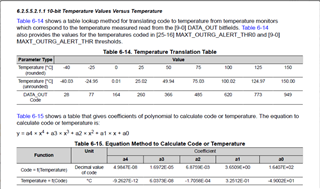
The problem was i didn't set the system separators correctly. Once i set “.” for decimal and “,” for thousands, the results changed for different temperatures.


 a.
a.