Part Number: SK-AM64B
Other Parts Discussed in Thread: UNIFLASH, SYSCONFIG
Tool/software:
Hello TI team!
I am learning about memory placement (memory change) using SK-AM64B.
Environment:
CCS12.7.0
AM64x MCU+ SDK 09.02.01
SK-AM64B
Using the empty project, the HelloWorld string output was successful.
Before running the HelloWorld test, clear FlashMemory.
Clear FlashMemory => r5f 0-1 Hello World string output OK
Clear FlashMemory => r5f 1-0 Hello World string output OK
Clear FlashMemory => r5f 1-1 Hello World string output OK
The memory allocation for the empty project is preconfigured (example.syscfg).
HelloWord test was easy.
The enet_cpsw_loopback application failed.
Clear FlashMemory => r5f 0-1 enet_cpsw_loopback NG
I have tested changing the memory allocation for the enet_cpsw_loopback application, but it terminates abnormally.
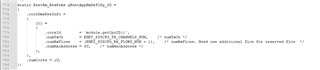
I have changed the example.syscfg of the enet_cpsw_loopback application but it seems to be wrong.
How do I change the memory placement in MSRAM?
I have created a project as follows:
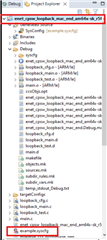
1.Import empty_am64x-sk_r5fss0-0_freertos_ti-arm-clang
2.Copy example.syscfg
Copied from: {SDK installation folder}\examples\networking\enet_loopback\enet_cpsw_loopback\am64x-sk\r5fss0-0_freertos\example.syscfg
Copy to: My project folder
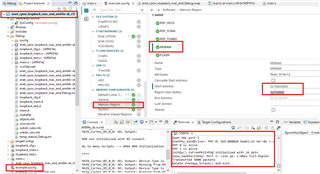
3.Modify example.syscfg
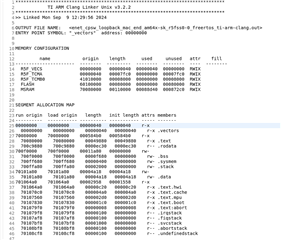
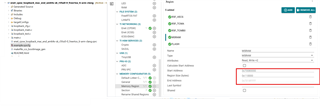
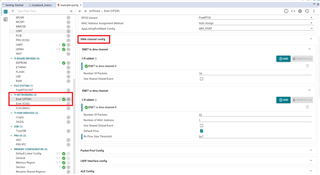
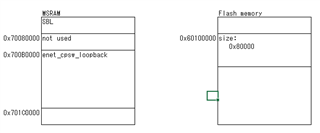
Memory Configurator > Memory Region > MSRAM
start address 0x70080000 => 0x700C0000
region size 0x110000
4.Copy the enet_cpsw_loopback application source files from the SDK installation folder
loopback_cfg.c
loopback_main.c
loopback_test.c
loopback_common.h
loopback_cfg.h
Copied from: {SDK installation folder}\examples\networking\enet_loopback\enet_cpsw_loopback
Copy to: My project folder
5.Modified CCS project settings (added include path, etc.)
6.Clear FlashMemory => r5f 0-1 cores only
UART LOG:
Starting OSPI Bootloader ...
DMSC Firmware Version 9.2.8--v09.02.08 (Kool Koala)
DMSC Firmware revision 0x9
DMSC ABI revision 3.1
423278:20240805.1703[64B][SBL-OSPI] 0=parseMultiCoreAppImage()
[BOOTLOADER_PROFILE] Boot Media : NOR SPI FLASH
KPI_DATA: [BOOTLOADER_PROFILE] Boot Media Clock : 166.667 MHz
KPI_DATA: [BOOTLOADER_PROFILE] Boot Image Size : 0 KB
[BOOTLOADER_PROFILE] Cores present :
r5f0-0
KPI_DATA: [BOOTLOADER PROFILE] SYSFW init : 13675us
KPI_DATA: [BOOTLOADER PROFILE] System_init : 395673us
KPI_DATA: [BOOTLOADER PROFILE] Drivers_open : 323us
KPI_DATA: [BOOTLOADER PROFILE] Board_driversOpen : 39013us
KPI_DATA: [BOOTLOADER PROFILE] Sciclient Get Version : 9989us
KPI_DATA: [BOOTLOADER PROFILE] CPU Load : 10581us
KPI_DATA: [BOOTLOADER_PROFILE] SBL Total Time Taken : 469260us
Image loading done, switching to application ...
0: Internal MAC loopback
1: External PHY loopback
Enter option: 0
=============================
Enet Loopback: Iteration 1
=============================
CPSW_3G Test
Enabling clocks!
EnetAppUtils_reduceCoreMacAllocation: Reduced Mac Address Allocation for CoreId:2 From 4 To 2
Mdio_open: MDIO Manual_Mode enabled
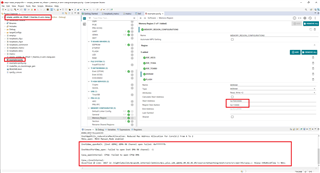
EnetUdma_openRxCh: [Enet UDMA] UDMA RX Channel open failed: 0xfffffffb
EnetHostPortDma_open: Failed to open Enet DMA RX channel: -1
Cpsw_openInternal: CPSW: Failed to open CPSW DMA
Assertion @ Line: 1027 in /nightlybuilds/mcupsdk_internal/jenkins/mcu_plus_sdk_am64x_09_02_01_05/source/networking/enet/core/src/per/V1/cpsw.c: hCpsw->hRxRsvdFlow != NULL
Regards,
Yoshiki Koide