This thread has been locked.

If you have a related question, please click the "Ask a related question" button in the top right corner. The newly created question will be automatically linked to this question.

SK-AM64B: Backup Boot Mode Ethernet not Working

Part Number: AM6442
Other Parts Discussed in Thread: SK-AM64B

Tool/software:

Hi!

(primary) Ethernet boot into Linux (BOOTP, DHCP, NFS) is working on AM64x SK board.

When changing boot switches as documented in AM64x SK EVM User's Guide (Figure 4-10) to primary boot mode SD Card and backup boot mode Eternet, the backup boot mode does nothing.

SD card boot works. When I remove SD card, nothing happens. Wireshark show there is no BOOTP pakage on the line.

Changing the boot switches to eMMC (which is our target configuration) doesN't work either.

How can I make backup boot over Ethernet working?

  • Hello Joachim, 

    (primary) Ethernet boot into Linux (BOOTP, DHCP, NFS) is working on AM64x SK board

    Can you share exactly what the bootswitch settings you used to test primary Ethernet boot? I'm specifically looking at if you had enable or disabled the "link info" bootswitch.

    SD card boot works. When I remove SD card, nothing happens. Wireshark show there is no BOOTP pakage on the line.

    As I mentioned in the other thread https://e2e.ti.com/support/processors-group/processors/f/processors-forum/1420145/sk-am64b-cannot-boot-via-ethernet-as-backup-boot-mode we are trying to find more information on how the ROM code handles Ethernet as secondary boot mode. I will respond with an update on that end once I receive more information.

    Changing the boot switches to eMMC (which is our target configuration) doesN't work either.

    You mentioned ultimately using eMMC as primary bootmode (indicated in the other thread), have you flashed any files into eMMC when you tested it (specifically the u-boot binaries and linux kernel image, dtb, filesystem if you are using planning on using Linux)?

    -Daolin

  • Hello Daolin,

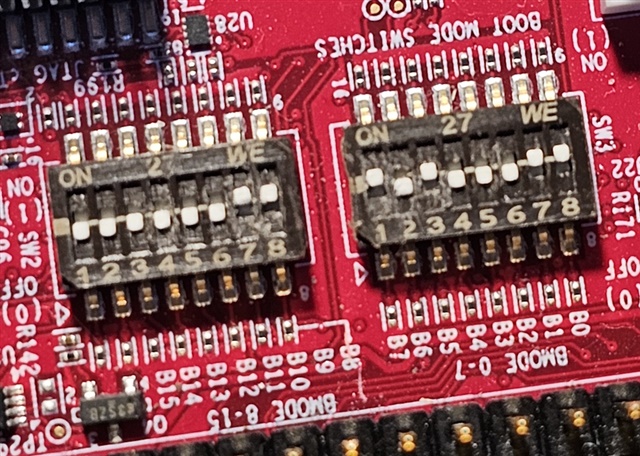
    the boot switches for primary Ethernet boot where these:

    I didn't flash any files into eMMC when testing Ethernet boot. I would like to be able to try this. But the SK board does not have eMMC und the EVM can't boot from Ethernet.

    What I tried was setting the boot switches on the SK board to eMMC (primary) and Ethernet (secondary) in the hope that without a existing eMMC the primary boot would fail and the secondary boot mode would start.

  • Hi Joachim,

    the boot switches for primary Ethernet boot where these:

    Thanks for sharing this information. Another question, for Ethernet configured as primary boot, if you set bootswitch bit 7 to 0, does booting via Ethernet work for you? 

    -Daolin

  • Hi Daolin,

    for reasons beyond my understandig the SK Users Guide in table 4-11 doesn't document the switch settings needed, so we used try and error to figure these out. Im glad it's 8 combinations, only. The setting shown was the only one that worked.

    So: when setting bit 7 to 0 it stops working.

    Joachim

  • Hello Joachim,

    for reasons beyond my understandig the SK Users Guide in table 4-11 doesn't document the switch settings needed, so we used try and error to figure these out. Im glad it's 8 combinations, only. The setting shown was the only one that worked.

    I admit, Table 4-11 in the SK User's guide is confusing as it doesn't document what each of those bits mean. The place to check what each of those bits mean is in the AM64x TRM. You can see a snippet of the configuration for Ethernet boot in the screenshot below (Table 5-20 in the TRM).

    I want to also make you aware that Ethernet boot (even if it's used as backup boot) is not reliable for production purposes because of the MDIO Interface corruption errata i2329. You mentioned that the use for Ethernet as backup boot is to be able to program the eMMC, is this intended for a production use case or purely for development purposes?

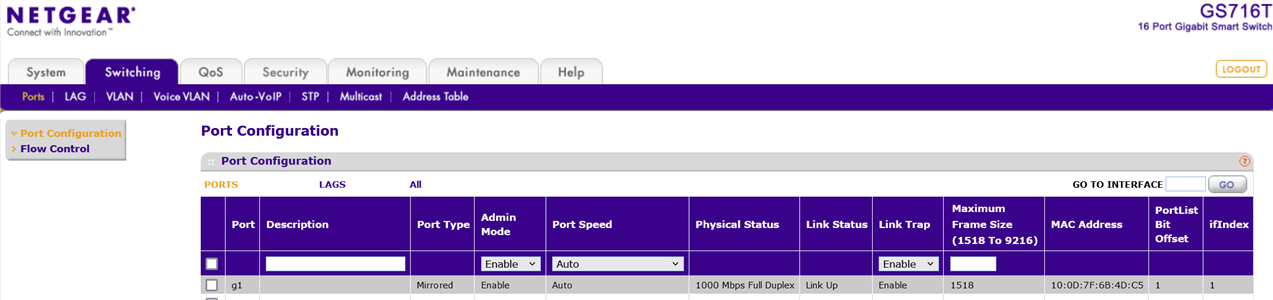
    What is the link speed of the Ethernet connection between your SK-AM64B and your host PC? Is it 1Gbps, 100Mbps, or 10Mbps?

    The reason why I ask for this I have reason to believe that by default when bit 7 is 0, it is in a mode that the link speed and duplexity is expected to be 1Gbps and full duplex by the ROM in order to establish a link. This almost seems opposite of what is described by the TRM. 

    I think this is the case because when I tested Ethernet primary boot with bit 7 = 1 and changed the link speed to be 100Mbps or 10Mbps, the Ethernet primary boot also works. This indicates that when bit 7 = 1, MDIO PHY scan is used to establish a link rather than programmed to be specifically 1Gbps full duplex by the ROM.

    This relates to Ethernet configured as secondary boot because secondary boot does not have a configuration for the link parameter (i.e. bit 7 configuration). By default, it should be establishing a link with MDIO PHY scan, but I think it may actually be trying to establish a link through the ROM programming at 1Gbps full duplex (same behavior as if bit 7 = 0). Could it be the case that your link speed is not at 1Gbps full duplex?

    -Daolin

  • Hi Daolin,

    sorry, but it's 1 Gbps:

    Joachim

  • Thanks Joachim,

    I'm confirming with the ROM experts about the finding I explained in my previous response. I'll respond with an update when I receive some more information.

    -Daolin