This thread has been locked.

If you have a related question, please click the "Ask a related question" button in the top right corner. The newly created question will be automatically linked to this question.

TDA4VM: Infinite loop while debugging on CCS, probably due to the use of read() function on a binary file on the DSP C7x

Part Number: TDA4VM

Tool/software:

Hello TI, 

My goal is to write C++ code that allows me to load a binary file in CCS and then store those values in an array.
My array contains complex numbers, having floating real and imaginary parts. This type has been implemented within a class that I called "CGestionFichier," which is used to manage the downloading and creation of files within my project. Below, here is the code for the header file as well as the source file of this class:


/*
 * CGestionFichier.hpp
 *
 *  Created on: 15 avr. 2025
 */

#ifndef CGESTIONFICHIER_HPP_
#define CGESTIONFICHIER_HPP_

#include "CFiltreFir.hpp"
#include <iostream>
#include <fstream>
#include <string>

using namespace std;

class CGestionFichier{

public :

    /* --- Constructeur par defaut --- */
    CGestionFichier();

    /* --- Destructeur par defaut --- */
    virtual ~CGestionFichier();

    /*--- CHARGEMENT FICHIER CONTENANT DES ECHANTILLONS COMPLEXES DE x(t) --- */
    /*
    *  @p_nomFichier : nom du fichier a charger en mem
    *  @return : pointeur
    */
    CFiltreFir::SComplexe* chargerFichierEchantillonEnMemoire(const string& p_nomFichier);

    /* --- CHARGEMENT FICHIER CONTENANT DES COEFFICIENTS DU FILTRE --- */
//    float* chargerFichierCoefficientsEnMemoire(const std::string& p_nomFichier);
    // pour moi la version la plus coherent est celle renvoyant du int
    int* chargerFichierCoefficientsEnMemoire(const string& p_nomFichier);

    /* --- SAUVEGARDE DANS UN FICHIER DES ECHANTILLONS FILTRES --- */
    /*
     * @p_nomFichier nom du fichier de sauvegarde pour les eschantillons
     * @p_echantillons echantillons a sauvegarder
     * @p_nbEchantillons Nombre d echantillons a sauvegarder
     *
     */
    bool sauvegarderEchantillonsDansFichier(const string& p_nomFichier, CFiltreFir::SComplexe* p_echantillons, size_t p_nbEchantillons);

    /* --- Calcul le nbr d octets du fichier charge  --- */
//        static const unsigned int compterNombreOctets(const std::string& p_nomFichier);


private :

    /* --- Calcul le nbr d octets du fichier charge  --- */
    static const unsigned int compterNombreOctets(const string& p_nomFichier);

};


#endif /* CGESTIONFICHIER_HPP_ */
     
/*
 * CGestionFichier.cpp
 *
 *  Created on: 15 avr. 2025
 */

#include "CFiltreFir.hpp"
#include "CGestionFichier.hpp"
#include <string>
#include <fstream>
#include <iostream>
#include <ios>  //add pour corriger pb Binf

using namespace std;

/* --- Constructeur par defaut --- */
CGestionFichier::CGestionFichier(){};

/* --- Destructeur par defaut --- */
CGestionFichier::~CGestionFichier(){};

/* CALCUL DU NBR D OCTETS DU FICHIER CHARGE */
const unsigned int CGestionFichier::compterNombreOctets(const string& p_nomFichier){

    /* Chargement des donnees en memoire */
    ifstream fichierTaille(p_nomFichier, ios::binary);

    /* ECHEC D OUVERTURE DU FICHIER */
    if (!fichierTaille.is_open()) {

        cout << "Fichier introuvable." << endl;
        return 0;
    }

    /* PLACEMENT DU POINTEUR A LA FIN DU FICHIER */
    fichierTaille.seekg(0, ios::end);

    /* RECUPERATION POISTION DU POINTEUR */
    /* DONNE NBR D OCTETS */
    const unsigned int nbOctets = fichierTaille.tellg();

    /* FERMETURE DU FICHIER */
    fichierTaille.close();

    /* CAS FICHIER VIDE */
    if (nbOctets == 0) {

        cout << "Aucune donnee dans le fichier." << endl;
        return 0;
    }

    return nbOctets;
}

/*--- CHARGEMENT FICHIER CONTENANT DES ECHANTILLONS COMPLEXES DE x(t) --- */
CFiltreFir::SComplexe* CGestionFichier::chargerFichierEchantillonEnMemoire(const string& p_nomFichier){

    /* Nombre d octets du fichier p_nomFichier */
    const unsigned int nbOctets = CGestionFichier::compterNombreOctets(p_nomFichier);

    /* Allocation memoire pour stocker les data via malloc */
    CFiltreFir::SComplexe* tableauEchantillons = (CFiltreFir::SComplexe*)malloc(nbOctets * sizeof(CFiltreFir::SComplexe));

    /* Verification de l allocation */
    if (tableauEchantillons == nullptr) {

        cout << "Erreur d'allocation memoire." << endl;
        return nullptr;

    }

    /* Chargement des donnees en memoire */
    // ifstream permet de lire les lignes du fichier
    // type d'objet : std::ifstream = reprensete un flux d entree pour lire des fichiers
    // fichier : c est le nom de l objet creee pour manip le flux de lecture
    // std :: ios :: binary = permet d indiquer le mode d ouverture du fichier => ici on demande a l ouvrir le fichier en mode binaire
    // note : si mode d ouverure non precise, par defaut on ouvre le fichier en mode texte
    ifstream fichier(p_nomFichier, ios::binary);

    /* SUCCESS D OUVERTURE DU FICHIER */
    if(fichier.is_open()){

        //la fonction suivante permet de recuperer les echantillons
        //1er argument de la fonction : specifier le pointeur vers l endroit ou on souhaite stocker les data
        //2eme argument : specifie le nombre d octets a lire
//        fichier.read(reinterpret_cast<char*>(tableauEchantillons), nbOctets);    //ligne generant une Binf
        // MODIFIE
        if(fichier.read(reinterpret_cast<char*>(tableauEchantillons), nbOctets)){

            cout << "La fin du fichier n'a pas été atteinte" << endl;

        }


        /* Verification de l etat du fichier ouvert */

        /* Cas 1 : Le fichier est corrompu ou incomplet */
        if (fichier.gcount() != static_cast<std::streamsize>(nbOctets)) {

            cout << "Erreur : Fichier incomplet ou corrompu" << endl;

            free(tableauEchantillons);  //liberation de memoire allouee dynamiquement par ex via malloc, ...
            // interet d utiliser free : il est indisp de liberer mem allouee via malloc quand plus necess pour eviter des fuites mem

            return nullptr;

        }

        /* Cas 2 : Le fichier ouvert est bien complet */
        fichier.close();
        cout << "Fichier charge en memoire avec succes." << endl;

    }

    /* ECHEC D OUVERTURE DU FICHIER */
    else{

        cout << "Erreur : impossible d'ouvrir le fichier." << endl;
        free(tableauEchantillons);
        return nullptr;

    }

    return tableauEchantillons;
}

/* --- CHARGEMENT FICHIER CONTENANT DES COEFFICIENTS DU FILTRE --- */

int* CGestionFichier::chargerFichierCoefficientsEnMemoire(const string& p_nomFichier){

    /* Nombre d octets du fichier p_nomFichier */
    const unsigned int nbOctets = compterNombreOctets(p_nomFichier);

    /* Allocation memoire pour stocker les data via malloc */
//    float* tableauEchantillons = (float*)malloc(nbOctets * sizeof(float));
    // pour moi version coherente est ci dessous
    int* tableauEchantillons = (int*)malloc(nbOctets * sizeof(int));

    /* Verification de l allocation */
    if (tableauEchantillons == nullptr) {

        cout << "Erreur d'allocation memoire." << endl;
        return nullptr;
    }

    /* Chargement des donnees en memoire */
    ifstream fichier(p_nomFichier, ios::binary);

    /* SUCCESS D OUVERTURE DU FICHIER */
    if (fichier.is_open()) {

        fichier.read(reinterpret_cast<char*>(tableauEchantillons), nbOctets);

        /* Verification de l etat du fichier ouvert */

        /* Cas 1 : Le fichier est corrompu ou incomplet */
        if (fichier.gcount() != static_cast<std::streamsize>(nbOctets)) {

            cout << "Erreur : Fichier incomplet ou corrompu" << endl;
            free(tableauEchantillons);
            return nullptr;

        }

        /* Cas 2 : Le fichier ouvert est bien complet */
        fichier.close();
        cout << "Fichier charge en memoire avec succes." << endl;
    }


    else {

        /* ECHEC D OUVERTURE DU FICHIER */
        cout << "Erreur : impossible d'ouvrir le fichier." << endl;
        free(tableauEchantillons);
        return nullptr;

    }

    return tableauEchantillons;

}

/* --- SAUVEGARDE DANS UN FICHIER DES ECHANTILLONS FILTRES --- */

bool CGestionFichier::sauvegarderEchantillonsDansFichier(const string& p_nomFichier, CFiltreFir::SComplexe* p_echantillons, size_t p_nbEchantillons){

    // Permet d ouvrir un fichier et ecrire directement dans le fichier a partiri du programme au nom de fichier
    // Mode d ouverture du fichier : en mode binaire
    ofstream fichier(p_nomFichier, ios::binary);

    /* ECHEC D OUVERTURE DU FICHIER */
    if (!fichier.is_open()) {

        cout << "Erreur : impossible d'ouvrir le fichier pour ecriture." << endl;
        return false;

    }

    /* SUCCES D OUVERTURE DU FICHIER */

   /* ECRITURE DES ECHANTILLONS DANS FICHIER */
    fichier.write(reinterpret_cast<const char*>(p_echantillons), p_nbEchantillons * sizeof(CFiltreFir::SComplexe));

    /* CAS D ERREUR AU MOMENT DE L ECRITURE DANS FICHIER */
    if (!fichier) {

        cout << "Erreur lors de l'ecriture des données." << endl;
        fichier.close();
        return false;
    }

    /* CAS SUCCES D ECRITURE DANS FICHIER */
    fichier.close();
    cout << "Echantillons savegardes dans : " << p_nomFichier << endl;
    return true;
}

In my case, I only use the functions CFiltreFir::SComplexe* chargerFichierEchantillonEnMemoire(const string& p_nomFichier) and static const unsigned int compterNombreOctets(const string& p_nomFichier); given that the main function of my project is as follows:

#include "CFiltreFir.hpp"
#include "CGestionFichier.hpp"
#include <string>
#include <fstream>
#include <iostream>
#include <stdio.h> 

using namespace std;

int main(){

/* --- INIT PARAM ENTREE DU FILTRE --- */
/* Definition du nbr de symboles */
long nbSymboles = 131704;

/* CHARGEMENT DES ECHANTILLONS DE x(t)*/

// Rappel : les echantillons du signal d entree x(t) sont complexes
// Fonction realisee par la methode chargerFichierEchantillonEnMemoire de la classe CGestionFichier
/* RAPPEL FORMAT FONCTION : CFiltreFir::SComplexe* chargerFichierEchantillonEnMemoire(const std::string& p_nomFichier) */
CGestionFichier getFichier;

// Chemin d acces au fichier .bin
// Pointeur vers une cdc
string cheminSignalEnt = "T:/depots/stage_jacinto7/FiltreFIR_TROPO/pattern/signalFiltreIn.bin";

// Chargement des donnees dans le fichier getEchant
CFiltreFir::SComplexe* signalEnt = getFichier.chargerFichierEchantillonEnMemoire(cheminSignalEnt);

return 0;
}

The problem encountered with this project is as follows: when I start a debug session on the DSP C7x, I find myself in an infinite loop. If I pause this session, I consistently land in the code of trgmsg.c, more precisely

Now, if I debug step by step, I find that the problem arises from the use of the read() function (line 86 of the file CGestionFichier.cpp) in CGestionFichier::chargerFichierEchantillonEnMemoire(). As soon as I reach this line, the code enters an infinite loop.

What could this be due to? Can anyone shed light on the problem encountered?

Thank you in advance,

Mélanie


  •  Just a small correction, the complex type is defined in the header CFiltreFichier.hpp, here is the corresponding code : 

    #ifndef CFILTREFIR_HPP_
    #define CFILTREFIR_HPP_
    
    #include <stdio.h>
    #include <stdlib.h>
    #include <math.h>
    
    class CFiltreFir{
    
        public:
            /* --- Definition de la structure d un nombre complexe --- */
            // permet de definir le type des echantillons d entree et sortie du filtre
            struct SComplexe{
    
                float re;
                float im;
            };
    
            /* --- Constructeur par defaut --- */
            CFiltreFir();
    
            /* --- Destructeur par defaut --- */
            virtual ~CFiltreFir();
    };
    
    #endif /* CFILTREFIR_HPP_ */

  • Hi Mélanie,

    Is this thread related to : https://e2e.ti.com/support/processors-group/processors/f/processors-forum/1508115/tda4vm-errors-while-using-c-libraries-string-and-istream-on-ccs

    Thanks for providing the steps and code. I will try it from my side and update you within a day.

    Regards,

    Sivadeep

  • Hi SIvadeep, 

    No it is not !

    Okay, thank you for your help, 

    Regards, 

    Mélanie

  • Hi Mélanie,

    I tried running your code in bare-metal mode but encountered some issues. I have a few follow-up questions:

    1. Are you running the code in noboot or sdboot mode?

    2. Which version of CCS are you using?

    3. Which version of the PSDK are you using?

    Regards,
    Sivadeep

  • Hi again Sivadeep, 

    1. I think I'm running the code in noboot mode, but I'm not sure of that.. Where can I check that? 
    2. I'm using the 12.6.0.00008 version of CCS
    3. I'm using the psdk_rtos_auto_prebuilt_07_00_00 version of PSDK and also the sdk : ti-processor-sdk-rtos-j721e-evm-10_01_00_04

  • Okay, 

    My thought is that I'm currently running the code in noboot mode since I launch the launch.js script before debugging my code

  • Thanks for the information. Also can you please check :

    • If the memory mapping is correct for the same
    • Run the application in Host Emulation mode and check if it is working correctly.
    • Also is the memory allocation correct here "CFiltreFir::SComplexe* tableauEchantillons = (CFiltreFir::SComplexe*)malloc(nbOctets * sizeof(CFiltreFir::SComplexe));"

    I have tried your code in HE and it was working. I'm assuming there is some issue with the memory allocation above but since the build environment is different I can't comment on the same.

    Regards,

    Sivadeep

  • Hi, 
    I checked the links you gave me.
    If I understood correctly, the only way to configure either a no-boot mode or an SD boot mode is to do it manually by configuring the SW8 and SW9 switches? As a result, launching the JavaScript launch.js provided by TI doesn't allow you to configure either of the two modes?

    /*
     * Copyright (c) 2018-2019, Texas Instruments Incorporated
     * All rights reserved.
     *
     * Redistribution and use in source and binary forms, with or without
     * modification, are permitted provided that the following conditions
     * are met:
     *
     * *  Redistributions of source code must retain the above copyright
     *    notice, this list of conditions and the following disclaimer.
     *
     * *  Redistributions in binary form must reproduce the above copyright
     *    notice, this list of conditions and the following disclaimer in the
     *    documentation and/or other materials provided with the distribution.
     *
     * *  Neither the name of Texas Instruments Incorporated nor the names of
     *    its contributors may be used to endorse or promote products derived
     *    from this software without specific prior written permission.
     *
     * THIS SOFTWARE IS PROVIDED BY THE COPYRIGHT HOLDERS AND CONTRIBUTORS "AS IS"
     * AND ANY EXPRESS OR IMPLIED WARRANTIES, INCLUDING, BUT NOT LIMITED TO,
     * THE IMPLIED WARRANTIES OF MERCHANTABILITY AND FITNESS FOR A PARTICULAR
     * PURPOSE ARE DISCLAIMED. IN NO EVENT SHALL THE COPYRIGHT OWNER OR
     * CONTRIBUTORS BE LIABLE FOR ANY DIRECT, INDIRECT, INCIDENTAL, SPECIAL,
     * EXEMPLARY, OR CONSEQUENTIAL DAMAGES (INCLUDING, BUT NOT LIMITED TO,
     * PROCUREMENT OF SUBSTITUTE GOODS OR SERVICES; LOSS OF USE, DATA, OR PROFITS;
     * OR BUSINESS INTERRUPTION) HOWEVER CAUSED AND ON ANY THEORY OF LIABILITY,
     * WHETHER IN CONTRACT, STRICT LIABILITY, OR TORT (INCLUDING NEGLIGENCE OR
     * OTHERWISE) ARISING IN ANY WAY OUT OF THE USE OF THIS SOFTWARE,
     * EVEN IF ADVISED OF THE POSSIBILITY OF SUCH DAMAGE.
     */
    
    //
    //File Name: launch_j721e.js
    //Description:
    //   Launch the DMSC firmware and board configuration from R5F.
    //
    //Usage:
    //
    //From CCS Scripting console
    //  1. loadJSFile "C:\\ti\\launch_j721e.js"
    //
    //Note:
    //  1. Search for "edit this" to look at changes that need to be edited
    //     for your usage.
    //
    
    
    //<!!!!!! EDIT THIS !!!!!>
    // Set this to 1, if using 'FreeRTOS'
    isFreertos = 1;  
    // Set this to 1, if using 'SafeRTOS'
    isSafertos = 0;  
    
    //PDK path. Edit this
    pdkPath = "C:/Users/T0314534/MyApp/Packages/ti-processor-sdk-rtos-j721e-evm-10_01_00_04/pdk_jacinto_10_01_00_25";
    
    //path to board config elf
    pathSciclient = pdkPath+"/packages/ti/drv/sciclient/tools/ccsLoadDmsc/j721e/"
    ccs_init_elf_file = pathSciclient+"sciclient_ccs_init_mcu1_0_release.xer5f";
    
    // Set this to 1, to clear 'Secure Claim' Bit in CLEC register
    clearCLECSecureClaimFlag = 1;
    
    loadSciserverFlag = 1;
    if(isFreertos == 1)
    {
        //Path to FreeRTOS sciserver
        sciserver_elf_file = pathSciclient+"sciserver_testapp_freertos_mcu1_0_release.xer5f";
    }
    else if(isSafertos == 1)
    {
        //Path to SafeRTOS sciserver
        sciserver_elf_file = pathSciclient+"sciserver_testapp_safertos_mcu1_0_release.xer5f";
    }
    
    //path to sysfw bin
    sysfw_bin = pdkPath+"/packages/ti/drv/sciclient/soc/sysfw/binaries/ti-fs-firmware-j721e-gp.bin"
    
    //<!!!!!! EDIT THIS !!!!!>
    
    // Import the DSS packages into our namespace to save on typing
    importPackage(Packages.com.ti.debug.engine.scripting)
    importPackage(Packages.com.ti.ccstudio.scripting.environment)
    importPackage(Packages.java.lang);
    importPackage(Packages.java.io);
    
    function updateScriptVars()
    {
        //Open a debug session
        dsMCU1_0 = debugServer.openSession( ".*MCU_Cortex_R5_0" );
        dsDMSC_0 = debugServer.openSession( ".*DMSC_Cortex_M3_0" );
    }
    
    function printVars()
    {
        updateScriptVars();
    }
    
    function connectTargets()
    {
        /* Set timeout of 20 seconds */
        script.setScriptTimeout(200000);
        updateScriptVars();
        sysResetVar=dsDMSC_0.target.getResetType(1);
        sysResetVar.issueReset();
        print("Connecting to DMSC_Cortex_M3_0!");
        // Connect targets
        dsDMSC_0.target.connect();
        print("Fill R5F ATCM memory...");
        dsDMSC_0.memory.fill(0x61000000, 0, 0x8000, 0);
        print("Writing While(1) for R5F")
        dsDMSC_0.memory.writeWord(0, 0x61000000, 0xE59FF004); /* ldr        pc, [pc, #4] */
        dsDMSC_0.memory.writeWord(0, 0x61000004, 0x38);       /* Address 0x38 */
        dsDMSC_0.memory.writeWord(0, 0x61000038, 0xEAFFFFFE) /* b          #0x38 */
        print("Loading DMSC Firmware ... " + sysfw_bin);
        // Load the DMSC firmware
        dsDMSC_0.memory.loadRaw(0, 0x40000, sysfw_bin, 32, false);
        print("DMSC Firmware Load Done...");
        // Set Stack pointer and Program Counter
        stackPointer = dsDMSC_0.memory.readWord(0, 0x40000);
        progCounter = dsDMSC_0.memory.readWord(0, 0x40004);
        dsDMSC_0.memory.writeRegister("SP", stackPointer);
        dsDMSC_0.memory.writeRegister("PC", progCounter);
        print( "DMSC Firmware run starting now...");
        // Run the DMSC firmware
        dsDMSC_0.target.runAsynch();
        // Run the DDR Configuration
        print("Running the DDR configuration... Wait till it completes!");
        dsDMSC_0.target.halt();
        dsDMSC_0.expression.evaluate("J7ES_LPDDR4_Config_Late()");
        dsDMSC_0.target.runAsynch();
    
        print("Connecting to MCU Cortex_R5_0!");
    
        // Connect the MCU R5F
        dsMCU1_0.target.connect();
        // This is done to support other boot modes. OSPI is the most stable.
        // MMC is not always stable.
        bootMode = dsMCU1_0.memory.readWord(0, 0x43000030) & 0xF8;
        print (" WKUP Boot Mode is " + bootMode);
        mainBootMode = dsMCU1_0.memory.readWord(0, 0x100030) & 0xFF;
        print (" Main Boot Mode is " + mainBootMode);
        if ((bootMode != 0x38) || (mainBootMode != 0x11))
        {
            print("Disable MCU Timer for ROM clean up");
            dsMCU1_0.memory.writeWord(0, 0x40400010, 0x1); /* Write reset to MCU Timer 0. Left running by ROM */
            dsMCU1_0.memory.writeWord(0, 0x40F80430, 0xFFFFFFFF); /* Clear Pending Interrupts */
            dsMCU1_0.memory.writeWord(0, 0x40F80018, 0x0); /* Clear Pending Interrupts */
            // Reset the R5F to be in clean state.
            dsMCU1_0.target.reset();
            // Load the board configuration init file.
            dsMCU1_0.expression.evaluate('GEL_Load("'+ ccs_init_elf_file +'")');
            // Run Asynchronously
            dsMCU1_0.target.runAsynch();
            print ("Running Async");
            // Halt the R5F and re-run.
            dsMCU1_0.target.halt();
        }
        // Reset the R5F to be in clean state.
        dsMCU1_0.target.reset();
        print("Running the board configuration initialization from R5!");
        // Load the board configuration init file.
        dsMCU1_0.memory.loadProgram(ccs_init_elf_file);
        // Halt the R5F and re-run.
        dsMCU1_0.target.halt();
        // Run Synchronously for the executable to finish
        dsMCU1_0.target.run();
    }
    
    function disconnectTargets()
    {
        updateScriptVars();
        // Reset MCU1_0
        dsMCU1_0.target.reset();
        // Disconnect targets
        dsDMSC_0.target.disconnect();
    }
    
    function sampleDDRCheck ()
    {
        print("Running DDR Memory Checks....");
        dsMCU1_0.memory.fill (0x80000000, 0, 1024, 0xA5A5A5A5);
        ar = dsMCU1_0.memory.readWord(0, 0x80000000, 1024);
        fail = 0
        for (i = 0; i < ar.length; i++) { 
                x = ar[i]; 
                if (x != 0xA5A5A5A5)
                {
                    fail = 1;
                }
            } 
        if (fail == 1)
        {
            print ("0x80000000: DDR memory sample check failed !!");
        }
        dsMCU1_0.memory.fill (0x81000000, 0, 1024, 0x5A5A5A5A);
        ar = dsMCU1_0.memory.readWord(0, 0x81000000, 1024);
        fail = 0
        for (i = 0; i < ar.length; i++) { 
                x = ar[i]; 
                if (x != 0x5a5a5a5a)
                {
                    fail = 1;
                }
            } 
        if (fail == 1)
        {
            print ("0x81000000: DDR memory sample check failed !!");
        }
    }
    
    function loadSciserver()
    {
        updateScriptVars();
        print("######################################################################################");
        print("Loading Sciserver Application on MCU1_0. This will service RM/PM messages");
        print("If you do not want this to be loaded update the launch script to make loadSciserverFlag = 0");
        print("If you want to load and run other cores, please run the MCU1_0 core after Sciserver is loaded. ");
        print("######################################################################################");
        dsMCU1_0.expression.evaluate('GEL_Load("'+ sciserver_elf_file +'")');
    }
    
    function clearCLECSecureClaim()
    {
        dsC7X1_0 = debugServer.openSession( ".*C71X_0" );
    
        dsC7X1_0.target.connect();
    
        c7x_binary = pdkPath+"/packages/ti/drv/sciclient/tools/clearClecSecureClaim/sciclient_clear_clec_secure_claim_c7x_1_release.xe71";
    
        dsC7X1_0.memory.loadProgram(c7x_binary);
        dsC7X1_0.target.runAsynch();
    
        // Halt and re-run since the startup code image doesn't have a main function.
        dsC7X1_0.target.halt();
        dsC7X1_0.target.runAsynch();
    
        dsC7X1_0.target.disconnect();
    }
    
    function doEverything()
    {
        printVars();
        connectTargets();
        disconnectTargets();
        sampleDDRCheck ();
        if (clearCLECSecureClaimFlag == 1)
        {
            print("Clearing CLEC Secure Claim...");
            clearCLECSecureClaim();
        }
        if (loadSciserverFlag == 1)
        {
            loadSciserver();
        }
    	// Ajout ligne pour activer le fonctionnement du MCU R5F, assrant le fonctionnement des serveurs RM PM SCI 
    	//dsMCU1_0.target.runAsynch();
        print("Happy Debugging!!");
    }
    
    var ds;
    var debugServer;
    var script;
    
    // Check to see if running from within CCSv4 Scripting Console
    var withinCCS = (ds !== undefined);
    
    // Create scripting environment and get debug server if running standalone
    if (!withinCCS)
    {
        // Import the DSS packages into our namespace to save on typing
        importPackage(Packages.com.ti.debug.engine.scripting);
        importPackage(Packages.com.ti.ccstudio.scripting.environment);
        importPackage(Packages.java.lang);
    
        // Create our scripting environment object - which is the main entry point into any script and
        // the factory for creating other Scriptable ervers and Sessions
        script = ScriptingEnvironment.instance();
    
        // Get the Debug Server and start a Debug Session
        debugServer = script.getServer("DebugServer.1");
    }
    else // otherwise leverage existing scripting environment and debug server
    {
        debugServer = ds;
        script = env;
    }
    
    doEverything();
    

    For the 2nd link, I'm already debuging as mentionned on the website

    Regards, 
    Mélanie

  • Here are the information you asked for : 

    - I wrote my own memory mapping in order for my code to provide sufficient memory space according to the operations performed (like memory allocation or loading a file of a certain size). To give you more information, my input binary file has a size of 3 MB. Here is my linker code:

    /****************************************************************************/
    /*  --- ADAPTATION DU LINKER POUR CARTE JACINTO7 J721E ---                  */
    /*                                                                          */
    /*  --- MEMORY INTERFACES ---                                               */
    /*  DDR MEMORY : 4GB of LPDDR4                                             	*/
    /* 				MAPPING : mapped from 0x80000000 to 0x180000000				*/
    /*  OPSI MEMORY : 512 Mbit                                                  */
    /*  UFS MEMORY : 32GB                                                       */
    /*  2 MMC PORTS (MCC0 and MCC1) : MMC0 = connected to  16GB eMMC Flash      */
    /*                                MMC1 = interfaced with Micro SD Socket    */ 
    /*  --- THE FOLLOWING ONES ARE OPTIONAL ---                                 */   
    /*  Hyper Flash = 512 Mb flash                                              */ 
    /*  Hyper RAM   = 64 Mb DRAM                                                */
    /*                                                                          */
    /*  --- MEMORY LAYOUT OF DSP C7X ---                                        */
    /*                                                                          */
    /*  L1 CACHE :                                                              */
    /*		L1 PRORAM MEMORY CONTROLLER (PMC) : 32KB L1P MEMORY                 */
    /*		L1 DATA MEMORY CONTROLLER (DMC) :   48KB L1D MEMORY                 */
    /* 												- 32KB OF CACHE             */
    /* 												- 16KB OF SRAM              */
    /*	L2 CACHE :																*/
    /*		L2 UNIFIED MEMORY CONTROLLER (UMC) : 512KB L2 MEMORY                */
    /*												- 64KB OF CACHE 			*/
    /*												- 448KB OF SRAM             */
    /*       																    */
    /*                                                                          */
    /*                                                                          */
    /****************************************************************************/
    
    // On met les tailles de la stack et du segment de heap de 20MB ici car on manip on fichier au max de 3MB 
    -stack		0x1400000
    -heap 		0x1400000


    MEMORY
    {
        
      /*448KB of L2 SRAM */
      L2SRAM_C7x_0           (RWIX)   : org = 0x64800000, len = 0x70000
      
      /*16KB of L1 DSRAM */
      L1DSRAM_C7x_0          (RWIX)   : org = 0x64E00000, len = 0x4000
      
      /*7.78MB of MSMC */
      MSMC_C7x_0			 (RWIX)   : org = 0x70020000, len = 0x7C7FFF
      
      /*64MB of DDR */ 
      DDR_C7x_0				 (RWIX)   : org = 0xA0000000, len = 0x4000000
    												
    }


    SECTIONS
    {
    	.ss_vectors 					> DDR_C7x_0 
    	
    	/*CONTAINS BINARY CODES */
    	.text 							 > DDR_C7x_0 
    	/*ENTRY POINT FOR THE PROGRAM EXECUTION */ 
    	/*BY DEFAULT IT IS NAMMED _c_init00 FOR C7x */ 
    	/*A VOIR MAIS JE PENSE UTILE QUE POUR BOOT */ 
    	.text:_c_init00: 				 > DDR_C7x_0 
    	
    	/*CONTAINS DYNAMIC ALLOCATION/HEAP */ 
    	.sysmem   						 > DDR_C7x_0 
    	
    	/*CONTAINS GLOBAL AND STATIC VARIABLES INITIALIZED */
    	.data 							 > DDR_C7x_0
    	
    	/*CONTAINS GLOBAL AND STATIC VARIABLES UNINITIALIZED */
    	.bss 							 > DDR_C7x_0
    	
    	/*CONTAINS LOCAL VARIABLES */
    	.stack 							 > DDR_C7x_0 
    	
    	/*CONTAINS ARGC/ARGV */ 
    	.args 							 > DDR_C7x_0 
    	
    	/*COULD BE PART OF CONST */ 
    	.cinit 						     > DDR_C7x_0
    	
    	/*C++ INITIALIZATION */
    	.init_array 					 > DDR_C7x_0
    	
    	/*ADDING SECTIONS CIO AND CONST AFTER 1ST BUILDING */
    	.cio 							 > DDR_C7x_0
    	.const 							 > DDR_C7x_0
    	
    	
    }


    - About running the application in Host Emulation mode, I do not know how to do it. Could you give me some hints ? 

    - Yes, this memory allocation is correct. It's working because I've adapted the size of the heap segment to the size of the input binary file. Also, when I debuged step by step, I saw that the code wasn't encoutering errors while during this allocation. Again, the issue comes up when I tried to read the data from the input binary file

    Regards, 

    Mélanie

  • Hi,

    - About running the application in Host Emulation mode, I do not know how to do it. Could you give me some hints ?

    Could you please check the steps below to configure the Host Emulation mode:

    // Set the following path in bashrc (linux users) or as environment variable (windows users)
    export CGT7X_ROOT="ti-cgt-c7000_5.0.0.LTS" //C7x CGT path
    export C7X_HOST_EMULATION_PATH=$CGT7X_ROOT/host_emulation
    export PATH=${CGT7X_ROOT}/bin:${PATH}
    
    # Compile the source file for C7504
    g++ -c --std=c++14 -fno-strict-aliasing -O3 -I "$C7X_HOST_EMULATION_PATH/include/C7504" <file_name (.c/.cpp)> -L "$C7X_HOST_EMULATION_PATH" -lC7504-host-emulation
    
    # Link the object file
    g++ -o <executable_name> <object_file_name> -L "$C7X_HOST_EMULATION_PATH" -lC7504-host-emulation
    
    # Run the executable
    ./<executable_name>
    
    eg: To run a main.cpp file on HE(host emulator)
    g++ -c --std=c++14 -fno-strict-aliasing -O3 -I "$C7X_HOST_EMULATION_PATH/include/C7504" main.cpp -L "$C7X_HOST_EMULATION_PATH" -lC7504-host-emulation
    g++ -o main_exe main.o -L "$C7X_HOST_EMULATION_PATH" -lC7504-host-emulation
    ./main_exe
    

    Regards,
    Sivadeep.


  • Hi, 

    I first checked whether I already had a host-emulation file, and here is what I found:


    As a result, I believe I do not need to follow the configuration you provided; please let me know if I'm mistaken.
    Another question: is the use of Host Emulation mode mandatory if we want to use C++ libraries in a project?

    Regards, 

    Mélanie

  • Hi again, 

    I tried to run my application using Host Emulation mode. To do this, I included the following library in my main.cpp code: #include <c7x.h>. However, it did not work, so I don’t understand how it worked for you. I still find myself stuck in that infinite loop, and as before, if I pause the session, I consistently end up in the code of trgmsg.c, more precisely:

    Regards, 

    Mélanie

  • Hi, 

    As a result, I believe I do not need to follow the configuration you provided; please let me know if I'm mistaken.

    Are you using this in your project?

    Another question: is the use of Host Emulation mode mandatory if we want to use C++ libraries in a project

    No. It's for just emulation purpose only.


    Let me try this from my side once more. 

    Regards,
    Sivadeep

  • Hi, 

    That's what I asked you. I'm not sure I've understand how to use it in the project... From what I understood, in order to use the Host Emulation mode it's only required to inclued the <c7x.h> library inside the main code. Is that correct or I'm missing something else ? 

    Regards, 

    Mélanie

  • From what I understood, in order to use the Host Emulation mode it's only required to inclued the <c7x.h> library inside the main code.

    Yes. Correct. Assuming you have linked all the libraries. 

    Also Could you please share a binary file that I could read.

    Regards,
    Sivadeep

  • Okay, 

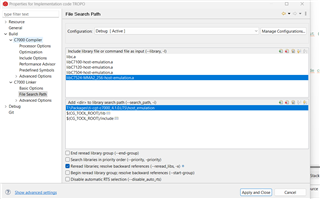
    Well, I didn't add those librairies in the File Search Path of the C7000 Linker inside the properties of my project. Also, I added the corresponding path in the Include options. Here are the changes I've done to the project : 

    However, despite adding them, I still got stuck in that same infinite loop. 
    Also, I tried adding also the .lib libraries, which I believe is unuseful. When compiling, I got that error : error #99923: Corrupt member header: 'T:/Packages/ti-cgt-c7000_4.1.0.LTS/host_emulation/C7524-MMA2_256-host-emulationd.lib'

    For the binary file, sure, here it is : 

  • I'm encountering issues sharing my code with you. Whenever I tried to add it in a code section, the site crashes every time... Do you have any idea how we could counteract this ? 

    Regards, 

    Mélanie 

  • Can you try Insert -> Image/Video/File and try to insert the file

    Regards,
    Sivadeep

  • Hi,

    I created a .bin file according to SComplexe struct you provided

    struct SComplexe{
    
        float re;
        float im;
    };

    I was able to read from the complex number from the .bin file. 

    I have attached the code for generating the binary file here. Can you please check if you can debug from the generated file .

    #include <iostream>
    #include <fstream>
    
    struct SComplexe {
        float re; 
        float im; 
    };
    
    int main() {
        // Create an array of complex numbers
        SComplexe data[3] = {
            {1.0f, 2.0f}, 
            {3.0f, 4.0f}, 
            {5.0f, 6.0f}   
        };
    
        std::ofstream outFile("complex_data.bin", std::ios::binary);
        
        if (!outFile) {
            std::cerr << "Error opening the file for writing." << std::endl;
            return 1;
        }
    
        outFile.write(reinterpret_cast<const char*>(data), sizeof(data));
        
        if (!outFile) {
            std::cerr << "Error writing data to the file." << std::endl;
            return 1;
        }
    
        std::cout << "Data written to the file successfully" << std::endl;
    
        outFile.close();
        return 0;
    }
    

    Regards,
    Sivadeep

  • Whenever I tried this method, is it written : the file or URL is not allowed to be inserted...
    Is there by any chance another way to send it to you ?

    Regards 

  • Hi Sivadeep, 

    The SComplexe struct you wrote is correct, and identical to the one I used for my project. I also debugged your code and it worked successfully
    However, I have several question : 

    - You didn't included in your source file c7x.h, so you didn't use Host Emulation mode. As a result, I don't understand why we previously tried to use it to fix the issue....
    - Also, the code you gave me doesn't represent the issue I'm currently dealing with. What I want to find out is why can I not read a binary input file in my project, which, just to remind you, results in an infinite loop whenever we reach the fread function.

    Regards, 

    Mélanie

  • Hi,

    - You didn't included in your source file c7x.h, so you didn't use Host Emulation mode. As a result, I don't understand why we previously tried to use it to fix the issue..

    I think I may have caused some misunderstanding with the Host Emulation mode. Apologies for that. If only c7x intrinsic need to be used I need to add the header. 

    Please see the attached user guide : C7000 Host Emulation v5.0.0.LTS User's Guide

    Also, the code you gave me doesn't represent the issue I'm currently dealing with. What I want to find out is why can I not read a binary input file in my project, which, just to remind you, results in an infinite loop whenever we reach the fread function.

    Yes I gave the code which can generate the binary file. I created a binary file for testing your code as no binary file was available for me. Here is the binary file I used.

    4760.binary.zip

    Here is the binary input file. I'm sorry for sharing it that way, but it's the only solution I have for the moment :

    You can copy the binary to a folder and compress and insert the zip file here.

    Regards,

    Sivadeep

  • Also attaching the modified code I used for testing in Host Emulation. I will check the same in board also. 

    #include <iostream>
    #include <fstream>
    #include <string>
    #include <fstream>
    #include <ios>  //add pour corriger pb Binf
    #include <stdio.h>
    #include <stdlib.h>
    #include <math.h>
    
    using namespace std;


    class CFiltreFir{
    
        public:
            /* --- Definition de la structure d un nombre complexe --- */
            // permet de definir le type des echantillons d entree et sortie du filtre
            struct SComplexe{
    
                float re;
                float im;
            };
    
            /* --- Constructeur par defaut --- */
            CFiltreFir();
    
            /* --- Destructeur par defaut --- */
            virtual ~CFiltreFir();
    };
     
     class CGestionFichier{
     
     public :
     
         /* --- Constructeur par defaut --- */
         CGestionFichier();
     
         /* --- Destructeur par defaut --- */
         virtual ~CGestionFichier();
     
         /*--- CHARGEMENT FICHIER CONTENANT DES ECHANTILLONS COMPLEXES DE x(t) --- */
         /*
         *  @p_nomFichier : nom du fichier a charger en mem
         *  @return : pointeur
         */
         CFiltreFir::SComplexe* chargerFichierEchantillonEnMemoire(const string& p_nomFichier);
     
         /* --- CHARGEMENT FICHIER CONTENANT DES COEFFICIENTS DU FILTRE --- */
     //    float* chargerFichierCoefficientsEnMemoire(const std::string& p_nomFichier);
         // pour moi la version la plus coherent est celle renvoyant du int
         int* chargerFichierCoefficientsEnMemoire(const string& p_nomFichier);
     
         /* --- SAUVEGARDE DANS UN FICHIER DES ECHANTILLONS FILTRES --- */
         /*
          * @p_nomFichier nom du fichier de sauvegarde pour les eschantillons
          * @p_echantillons echantillons a sauvegarder
          * @p_nbEchantillons Nombre d echantillons a sauvegarder
          *
          */
         bool sauvegarderEchantillonsDansFichier(const string& p_nomFichier, CFiltreFir::SComplexe* p_echantillons, size_t p_nbEchantillons);
     
         /* --- Calcul le nbr d octets du fichier charge  --- */
     //        static const unsigned int compterNombreOctets(const std::string& p_nomFichier);
     
     
     private :
     
         /* --- Calcul le nbr d octets du fichier charge  --- */
         static const unsigned int compterNombreOctets(const string& p_nomFichier);
     
     };


    /* --- Constructeur par defaut --- */
    CGestionFichier::CGestionFichier(){};
    
    /* --- Destructeur par defaut --- */
    CGestionFichier::~CGestionFichier(){};
    
    /* CALCUL DU NBR D OCTETS DU FICHIER CHARGE */
    const unsigned int CGestionFichier::compterNombreOctets(const string& p_nomFichier){
    
        /* Chargement des donnees en memoire */
        ifstream fichierTaille(p_nomFichier, ios::binary);
    
        /* ECHEC D OUVERTURE DU FICHIER */
        if (!fichierTaille.is_open()) {
    
            cout << "Fichier introuvable." << endl;
            return 0;
        }
    
        /* PLACEMENT DU POINTEUR A LA FIN DU FICHIER */
        fichierTaille.seekg(0, ios::end);
    
        /* RECUPERATION POISTION DU POINTEUR */
        /* DONNE NBR D OCTETS */
        const unsigned int nbOctets = fichierTaille.tellg();
    
        /* FERMETURE DU FICHIER */
        fichierTaille.close();
    
        /* CAS FICHIER VIDE */
        if (nbOctets == 0) {
    
            cout << "Aucune donnee dans le fichier." << endl;
            return 0;
        }
    
        return nbOctets;
    }
    
    /*--- CHARGEMENT FICHIER CONTENANT DES ECHANTILLONS COMPLEXES DE x(t) --- */
    CFiltreFir::SComplexe* CGestionFichier::chargerFichierEchantillonEnMemoire(const string& p_nomFichier){
    
        /* Nombre d octets du fichier p_nomFichier */
        const unsigned int nbOctets = CGestionFichier::compterNombreOctets(p_nomFichier);
    
        std::cout<<"nbOctets : "<<nbOctets<<std::endl;
    
        /* Allocation memoire pour stocker les data via malloc */
        CFiltreFir::SComplexe* tableauEchantillons = (CFiltreFir::SComplexe*)malloc(nbOctets * sizeof(CFiltreFir::SComplexe));
        //CFiltreFir::SComplexe* tableauEchantillons = (CFiltreFir::SComplexe*)malloc(nbOctets );
        //CFiltreFir::SComplexe* tableauEchantillons = (CFiltreFir::SComplexe*)malloc(nbOctets / sizeof(CFiltreFir::SComplexe));
        
        //CFiltreFir::SComplexe* tableauEchantillons = new(std::nothrow) CFiltreFir::SComplexe[nbOctets / sizeof(CFiltreFir::SComplexe)];
        /* Verification de l allocation */
        if (tableauEchantillons == nullptr) {
    
            cout << "Erreur d'allocation memoire." << endl;
            return nullptr;
    
        }
    
        /* Chargement des donnees en memoire */
        // ifstream permet de lire les lignes du fichier
        // type d'objet : std::ifstream = reprensete un flux d entree pour lire des fichiers
        // fichier : c est le nom de l objet creee pour manip le flux de lecture
        // std :: ios :: binary = permet d indiquer le mode d ouverture du fichier => ici on demande a l ouvrir le fichier en mode binaire
        // note : si mode d ouverure non precise, par defaut on ouvre le fichier en mode texte
        ifstream fichier(p_nomFichier, ios::binary);
    
        /* SUCCESS D OUVERTURE DU FICHIER */
        if(fichier.is_open()){
    
            //la fonction suivante permet de recuperer les echantillons
            //1er argument de la fonction : specifier le pointeur vers l endroit ou on souhaite stocker les data
            //2eme argument : specifie le nombre d octets a lire
    //        fichier.read(reinterpret_cast<char*>(tableauEchantillons), nbOctets);    //ligne generant une Binf
            // MODIFIE
            if(fichier.read(reinterpret_cast<char*>(tableauEchantillons), nbOctets)){
    
                
            const unsigned int  numElements=nbOctets/sizeof(CFiltreFir::SComplexe);
    
            for (unsigned int i = 0; i < numElements; ++i) {
                cout << "Complex number " << i + 1 << ": "
                     << tableauEchantillons[i].re << " + " << tableauEchantillons[i].im << "i" << endl;
            }
    
                cout << "La fin du fichier n'a pas été atteinte hola" << endl;
    
            }
    
    
            /* Verification de l etat du fichier ouvert */
    
            /* Cas 1 : Le fichier est corrompu ou incomplet */
            if (fichier.gcount() != static_cast<std::streamsize>(nbOctets)) {
    
                cout << "Erreur : Fichier incomplet ou corrompu" << endl;
    
                free(tableauEchantillons);  //liberation de memoire allouee dynamiquement par ex via malloc, ...
                // interet d utiliser free : il est indisp de liberer mem allouee via malloc quand plus necess pour eviter des fuites mem
    
                return nullptr;
    
            }
    
            /* Cas 2 : Le fichier ouvert est bien complet */
            fichier.close();
            cout << "Fichier charge en memoire avec succes." << endl;
    
        }
    
        /* ECHEC D OUVERTURE DU FICHIER */
        else{
    
            cout << "Erreur : impossible d'ouvrir le fichier." << endl;
            free(tableauEchantillons);
            return nullptr;
    
        }
    
        return tableauEchantillons;
    }
    
    /* --- CHARGEMENT FICHIER CONTENANT DES COEFFICIENTS DU FILTRE --- */
    
    int* CGestionFichier::chargerFichierCoefficientsEnMemoire(const string& p_nomFichier){
    
        /* Nombre d octets du fichier p_nomFichier */
        const unsigned int nbOctets = compterNombreOctets(p_nomFichier);
    
        /* Allocation memoire pour stocker les data via malloc */
    //    float* tableauEchantillons = (float*)malloc(nbOctets * sizeof(float));
        // pour moi version coherente est ci dessous
        int* tableauEchantillons = (int*)malloc(nbOctets * sizeof(int));
    
        /* Verification de l allocation */
        if (tableauEchantillons == nullptr) {
    
            cout << "Erreur d'allocation memoire." << endl;
            return nullptr;
        }
    
        /* Chargement des donnees en memoire */
        ifstream fichier(p_nomFichier, ios::binary);
    
        /* SUCCESS D OUVERTURE DU FICHIER */
        if (fichier.is_open()) {
    
            fichier.read(reinterpret_cast<char*>(tableauEchantillons), nbOctets);
    
            /* Verification de l etat du fichier ouvert */
    
            /* Cas 1 : Le fichier est corrompu ou incomplet */
            if (fichier.gcount() != static_cast<std::streamsize>(nbOctets)) {
    
                cout << "Erreur : Fichier incomplet ou corrompu" << endl;
                free(tableauEchantillons);
                return nullptr;
    
            }
    
            /* Cas 2 : Le fichier ouvert est bien complet */
            fichier.close();
            cout << "Fichier charge en memoire avec succes." << endl;
        }
    
    
        else {
    
            /* ECHEC D OUVERTURE DU FICHIER */
            cout << "Erreur : impossible d'ouvrir le fichier." << endl;
            free(tableauEchantillons);
            return nullptr;
    
        }
    
        return tableauEchantillons;
    
    }
    
    /* --- SAUVEGARDE DANS UN FICHIER DES ECHANTILLONS FILTRES --- */
    
    bool CGestionFichier::sauvegarderEchantillonsDansFichier(const string& p_nomFichier, CFiltreFir::SComplexe* p_echantillons, size_t p_nbEchantillons){
    
        // Permet d ouvrir un fichier et ecrire directement dans le fichier a partiri du programme au nom de fichier
        // Mode d ouverture du fichier : en mode binaire
        ofstream fichier(p_nomFichier, ios::binary);
    
        /* ECHEC D OUVERTURE DU FICHIER */
        if (!fichier.is_open()) {
    
            cout << "Erreur : impossible d'ouvrir le fichier pour ecriture." << endl;
            return false;
    
        }
    
        /* SUCCES D OUVERTURE DU FICHIER */
    
       /* ECRITURE DES ECHANTILLONS DANS FICHIER */
        fichier.write(reinterpret_cast<const char*>(p_echantillons), p_nbEchantillons * sizeof(CFiltreFir::SComplexe));
    
        /* CAS D ERREUR AU MOMENT DE L ECRITURE DANS FICHIER */
        if (!fichier) {
    
            cout << "Erreur lors de l'ecriture des données." << endl;
            fichier.close();
            return false;
        }
    
        /* CAS SUCCES D ECRITURE DANS FICHIER */
        fichier.close();
        cout << "Echantillons savegardes dans : " << p_nomFichier << endl;
        return true;
    }


    int main(){
    
        /* --- INIT PARAM ENTREE DU FILTRE --- */
        /* Definition du nbr de symboles */
        long nbSymboles = 131704;
        
        /* CHARGEMENT DES ECHANTILLONS DE x(t)*/
        
        // Rappel : les echantillons du signal d entree x(t) sont complexes
        // Fonction realisee par la methode chargerFichierEchantillonEnMemoire de la classe CGestionFichier
        /* RAPPEL FORMAT FONCTION : CFiltreFir::SComplexe* chargerFichierEchantillonEnMemoire(const std::string& p_nomFichier) */
        CGestionFichier getFichier;
        
        // Chemin d acces au fichier .bin
        // Pointeur vers une cdc
        string cheminSignalEnt = R"(complex_data.bin)";
        
        // Chargement des donnees dans le fichier getEchant
        CFiltreFir::SComplexe* signalEnt = getFichier.chargerFichierEchantillonEnMemoire(cheminSignalEnt);
        
        return 0;
    }

    I added some extra lines to print the complex number from the binary file and was able to print the values.

            if(fichier.read(reinterpret_cast<char*>(tableauEchantillons), nbOctets)){
    
                
    			const unsigned int  numElements=nbOctets/sizeof(CFiltreFir::SComplexe);
    
    			for (unsigned int i = 0; i < numElements; ++i) {
    				cout << "Complex number " << i + 1 << ": "
    					 << tableauEchantillons[i].re << " + " << tableauEchantillons[i].im << "i" << endl;
    			}
    
                cout << "La fin du fichier n'a pas été atteinte hola" << endl;
    
            }

    Regards,
    Sivadeep

  • Hi, 

    Then, I don't understand how we activate or not the Host Emulation mode inside a project ... Is it activated simply by adding all the host emulation librairies ? 

    Here is the binary inpu file :

     8032.signalFiltreIn.zip

    Regards, 

    Mélanie

  • Hi Mélanie,

    This is the code I used for testing 

    #include <iostream>
    #include <fstream>
    #include <string>
    
    using namespace std;
    
    struct SComplexe {
        float re;  // Real part
        float im;  // Imaginary part
    };
    
    // Function to count the number of bytes in the file
    const unsigned int countNumberOfBytes(const string& p_fileName) {
        // Loading the data into memory
        ifstream fileSize(p_fileName, ios::binary);
    
        // FAILURE TO OPEN THE FILE
        if (!fileSize.is_open()) {
            cout << "File not found." << endl;
            return 0;
        }
    
        // PLACING THE POINTER AT THE END OF THE FILE
        fileSize.seekg(0, ios::end);
    
        // GETTING THE POINTER POSITION
        const unsigned int numBytes = fileSize.tellg();
    
        // CLOSING THE FILE
        fileSize.close();
    
        // CASE: EMPTY FILE
        if (numBytes == 0) {
            cout << "No data in the file." << endl;
            return 0;
        }
    
        return numBytes;
    }
    
    
    SComplexe* loadFileSamplesIntoMemory(const string& p_fileName){
    
        /* Number of bytes in the file p_fileName */
        const unsigned int numBytes = countNumberOfBytes(p_fileName);
    
        std::cout<<"num Bytes : "<<numBytes<<std::endl;
        std::cout<<"Size : "<<numBytes * sizeof(SComplexe)<<std::endl;
    
    
        /* Memory allocation to store data via malloc */
        SComplexe* sampleArray = (SComplexe*)malloc(numBytes * sizeof(SComplexe));
    
        /* Checking the allocation */
        if (sampleArray == nullptr) {
    
            cout << "Memory allocation error." << endl;
            return nullptr;
    
        }
    
        ifstream file(p_fileName, ios::binary);
    
        /* SUCCESS OPENING THE FILE */
        if(file.is_open()){
    
            file.read(reinterpret_cast<char*>(sampleArray), numBytes);
    
            /* Case 1: The file is corrupted or incomplete */
            if (file.gcount() != static_cast<std::streamsize>(numBytes)) {
    
                cout << "Error: File incomplete or corrupted" << endl;
                free(sampleArray);
                return nullptr;
    
            }
    
            const unsigned int  numElements=numBytes/sizeof(SComplexe);
    
            for (unsigned int i = 0; i < numElements; ++i) {
                cout << "Complex number " << i + 1 << ": "
                     << sampleArray[i].re << " + " << sampleArray[i].im << "i" << endl;
            }
    
            /* Case 2: The file is completely opened */
            file.close();
            cout << "File loaded into memory successfully." << endl;
    
        }
    
        /* FAILURE TO OPEN THE FILE */
        else{
    
            cout << "Error: unable to open the file." << endl;
            free(sampleArray);
            return nullptr;
    
        }
    
        return sampleArray;
    }
    
    int main(){
    
        // File path for the binary file
        string sFilePath = "complex_data.bin";//complex_data//signalFiltreIn
    
       SComplexe* data = loadFileSamplesIntoMemory(sFilePath);
    
       free(data);
    
        return 0;


    }
    

    When using your binary file I'm not able to read the data but with the binary file created by me I'm able to read it, Can you please confirm from your side also?

    Yes I gave the code which can generate the binary file. I created a binary file for testing your code as no binary file was available for me. Here is the binary file I used.

    4760.binary.zip

    Please use the binary file attached from the previous reply (4760.binary.zip)

    Regards,
    Sivadeep

  • Hi Sivadeep, 

    If you don't mind me saying so, I think you should do a test with a binary file that has a size similar to mine. Yours is 24o and mine is about 1Mo, so there is clearly a significant difference in terms of size, which could possibly be the main reason of the problem. 

    Also, whenever I try to debug your code, it doesn't work. I always get the same error message : 

    C71X_0: Trouble Reading Memory Block at 0x86406a3e28845d0e on Page 0 of Length 0x8: (Error -1344 - (0:0:0)) Register or Memory request has failed due to a Transaction Error.  This may be the result of reading from a write only register, writing to a read only register, or accessing a memory location that is not assigned. No user action required. (Emulation package 12.6.0.00029) 
    C71X_0: Error: (Error -1351 - (0:0:0)) Register or Memory request has timed out.  The CPU is executing a High Priority Interrupt, this is typically due to a Double Page Fault. Choose 'Force' to force the CPU into a state that allows debug of why the HPI is active. (Emulation package 12.6.0.00029) 
    C71X_0: Trouble cleaning up after halt: Target class encountered error during OnHalt
    C71X_0: Trouble Reading Register General.PC: (Error -1351 - (0:0:0)) Register or Memory request has timed out.  The CPU is executing a High Priority Interrupt, this is typically due to a Double Page Fault. Choose 'Force' to force the CPU into a state that allows debug of why the HPI is active. (Emulation package 12.6.0.00029) 
    C71X_0: Trouble Reading Register 'General Purpose'.D15: (Error -1351 - (0:0:0)) Register or Memory request has timed out.  The CPU is executing a High Priority Interrupt, this is typically due to a Double Page Fault. Choose 'Force' to force the CPU into a state that allows debug of why the HPI is active. (Emulation package 12.6.0.00029) 
    

    Have you used the linker I wrote or yours ? 

    Regards,

    Mélanie

  • Hi Mélanie,

    If you don't mind me saying so, I think you should do a test with a binary file that has a size similar to mine. Yours is 24o and mine is about 1Mo, so there is clearly a significant difference in terms of size, which could possibly be the main reason of the problem. 

    I also think the file size is the problem which is why there is crash. Let me confirm from my side.

    I always get the same error message

    I'm also getting the same error message from the code you shared. Let me try to debug this error. I will get back to you in a day.

    Regards,
    Sivadeep

  • Hi Sivadeep, 

    Okay, thank you in advance for your answer!

    I'm not sure to understand with which code you're getting the same error message. Did you use the code from my linker script to run this code ?

    #include <iostream>
    #include <fstream>
    #include <string>
    
    using namespace std;
    
    struct SComplexe {
        float re;  // Real part
        float im;  // Imaginary part
    };
    
    // Function to count the number of bytes in the file
    const unsigned int countNumberOfBytes(const string& p_fileName) {
        // Loading the data into memory
        ifstream fileSize(p_fileName, ios::binary);
    
        // FAILURE TO OPEN THE FILE
        if (!fileSize.is_open()) {
            cout << "File not found." << endl;
            return 0;
        }
    
        // PLACING THE POINTER AT THE END OF THE FILE
        fileSize.seekg(0, ios::end);
    
        // GETTING THE POINTER POSITION
        const unsigned int numBytes = fileSize.tellg();
    
        // CLOSING THE FILE
        fileSize.close();
    
        // CASE: EMPTY FILE
        if (numBytes == 0) {
            cout << "No data in the file." << endl;
            return 0;
        }
    
        return numBytes;
    }
    
    
    SComplexe* loadFileSamplesIntoMemory(const string& p_fileName){
    
        /* Number of bytes in the file p_fileName */
        const unsigned int numBytes = countNumberOfBytes(p_fileName);
    
        std::cout<<"num Bytes : "<<numBytes<<std::endl;
        std::cout<<"Size : "<<numBytes * sizeof(SComplexe)<<std::endl;
    
    
        /* Memory allocation to store data via malloc */
        SComplexe* sampleArray = (SComplexe*)malloc(numBytes * sizeof(SComplexe));
    
        /* Checking the allocation */
        if (sampleArray == nullptr) {
    
            cout << "Memory allocation error." << endl;
            return nullptr;
    
        }
    
        ifstream file(p_fileName, ios::binary);
    
        /* SUCCESS OPENING THE FILE */
        if(file.is_open()){
    
            file.read(reinterpret_cast<char*>(sampleArray), numBytes);
    
            /* Case 1: The file is corrupted or incomplete */
            if (file.gcount() != static_cast<std::streamsize>(numBytes)) {
    
                cout << "Error: File incomplete or corrupted" << endl;
                free(sampleArray);
                return nullptr;
    
            }
    
            const unsigned int  numElements=numBytes/sizeof(SComplexe);
    
            for (unsigned int i = 0; i < numElements; ++i) {
                cout << "Complex number " << i + 1 << ": "
                     << sampleArray[i].re << " + " << sampleArray[i].im << "i" << endl;
            }
    
            /* Case 2: The file is completely opened */
            file.close();
            cout << "File loaded into memory successfully." << endl;
    
        }
    
        /* FAILURE TO OPEN THE FILE */
        else{
    
            cout << "Error: unable to open the file." << endl;
            free(sampleArray);
            return nullptr;
    
        }
    
        return sampleArray;
    }
    
    int main(){
    
        // File path for the binary file
        string sFilePath = "complex_data.bin";//complex_data//signalFiltreIn
    
       SComplexe* data = loadFileSamplesIntoMemory(sFilePath);
    
       free(data);
    
        return 0;


    }

    If so, do you get that error when you're using your linker script ? 

    Regards, 

    Mélanie

  • Hi again,

    I tried debugging your code while using the linker script provided by TI (lnk_C710.cmd), and I received the same error message. As a result, the issue is not with my linker script but rather with your code (below):

    #include <iostream>
    #include <fstream>
    #include <string>
    
    using namespace std;
    
    struct SComplexe {
        float re;  // Real part
        float im;  // Imaginary part
    };
    
    // Function to count the number of bytes in the file
    const unsigned int countNumberOfBytes(const string& p_fileName) {
        // Loading the data into memory
        ifstream fileSize(p_fileName, ios::binary);
    
        // FAILURE TO OPEN THE FILE
        if (!fileSize.is_open()) {
            cout << "File not found." << endl;
            return 0;
        }
    
        // PLACING THE POINTER AT THE END OF THE FILE
        fileSize.seekg(0, ios::end);
    
        // GETTING THE POINTER POSITION
        const unsigned int numBytes = fileSize.tellg();
    
        // CLOSING THE FILE
        fileSize.close();
    
        // CASE: EMPTY FILE
        if (numBytes == 0) {
            cout << "No data in the file." << endl;
            return 0;
        }
    
        return numBytes;
    }
    
    
    SComplexe* loadFileSamplesIntoMemory(const string& p_fileName){
    
        /* Number of bytes in the file p_fileName */
        const unsigned int numBytes = countNumberOfBytes(p_fileName);
    
        std::cout<<"num Bytes : "<<numBytes<<std::endl;
        std::cout<<"Size : "<<numBytes * sizeof(SComplexe)<<std::endl;
    
    
        /* Memory allocation to store data via malloc */
        SComplexe* sampleArray = (SComplexe*)malloc(numBytes * sizeof(SComplexe));
    
        /* Checking the allocation */
        if (sampleArray == nullptr) {
    
            cout << "Memory allocation error." << endl;
            return nullptr;
    
        }
    
        ifstream file(p_fileName, ios::binary);
    
        /* SUCCESS OPENING THE FILE */
        if(file.is_open()){
    
            file.read(reinterpret_cast<char*>(sampleArray), numBytes);
    
            /* Case 1: The file is corrupted or incomplete */
            if (file.gcount() != static_cast<std::streamsize>(numBytes)) {
    
                cout << "Error: File incomplete or corrupted" << endl;
                free(sampleArray);
                return nullptr;
    
            }
    
            const unsigned int  numElements=numBytes/sizeof(SComplexe);
    
            for (unsigned int i = 0; i < numElements; ++i) {
                cout << "Complex number " << i + 1 << ": "
                     << sampleArray[i].re << " + " << sampleArray[i].im << "i" << endl;
            }
    
            /* Case 2: The file is completely opened */
            file.close();
            cout << "File loaded into memory successfully." << endl;
    
        }
    
        /* FAILURE TO OPEN THE FILE */
        else{
    
            cout << "Error: unable to open the file." << endl;
            free(sampleArray);
            return nullptr;
    
        }
    
        return sampleArray;
    }
    
    int main(){
    
        // File path for the binary file
        string sFilePath = "complex_data.bin";//complex_data//signalFiltreIn
    
       SComplexe* data = loadFileSamplesIntoMemory(sFilePath);
    
       free(data);
    
        return 0;


    }

  • Hi,

    Thank you for the update, and sorry for the delay. I am able to reproduce the issue as well. It seems that the file size is the problem. I will check internally and get back to you in two days.

    Regards,
    Sivadeep

  • Hi,

    Apologies for the delay in getting back to you. I wanted to check if there are any updates from your side. I've encountered some errors while using the fstream library and am currently investigating them. I’ll also loop in the compiler team on this thread for further input.

    Regards,
    Sivadeep

  • Hi Sivadeep, 

    I tried to launch a debug session again, using the original input binary files (the ones I provided you). However, I keep getting stuck in an infinite loop every time, even though, upon verification, the linker file I created provides significantly more memory space than necessary for these loads.

    I then truncated my input binary files from 2MB to 1KB, and the problem disappeared. I think that beyond a certain file size, CCS is not fast enough to load the data... I also tried to reduce the JTAG frequency, but the issue remains the same... Other than that, I haven’t been able to draw any conclusions regarding the problem encountered...

    Please keep me updated if you have any news from the compiler team

    Regards, 

    Mélanie 

  • I'm sure I don't understand everything in this long thread.  Please be patient with my errors and questions.

    Note that host emulation requires using a compiler that builds for execution on your host system, and not a C7000 CPU.  For an introduction, please view the host emulation video from the C7000 video series.  That being the case, it confuses me to see you trying to build for host emulation inside of CCS.  

    With regard to using I/O operations like << and getline, please see the article Tips for using printf.  While it is focused on C functions like printf, much of it applies here.  Note how it relies on a debugger (usually CCS) to work.  Is that what you are doing?

    Thanks and regards,

    -George

  • Hi George,

    First of all, don’t worry about asking for explanations on what I’ve done so far. On the contrary, I’m pleased that you’re trying to help me.

    Just to sum up the current issue, I get stuck in an infinite loop whenever I try to read a binary file of 2 MB. More specifically, the problem arises from the use of the read() function in CGestionFichier::chargerFichierEchantillonEnMemoire(). However, if I try to do the same with a smaller binary file (like 1 KB), the issue doesn’t appear.

    Regarding the use of host emulation inside CCS, I did that because Sivadeep told me that it was the way to use it. Otherwise, I don’t know much about host emulation, so I followed his instructions. After watching the video you provided, I realize that we didn’t use the host emulation correctly.

    Despite that, I don’t understand how using host emulation to run code for C7x will solve my issue? For me, it just allows me to use intrinsics and TI vector types of C7X on a PC or Linux host system.

    Regarding the use of I/O operations, I consulted your website, and I’m indeed using the low-level Unix-style I/O functions that are considered part of the C I/O functions in the RTS (like read)

    Regards, 

    Mélanie

  • I don’t understand how using host emulation to run code for C7x will solve my issue?

    Please ignore host emulation as a possible solution.  I think Sivadeep suggested it as yet another way to see if your program has problems.  But because ...

    if I try to do the same with a smaller binary file (like 1 KB), the issue doesn’t appear.

    ... your program mostly works.

    I get stuck in an infinite loop whenever I try to read a binary file of 2 MB

    In the article Tips for using printf, please search the the sub-part titled C I/O Communication Buffer Placement.  Consider the sentence:

    This section is rather small, which means that large reads and writes may require many hits of the C$$IO$$ breakpoint to be performed.

    In your case, this buffer is 288 bytes. Thus, it takes about 7300 hits of the special C I/O breakpoint to read 2 MB.  It is outside my expertise to say how long that should take.  But I suspect it takes a long time.

    Thanks and regards,

    -George