This thread has been locked.

If you have a related question, please click the "Ask a related question" button in the top right corner. The newly created question will be automatically linked to this question.

J721S2XSOMXEVM: How to enabling USB3.0 on J721S2 EVM

Part Number: J721S2XSOMXEVM


Tool/software:

The previous thread was locked, so I am posting here as a new question.
J721S2XSOMXEVM: J721S2 / J721E USB 3.1 ports only operate at USB 2.0 speed (SDK 10.01.00.04) - Processors forum - Processors - TI E2E support forums

 On J721E I was able to resolve the USB3.0 issue successfully.

Now I need to enable USB3.0 on the J721S2 platform as well.(using Processor SDK Linux 10.01.00.04)

Issue observed:

  • When connecting with a USB3.0 cable, the device is not detected at all.

  • When connecting with a USB2.0 cable, the device is detected but only enumerates as USB2.0.

Could you please let me know what steps are required, or if there are any patches/configurations needed, for J721S2 to get USB3.0 working?

Best regards,
Liu

  • HI zemiao,

     On J721E I was able to resolve the USB3.0 issue successfully.

    Can you share the steps or patches you had applied to get it working on J721E?

    Regards

    Gokul

  • Hi Gokul,

    I actually didn’t apply any specific patches on J721E. Once I connected the board through a USB-C to USB-A hub with Power Delivery (PD) support, the devices were automatically enumerated as USB3.0.

    On J721S2, however, when using the same PD-powered hub, no device is detected at all. If I connect through a simple USB-C to USB-A adapter (which previously enumerated only as a USB2.0 hub), the device does get recognized but only as a USB2.0 device.

    I also followed the steps mentioned in the previous thread (including modifying the DTB), but still the USB3.0 device is not recognized.

    Best regards,
    Liu

  • HI Zemiao,

    Thank you for the elaborate explanation.

    Can you help me with the current patches you have applied on top of j721s2 so that I can validate them and suggest changes.

    Regards

    Gokul

  • Hi Gokul,


    The change I made was in k3-j721s2-common-proc-board.dts, where I set:

    ・dr_mode: otg -> host
    ・maximum-speed: high-speed ->super-speed

    Best regards,
    Liu

  • Hi Zemiaou,

    Applying the below patch on top of 10.01 SDK worked for me:

    https://e2e.ti.com/cfs-file/__key/communityserver-discussions-components-files/791/0001_2D00_USB3.0_5F00_J721S2.patch

    USB3.0 Logs:

    oot@j721s2-evm:~# [   18.302369] xhci-hcd xhci-hcd.19.auto: xHCI Host Controller
    [   18.307976] xhci-hcd xhci-hcd.19.auto: new USB bus registered, assigned bus number 1
    [   18.315849] xhci-hcd xhci-hcd.19.auto: hcc params 0x200073c9 hci version 0x100 quirks 0x0000002000008010
    [   18.325364] xhci-hcd xhci-hcd.19.auto: irq 783, io mem 0x06010000
    [   18.331585] xhci-hcd xhci-hcd.19.auto: xHCI Host Controller
    [   18.337155] xhci-hcd xhci-hcd.19.auto: new USB bus registered, assigned bus number 2
    [   18.344889] xhci-hcd xhci-hcd.19.auto: Host supports USB 3.0 SuperSpeed
    [   18.351988] hub 1-0:1.0: USB hub found
    [   18.355811] hub 1-0:1.0: 1 port detected
    [   18.360108] usb usb2: We don't know the algorithms for LPM for this host, disabling LPM.
    [   18.368686] hub 2-0:1.0: USB hub found
    [   18.372516] hub 2-0:1.0: 1 port detected
    [   18.467223] xhci-hcd xhci-hcd.19.auto: remove, state 1
    [   18.472388] usb usb2: USB disconnect, device number 1
    [   18.477933] xhci-hcd xhci-hcd.19.auto: USB bus 2 deregistered
    [   18.483733] xhci-hcd xhci-hcd.19.auto: remove, state 84
    [   18.488975] usb usb1: USB disconnect, device number 1
    [   18.498272] xhci-hcd xhci-hcd.19.auto: USB bus 1 deregistered
    [   18.646457] xhci-hcd xhci-hcd.19.auto: xHCI Host Controller
    [   18.652064] xhci-hcd xhci-hcd.19.auto: new USB bus registered, assigned bus number 1
    [   18.659935] xhci-hcd xhci-hcd.19.auto: hcc params 0x200073c9 hci version 0x100 quirks 0x0000002000008010
    [   18.669439] xhci-hcd xhci-hcd.19.auto: irq 783, io mem 0x06010000
    [   18.675642] xhci-hcd xhci-hcd.19.auto: xHCI Host Controller
    [   18.681209] xhci-hcd xhci-hcd.19.auto: new USB bus registered, assigned bus number 2
    [   18.688941] xhci-hcd xhci-hcd.19.auto: Host supports USB 3.0 SuperSpeed
    [   18.695992] hub 1-0:1.0: USB hub found
    [   18.699803] hub 1-0:1.0: 1 port detected
    [   18.704096] usb usb2: We don't know the algorithms for LPM for this host, disabling LPM.
    [   18.712702] hub 2-0:1.0: USB hub found
    [   18.716520] hub 2-0:1.0: 1 port detected
    [   18.811103] xhci-hcd xhci-hcd.19.auto: remove, state 1
    [   18.816263] usb usb2: USB disconnect, device number 1
    [   18.821839] xhci-hcd xhci-hcd.19.auto: USB bus 2 deregistered
    [   18.827636] xhci-hcd xhci-hcd.19.auto: remove, state 84
    [   18.832874] usb usb1: USB disconnect, device number 1
    [   18.838542] xhci-hcd xhci-hcd.19.auto: USB bus 1 deregistered
    [   18.990334] xhci-hcd xhci-hcd.19.auto: xHCI Host Controller
    [   18.995951] xhci-hcd xhci-hcd.19.auto: new USB bus registered, assigned bus number 1
    [   19.003817] xhci-hcd xhci-hcd.19.auto: hcc params 0x200073c9 hci version 0x100 quirks 0x0000002000008010
    [   19.013310] xhci-hcd xhci-hcd.19.auto: irq 783, io mem 0x06010000
    [   19.019513] xhci-hcd xhci-hcd.19.auto: xHCI Host Controller
    [   19.025080] xhci-hcd xhci-hcd.19.auto: new USB bus registered, assigned bus number 2
    [   19.032813] xhci-hcd xhci-hcd.19.auto: Host supports USB 3.0 SuperSpeed
    [   19.039852] hub 1-0:1.0: USB hub found
    [   19.043668] hub 1-0:1.0: 1 port detected
    [   19.047969] usb usb2: We don't know the algorithms for LPM for this host, disabling LPM.
    [   19.056538] hub 2-0:1.0: USB hub found
    [   19.060347] hub 2-0:1.0: 1 port detected
    [   21.017677] usb 2-1: new SuperSpeed USB device number 2 using xhci-hcd
    [   21.043908] usb-storage 2-1:1.0: USB Mass Storage device detected
    [   21.051485] scsi host0: usb-storage 2-1:1.0
    [   22.058375] scsi 0:0:0:0: Direct-Access     hp       x740w            DL17 PQ: 0 ANSI: 6
    [   22.115456] sd 0:0:0:0: [sda] 60678144 512-byte logical blocks: (31.1 GB/28.9 GiB)
    [   22.123468] sd 0:0:0:0: [sda] Write Protect is off
    [   22.128510] sd 0:0:0:0: [sda] Write cache: disabled, read cache: enabled, doesn't support DPO or FUA
    [   22.149582]  sda: sda1 sda2 sda3 sda4
    [   22.153762] sd 0:0:0:0: [sda] Attached SCSI removable disk
    [   23.668100] EXT4-fs (sda4): mounted filesystem 11d5ab69-1c7a-483b-93a1-0cd4b337b6dc r/w with ordered data mode. Quota mode: none.
    
    root@j721s2-evm:~# lsusb -t
    /:  Bus 001.Port 001: Dev 001, Class=root_hub, Driver=xhci-hcd/1p, 480M
    /:  Bus 002.Port 001: Dev 001, Class=root_hub, Driver=xhci-hcd/1p, 5000M
        |__ Port 001: Dev 002, If 0, Class=Mass Storage, Driver=usb-storage, 5000M
    root@j721s2-evm:~# 
     

    Regards

    Gokul

  • Hi Gokul,

    On J721S2, I modified the DTS that you provided.
    However, the USB controller does not probe successfully.
    During boot I see logs like:

    [   16.962916] kauditd_printk_skb: 4 callbacks suppressed
    [   16.962923] audit: type=1006 audit(1728871509.684:16): pid=1065 uid=0 subj=kernel old-auid=4294967295 auid=0 tty=(none) old-ses=4294967295 ses=3 res=1
    [   16.981642] audit: type=1300 audit(1728871509.684:16): arch=c00000b7 syscall=64 success=yes exit=1 a0=8 a1=ffffd2151e38 a2=1 a3=1 items=0 ppid=1 pid=1065 auid=0 uid=0 gid=0 euid=0 suid=0 fsuid=0 egid=0 sgid=0 fsgid=0 tty=(none) ses=3 comm="(systemd)" exe="/usr/lib/systemd/systemd-executor" subj=kernel key=(null)
    [   17.009379] audit: type=1327 audit(1728871509.684:16): proctitle="(systemd)"
    [   17.016449] audit: type=1334 audit(1728871509.704:17): prog-id=18 op=LOAD
    [   17.023334] audit: type=1300 audit(1728871509.704:17): arch=c00000b7 syscall=280 success=yes exit=8 a0=5 a1=ffffdf7777e8 a2=90 a3=0 items=0 ppid=1 pid=1065 auid=0 uid=0 gid=0 euid=0 suid=0 fsuid=0 egid=0 sgid=0 fsgid=0 tty=(none) ses=3 comm="systemd" exe="/usr/lib/systemd/systemd" subj=kernel key=(null)
    [   17.050287] audit: type=1327 audit(1728871509.704:17): proctitle="(systemd)"
    [   17.057409] audit: type=1334 audit(1728871509.732:18): prog-id=18 op=UNLOAD
    [   17.064425] audit: type=1300 audit(1728871509.732:18): arch=c00000b7 syscall=57 success=yes exit=0 a0=8 a1=1 a2=0 a3=ffff8328fc60 items=0 ppid=1 pid=1065 auid=0 uid=0 gid=0 euid=0 suid=0 fsuid=0 egid=0 sgid=0 fsgid=0 tty=(none) ses=3 comm="systemd" exe="/usr/lib/systemd/systemd" subj=kernel key=(null)
    [   17.091163] audit: type=1327 audit(1728871509.732:18): proctitle="(systemd)"
    [   17.098274] audit: type=1334 audit(1728871509.732:19): prog-id=19 op=LOAD
    root@j721s2-evm:~# [   20.350062] platform 6000000.usb: deferred probe pending
    [   20.355389] platform regulator-dp1-prw: deferred probe pending
    [   20.361217] platform fixedregulator-dp0-prw: deferred probe pending
    [   20.367485] platform a000000.dp-bridge: deferred probe pending
    [   20.373311] platform dp0-connector: deferred probe pending

    So the USB3.0 device is not detected at all.

    Could you please advise if additional changes are required on J721S2?

    Best regards,
    Liu

  • HI Zemiao,

    These are the only changes I made on top of the default 10.01 SDK and it is working fine for me on  TI J721S2 EVM.

    Regards

    Gokul

  • Hi Gokul,

    Thanks for the confirmation.

    Since my DTS modifications are not giving the same result, could you please share your DTS/DTB files directly (for example, your `k3-j721s2-common-proc-board.dts` and the compiled `k3-j721s2-common-proc-board.dtb`) from your working setup?

    This will help me compare line by line with my version and identify where the difference might be.

    Thank you very much for your help.

    Best regards,
    Liu

  • HI Zemiaou,

    I am attaching the dtb I have used. 

    https://e2e.ti.com/cfs-file/__key/communityserver-discussions-components-files/791/6406.k3_2D00_j721s2_2D00_common_2D00_proc_2D00_board.dtb

    Regards

    Gokul

  • Hi Gokul,

    Thank you for sharing the DTB file.

    I have downloaded and tested it, but I still see the same issue on my setup.
    In my case, I get the log message

    platform 6000000.usb: deferred probe pending
    ,
    and when I run `lsusb` no devices are detected.

    What I did was directly copy the DTB into `/rootfs/boot/dts/ti/`, replacing the old file.

    Could you please let me know the exact steps you followed to compile and deploy the DTB on your setup?
    Also, do you see the same `platform 6000000.usb: deferred probe pending` log message on your board?

    Best regards,
    Liu

  • Hi zemiaou,

    Just had a couple of questions to ask:

    • Are you using TI J721S2 EVM or is it a custom board?
    • Also have you made any other changes from the default SDK code other than the device tree changes that I have provided.
    Could you please let me know the exact steps you followed to compile and deploy the DTB on your setup?
    Also, do you see the same `platform 6000000.usb: deferred probe pending` log message on your board?

    I also just copied the dtb to the /rootfs/boot/dts/ti directory and I was not able to see the deferred probe pending messages on my side, actually.

    Regards

    Gokul

  • Hi Gokul,

    • I am using the official TI J721S2 EVM, not a custom board.

    • Other than the device tree changes you provided, I have not made any other modifications to the SDK. 

    only k3-j721s2-common-proc-board.dtb shows a recent date (Aug 31 2025), while all the other dtb/dtbo files still have the same timestamp (Mar 9 2018) .These 2018 timestamps are just the default ones coming from the SDK.

    root@j721s2-evm:/boot/dtb/ti# ls -l
    total 372
    -rw-r--r-- 1 root root 103376 Mar  9  2018 k3-am68-sk-base-board.dtb
    -rw-r--r-- 1 root root   2051 Mar  9  2018 k3-am68-sk-bb-csi2-ov5640.dtbo
    -rw-r--r-- 1 root root   1936 Mar  9  2018 k3-am68-sk-rpi-hdr-ehrpwm.dtbo
    -rw-r--r-- 1 root root   4200 Mar  9  2018 k3-am68-sk-v3link-fusion.dtbo
    -rw-r--r-- 1 root root   2389 Mar  9  2018 k3-fpdlink-imx390-rcm-0-0.dtbo
    -rw-r--r-- 1 root root   2389 Mar  9  2018 k3-fpdlink-imx390-rcm-0-1.dtbo
    -rw-r--r-- 1 root root   2389 Mar  9  2018 k3-fpdlink-imx390-rcm-0-2.dtbo
    -rw-r--r-- 1 root root   2389 Mar  9  2018 k3-fpdlink-imx390-rcm-0-3.dtbo
    -rw-r--r-- 1 root root   2389 Mar  9  2018 k3-fpdlink-imx390-rcm-1-0.dtbo
    -rw-r--r-- 1 root root   2389 Mar  9  2018 k3-fpdlink-imx390-rcm-1-1.dtbo
    -rw-r--r-- 1 root root   2389 Mar  9  2018 k3-fpdlink-imx390-rcm-1-2.dtbo
    -rw-r--r-- 1 root root   2389 Mar  9  2018 k3-fpdlink-imx390-rcm-1-3.dtbo
    -rw-r--r-- 1 root root   2389 Mar  9  2018 k3-fpdlink-imx390-rcm-2-0.dtbo
    -rw-r--r-- 1 root root   2389 Mar  9  2018 k3-fpdlink-imx390-rcm-2-1.dtbo
    -rw-r--r-- 1 root root   2389 Mar  9  2018 k3-fpdlink-imx390-rcm-2-2.dtbo
    -rw-r--r-- 1 root root   2389 Mar  9  2018 k3-fpdlink-imx390-rcm-2-3.dtbo
    -rw-r--r-- 1 root root   2221 Mar  9  2018 k3-fpdlink-ov2312-0-0.dtbo
    -rw-r--r-- 1 root root   2221 Mar  9  2018 k3-fpdlink-ov2312-0-1.dtbo
    -rw-r--r-- 1 root root   2221 Mar  9  2018 k3-fpdlink-ov2312-0-2.dtbo
    -rw-r--r-- 1 root root   2221 Mar  9  2018 k3-fpdlink-ov2312-0-3.dtbo
    -rw-r--r-- 1 root root    785 Mar  9  2018 k3-j7200-evm-mcspi-loopback.dtbo
    -rw-r--r-- 1 root root 112475 Aug 31  2025 k3-j721s2-common-proc-board.dtb
    -rw-r--r-- 1 root root   9182 Mar  9  2018 k3-j721s2-edgeai-apps.dtbo
    -rw-r--r-- 1 root root   2072 Mar  9  2018 k3-j721s2-evm-csi2-ov5640.dtbo
    -rw-r--r-- 1 root root   3905 Mar  9  2018 k3-j721s2-evm-fusion.dtbo
    -rw-r--r-- 1 root root   2046 Mar  9  2018 k3-j721s2-evm-gesi-exp-board.dtbo
    -rw-r--r-- 1 root root   1540 Mar  9  2018 k3-j721s2-evm-pcie1-ep.dtbo
    -rw-r--r-- 1 root root  10287 Mar  9  2018 k3-j721s2-vision-apps.dtbo
    -rw-r--r-- 1 root root   2489 Mar  9  2018 k3-v3link-imx219-0-0.dtbo
    -rw-r--r-- 1 root root   2489 Mar  9  2018 k3-v3link-imx219-0-1.dtbo
    -rw-r--r-- 1 root root   2489 Mar  9  2018 k3-v3link-imx219-0-2.dtbo
    -rw-r--r-- 1 root root   2489 Mar  9  2018 k3-v3link-imx219-0-3.dtbo
    -rw-r--r-- 1 root root   2489 Mar  9  2018 k3-v3link-imx219-1-0.dtbo
    -rw-r--r-- 1 root root   2489 Mar  9  2018 k3-v3link-imx219-1-1.dtbo
    -rw-r--r-- 1 root root   2489 Mar  9  2018 k3-v3link-imx219-1-2.dtbo
    -rw-r--r-- 1 root root   2489 Mar  9  2018 k3-v3link-imx219-1-3.dtbo

    Best regards,
    Liu

  • Hi Zemiaou,

    • Can you provide more info on why the regulators for dp0 and dp1 as well as dp-bridge are not getting probed. Because, Ideally that shouldn't happen.

    root@j721s2-evm:~# [   20.350062] platform 6000000.usb: deferred probe pending
    [   20.355389] platform regulator-dp1-prw: deferred probe pending
    [   20.361217] platform fixedregulator-dp0-prw: deferred probe pending
    [   20.367485] platform a000000.dp-bridge: deferred probe pending
    [   20.373311] platform dp0-connector: deferred probe pending

    • Can you also try applying the below patch which disables the display ports and display related serdes as it could be that the serdes used for display ports could be interefering with the usb serdes and causing issues in your case.

    From 7abec9c2405cdca8c5ac8f8338a7b7e938bed43f Mon Sep 17 00:00:00 2001
    From: Gokul Praveen <g-praveen@ti.com>
    Date: Tue, 2 Sep 2025 11:01:26 +0530
    Subject: [PATCH] Dp_disable
    
    ---
     arch/arm64/boot/dts/ti/k3-j721s2-common-proc-board.dts | 4 ++--
     arch/arm64/boot/dts/ti/k3-j721s2-main.dtsi             | 2 ++
     2 files changed, 4 insertions(+), 2 deletions(-)
    
    diff --git a/arch/arm64/boot/dts/ti/k3-j721s2-common-proc-board.dts b/arch/arm64/boot/dts/ti/k3-j721s2-common-proc-board.dts
    index 4de4a18fd..a9102553e 100644
    --- a/arch/arm64/boot/dts/ti/k3-j721s2-common-proc-board.dts
    +++ b/arch/arm64/boot/dts/ti/k3-j721s2-common-proc-board.dts
    @@ -601,7 +601,7 @@ &usbss0 {
     };
     
     &usb0 {
    -	dr_mode = "otg";
    +	dr_mode = "host";
     	maximum-speed = "super-speed";
     	phys= <&serdes0_usb_link>;
     	phy-names ="cdns3,usb3-phy";
    @@ -766,7 +766,7 @@ dpi2_out: endpoint {
     };
     
     &mhdp {
    -	status = "okay";
    +	status = "disabled";
     	pinctrl-names = "default";
     	pinctrl-0 = <&dp0_pins_default>;
     	cdns,no-hpd;
    diff --git a/arch/arm64/boot/dts/ti/k3-j721s2-main.dtsi b/arch/arm64/boot/dts/ti/k3-j721s2-main.dtsi
    index 324b48779..d742ecdf8 100644
    --- a/arch/arm64/boot/dts/ti/k3-j721s2-main.dtsi
    +++ b/arch/arm64/boot/dts/ti/k3-j721s2-main.dtsi
    @@ -1461,6 +1461,7 @@ serdes0: serdes@5060000 {
     			status = "disabled"; /* Needs lane config */
     
     			torrent_phy_dp: phy@2 {
    +				status = "disabled";
     				reg = <2>;
     				resets = <&serdes_wiz0 3>;
     				cdns,phy-type = <PHY_TYPE_DP>;
    @@ -1873,6 +1874,7 @@ main_spi7: spi@2170000 {
     	};
     
     	mhdp: dp-bridge@a000000 {
    +		status = "disabled";
     		compatible = "ti,j721e-mhdp8546";
     		/*
     		 * Note: we do not map DPTX PHY area, as that is handled by
    -- 
    2.34.1


    • Can you also share the image of your board setup containing all the cables you have connected to the board.

    Regards

    Gokul

  • Hi Gokul,

    • On my side, with SDK 10.01 default configuration (no custom changes besides the DTB you shared earlier), I also see the deferred probe pending messages for dp0-connector, dp-bridge, and the DP regulators:
      j721s2-evm login: root
      
      [   19.375137] kauditd_printk_skb: 8 callbacks suppressed
      [   19.375144] audit: type=1006 audit(1728489755.528:16): pid=1069 uid=0 subj=kernel old-auid=4294967295 auid=0 tty=(none) old-ses=4294967295 ses=3 res=1
      [   19.393862] audit: type=1300 audit(1728489755.528:16): arch=c00000b7 syscall=64 success=yes exit=1 a0=8 a1=ffffd1891e38 a2=1 a3=1 items=0 ppid=1 pid=1069 auid=0 uid=0 gid=0 euid=0 suid=0 fsuid=0 egid=0 sgid=0 fsgid=0 tty=(none) ses=3 comm="(systemd)" exe="/usr/lib/systemd/systemd-executor" subj=kernel key=(null)
      [   19.422099] audit: type=1327 audit(1728489755.528:16): proctitle="(systemd)"
      [   19.429659] audit: type=1334 audit(1728489755.548:17): prog-id=18 op=LOAD
      [   19.437139] audit: type=1300 audit(1728489755.548:17): arch=c00000b7 syscall=280 success=yes exit=8 a0=5 a1=ffffdfda1158 a2=90 a3=0 items=0 ppid=1 pid=1069 auid=0 uid=0 gid=0 euid=0 suid=0 fsuid=0 egid=0 sgid=0 fsgid=0 tty=(none) ses=3 comm="systemd" exe="/usr/lib/systemd/systemd" subj=kernel key=(null)
      [   19.464328] audit: type=1327 audit(1728489755.548:17): proctitle="(systemd)"
      [   19.471822] audit: type=1334 audit(1728489755.576:18): prog-id=18 op=UNLOAD
      [   19.479158] audit: type=1300 audit(1728489755.576:18): arch=c00000b7 syscall=57 success=yes exit=0 a0=8 a1=1 a2=0 a3=ffff9d0a8c60 items=0 ppid=1 pid=1069 auid=0 uid=0 gid=0 euid=0 suid=0 fsuid=0 egid=0 sgid=0 fsgid=0 tty=(none) ses=3 comm="systemd" exe="/usr/lib/systemd/systemd" subj=kernel key=(null)
      [   19.506668] audit: type=1327 audit(1728489755.576:18): proctitle="(systemd)"
      [   19.513959] audit: type=1334 audit(1728489755.576:19): prog-id=19 op=LOAD
      root@j721s2-evm:~#
      root@j721s2-evm:~#
      root@j721s2-evm:~# [   23.934171] j721e-pcie 2910000.pcie: host bridge /bus@100000/pcie@2910000 ranges:
      [   23.941700] j721e-pcie 2910000.pcie:       IO 0x0018001000..0x0018010fff -> 0x0018001000
      [   23.949865] j721e-pcie 2910000.pcie:      MEM 0x0018011000..0x001fffffff -> 0x0018011000
      [   23.957965] j721e-pcie 2910000.pcie:   IB MEM 0x0000000000..0xffffffffffff -> 0x0000000000
      [   23.966888] platform fixedregulator-dp0-prw: deferred probe pending
      [   23.973180] platform dp0-connector: deferred probe pending
      [   23.978676] platform regulator-dp1-prw: deferred probe pending
      [   23.984508] platform a000000.dp-bridge: deferred probe pending
      [   23.990331] platform 2910000.pcie: deferred probe pending

      Despite these logs, Display continues to work fine here.

    • Regarding the patch you asked me to try:
      The mhdp:dp-bridge@a000000 is already set to "disabled" by default in the SDK.

      So when I try to apply your patch, the build fails with a duplicate property error (status defined twice).

      For the other nodes you mentioned, I applied your patch and recompiled the DTB successfully.

      After booting with this updated DTB, I still see deferred probe pending messages for other components:
      [   12.355888] Bluetooth: Core ver 2.22
      [   12.362947] NET: Registered PF_BLUETOOTH protocol family
      [   12.371739] Bluetooth: HCI device and connection manager initialized
      [   12.388299] Bluetooth: HCI socket layer initialized
      [   12.400185] Bluetooth: L2CAP socket layer initialized
      [   12.409649] Bluetooth: SCO socket layer initialized
      [   12.429203] platform 2030000.i2c: deferred probe pending
      [   12.434869] platform regulator-dp1-prw: deferred probe pending
      [   12.441237] platform fixedregulator-dp0-prw: deferred probe pending
      [   13.319671] remoteproc remoteproc0: releasing 64800000.dsp
      [   13.329320] remoteproc remoteproc0: releasing 65800000.dsp
      [   13.353289] remoteproc remoteproc0: releasing 64800000.dsp
      [   13.366037] remoteproc remoteproc0: releasing 65800000.dsp
      [   13.378987] remoteproc remoteproc0: releasing 64800000.dsp
      [   13.387004] remoteproc remoteproc0: releasing 65800000.dsp
      [   14.341109] remoteproc remoteproc0: releasing 64800000.dsp
      [   14.349658] remoteproc remoteproc0: releasing 65800000.dsp
      [   14.356196] omap_rng 4e10000.rng: Random Number Generator ver. 241b34c
      [   14.363892] remoteproc remoteproc0: releasing 64800000.dsp
      [   14.364028] remoteproc remoteproc0: releasing 65800000.dsp
      [   14.370857] remoteproc remoteproc0: releasing 64800000.dsp
      [   14.371005] remoteproc remoteproc0: releasing 65800000.dsp
      [   14.379178] remoteproc remoteproc0: releasing 64800000.dsp
      [   14.397734] remoteproc remoteproc0: releasing 65800000.dsp
      [  OK  ] Started User Login Management.

    • Below will show my J721S2 EVM board setup showing all the cables currently connected.
        
      Ethernet
      Serial (UART) 
      USB-C (connected through a USB hub)
      DisplayPort

    Best regards,
    Liu

  • Hi Liu,

    I see that the platform 6000000.usb: deferred probe pending print has gone away from your logs. Please correct me if I am wrong.

    Also, can you remove the USB-C connection and share the output of the "lsusb -t" command in Linux.

    Regards

    Gokul

  • Hi Gokul,

    Yes, you are correct — the platform 6000000.usb: deferred probe pending log has disappeared after applying the patch.

    I also tried running lsusb -t after removing the USB-C connection, and the command shows no devices connected (empty output).

    Best regards,
    Liu

  • Hi Zemiaou,

    Can you provide the output of the command "dmesg | grep usb" in the linux kernel.

    Also can you try the command "lsusb -t" after plugging back the USB C connection.

    Regards

    Gokul

  • Hi, Gokul

    Output of dmesg | grep usb:

    root@j721s2-evm:~# dmesg | grep usb
    [    0.406574] usbcore: registered new interface driver usbfs
    [    0.412195] usbcore: registered new interface driver hub
    [    0.417637] usbcore: registered new device driver usb
    [    0.785315] usbcore: registered new interface driver usb-storage
    [    0.827308] usbcore: registered new interface driver usbhid
    [    0.833006] usbhid: USB HID core driver

    Output of lsusb -t after reconnecting USB-C:

    root@j721s2-evm:~# lsusb -t
    root@j721s2-evm:~#
    root@j721s2-evm:~# lsusb -t
    root@j721s2-evm:~#
    root@j721s2-evm:~#

    After reconnecting the USB-C, nothing is detected.

    Best regards,
    Liu

  • Hello, 

    The engineer assigned is out for the rest of this week. Thank you for your patience.

    Warm regards,

    Christina

  • Hi Zemiaou,

    Sorry for the delayed response.

    Can you remove he USB HUB connected through USB C and replace it with a USB2.0/USB3.0 storage device and give it a try.

    Regards

    Gokul

  • Hi Gokul,

    I directly connected a USB3.0 storage device to the USB-C port , but the result was the same.
    lsusb does not show any new device after plugging it in.

    Best regards,
    Liu

  • HI zemiaou,

    I will loop in the hardware USB expert to also look into this issue. 

    Regards

    Gokul

  • Hi Liu,

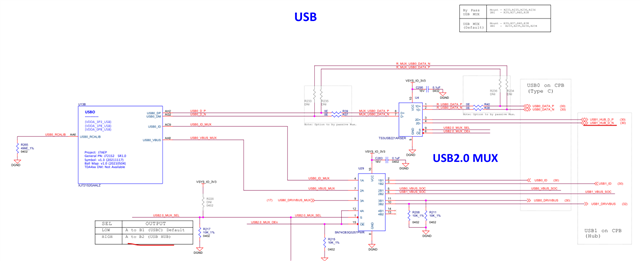
    It seems that the SERDES pins are connected to the USB HUB?

    so maybe in the dtb, you need to change the USB_SEL_MUX to high instead of low to route the SERDES through the HUB? 

  • I got to know that only the type-C supports the USB3.0 and the HUB is only USB2.0 support.

    Please ensure that the USB mux is pulled low and not high.

    Also, check on the SERDES USB assignment in the dtb are right.

    By any chance, if you flip the cable, is it detecting the USB3.0? I remember from another e2e that flipping the cable was able to detect the USB3.0. Maybe again it could be pointing to the SERDES assignment. 

  • Hi Shreyas,

    Regarding the USB mux: since the USB2.0_MUX_SEL default is low, I didn’t change that part.
    What I did was modify the DTB as below:

    &usb_serdes_mux {
        idle-states = <0>; /* USB0 to SERDES lane 1: Lane 0&1 for USBTYPEC and lane swap */
    };
    

    I tested with both <0> and <1>, but in both cases lsusb doesn’t detect any device.
    I also tried flipping the Type-C cable, but that didn’t help either.

    Could you advise if there are any additional settings required for the SERDES assignment?

    Best regards,
    Liu

  • Liu,

    The other thing would be to ensure that the USB_mode_sel DIP switches are in off, off position to select the DFP mode.

  • Hi Liu,

    If using the adas Linux image as a baseline, please check the uEnv.txt file in boot partition. If there is a name_overlays variable, then please comment it out so that dtbo files do not get overlayed.

    Regards,

    Takuma

  • Thanks, Takuma! 

  • Liu,

    When Takuma and I tried the changes on our end, we were still seeing the speed as 480M as you reported. Once the uEnv.txt file was commented, it then applies the code updates and does not overide them. It should show as 5000M.

  • Hi Gokul, Takuma, Shreyas,

    Thanks a lot for your support.
    I modified the uEnv.txt as you suggested, and it worked.
    Now the USB device is correctly detected as SuperSpeed (5000M).

    root@j721s2-evm:~# [  210.517951] usb 2-1.4: new SuperSpeed USB device number 6 using xhci-hcd
    [  210.550775] usb-storage 2-1.4:1.0: USB Mass Storage device detected
    [  210.557380] scsi host1: usb-storage 2-1.4:1.0
    [  211.583921] scsi 1:0:0:0: Direct-Access     BUFFALO  USB Flash Disk   1.00 PQ: 0 ANSI: 6
    [  211.925986] sd 1:0:0:0: [sdc] 60628992 512-byte logical blocks: (31.0 GB/28.9 GiB)
    [  211.934397] sd 1:0:0:0: [sdc] Write Protect is off
    [  211.939802] sd 1:0:0:0: [sdc] Write cache: disabled, read cache: enabled, doesn't support DPO or FUA
    [  211.953985]  sdc:
    [  211.956006] sd 1:0:0:0: [sdc] Attached SCSI removable disk
    [  212.826083]  sdc:
    root@j721s2-evm:~# lsusb -t
    /:  Bus 001.Port 001: Dev 001, Class=root_hub, Driver=xhci-hcd/1p, 480M
        |__ Port 001: Dev 002, If 0, Class=Hub, Driver=hub/5p, 480M
            |__ Port 005: Dev 005, If 0, Class=Billboard, Driver=[none], 480M
    /:  Bus 002.Port 001: Dev 001, Class=root_hub, Driver=xhci-hcd/1p, 5000M
        |__ Port 001: Dev 002, If 0, Class=Hub, Driver=hub/4p, 5000M
            |__ Port 003: Dev 004, If 0, Class=Mass Storage, Driver=usb-storage, 5000M
            |__ Port 004: Dev 006, If 0, Class=Mass Storage, Driver=usb-storage, 5000M

    Best regards,
    Liu

  • Hi Shreyas,

    I would like to continue using Vision Apps.
    However, if I remove the overlay in uEnv.txt (name_overlays=ti/k3-j721s2-vision-apps.dtbo), running

    source /opt/vision_apps/vision_apps_init.sh

    fails with memory mapping errors (log/fileio carveout not available).

    root@j721s2-evm:/opt# source ./vision_apps/vision_apps_init.sh
    root@j721s2-evm:/opt#
    root@j721s2-evm:/opt#      0.000000 s: APP_LOG: ERROR: Unable to map memory @ 0xaa000000 of size 262144 bytes !!!
    APP_LOG: ERROR: Unable to map memory @ 0xae000000 of size 3288576 bytes !!!

    On the other hand, if I keep the overlay, USB3.0 only works in USB2.0 speed mode.

    How can I solve this conflict so that I can use Vision Apps with USB3.0 enabled?

    Best regards,
    Liu

  • Liu,

    This is great to see the USB3.0 5G mode working now with the uenv.txt commented out.

    Mem map error looks like we need to allocate more memory into these memory area beyond the default. 

  • Hi Liu,

    Issue is that the dtbo disables serdes_wiz node in devicetree for Linux, since without it, both A72 Linux running the USB driver, and R5F RTOS running the display driver are configuring the serdes, causing resource conflict. Software needs to be configured such that Linux only touches USB related configurations, and RTOS only touches display related configurations.

    Please apply this patch in dts to disable PCIe, DP from Linux, and enable just USB: https://gist.github.com/Siddharth-Vadapalli-at-TI/d1e38147a453538a691cc6e39024123d

    And MCU R5 core needs to configure the serdes for DP+USB multi-link configuration.

    Regards,

    Takuma

  • Hi Takuma,

    I applied the diff patch you shared and rebuilt the dtb.
    In addition, I commented out the name_overlays entries in uEnv.txt.

    After that, I tried to run:

    source /opt/vision_apps/vision_apps_init.sh

    However, I still see the same issue:

    root@j721s2-evm:/opt# source ./vision_apps/vision_apps_init.sh
    root@j721s2-evm:/opt#
    root@j721s2-evm:/opt#      0.000000 s: APP_LOG: ERROR: Unable to map memory @ 0xaa000000 of size 262144 bytes !!!
    APP_LOG: ERROR: Unable to map memory @ 0xae000000 of size 3288576 bytes !!!
    

    Could you advise what else might be missing in the configuration?

    Best regards,
    Liu

  • Currently traveling for work. Let me get back to you tomorrow on this.

    Regards,

    Takuma

  • Hi Liu,

    The memory map error is coming due to the memory map being defined in the vision apps device tree overlay, so you will need to keep the memory map information while applying the changes in the previous patch to disable PCIe, DP from Linux and enable just USB. 

    Regards,

    Takuma

  • Hi Takuma,

    I have a few follow-up questions regarding the previous discussion:

    • For the SERDES configuration, I currently have the following in my device tree:
      &serdes_ln_ctrl {
          idle-states = <J721S2_SERDES0_LANE0_PCIE1_LANE0>,
                        <J721S2_SERDES0_LANE1_USB>,
                        <J721S2_SERDES0_LANE2_EDP_LANE2>,
                        <J721S2_SERDES0_LANE3_EDP_LANE3>;
      };

      Is this exactly what you meant when you mentioned that the MCU R5 core needs to configure the SERDES for DP+USB multi-link configuration?

    • After applying the diff file you provided, I see the following error during initialization when running vision_apps_init.sh:
      [MCU2_0] REMOTE_SERVICE: ERROR: Unable to find handler for service [com.ti.image_sensor]
      

      Could you please explain why this happens after applying the diff?

    • You also mentioned earlier: “so you will need to keep the memory map information while applying the changes…”.
      Could you please clarify what exactly should be kept from the vision-apps device tree overlay, and how this memory map information should be integrated when enabling USB and disabling PCIe/DP in Linux?

    Thanks a lot for your support.

    Best regards,
    Liu

  • Hi Liu,

    Is this exactly what you meant when you mentioned that the MCU R5 core needs to configure the SERDES for DP+USB multi-link configuration?

    In RTOS code, there is a function that starts serdes phy in multilink mode:

    You will need to select USB for the second Ml (Multilink) interface.

    The serdes_ln_ctrl in Linux devicetree should also match the multilink configuration set in RTOS, as this controls the ctrl mmr registers. And the diff in my previous post will disable DP configuration from Linux-side as it will now be handled by RTOS, and enable USB configuration from Linux-side as this is still handled from Linux-side.

    • Could you please clarify what exactly should be kept from the vision-apps device tree overlay, and how this memory map information should be integrated when enabling USB and disabling PCIe/DP in Linux?

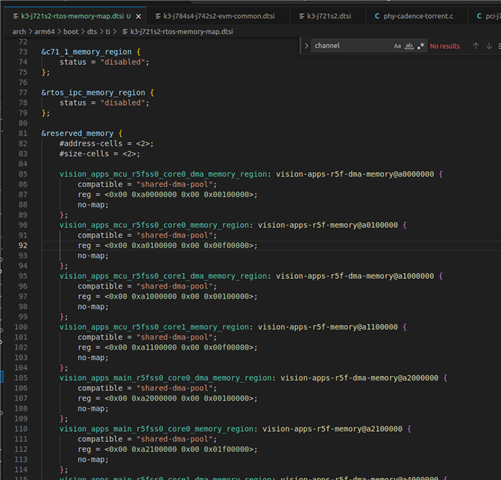
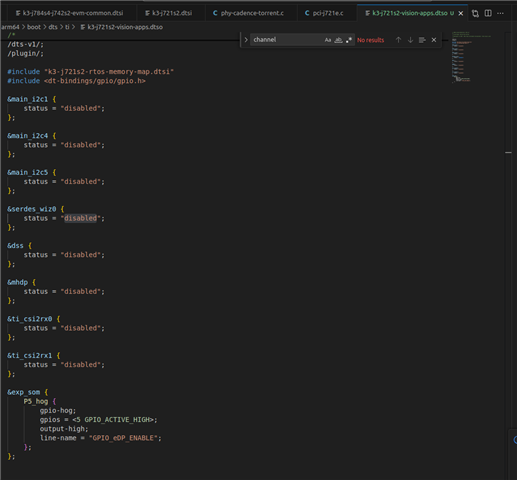
    Please refer to two files in Linux kernel.

    1: k3-j721s2-rtos-memory-map.dtsi - this is an include file that has the memory map of the remote cores. This is needed.

    2: k3-j721s2-vision-apps.dtso - this is the overlay file that includes the memory map dtsi. This disables a couple of different interfaces in Linux to give control to RTOS. serdes_wiz0 might be needed... but first just try out with no changes.

    After applying the diff file you provided, I see the following error during initialization when running vision_apps_init.sh

    Nothing in patch should affect sensor. Is this with the overlay enabled or disabled? Overlay will disable CSI from Linux to give control to RTOS, so it affects which cores can take control of CSI.

    Regards,

    Takuma