This thread has been locked.

If you have a related question, please click the "Ask a related question" button in the top right corner. The newly created question will be automatically linked to this question.

J784S4XEVM: Request for Patch or Guidance on GridSample Model Issue (SDK 11)

Part Number: J784S4XEVM
Other Parts Discussed in Thread: AM69A

Hello,

As recommended in the thread 784S4XEVM: Graph Verify Failed when running a model with Gridsample, I tested the SDK 11 code and included everything related to GridSample. I was able to reproduce the same artifacts during model compilation:
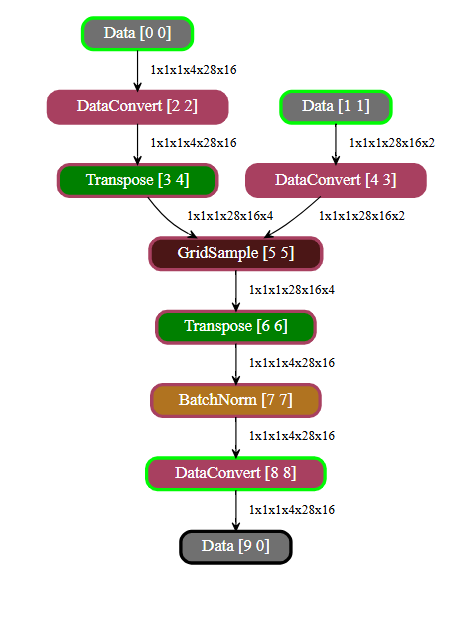
image.png

However, the board is still getting stuck, as shown below:

image.png

I am using the same model referenced in the earlier discussion: 8738.gridsample_model.zip 

Is there a patch or guide available to fix this issue?
Any additional instructions you can share would be appreciated.

Best regards,

Ghassen

  • Hi Ghassen,

    Have you followed the following steps here to enable the backport? https://github.com/TexasInstruments/edgeai-tidl-tools/blob/11_00_07_00/docs/update_target.md

    Warm regards,

    Christina

  • Hello Christina,

    In the steps provided in the link, they only describe how to update the target for SDK 10.1
    As you can see here:

    I also checked update_target.sh, and it seems that 10_1 is the only SDK version supported there.

    Can you confirm if other SDK versions are expected to be supported or if there is an alternative method?

  • Hi Ghassen, 

    Based off of your E2e that you linked, I was under the understanding you are using SDK 10.1. The edgeai-tidl-tools version 11_00_07_00  is backwards compatible with SDK 10.1, meaning without changing the SDK, you can use the update_target.sh script to make it compatible with the 10.1 version, but with the updates/fixes that occurred after the 10.1 release. 

    If you are using a different SDK, please let me know exactly which Processor SDK version you are using, as well as exactly which edgeai-tidl-tools version you are using as well. 

    I suspect you have the wrong pairing of versions together, and this is the reason why you are running into the hang on board, especially if it runs on PC emulation.  

    Warm regards,

    Christina

  • Hello Christina,

    Yes, I’m using SDK 10.

    As you suggested, I tried testing the backport solution for edgeai-tidl. Below are the exact steps I performed on the EVM:

    cd edgeai-tidl-tools
    git checkout 11_00_07_00
    export SOC=am69a
    export SDK_VERSION=10_1
    export TISDK_IMAGE=adas
    ./update_target.sh
     

    Unfortunately, it still didn’t work on the board — I’m seeing the same error: “Node kernel init failed.”

    Is there anything I might have missed in the steps?
    Or do you have any other suggestions I could try?

    Thank you,
    Ghassen

  • Hi Ghassen,

    After running the update script, did you reboot the device before running TIDL? This step is necessary to see the needed changes.

    Also did the update script complete without any errors?

    Warm regards,

    Christina

  • Hello Christina,

    Yes I did the reboot and there were no error during the execution of the script.

    You can see the logs here:

    root@j784s4-evm:~/backward/edgeai-tidl-tools# ./update_target.sh 
    =========================================================================
    REL: 11_00_07_00
    SOC: am69a
    TISDK_IMAGE: adas
    SDK_VERSION: 10_1
    UPDATE_OSRT_COMPONENTS: 1
    UPDATE_FIRMWARE_AND_LIB: 1
    =========================================================================
    
    Updating OSRT components
    ==================== Updating dlr runtime wheel ====================
    Connecting to software-dl.ti.com (23.201.85.24:443)
    wget: note: TLS certificate validation not implemented
    Connecting to downloads.ti.com (2.20.6.26:443)
    saving to 'dlr-1.13.0-py3-none-any.whl'
    dlr-1.13.0-py3-none- 100% |*******************************************************************************************************************************************************************************| 1222k  0:00:00 ETA
    'dlr-1.13.0-py3-none-any.whl' saved
    Processing ./dlr-1.13.0-py3-none-any.whl
    Collecting numpy (from dlr==1.13.0)
      Downloading numpy-2.3.5-cp312-cp312-manylinux_2_27_aarch64.manylinux_2_28_aarch64.whl.metadata (62 kB)
         ���������������������������������������� 62.1/62.1 kB 1.1 MB/s eta 0:00:00
    Collecting requests (from dlr==1.13.0)
      Downloading requests-2.32.5-py3-none-any.whl.metadata (4.9 kB)
    Collecting distro (from dlr==1.13.0)
      Downloading distro-1.9.0-py3-none-any.whl.metadata (6.8 kB)
    Collecting charset_normalizer<4,>=2 (from requests->dlr==1.13.0)
      Downloading charset_normalizer-3.4.4-cp312-cp312-manylinux2014_aarch64.manylinux_2_17_aarch64.manylinux_2_28_aarch64.whl.metadata (37 kB)
    Collecting idna<4,>=2.5 (from requests->dlr==1.13.0)
      Downloading idna-3.11-py3-none-any.whl.metadata (8.4 kB)
    Collecting urllib3<3,>=1.21.1 (from requests->dlr==1.13.0)
      Downloading urllib3-2.5.0-py3-none-any.whl.metadata (6.5 kB)
    Collecting certifi>=2017.4.17 (from requests->dlr==1.13.0)
      Downloading certifi-2025.11.12-py3-none-any.whl.metadata (2.5 kB)
    Downloading distro-1.9.0-py3-none-any.whl (20 kB)
    Downloading numpy-2.3.5-cp312-cp312-manylinux_2_27_aarch64.manylinux_2_28_aarch64.whl (14.3 MB)
       ���������������������������������������� 14.3/14.3 MB 7.5 MB/s eta 0:00:00
    Downloading requests-2.32.5-py3-none-any.whl (64 kB)
       ���������������������������������������� 64.7/64.7 kB 2.5 MB/s eta 0:00:00
    Downloading certifi-2025.11.12-py3-none-any.whl (159 kB)
       ���������������������������������������� 159.4/159.4 kB 5.1 MB/s eta 0:00:00
    Downloading charset_normalizer-3.4.4-cp312-cp312-manylinux2014_aarch64.manylinux_2_17_aarch64.manylinux_2_28_aarch64.whl (148 kB)
       ���������������������������������������� 148.2/148.2 kB 5.7 MB/s eta 0:00:00
    Downloading idna-3.11-py3-none-any.whl (71 kB)
       ���������������������������������������� 71.0/71.0 kB 3.4 MB/s eta 0:00:00
    Downloading urllib3-2.5.0-py3-none-any.whl (129 kB)
       ���������������������������������������� 129.8/129.8 kB 5.3 MB/s eta 0:00:00
    Installing collected packages: urllib3, numpy, idna, distro, charset_normalizer, certifi, requests, dlr
      Attempting uninstall: numpy
        Found existing installation: numpy 1.26.4
        Uninstalling numpy-1.26.4:
          Successfully uninstalled numpy-1.26.4
      Attempting uninstall: dlr
        Found existing installation: dlr 1.13.0
        Uninstalling dlr-1.13.0:
          Successfully uninstalled dlr-1.13.0
    ERROR: pip's dependency resolver does not currently take into account all the packages that are installed. This behaviour is the source of the following dependency conflicts.
    onnxruntime-tidl 1.15.0 requires coloredlogs, which is not installed.
    onnxruntime-tidl 1.15.0 requires flatbuffers, which is not installed.
    onnxruntime-tidl 1.15.0 requires sympy, which is not installed.
    Successfully installed certifi-2025.11.12 charset_normalizer-3.4.4 distro-1.9.0 dlr-1.13.0 idna-3.11 numpy-2.3.5 requests-2.32.5 urllib3-2.5.0
    WARNING: Running pip as the 'root' user can result in broken permissions and conflicting behaviour with the system package manager. It is recommended to use a virtual environment instead: https://pip.pypa.io/warnings/venv
    ==================== Updating arm-tidl headers ====================
    Cloning into 'arm-tidl'...
    remote: Counting objects: 4173, done.
    remote: Compressing objects: 100% (1687/1687), done.
    remote: Total 4173 (delta 2537), reused 4035 (delta 2479)
    Receiving objects: 100% (4173/4173), 1.00 MiB | 730.00 KiB/s, done.
    Resolving deltas: 100% (2537/2537), done.
    ==================== Updating onnxruntime wheel ====================
    Connecting to software-dl.ti.com (23.201.85.24:443)
    wget: note: TLS certificate validation not implemented
    Connecting to downloads.ti.com (2.20.6.26:443)
    saving to 'onnxruntime_tidl-1.15.0-cp312-cp312-linux_aarch64.whl'
    onnxruntime_tidl-1.1 100% |*******************************************************************************************************************************************************************************| 6656k  0:00:00 ETA
    'onnxruntime_tidl-1.15.0-cp312-cp312-linux_aarch64.whl' saved
    Processing ./onnxruntime_tidl-1.15.0-cp312-cp312-linux_aarch64.whl
    Collecting coloredlogs (from onnxruntime-tidl==1.15.0)
      Downloading coloredlogs-15.0.1-py2.py3-none-any.whl.metadata (12 kB)
    Collecting flatbuffers (from onnxruntime-tidl==1.15.0)
      Downloading flatbuffers-25.9.23-py2.py3-none-any.whl.metadata (875 bytes)
    Requirement already satisfied: numpy>=1.23.0 in /usr/lib/python3.12/site-packages (from onnxruntime-tidl==1.15.0) (2.3.5)
    Requirement already satisfied: packaging in /usr/lib/python3.12/site-packages (from onnxruntime-tidl==1.15.0) (23.2)
    Requirement already satisfied: protobuf in /usr/lib/python3.12/site-packages (from onnxruntime-tidl==1.15.0) (6.33.1)
    Collecting sympy (from onnxruntime-tidl==1.15.0)
      Downloading sympy-1.14.0-py3-none-any.whl.metadata (12 kB)
    Collecting humanfriendly>=9.1 (from coloredlogs->onnxruntime-tidl==1.15.0)
      Downloading humanfriendly-10.0-py2.py3-none-any.whl.metadata (9.2 kB)
    Collecting mpmath<1.4,>=1.1.0 (from sympy->onnxruntime-tidl==1.15.0)
      Downloading mpmath-1.3.0-py3-none-any.whl.metadata (8.6 kB)
    onnxruntime-tidl is already installed with the same version as the provided wheel. Use --force-reinstall to force an installation of the wheel.
    Downloading coloredlogs-15.0.1-py2.py3-none-any.whl (46 kB)
       ���������������������������������������� 46.0/46.0 kB 987.3 kB/s eta 0:00:00
    Downloading flatbuffers-25.9.23-py2.py3-none-any.whl (30 kB)
    Downloading sympy-1.14.0-py3-none-any.whl (6.3 MB)
       ���������������������������������������� 6.3/6.3 MB 8.0 MB/s eta 0:00:00
    Downloading humanfriendly-10.0-py2.py3-none-any.whl (86 kB)
       ���������������������������������������� 86.8/86.8 kB 3.7 MB/s eta 0:00:00
    Downloading mpmath-1.3.0-py3-none-any.whl (536 kB)
       ���������������������������������������� 536.2/536.2 kB 7.5 MB/s eta 0:00:00
    Installing collected packages: mpmath, flatbuffers, sympy, humanfriendly, coloredlogs
    Successfully installed coloredlogs-15.0.1 flatbuffers-25.9.23 humanfriendly-10.0 mpmath-1.3.0 sympy-1.14.0
    WARNING: Running pip as the 'root' user can result in broken permissions and conflicting behaviour with the system package manager. It is recommended to use a virtual environment instead: https://pip.pypa.io/warnings/venv
    ==================== Updating onnxruntime components ====================
    Connecting to software-dl.ti.com (23.201.85.24:443)
    wget: note: TLS certificate validation not implemented
    Connecting to downloads.ti.com (2.20.6.26:443)
    saving to 'onnx_1.15.0_aragoj7.tar.gz'
    onnx_1.15.0_aragoj7. 100% |*******************************************************************************************************************************************************************************| 16.1M  0:00:00 ETA
    'onnx_1.15.0_aragoj7.tar.gz' saved
    ==================== Updating tflite wheel ====================
    Connecting to software-dl.ti.com (23.201.85.24:443)
    wget: note: TLS certificate validation not implemented
    Connecting to downloads.ti.com (2.20.6.26:443)
    saving to 'tflite_runtime-2.12.0-cp312-cp312-linux_aarch64.whl'
    tflite_runtime-2.12. 100% |*******************************************************************************************************************************************************************************| 2371k  0:00:00 ETA
    'tflite_runtime-2.12.0-cp312-cp312-linux_aarch64.whl' saved
    Processing ./tflite_runtime-2.12.0-cp312-cp312-linux_aarch64.whl
    Collecting numpy>=1.19.2 (from tflite-runtime==2.12.0)
      Using cached numpy-2.3.5-cp312-cp312-manylinux_2_27_aarch64.manylinux_2_28_aarch64.whl.metadata (62 kB)
    Using cached numpy-2.3.5-cp312-cp312-manylinux_2_27_aarch64.manylinux_2_28_aarch64.whl (14.3 MB)
    Installing collected packages: numpy, tflite-runtime
      Attempting uninstall: numpy
        Found existing installation: numpy 2.3.5
        Uninstalling numpy-2.3.5:
          Successfully uninstalled numpy-2.3.5
      Attempting uninstall: tflite-runtime
        Found existing installation: tflite-runtime 2.12.0
        Uninstalling tflite-runtime-2.12.0:
          Successfully uninstalled tflite-runtime-2.12.0
    Successfully installed numpy-2.3.5 tflite-runtime-2.12.0
    WARNING: Running pip as the 'root' user can result in broken permissions and conflicting behaviour with the system package manager. It is recommended to use a virtual environment instead: https://pip.pypa.io/warnings/venv
    ==================== Updating tflite components ====================
    Connecting to software-dl.ti.com (23.201.85.24:443)
    wget: note: TLS certificate validation not implemented
    Connecting to downloads.ti.com (2.20.6.26:443)
    saving to 'tflite_2.12_aragoj7.tar.gz'
    tflite_2.12_aragoj7. 100% |*******************************************************************************************************************************************************************************| 15.7M  0:00:00 ETA
    'tflite_2.12_aragoj7.tar.gz' saved
    Collecting numpy==1.26.4
      Downloading numpy-1.26.4-cp312-cp312-manylinux_2_17_aarch64.manylinux2014_aarch64.whl.metadata (62 kB)
         ���������������������������������������� 62.3/62.3 kB 2.2 MB/s eta 0:00:00
    Downloading numpy-1.26.4-cp312-cp312-manylinux_2_17_aarch64.manylinux2014_aarch64.whl (13.9 MB)
       ���������������������������������������� 13.9/13.9 MB 11.3 MB/s eta 0:00:00
    Installing collected packages: numpy
      Attempting uninstall: numpy
        Found existing installation: numpy 2.3.5
        Uninstalling numpy-2.3.5:
          Successfully uninstalled numpy-2.3.5
    Successfully installed numpy-1.26.4
    WARNING: Running pip as the 'root' user can result in broken permissions and conflicting behaviour with the system package manager. It is recommended to use a virtual environment instead: https://pip.pypa.io/warnings/venv
    Updating Firmwares
    ==================== Updating C7X firmware ====================
    FIRMWARE_PATH: //lib/firmware/vision_apps_evm
    Connecting to software-dl.ti.com (23.201.85.24:443)
    wget: note: TLS certificate validation not implemented
    Connecting to downloads.ti.com (2.20.6.26:443)
    saving to 'firmware.tar.gz'
    firmware.tar.gz      100% |*******************************************************************************************************************************************************************************| 24.3M  0:00:00 ETA
    'firmware.tar.gz' saved
    Replacing ./vx_app_rtos_linux_c7x_4.out
    Replacing ./vx_app_rtos_linux_c7x_3.out
    Replacing ./vx_app_rtos_linux_c7x_2.out
    Replacing ./vx_app_rtos_linux_c7x_1.out
    ==================== Updating TIDL lib ====================
    Connecting to software-dl.ti.com (23.201.85.24:443)
    wget: note: TLS certificate validation not implemented
    Connecting to downloads.ti.com (2.20.6.26:443)
    saving to 'tidl_lib.tar.gz'
    tidl_lib.tar.gz      100% |*******************************************************************************************************************************************************************************| 5367k  0:00:00 ETA
    'tidl_lib.tar.gz' saved
    Replacing libtidl_onnxrt_EP.so
    Replacing libtidl_onnxrt_EP.so.1.0
    Replacing libtidl_onnxrt_EP.so.map
    WARNING: libtidl_onnxrt_EP.so.map not used. Still copying
    Replacing libtidl_tfl_delegate.so
    Replacing libtidl_tfl_delegate.so.1.0
    Replacing libtidl_tfl_delegate.so.map
    WARNING: libtidl_tfl_delegate.so.map not used. Still copying
    Replacing libtivision_apps.so
    Replacing libtivision_apps.so.10.1.0
    Replacing libvx_tidl_rt.so
    Replacing libvx_tidl_rt.so.1.0
    Replacing libvx_tidl_rt.so.map
    WARNING: libvx_tidl_rt.so.map not used. Still copying

  • Hi Ghassen,

    I just realized you might be using the AM69a board. Could you confirm if you are using the SK-board or the EVM? I will need to check internally if this update_target.sh script works for the AM69a board or not. I appreciate your patience as I check this, and my apologies for overlooking this earlier. 

    Just an FYI, but our support for the SK boards are changing starting 2026:  [FAQ] Important Notice for Support transition for AM68/AM68A and AM69/AM69A devices 

    Warm regards,

    Christina Kuruvilla

  • Hello Christina,

    Yes I'm using the EVM board AM69a. (J784S4 EVM)

  • Hi Ghassen,

    Thank you for confirming this. There should be no problems running the update_target.sh on EVM boards. Are you running this under advanced_examples? I recommend running this on either examples or on TIDLRT flow (using the tools directory found in edgeai-tidl-tools). 

    Another question is that now with the new setup, you are using new artifacts created under the 11.00.07.00 edgeai-tidl-tools version, correct? Could you check if you are able to get any of the example models to run on the setup?

    Through these testing, we can eliminate whether the issue is with the SDK/TIDL build or if it is related to the model/configuration.

    Warm regards,

    Christina

  • Hi Ghassen,

    Wanted to double check if you still needed help on this. Please let me know if you have the answers to the above. 

    Warm regards,

    Christina