This thread has been locked.

If you have a related question, please click the "Ask a related question" button in the top right corner. The newly created question will be automatically linked to this question.

AM625: Custom board - DFU - tiboot3.bin

Part Number: AM625
Other Parts Discussed in Thread: DA8XX

hello everyone,
How are you? I have the following situation:

1) I compile tiboot3.bin, tispl.bin, and u-boot.img.

2) From usb-dfu, it recognizes the processor.

3) When I send tiboot3.bin, it reports that it has loaded correctly, but nothing appears from the processor console. It restarts, and it seems to be the custom board requesting tiboot3.bin again.


My questions are:

1) Is there a tool other than JTAG that allows me to know where we stand? Why does it fail? Or where does it fail?

2) The reasons why tiboot3.bin fails.

3) Do I have any documentation that explains how to work with tiboo3.bin?

4) Is there any tiboot3.bin that has debug included in the package for use?

Thank you for your help. I look forward to your response.

Rodolfo

  • Hi Rodolfo,

    When I send tiboot3.bin, it reports that it has loaded correctly, but nothing appears from the processor console. It restarts, and it seems to be the custom board requesting tiboot3.bin again.

    Can you share the DFU boot logs from UART terminal with me?

    Best Regards,

    Meet.

  • Hi Meet,
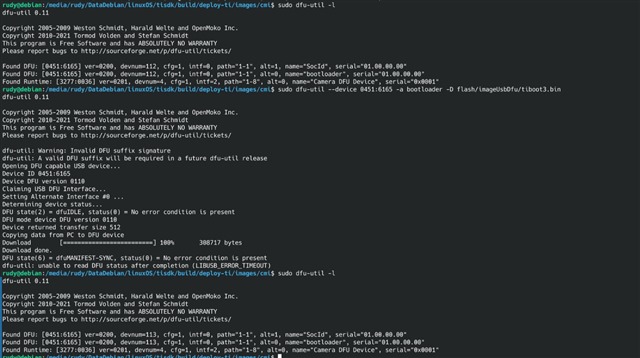
    I'll share what is displayed on the host from DFU:

    From the side of the board via main_uart0, I am not getting any response/activity. The R5 UART is not available to me.

    best regards,

    Rodolfo

  • If the DRR is misconfigured, should you see something in the UART?

  • From the side of the board via main_uart0, I am not getting any response/activity.

    Could you elaborate what is meant by this? Are there no logs on the UART after you send tiboot3.bin?

    If the DRR is misconfigured, should you see something in the UART?

    The logs can give us some idea on what could be wrong.

    Could you confirm if you changed the DDR config for your custom board? You can use this tool to generate the same: https://dev.ti.com/sysconfig/#/config/?args=--product%20%2Fmnt%2Ftirex-content%2FProcessor_DDR_Config_0.10.32.0000%2F.metadata%2Fproduct.json%20--device%20AM625%20--package%20%22FCBGA%20P$OPEN$ALWP$CLOSE$%22%20--variant%20AM6251-G%20--context%20system 

    You also have to rebuild u-boot binaries with am62x_r5_usbdfu.config fragment when using dfu: https://software-dl.ti.com/processor-sdk-linux/esd/AM62X/11_02_08_02/exports/docs/linux/Foundational_Components/U-Boot/UG-DFU.html 

  • Could you also let me know the device type by referring to this:  [FAQ] [AM6XX]: How to check if device type is HS-SE, HS-FS or GP?  

  • "Could you elaborate what is meant by this? Are there no logs on the UART after you send tiboot3.bin?"
    Nothing at all comes out of the UART side of the custom board. The screenshot I showed you is tiboot3.bin being sent to the board, and it is received successfully. But nothing happens.

    "The logs can give us some idea on what could be wrong.
    Could you confirm if you changed the DDR config for your custom board? You can use this tool to generate the same: https://dev.ti.com/sysconfig/#/config/?args=--product%20%2Fmnt%2Ftirex-content%2FProcessor_DDR_Config_0.10.32.0000%2F.metadata%2Fproduct.json%20--device%20AM625%20--package%20%22FCBGA%20P$OPEN$ALWP$CLOSE$%22%20--variant%20AM6251-G%20--context%20system "

    Yes, modify the RAM using that tool.

    "You also have to rebuild u-boot binaries with am62x_r5_usbdfu.config fragment when using dfu: https://software-dl.ti.com/processor-sdk-linux/esd/AM62X/11_02_08_02/exports/docs/linux/Foundational_Components/U-Boot/UG-DFU.html "

    When compiling, I also used the file you mentioned.

  • I downloaded it via dfu socid and it is in GP. Even so, the reality is that I tried loading the three versions generated by tiboot3.bin (obviously changing their names) and the result is the same. It sends them, acknowledges receipt, and requests the tiboot3.bin file again. From the uart side of the custom board, there is no activity whatsoever; the console remains black.

  • You have to use tiboot3-am62x-gp-evm.bin for GP board, name change is not required when using DFU. You can try the following command:

    dfu-util -R -a 0 -D board-support/u-boot-build/r5/tiboot3-am62x-gp-evm.bin

  • The result is the same, absolutely nothing changes. I still have no signal on uart0, and from the host side, usb-dfu reports that the binary is sent correctly. But the request is restarted, so something is wrong. What can I do or test? The reset voltages are correct, as is the main clock.

    If the DRR is misconfigured, should you see something in the UART?

  • If the DRR is misconfigured, should you see something in the UART?

    Yes, you would see logs similar to what is mentioned in the section 2 of this FAQ:  [FAQ] Board bring up tips for Sitara devices (AM64x, AM243x, AM62x, AM62L, AM62Ax, AM62D-Q1, AM62Px)  

    As you mentioned that you are not observing any output on the UART terminal, you can refer to the section-1 of this FAQ and see if that helps.

  • hi meet.
    How are you? 

    I checked what the FAQ says and I meet all the requirements for something to come out through the console, but nothing happens. Do you have any idea if something can be activated in tiboot3.bin that would allow me to debug from the very beginning? To find out if it rejects authentication and that's why it doesn't send anything related to the DDR?

  • Hi Rodolfo,

    Could you share your tiboot3.bin with me? I want to check if I get the failure messages at least with the image you are using.

    Best Regards,

    Meet.

  • Yes, but How do I upload it to tiboot3.bin?

  • Is there a way to debug, and how do I correctly use “Trace Layer”?

    # SPDX-License-Identifier: GPL-2.0+
    # Copyright (C) 2022 Texas Instruments Incorporated - https://www.ti.com/
    #
    # Board configuration for AM62
    #

    ---

    board-cfg:
    rev:
    boardcfg_abi_maj : 0x0
    boardcfg_abi_min : 0x1
    control:
    subhdr:
    magic: 0xC1D3
    size: 7
    main_isolation_enable : 0x5A
    main_isolation_hostid : 0x2
    secproxy:
    subhdr:
    magic: 0x1207
    size: 7
    scaling_factor : 0x1
    scaling_profile : 0x1
    disable_main_nav_secure_proxy : 0
    msmc:
    subhdr:
    magic: 0xA5C3
    size: 5
    msmc_cache_size : 0x0
    debug_cfg:
    subhdr:
    magic: 0x020C
    size: 8
    trace_dst_enables : 0x01
    trace_src_enables : 0x1F


    No information is displayed for main_uart0 and main_uart1. 

    I follow the next links:
    https://software-dl.ti.com/processor-sdk-linux/esd/AM62X/11_02_08_02/exports/docs/linux/How_to_Guides/Host/SYSFW_Trace_Parser.html

  • Yes, but How do I upload it to tiboot3.bin?

    You can attach it as a zip.

    This is the correct way to enable SYSFW logs, after doing this you need to rebuild the u-boot binaries. But I doubt that this will provide any information regarding this issue if your tiboot3.bin itself is not getting loaded

    Can you try any other boot mode like UART/SD boot, so that it clarifies whether the issue is with the DFU boot or with the board.

    It could also be a UART issue if you don't observe any logs, do you see the "CC..." characters being printed on the UART terminal once you switch to UART boot mode?

  • It won't let me upload the .zip file. The forum throws this error: "We apologize, but an unexpected issue prevented the page you requested from being available. We've logged the issue so the site administrator can resolve the problem. " 

    An email to send you the file?

  • Regarding booting via UART, for example, if I enter and get this: 

    02000000011a0000616d3632780000000000000048534653010001000100010002a6000000000000d68ecb2c055dff11ade95bd927e837d2a53bc23b0a2800cebce4f106bcf309df2213912d77a157a8b7c2df40672a06a918034aa4c7d603e462481475225d49bC


  • Can you try any other boot mode like UART/SD boot, so that it clarifies whether the issue is with the DFU boot or with the board.

    You can try these for now.

    It won't let me upload the .zip file.

    Could you try to change the extension to .txt and check if you can upload then.

  • You can try these for now.

    I just tried it with uart: and it throws this 02000000011a0000616d3632780000000000000048534653010001000100010002a6000000000000d68ecb2c055dff11ade95bd927e837d2a53bc23b0a2800cebce4f106bcf309df2213912d77a157a8b7c2df40672a06a918034aa4c7d603e462481475225d49bC


  • Could you try to change the extension to .txt and check if you can upload then

    It won't let me upload it.

  • I meant try to boot the device via different boot media like UART, please refer to this:

    Yes, yes. I start booted from main_uart0 (uart mode), load tiboot3.bin from that mode, and nothing happens. It reaches the ACK, the timeout, and ends. 

    Nothing happens, nothing is printed by the console.

  • I still have some doubts about about the device type you are using, because from the UART logs shared by you, this seems to be a HS-FS device.

    Could you try the following steps in DFU boot mode:

    1. Run the following commands to get the Device type:

    ❯ dfu-util -a SocId -U socid.bin
    dfu-util 0.11
    
    Copyright 2005-2009 Weston Schmidt, Harald Welte and OpenMoko Inc.
    Copyright 2010-2021 Tormod Volden and Stefan Schmidt
    This program is Free Software and has ABSOLUTELY NO WARRANTY
    Please report bugs to http://sourceforge.net/p/dfu-util/tickets/
    
    Opening DFU capable USB device...
    Device ID 0451:6165
    Device DFU version 0110
    Claiming USB DFU Interface...
    Setting Alternate Interface #1 ...
    Determining device status...
    DFU state(2) = dfuIDLE, status(0) = No error condition is present
    DFU mode device DFU version 0110
    Device returned transfer size 512
    Copying data from DFU device to PC
    Upload  [=========================] 100%          200 bytes
    Upload done.
    Received a total of 200 bytes
    ❯ xxd -p -c 1000 socid.bin > socid.txt
    ❯ python3 7080.uart_boot_socid.py socid.txt
    -----------------------
    SoC ID Header Info:
    -----------------------
    NumBlocks            : [2]
    -----------------------
    SoC ID Public ROM Info:
    -----------------------
    SubBlockId           :
    SubBlockSize         :
    DeviceName           : am62px
    DeviceType           : HSFS
    DMSC ROM Version     : [0, 1, 0, 0]
    R5 ROM Version       : [0, 1, 0, 0]
    -----------------------
    SoC ID Secure ROM Info:
    -----------------------
    Sec SubBlockId       : 2
    Sec SubBlockSize     : 166
    Sec Prime            : 0
    Sec Key Revision     : 0
    Sec Key Count        : 0
    Sec TI MPK Hash      : ade976fcfd18ebf60229bee902edcec6d5fd07d1b2101101198c7ff4f552a9436bda045679d54baa04a1cb85d16fffe0f21e32f7f341c769534d7a560364a908
    Sec Cust MPK Hash    : ad0bc40b000000000000000000000000000000000000000000000000000000000000000000000000000000000000000000000000000000000000000000000000
    Sec Unique ID        : 981a687360738840bf4103d34bf416e24dfcf67ab8ad5ef03f499e28a467c742 

    2. run dfu-util -l and send your tiboot3.bin binary.

    3, run dfu-util -l and check if this still shows SocId and bootloader instead of tispl.bin and u-boot.img

    Please do these and share the output with me.

  • -----------------------
    SoC ID Header Info:
    -----------------------
    NumBlocks            : 2
    -----------------------
    SoC ID Public ROM Info:
    -----------------------
    SubBlockId           : 1
    SubBlockSize         : 26
    DeviceName           : am62x
    DeviceType           : HSFS
    DMSC ROM Version     : [0, 1, 0, 1]
    R5 ROM Version       : [0, 1, 0, 1]
    -----------------------
    SoC ID Secure ROM Info:
    -----------------------
    Sec SubBlockId       : 2
    Sec SubBlockSize     : 166
    Sec Prime            : 0
    Sec Key Revision     : 0
    Sec Key Count        : 0


    I send tiboot3.bin and I still see socid.bin and tiboot3.bin after loading the file, tispl.bin and u-boot.img never appear.


    How do I get Biman to include the signatures for HS-FS? In the three files tiboot3.bin, tispl.bin, and u-boot.img? Because I try it on the development kit I have and something like this happens when booting via DFU:

    U-Boot SPL 2023.04-gbd8c95e9fc (Mar 11 2026 - 17:48:32 +0000)

    SPL initial stack usage: 13408 bytes

    Trying to boot from DFU

    ##########################################################DOWNLOAD ... OK

    Ctrl+C to exit ...

    ti_sci system-controller@44043000: Message not acknowledgedAuthentication failed!

    ### ERROR ### Please RESET the board ###

    So, if I use tiboot3-am62x-hs-fs-evm.bin in the kit, it takes it, and when I load tispl.bin, that happens. What could it be? How do I solve that other problem?


  • Hi,

    Sorry I am a bit confused.

    Are you observing 2 different issues on 2 different boards, so on one you are sending the tiboot3.bin but are not observing any console logs, while on the other tiboot3.bin is being sent but you observe this error message?

    The logs shared by you, usually means that you are trying to load an unsigned tispl.bin on an HS-SE board: https://software-dl.ti.com/processor-sdk-linux/esd/AM62X/11_02_08_02/exports/docs/linux/Foundational_Components_Migration_Guide.html#u-boot 

    Could you give some more details on how you are building these images? Are you using different build setup than the one used by default in the SDK?

    Also, you can try to check if you are able to upload the image now.

    Best regards,

    Meet.

  • I managed to fix that security issue, but now I have another problem. The chip is Hs-Fs; I load tiboot3.bin, tispl.bin, and u-boot.img via USB-DFU. I get to the u-boot prompt or u-boot command line, but when I try to view the NAND-FLASH, I get an error. I also can’t change the driver from the DTS; whenever I compile, it loads the one from NOR memory.

    => mtd list
    Unknown command 'mtd' - try 'help'

    => sf probe
    jedec_spi_nor flash@0: unrecognized JEDEC id bytes: ff, c2, 37
    Failed to initialize SPI flash at 0:0 (error 0)

    in $path-ti-u-boot/configs/cmi_r5_usbdfu_defconfig:  I have set this config

    CONFIG_CMD_MTD=y
    CONFIG_CMD_MTDPARTS=y
    CONFIG_MTD_SPI_NAND=y
    CONFIG_CADENCE_QSPI=y
    CONFIG_DM_MTD=y

    in DTs : 

    &main_pmx0 {
    ospi0_pins_default: ospi0-pins-default {
    pinctrl-single,pins = <
    AM62X_IOPAD(0x000, PIN_OUTPUT, 0) /* (H24) OSPI0_CLK */
    AM62X_IOPAD(0x02c, PIN_OUTPUT, 0) /* (F23) OSPI0_CSn0 */
    AM62X_IOPAD(0x00c, PIN_INPUT, 0) /* (E25) OSPI0_D0 */
    AM62X_IOPAD(0x010, PIN_INPUT, 0) /* (G24) OSPI0_D1 */
    AM62X_IOPAD(0x014, PIN_INPUT, 0) /* (F25) OSPI0_D2 */
    AM62X_IOPAD(0x018, PIN_INPUT, 0) /* (F24) OSPI0_D3 */
    >;
    };
    };

    &ospi0 {
    status = "okay";
    pinctrl-names = "default";
    pinctrl-0 = <&ospi0_pins_default>;

    flash@0{
    compatible = "spi-nand";
    reg = <0x0>;
    spi-tx-bus-width = <4>;
    spi-rx-bus-width = <4>;
    spi-max-frequency = <25000000>;
    cdns,read-delay = <2>;

    partitions {
    compatible = "fixed-partitions";
    #address-cells = <1>;
    #size-cells = <1>;

    partition@0 {
    label = "ospi.tiboot3";
    reg = <0x0 0x80000>;
    };

    partition@80000 {
    label = "ospi.tispl";
    reg = <0x80000 0x200000>;
    };

    partition@280000 {
    label = "ospi.u-boot";
    reg = <0x280000 0x400000>;
    };

    partition@680000 {
    label = "ospi.env";
    reg = <0x680000 0x40000>;
    };

    partition@6c0000 {
    label = "ospi.env.backup";
    reg = <0x6c0000 0x40000>;
    };

    partition@800000 {
    label = "ospi.rootfs";
    reg = <0x800000 0x37c0000>;
    };

    partition@3fc0000 {
    label = "ospi.phypattern";
    reg = <0x3fc0000 0x40000>;
    };
    };
    };
    };

    in DTsi common uboot:

    &ospi0_pins_default {
    bootph-pre-ram;
    };


    &ospi0 {
    bootph-pre-ram;

    flash@0 {
    bootph-pre-ram;

    partitions {
    bootph-pre-ram;

    partition@3fc0000 {
    bootph-pre-ram;
    };
    };
    };
    };

    The goal is to flash the NAND flash memory connected to the QSPI0 bus using usb-dfu. The memory is www.mouser.com/.../MX35LF4GE4AD-Z4I-T

  • Hi,

    I am assigning this query to the u-boot expert, please wait for their response.

    Best Regards,

    Meet.

  • Hi Rodolfo,

    in $path-ti-u-boot/configs/cmi_r5_usbdfu_defconfig:  I have set this config

    cmi_r5_usbdfu_defconfig will be used for the R5 SPL (tiboot3.bin).

    But the u-boot.img runs on A53 core. Can you try applying the MTD configs in  your a53 defconfig too?

    Regards,
    Vinu

  • But the u-boot.img runs on A53 core. Can you try applying the MTD configs in  your a53 defconfig too?

    They are also applied in $path-ti-u-boot/configs/cmi_a53_defconfig but nothing changes.

  • Hi Rodolfo,

    Have you applied the exact same configs?

    Can you share your updated a53 defconfig file?

    Regards,
    Vinu

  • Have you applied the exact same configs?

    yes

    Can you share your updated a53 defconfig file?

    ONFIG_ARM=y
    CONFIG_ARCH_K3=y
    CONFIG_TI_SECURE_DEVICE=y
    CONFIG_SYS_MALLOC_F_LEN=0x8000
    # CONFIG_BOARD_HAS_32K_RTC_CRYSTAL=y
    CONFIG_TI_I2C_BOARD_DETECT=y
    CONFIG_TI_COMMON_CMD_OPTIONS=y
    CONFIG_SPL_GPIO=y
    CONFIG_SPL_LIBCOMMON_SUPPORT=y
    CONFIG_SPL_LIBGENERIC_SUPPORT=y
    CONFIG_NR_DRAM_BANKS=2
    CONFIG_SOC_K3_AM625=y
    CONFIG_K3_ATF_LOAD_ADDR=0x9e780000
    CONFIG_TARGET_CMI_A53=y
    CONFIG_SPL_OF_LIST="k3-am625-cmi"
    CONFIG_OF_LIST="k3-am625-cmi"
    CONFIG_HAS_CUSTOM_SYS_INIT_SP_ADDR=y
    CONFIG_CUSTOM_SYS_INIT_SP_ADDR=0x80B80000
    CONFIG_DM_GPIO=y
    CONFIG_SPL_DM_SPI=y
    CONFIG_DEFAULT_DEVICE_TREE="k3-am625-cmi"
    CONFIG_SPL_TEXT_BASE=0x80080000
    CONFIG_DM_RESET=y
    CONFIG_SPL_MMC=y
    CONFIG_SPL_SERIAL=y
    CONFIG_SPL_DRIVERS_MISC=y
    CONFIG_SPL_STACK_R_ADDR=0x82000000
    CONFIG_SPL_SIZE_LIMIT=0x80000
    CONFIG_SPL_SIZE_LIMIT_PROVIDE_STACK=0x800
    CONFIG_SPL_FS_FAT=y
    CONFIG_SPL_LIBDISK_SUPPORT=y
    CONFIG_SPL_SPI_FLASH_SUPPORT=y
    CONFIG_SPL_SPI=y
    # CONFIG_SYS_MALLOC_CLEAR_ON_INIT is not set
    CONFIG_SPL_LOAD_FIT=y
    CONFIG_SPL_LOAD_FIT_ADDRESS=0x81000000
    # CONFIG_OF_BOARD_SETUP=y
    CONFIG_DISTRO_DEFAULTS=y
    CONFIG_BOOTCOMMAND="run envboot; run distro_bootcmd;"
    CONFIG_BOARD_LATE_INIT=y
    CONFIG_BLOBLIST=y
    CONFIG_BLOBLIST_ADDR=0x80D00000
    CONFIG_SPL_MAX_SIZE=0x80000
    CONFIG_SPL_HAS_BSS_LINKER_SECTION=y
    CONFIG_SPL_BSS_START_ADDR=0x80c80000
    CONFIG_SPL_BSS_MAX_SIZE=0x80000
    CONFIG_SPL_SYS_REPORT_STACK_F_USAGE=y
    CONFIG_SPL_BOARD_INIT=y
    CONFIG_SPL_SYS_MALLOC_SIMPLE=y
    CONFIG_SPL_STACK_R=y
    CONFIG_SYS_SPL_MALLOC=y
    CONFIG_SYS_MMCSD_RAW_MODE_U_BOOT_USE_SECTOR=y
    CONFIG_SYS_MMCSD_RAW_MODE_U_BOOT_SECTOR=0x1400
    CONFIG_SPL_DMA=y
    CONFIG_SPL_ENV_SUPPORT=y
    CONFIG_SPL_ETH=y
    CONFIG_SPL_FS_LOAD_PAYLOAD_NAME="u-boot.img"
    CONFIG_SPL_I2C=y
    CONFIG_SPL_DM_MAILBOX=y
    CONFIG_SPL_DM_SPI_FLASH=y
    CONFIG_SPL_NET=y
    CONFIG_SPL_NET_VCI_STRING="AM62X U-Boot A53 SPL"
    CONFIG_SPL_POWER_DOMAIN=y
    CONFIG_SPL_RAM_SUPPORT=y
    CONFIG_SPL_RAM_DEVICE=y
    # CONFIG_SPL_SPI_FLASH_TINY is not set
    CONFIG_SPL_SPI_FLASH_SFDP_SUPPORT=y
    CONFIG_SPL_SPI_LOAD=y
    CONFIG_SYS_SPI_U_BOOT_OFFS=0x280000
    CONFIG_SPL_THERMAL=y
    CONFIG_SPL_USB_HOST=y
    CONFIG_SPL_USB_STORAGE=y
    CONFIG_SPL_USB_GADGET=y
    CONFIG_SPL_DFU=y
    CONFIG_SPL_YMODEM_SUPPORT=y
    CONFIG_FDT_SIMPLEFB=y
    CONFIG_SPL_BMP=y
    CONFIG_SYS_MAXARGS=64
    CONFIG_CMD_CLK=y
    CONFIG_CMD_DM=y
    CONFIG_CMD_REMOTEPROC=y
    CONFIG_CMD_USB_MASS_STORAGE=y
    CONFIG_CMD_BMP=y
    CONFIG_CMD_DDRSS=y
    CONFIG_OF_CONTROL=y
    CONFIG_SPL_OF_CONTROL=y
    CONFIG_MULTI_DTB_FIT=y
    CONFIG_SPL_MULTI_DTB_FIT=y
    CONFIG_SPL_MULTI_DTB_FIT_NO_COMPRESSION=y
    CONFIG_NET_RANDOM_ETHADDR=y
    CONFIG_SPL_DM=y
    CONFIG_SPL_DM_DEVICE_REMOVE=y
    CONFIG_SPL_DM_SEQ_ALIAS=y
    CONFIG_REGMAP=y
    CONFIG_SPL_REGMAP=y
    CONFIG_SPL_SYSCON=y
    CONFIG_SPL_OF_TRANSLATE=y
    CONFIG_CLK=y
    CONFIG_SPL_CLK=y
    CONFIG_CLK_TI_SCI=y
    CONFIG_DFU_MMC=y
    CONFIG_DFU_RAM=y
    CONFIG_DFU_SF=y
    CONFIG_SYS_DFU_DATA_BUF_SIZE=0x40000
    CONFIG_SYS_DFU_MAX_FILE_SIZE=0x800000
    CONFIG_DMA_CHANNELS=y
    CONFIG_TI_K3_NAVSS_UDMA=y
    CONFIG_TI_SCI_PROTOCOL=y
    CONFIG_SPL_DM_GPIO_LOOKUP_LABEL=y
    CONFIG_DA8XX_GPIO=y
    CONFIG_DM_PCA953X=y
    CONFIG_SPL_DM_PCA953X=y
    CONFIG_DM_I2C=y
    CONFIG_SYS_I2C_OMAP24XX=y
    CONFIG_DM_MAILBOX=y
    CONFIG_K3_SEC_PROXY=y
    CONFIG_I2C_EEPROM=y
    CONFIG_SPL_I2C_EEPROM=y
    CONFIG_SUPPORT_EMMC_BOOT=y
    CONFIG_MMC_IO_VOLTAGE=y
    CONFIG_SPL_MMC_IO_VOLTAGE=y
    CONFIG_MMC_UHS_SUPPORT=y
    CONFIG_SPL_MMC_UHS_SUPPORT=y
    CONFIG_MMC_HS200_SUPPORT=y
    CONFIG_SPL_MMC_HS200_SUPPORT=y
    CONFIG_MMC_SDHCI=y
    CONFIG_MMC_SDHCI_ADMA=y
    CONFIG_SPL_MMC_SDHCI_ADMA=y
    CONFIG_MMC_SDHCI_AM654=y
    CONFIG_DM_SPI_FLASH=y
    CONFIG_SF_DEFAULT_SPEED=25000000
    CONFIG_SPI_FLASH_SFDP_SUPPORT=y
    CONFIG_SPI_FLASH_SOFT_RESET=y
    CONFIG_SPI_FLASH_SOFT_RESET_ON_BOOT=y
    CONFIG_SPI_FLASH_SPANSION=y
    CONFIG_SPI_FLASH_S28HX_T=y
    CONFIG_PHY_TI_DP83867=y
    CONFIG_PHY_FIXED=y
    CONFIG_TI_AM65_CPSW_NUSS=y
    CONFIG_PHY=y
    CONFIG_PINCTRL=y
    CONFIG_SPL_PINCTRL=y
    CONFIG_PINCTRL_SINGLE=y
    CONFIG_POWER_DOMAIN=y
    CONFIG_TI_SCI_POWER_DOMAIN=y
    CONFIG_DM_REGULATOR=y
    CONFIG_SPL_DM_REGULATOR=y
    CONFIG_DM_REGULATOR_FIXED=y
    CONFIG_SPL_DM_REGULATOR_FIXED=y
    CONFIG_DM_REGULATOR_GPIO=y
    CONFIG_SPL_DM_REGULATOR_GPIO=y
    CONFIG_K3_SYSTEM_CONTROLLER=y
    CONFIG_REMOTEPROC_TI_K3_ARM64=y
    CONFIG_REMOTEPROC_TI_K3_M4F=y
    CONFIG_RESET_TI_SCI=y
    CONFIG_DM_SERIAL=y
    CONFIG_SOC_DEVICE=y
    CONFIG_SOC_DEVICE_TI_K3=y
    CONFIG_SOC_TI=y
    CONFIG_SPI=y
    CONFIG_DM_SPI=y
    CONFIG_CADENCE_QSPI=y
    CONFIG_CADENCE_QSPI_PHY=y
    CONFIG_SYSRESET=y
    CONFIG_SPL_SYSRESET=y
    CONFIG_SYSRESET_TI_SCI=y
    CONFIG_DM_THERMAL=y
    CONFIG_USB=y
    CONFIG_DM_USB_GADGET=y
    CONFIG_SPL_DM_USB_GADGET=y
    CONFIG_USB_XHCI_HCD=y
    CONFIG_USB_DWC3=y
    CONFIG_USB_DWC3_GENERIC=y
    CONFIG_SPL_USB_DWC3_GENERIC=y
    CONFIG_SPL_USB_DWC3_AM62=y
    CONFIG_USB_DWC3_AM62=y
    CONFIG_USB_GADGET=y
    CONFIG_USB_GADGET_MANUFACTURER="Texas Instruments"
    CONFIG_USB_GADGET_VENDOR_NUM=0x0451
    CONFIG_USB_GADGET_PRODUCT_NUM=0x6165
    CONFIG_USB_GADGET_DOWNLOAD=y
    CONFIG_VIDEO=y
    # CONFIG_VIDEO_LOGO is not set
    CONFIG_SYS_WHITE_ON_BLACK=y
    CONFIG_VIDEO_TIDSS=y
    CONFIG_SPL_VIDEO_TIDSS=y
    CONFIG_VIDEO_BMP_GZIP=y
    CONFIG_BMP_24BPP=y
    CONFIG_BMP_32BPP=y
    CONFIG_SPL_VIDEO=y
    CONFIG_SPL_SPLASH_SCREEN=y
    CONFIG_SPL_SYS_WHITE_ON_BLACK=y
    CONFIG_SPL_SPLASH_SCREEN_ALIGN=y
    CONFIG_SPL_SPLASH_SOURCE=y
    CONFIG_SPL_VIDEO_BMP_GZIP=y
    CONFIG_SPL_BMP_24BPP=y
    CONFIG_SPL_BMP_32BPP=y
    CONFIG_SPL_HIDE_LOGO_VERSION=y
    CONFIG_FS_FAT_MAX_CLUSTSIZE=16384
    CONFIG_SPL_GZIP=y
    CONFIG_OF_LIBFDT_OVERLAY=y

    CONFIG_MTD=y
    CONFIG_DM_MTD=y
    CONFIG_SPI_NAND=y
    CONFIG_CMD_MTD=y
    CONFIG_CMD_MTDPARTS=y
    CONFIG_SPI_MEM=y
    CONFIG_CADENCE_QSPI=y
    CONFIG_MTD_SPI_NAND=y

  •  I'm trying to read or list something from the U-Boot prompt, but nothing happens


    Hit any key to stop autoboot:  0  
    => mtd list
    Unknown command 'mtd' - try 'help'
    => mtdparts  
    Unknown command 'mtdparts' - try 'help'
    => nand device
    Unknown command 'nand' - try 'help'
    => mtd list
    Unknown command 'mtd' - try 'help'

  • Hi Rodolfo,

    Can you share the complete bootlogs too? Right from the start?

    Would it be possible to try out the same bootloader binaries from SD?

    Regards,
    Vinu

  • ...

    Not from the SD card; I'm booting from USB-DFU

    an you share the complete bootlogs too? Right from the start?

    U-Boot SPL 2023.04-g433c722dbc (Mar 17 2026 - 19:28:20 +0000)
    SYSFW ABI: 3.1 (firmware rev 0x0009 '9.1.8--v09.01.08 (Kool Koala)')
    k3_ddrss_probe(dev=43c345d0)
    k3_ddrss_ofdata_to_priv(dev=43c345d0)
    k3_ddrss memorycontroller@f300000: ddr freq0 not populated, using bypass frequency.
    k3_ddrss_power_on(ddrss=43c39ec0)
    k3_ddrss memorycontroller@f300000: vtt-supply not found.
    k3_lpddr4_probe: PASS
    k3_lpddr4_init: PASS
    --->>> LPDDR4 Initialization is in progress ... <<<---
    k3_lpddr4_start: Post start PASS
    SPL initial stack usage: 13408 bytes
    Trying to boot from DFU
    ##########################################################DOWNLOAD ... OK
    Ctrl+C to exit ...
    ###############################################DOWNLOAD ... OK
    Ctrl+C to exit ...
    Authentication passed
    Authentication passed
    Authentication passed
    Loading Environment from nowhere... OK
    init_env from device 10 not supported!
    Authentication passed
    Authentication passed
    Starting ATF on ARM64 core...

    NOTICE:  BL31: v2.9(release):v2.9.0-614-gd7a7135d3-dirty
    NOTICE:  BL31: Built : 09:34:15, Aug 24 2023

    U-Boot SPL 2023.04-g433c722dbc (Mar 17 2026 - 19:28:20 +0000)
    SYSFW ABI: 3.1 (firmware rev 0x0009 '9.1.8--v09.01.08 (Kool Koala)')
    SPL initial stack usage: 1856 bytes
    sdhci_send_command: Timeout for status update!
    ** Bad device specification mmc 1 **
    Couldn't find partition mmc 1:1
    Error: could not access storage.
    Trying to boot from DFU
    Authentication passed
    Authentication passed


    U-Boot 2023.04-g433c722dbc (Mar 17 2026 - 19:28:20 +0000)

    SoC:   AM62X SR1.0 HS-FS
    Model: Teceng AM625 CMI
    EEPROM not available at 80, trying to read at 81
    Reading on-board EEPROM at 0x51 failed -121
    DRAM:  no bloblist found!512 MiB
    Core:  58 devices, 28 uclasses, devicetree: separate
    MMC:   mmc@fa10000: 0, mmc@fa00000: 1
    Loading Environment from nowhere... OK
    In:    serial
    Out:   serial
    Err:   serial
    Timed out in wait_for_event: status=0000
    Check if pads/pull-ups of bus are properly configured
    EEPROM not available at 80, trying to read at 81
    Timed out in wait_for_event: status=0000
    Check if pads/pull-ups of bus are properly configured
    Reading on-board EEPROM at 0x51 failed -121
    Net:   am65_cpsw_nuss_port ethernet@8000000port@1: Invalid PHY mode, port 1
    am65_cpsw_nuss_port ethernet@8000000port@2: Invalid PHY mode, port 2
    No ethernet found.

    Hit any key to stop autoboot:  0

    Hit any key to stop autoboot:  0  

    => mtd list
    Unknown command 'mtd' - try 'help'
    => mtdparts   
    Unknown command 'mtdparts' - try 'help'

    => sf probe
    cadence_spi spi@fc40000: Invalid chip select 0:0 (err=-19)
    "Synchronous Abort" handler, esr 0x96000021
    elr: 0000000080833a48 lr : 000000008081b940 (reloc)
    elr: 000000009bf3aa48 lr : 000000009bf22940
    x0 : 0000000000000002 x1 : 0000000000000000
    x2 : 000000000000000a x3 : 0000000002800000
    x4 : 0000000002800000 x5 : 0000000099ed87bf
    x6 : 0000000000000039 x7 : 0000000099ed8c30
    x8 : 0000000000000001 x9 : 0000000000000008
    x10: 00000000fffffff0 x11: 0000000000000006
    x12: 000000000001869f x13: 0000000000000000
    x14: 0000000099ed9ba0 x15: 0000000000000002
    x16: 000000009bf5a148 x17: 0000000000000000
    x18: 0000000099ee7d80 x19: 0000000000000002
    x20: 0000000000000000 x21: 0000000000000000
    x22: 0000000000000000 x23: 00000000ffffffed
    x24: 0000000000000001 x25: 00000000017d7840
    x26: 000000009bfe4000 x27: 0000000000000000
    x28: 0000000099ef1b30 x29: 0000000099ed8c90

    Code: aa1303e0 f9400bf3 a8c27bfd d65f03c0 (f9402413)  
    Resetting CPU ...

    resetting ...


  • Hi Rodolfo,

    I have built the u-boot with MTD and could see the devices on AM62x EVM (which only have a NOR device) (from SD, not DFU).

    Following are the configs that I've used. (All of these are not required, some of which are for NOR)

    CONFIG_CMD_MTD=y
    CONFIG_CMD_MTDPARTS=y
    CONFIG_MTD_PARTITIONS=y
    CONFIG_MTD=y
    CONFIG_DM_MTD=y
    CONFIG_MTD_NAND_CORE=y
    CONFIG_MTD_SPI_NAND=y
    CONFIG_SPI_FLASH_MTD=y

    Bootlogs

    U-Boot SPL 2025.01-00527-gd2a72467939e-dirty (Mar 18 2026 - 13:16:02 +0000)
    SYSFW ABI: 4.0 (firmware rev 0x000b '11.1.2--v11.01.02 (Fancy Rat)')
    Changed A53 CPU frequency to 1250000000Hz (T grade) in DT
    SPL initial stack usage: 13392 bytes
    Trying to boot from MMC2
    Authentication passed
    Authentication passed
    Authentication passed
    Authentication passed
    Authentication passed
    Starting ATF on ARM64 core...
    
    NOTICE:  BL31: v2.13.0(release):v2.13.0-240-gd90bb650fe-dirty
    NOTICE:  BL31: Built : 21:37:18, Jun 23 2025
    
    U-Boot SPL 2025.01-00527-gd2a72467939e-dirty (Mar 18 2026 - 13:18:23 +0000)
    SYSFW ABI: 4.0 (firmware rev 0x000b '11.1.2--v11.01.02 (Fancy Rat)')
    SPL initial stack usage: 2032 bytes
    Error (-2): cannot determine file size
    Trying to boot from MMC2
    Authentication passed
    Authentication passed
    
    
    U-Boot 2025.01-00527-gd2a72467939e-dirty (Mar 18 2026 - 13:18:23 +0000)
    
    SoC:   AM62X SR1.0 HS-FS
    Model: Texas Instruments AM625 SK
    DRAM:  2 GiB
    Core:  83 devices, 31 uclasses, devicetree: separate
    MMC:   mmc@fa10000: 0, mmc@fa00000: 1
    Loading Environment from nowhere... OK
    In:    serial
    Out:   serial
    Err:   serial
    Net:   eth0: ethernet@8000000port@1
    
    Hit any key to stop autoboot:  0 
    => mtd list
    SF: Detected s28hs512t with page size 256 Bytes, erase size 256 KiB, total 64 MiB
    Could not find a valid device for spi-nand0
    List of MTD devices:
    * nor0
      - device: flash@0
      - parent: spi@fc40000
      - driver: jedec_spi_nor
      - path: /bus@f0000/bus@fc00000/spi@fc40000/flash@0
      - type: NOR flash
      - block size: 0x40000 bytes
      - min I/O: 0x10 bytes
      - 0x000000000000-0x000004000000 : "nor0"
    	  - 0x000000000000-0x000000080000 : "ospi.tiboot3"
    	  - 0x000000080000-0x000000280000 : "ospi.tispl"
    	  - 0x000000280000-0x000000680000 : "ospi.u-boot"
    	  - 0x000000680000-0x0000006c0000 : "ospi.env"
    	  - 0x0000006c0000-0x000000700000 : "ospi.env.backup"
    	  - 0x000000800000-0x000003fc0000 : "ospi.rootfs"
    	  - 0x000003fc0000-0x000004000000 : "ospi.phypattern"
    => mtdparts
    Device spi-nand0 not found!

    Please try these out.

    Regards,
    Vinu

  • It's not working for me; I'm still in the exact same situation. Any other ideas? I also see in your log that ospi.rootfs is small. How do you allocate the available space to the root directory, for example, if your memory is 512MB and all the other blocks occupy 64MB?

    Also, NAND flash memory has a limited block size, right? How do you allocate space to the root user, which can occupy more than 300MB?

  • - 0x000000800000-0x000003fc0000 : "ospi.rootfs" 

    Does the root filesystem need to be flashed from DFU mode in a specific way?


  • Hi Rodolfo,

    Are you still getting the same unknown command errors?

    => mtd list
    Unknown command 'mtd' - try 'help'
    => mtdparts   
    Unknown command 'mtdparts' - try 'help'

    If you are getting unknown command, it's because the configs are not enabled properly in u-boot.

    Regards,
    Vinu

  • If you are getting unknown command, it's because the configs are not enabled properly in u-boot.

    How do I enable them correctly? What do I need to add to `myboard_a53`, `myboard_r5`, and `myboard_r5_usbdfu` so that I can use the command to work with the NAND flash and also flash it using USBDFU?

  • I created the rootfs.ubi image like this:
    host : sudo mkfs.ubifs -r rootfs -o rootfs.ubifs -m 4096 -e 253952 -c 2048
    host : sudo ubinize -o rootfs.ubi -m 4096 -p 262144 -s 4096 -O 4096 ubinize.cfg

    file ubinize.cfg:

    [ubifs]
    mode=ubi
    image=rootfs.ubifs
    vol_id=0
    vol_type=dynamic
    vol_name=rootfs
    vol_flags=autoresize

    [kernel]
    mode=ubi
    image=Image
    vol_id=1
    vol_name=kernel
    vol_type=static

    [dtb]
    mode=ubi
    image=k3-am625-cmi.dtb
    vol_id=2
    vol_name=dtb
    vol_type=static

    The tiboot3, tispl, and uboot and rootfs.ubi files were loaded without any problems from usb-dfu. The rootfs.ubi file was loaded as-is using OS-myboard.rootfs.tar.xz and extracted to rootfs/

    ( It was tested without linking it to Image or DTB, but it wouldn't start. The following output was displayed:

    =>setenv bootargs console=ttyS2,115200 root=ubi0:rootfs rootfstype=ubifs rw    
    => boot
    Card did not respond to voltage select! : -110
    Card did not respond to voltage select! : -110
    Card did not respond to voltage select! : -110
    ** Bad device specification mmc 0 **
    ## Error: "main_cpsw0_qsgmii_phyinit" not defined
    Card did not respond to voltage select! : -110
    ** Bad device specification mmc 0 **
    Couldn't find partition mmc 0:2
    Can't set block device
    Card did not respond to voltage select! : -110
    ** Bad device specification mmc 0 **
    Couldn't find partition mmc 0:2
    Can't set block device
    libfdt fdt_check_header(): FDT_ERR_BADMAGIC
    No FDT memory address configured. Please configure
    the FDT address via "fdt addr <address>" command.
    Aborting!
    Bad Linux ARM64 Image magic!
    Card did not respond to voltage select! : -110
    sdhci_send_command: Timeout for status update!
    starting USB...
    No working controllers found
    USB is stopped. Please issue 'usb start' first.
    starting USB...
    No working controllers found
    am65_cpsw_nuss_port ethernet@8000000ethernet@8000000port@1: Invalid PHY mode, port 1
    am65_cpsw_nuss_port ethernet@8000000ethernet@8000000ethernet@8000000port@1: Invalid PHY mode, port 1
    am65_cpsw_nuss_port ethernet@8000000ethernet@8000000ethernet@8000000ethernet@8000000port@1: Invalid PHY mode, port 1
    am65_cpsw_nuss_port ethernet@8000000ethernet@8000000ethernet@8000000ethernet@8000000ethernet@8000000port@1: Invalid PHY mode, port 1
    am65_cpsw_nuss_port ethernet@8000000ethernet@8000000ethernet@8000000ethernet@8000000ethernet@8000000ethernet@8000000port@1: Invalid PHY mode, port 1
    am65_cpsw_nuss_port ethernet@8000000ethernet@8000000ethernet@8000000ethernet@8000000ethernet@8000000ethernet@8000000ethernet@8000000port@1: Invalid PHY mode, port 1
    "Synchronous Abort" handler, esr 0x86000004
    elr: 3030303014c2f840 lr : 3030303014c2f840 (reloc)
    elr: 3030303030303840 lr : 3030303030303840
    x0 : 00000000ffffffea x1 : 0000000000000000
    x2 : 00000000000000f1 x3 : 0000000099ee4dc0
    x4 : 000000009bfc54a0 x5 : 0000000099ee4e60
    x6 : 000000009bfc54b0 x7 : 000000009a226d80
    x8 : 0000000000000000 x9 : 0000000000000008
    x10: 00000000ffffffe0 x11: 0000000000000006
    x12: 000000000001869f x13: 0000000099ea4ca8
    x14: 0000000099ea6b20 x15: 0000000000000000
    x16: 000000009bf45368 x17: 0000000000000000
    x18: 0000000099eb4d80 x19: 0000314074726f70
    x20: 000000009bfed000 x21: 000000009bfef000
    x22: 0000000000000004 x23: 000000009bfed000
    x24: 0000000000000000 x25: 000000009bfef000
    x26: 000000009bfed000 x27: 0000000000000000
    x28: 0000000099fe99d0 x29: 74656e7265687465

    Code: "Synchronous Abort" handler, esr 0x96000004
    elr: 0000000080802bbc lr : 0000000080802b9c (reloc)
    elr: 000000009bed6bbc lr : 000000009bed6b9c
    x0 : 000000009bfa4921 x1 : 0000000000000000
    x2 : 0000000000000020 x3 : 0000000002800000
    x4 : 0000000002800000 x5 : 0000000099ea4cc3
    x6 : 0000000000000035 x7 : 0000000099ea5150
    x8 : 0000000000000001 x9 : 0000000000000008
    x10: 00000000ffffffe8 x11: 0000000000000010
    x12: 000000000001869f x13: 0000000099ea4ca8
    x14: 0000000099ea6b20 x15: 0000000000000021
    x16: 000000009bf45368 x17: 0000000000000000
    x18: 0000000099eb4d80 x19: 3030303030303830
    x20: 000000009bfaea7b x21: 00000000fffffffc
    x22: 000000009bfb093d x23: 000000009bfa4921
    x24: 0000000000000000 x25: 000000009bfef000
    x26: 000000009bfed000 x27: 0000000000000000
    x28: 0000000099fe99d0 x29: 0000000099ea5150

    Code: d1004273 9124f6d6 aa0003f7 12800075 (b9400261)
    Resetting CPU ...

    resetting ...


    )

    main_uart0 terminal from custom board:


    U-Boot 2023.04-g8c0d1e3c89 (Mar 23 2026 - 18:38:26 +0000)

    SoC: AM62X SR1.0 HS-FS
    Model: Teceng AM625 CMI
    EEPROM not available at 80, trying to read at 81
    Reading on-board EEPROM at 0x51 failed -121
    DRAM: no bloblist found!512 MiB
    Core: 59 devices, 29 uclasses, devicetree: separate
    MMC: mmc@fa10000: 0, mmc@fa00000: 1
    Loading Environment from nowhere... OK
    In: serial
    Out: serial
    Err: serial
    Timed out in wait_for_event: status=0000
    Check if pads/pull-ups of bus are properly configured
    EEPROM not available at 80, trying to read at 81
    Timed out in wait_for_event: status=0000
    Check if pads/pull-ups of bus are properly configured
    Reading on-board EEPROM at 0x51 failed -121
    Net: am65_cpsw_nuss_port ethernet@8000000port@1: Invalid PHY mode, port 1
    am65_cpsw_nuss_port ethernet@8000000port@2: Invalid PHY mode, port 2
    No ethernet found.

    Hit any key to stop autoboot: 0


    => mtd list
    List of MTD devices:
    * spi-nand0
    - device: flash@0
    - parent: spi@fc40000
    - driver: spi_nand
    - path: /bus@f0000/bus@fc00000/spi@fc40000/flash@0
    - type: NAND flash
    - block size: 0x40000 bytes
    - min I/O: 0x1000 bytes
    - OOB size: 128 bytes
    - OOB available: 126 bytes
    - 0x000000000000-0x000020000000 : "spi-nand0"
    - 0x000000000000-0x000000080000 : "qspi.tiboot3"
    - 0x000000080000-0x000000280000 : "qspi.tispl"
    - 0x000000280000-0x000000680000 : "qspi.u-boot"
    - 0x000000680000-0x0000006c0000 : "qspi.env"
    - 0x0000006c0000-0x000000700000 : "qspi.env.backup"
    - 0x000000700000-0x00001c700000 : "qspi.rootfs"
    - 0x00001c700000-0x00001c740000 : "qspi.phypattern"
    => setenv dfu_alt_info "tiboot3-qspi.bin raw 0x0 0x80000;tispl-qspi.bin raw 0x80000 0x200000;u-boot-qspi.bin raw 0x280000 0x400000;rootfs-qspi.bin raw 0x700000 0x1C000000"
    => dfu 0 mtd spi-nand0
    generic_phy_get_bulk : no phys property

    => ubi part qspi.rootfs
    ubi0: attaching mtd6
    ubi0: scanning is finished
    ubi0: volume 0 ("rootfs") re-sized from 252 to 1670 LEBs
    ubi0: attached mtd6 (name "qspi.rootfs", size 448 MiB)
    ubi0: PEB size: 262144 bytes (256 KiB), LEB size: 253952 bytes
    ubi0: min./max. I/O unit sizes: 4096/4096, sub-page size 4096
    ubi0: VID header offset: 4096 (aligned 4096), data offset: 8192
    ubi0: good PEBs: 1790, bad PEBs: 2, corrupted PEBs: 0
    ubi0: user volume: 3, internal volumes: 1, max. volumes count: 128
    ubi0: max/mean erase counter: 1/0, WL threshold: 4096, image sequence number: 1126172684
    ubi0: available PEBs: 0, total reserved PEBs: 1790, PEBs reserved for bad PEB handling: 38


    => ubi info
    UBI: MTD device name:            "qspi.rootfs"
    UBI: MTD device size:            448 MiB
    UBI: physical eraseblock size:   262144 bytes (256 KiB)
    UBI: logical eraseblock size:    253952 bytes
    UBI: number of good PEBs:        1790
    UBI: number of bad PEBs:         2
    UBI: smallest flash I/O unit:    4096
    UBI: VID header offset:          4096 (aligned 4096)
    UBI: data offset:                8192
    UBI: max. allowed volumes:       128
    UBI: wear-leveling threshold:    4096
    UBI: number of internal volumes: 1
    UBI: number of user volumes:     3
    UBI: available PEBs:             0
    UBI: total number of reserved PEBs: 1790
    UBI: number of PEBs reserved for bad PEB handling: 38
    UBI: max/mean erase counter: 1/0


    => setenv bootargs console=ttyS2,115200 root=ubi0:rootfs rootfstype=ubifs rw    
    => ubifsmount ubi0:rootfs
    =>setenv bootcmd 'ubi part qspi.rootfs; ubi read 0x80000000 rootfs; bootm 0x80000000'
    => boot
    UBI partition 'qspi.rootfs' already selected
    No size specified -> Using max size (424099840)
    Read 424099840 bytes from volume rootfs to 0000000080000000


    The set boot mode is QSPI = 0100011 (B3-B8) 

    The kernel isn't starting now. What can I do?


  • Hi Rodolfo,

    How do I enable them correctly?

    The configs that I've given in the previous reply will enable it. 

    Following are the configs that I've used. (All of these are not required, some of which are for NOR)

    I could see that in your subsequent reply, you also could see the mtd ist.

    => mtd list
    List of MTD devices:
    * spi-nand0
    - device: flash@0
    - parent: spi@fc40000

    Do you have to do anything other than what I've suggested?

    Regards,
    Vinu