This thread has been locked.

If you have a related question, please click the "Ask a related question" button in the top right corner. The newly created question will be automatically linked to this question.

AM62P: Cannot receive data on CAN bus on AM62P-LP

Part Number: AM62P
Other Parts Discussed in Thread: SN65HVD230

Hello everyone,

We are currently testing the CAN setup during Falcon boot (SBL + Linux) on the A52 Linux core, following the instructions from section 4.1.5 of the MCAN Linux guide. The platform is running SDK 11.02.

We successfully tested the internal loopback (which does not require additional setup) using two terminals on the board. In one terminal, we execute cansend, while the other runs candump to listen for messages. This test works as expected.

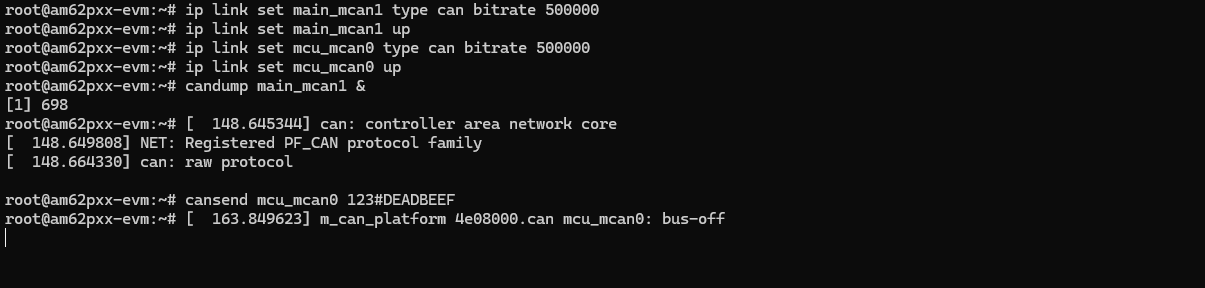
However, we are encountering issues when attempting an external loopback. Specifically, we connected the main_mcan1 (J1 connector pins 1 and 2) and mcu_mcan0 (J11 connector pins 22 and 16) interfaces using jumper wires. When sending a message, the interface eventually enters a bus-off state and stops functioning. We verified the TX/RX pin locations using the board schematics, but it is possible that we may have missed something in the wiring.

In addition, we attempted to use an external CAN transmitter. We connected a Vector VN1610 device to connector J1 on the EVM board using jumper wires and connected the VN1610 to a PC via USB-C. We used a PC application based on Vector's XL Driver Library API to transmit CAN frames, but the behavior remains the same, and the interface still transitions to the bus-off state.

Could you please advise on possible causes for this behavior? Also, is there a way to enable additional debug logging for the CAN subsystem in Linux to help diagnose potential issues at a lower level?

We will attach images of our hardware setup and wiring for reference.

Regards,
Dušan
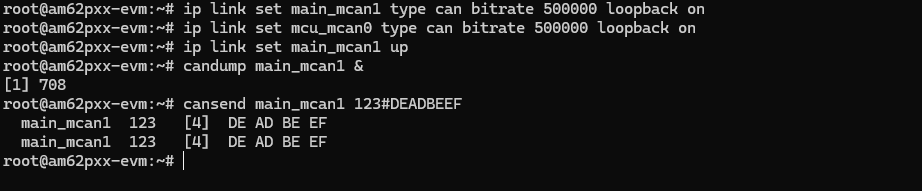
 

internal_loopback.png
external_loopback.png

  • Hello Dušan,

    Can you confirm you were refer to this part of the Linux documentation: https://software-dl.ti.com/processor-sdk-linux/esd/AM62PX/latest/exports/docs/linux/Foundational_Components/Kernel/Kernel_Drivers/MCAN.html


    Can you provide a diagram of your external loop back setup?

    Are both modules set to the same baud-rate?

    It seems like you are using the SK-AM62P-LP, which doesn't have CAN Transceiver. You can refer to a similar example in the Linux SDK docs: https://software-dl.ti.com/processor-sdk-linux/esd/AM62PX/latest/exports/docs/linux/How_to_Guides/Target/How_to_test_MCAN_on_AM62x.html

     You can also refer to the MCAN Debug guide application note: https://www.ti.com/lit/an/spradp4/spradp4.pdf

    Best Regards,

    Anshu

  • Hello Dušan,

    I realized that the transceiver might not be required for this. Just to make sure, the jumper wires are firmly connected, correct? Its possible a lose connection could cause the bus off behavior.

    Thanks,

    Anshu

  • Hello Anshu,

    Yes, we were referring to the documentation link you mentioned.

    Our goal was to reproduce a setup similar to the one we previously used on the J784S4 board. In that setup we connected two CAN interfaces directly with jumper wires and were able to successfully transmit and receive messages without encountering a bus-off condition. For reference, the setup and discussion can be seen here:
    https://e2e.ti.com/support/processors-group/processors/f/processors-forum/1400374/processor-sdk-j784s4-cannot-receive-data-on-can-bus-on-sdk-j784s4-9-2/5363418

    In the current setup on the AM62PX platform, both interfaces are configured with the same bitrate (500000). Despite this, when attempting external communication the interface eventually enters a bus-off state.

    We have looked for information regarding the interfaces main_mcan1 and mcu_mcan0 on TX/RX pin locations using the schematics and connected the jumper wires accordingly (Still not sure if these pins are valid for TX/RX). The connections are firmly attached, but we will include a picture of the current wiring setup below for confirmation.

    Please let us know if there is anything in the configuration or hardware setup that we may be overlooking.

    Best regards,
    Dušan


  • Hello Dušan,

    I don't see any clear issues with this setup.

    You said you're using SBL boot, correct? Can you confirm the other OS is not trying access CAN or any of the other signals not muxed on that pin?

    On your candump command, can you add the -e and -x flags? Hopefully that gives us a bit more info.

    Thanks,

    Anshu

  • Hello Anshu,

    To eliminate any potential issues related to our modifications, we switched back to the default SD card image and booted the system using the standard boot flow (SPL + U-Boot + Linux).

    However, even in this configuration we observe the same behavior. When we initialize the interface and attempt to send a CAN frame, the interface transitions to a bus-off state.

    Commands used:

    ip link set main_mcan1 type can bitrate 1000000
    ip link set main_mcan1 up
    cansend main_mcan1 123#DEADBEEF

    Kernel output:

    [108.752325] can: controller area network core
    [108.756785] NET: Registered PF_CAN protocol family
    [108.770272] can: raw protocol
    [108.775598] m_can_platform 20711000.can main_mcan1: bus-off

    Additionally, the output of ip -details link show main_mcan1 is:

    6: main_mcan1: <NOARP,UP,LOWER_UP,ECHO> mtu 16 qdisc pfifo_fast state UP mode DEFAULT group default qlen 10
    link/can promiscuity 0 allmulti 0 minmtu 0 maxmtu 0
    can state ERROR-ACTIVE (berr-counter tx 0 rx 0) restart-ms 0
    bitrate 500000 sample-point 0.875
    tq 12 prop-seg 69 phase-seg1 70 phase-seg2 20 sjw 10 brp 1
    m_can: tseg1 2..256 tseg2 2..128 sjw 1..128 brp 1..512 brp_inc 1
    m_can: dtseg1 1..32 dtseg2 1..16 dsjw 1..16 dbrp 1..32 dbrp_inc 1

    Since this board does not include an onboard CAN transceiver, we added an external transceiver to the setup. We used the same transceiver referenced in the TI documentation, specifically the SN65HVD230 CAN Board Kit, which is mentioned in the AM62x CAN testing guide.

    We verified the hardware connections by measuring:

    • 3.3 V between VCC and GND

    • 120 Ω between CANH and CANL

    Despite this, the bus-off condition still occurs when transmitting a message.

    We also tested communication using a Vector VN1610 device. On the Linux side, we ran:

    candump -x -e main_mcan1

    When transmitting frames from the VN1610, no messages are received on the Linux side, and no additional errors are reported.

    Below is an image of our current hardware setup for reference.

    Best regards,
    Dušan

  • Hi Dušan,

    I'm currently out of office so I'm unable to test it on my own EVM. I'll check with the development team to see when their setup was last tested.

    Thanks,

    Anshu

  • Hi Dušan,

    Apologies for the delay. The development team has tested the setup on their own EVMs and didn't get the bus-off condition.

    Just as a test, can you change the MCAN interface you are using from MCU MCAN1 to 0?

    Thanks,

    Anshu

  • Hi Anshu,

    Apologies for the delayed response. We have now successfully verified CAN transmit and receive. The root cause was incorrect jumper selection on the VN1610 box. After probing the signals with an oscilloscope during transmission, we observed that the documentation for CAN H and CAN L jumper mapping seems to be inaccurate.

    Sharing our working setup below in case it helps others.

    Best regards,
    Dusan

  • Hi Dušan,

    Thanks for sharing the solution with others. This thread will be closed.

    Best Regards,

    Anshu