LP-AM263: LP-AM263: Definitive Method to Debugging

Part Number: LP-AM263
Other Parts Discussed in Thread: UNIFLASH

Hi,

My team has been trying to debug project on LP-AM263 but we have not been able to do so. We have tried two sample projects for the same. This are provided by TI & we have not changed a single code line. Projects are rpmsg_echo_callback & empty.

We have tried two methods to debug projects

  1. CCS Launch, Load and Run Link
    1. A brief of what we do, set mode = 1 to enable dual core configuration in gel file
    2. SOC Init with SBL_Null flash (As per TI's guide Link). This includes Flashing SBL_NULL bootloader in UART Mode & Power Cycle in QSPI boot & verify NULL BootLoader is flashed.
    3. Launch a project-less debug in CCS.
    4. We connect to R5_0 which does gel config for R5_0 core
    5. Reset core & load binary
    6. Repeat for core R5_1, R5_2 & R5_3.
    7. Create a core group.
    8. Run all cores simulaneously using core groups.
  2. One Click Debug Mode Link
    1. This is a simply straightforward method.
    2. Import Project in CCS
    3. Build Project
    4. Start Debugging by clicking Run->Debug Project

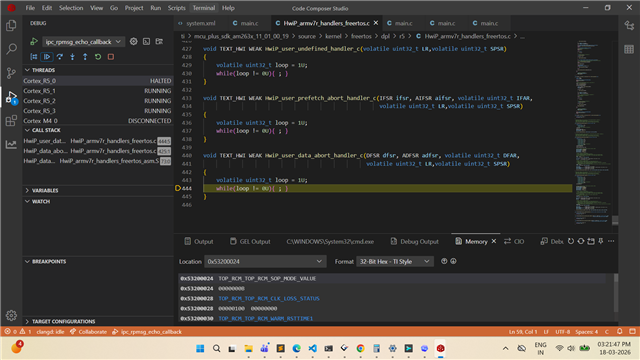
In both the methods, debugging doesn't work. We have an error on R5_0 core attached as per attached Screenshot. Code loops under HwiP_user_data_abort_handler_c.

Screenshot (37).png

NOTE: Project works when it is flashed using Uniflash Tool or uart_uniflash.py. Which indicate that problem is with debugging the code and not the application logic.

TI Uniflash Tool: sbl_ospi_multicore_elf.release.tiimage & Multicore Application Image (Flashing in UART Boot, Flash, Power Cycle & QSPI boot)

Uart Uniflash Py: sbl_uart.release.tiimage & Multicore Application in UART Boot Mode (Flashing in UART Boot)

  • In both the methods, debugging doesn't work. We have an error on R5_0 core attached as per attached Screenshot. Code loops under HwiP_user_data_abort_handler_c.

    Could you please confirm if you’ve set the boot mode on your board to DevBoot mode when doing this?

  • Yes, debugging is done in DevBoot Mode.

  • The switches are inverted in Launchpad settings, for example 1011 would need to be set as 0100.

    Is the following switch setting done.

    Can you also read the value in the register MSS_TOPRCM_SOP_MODE_VALUE (5320 0024h) to confirm the boot mode is correct. Data abort is usually seen when you try running the code from CCS in QSPI bootmode.

    Thanks,

    Sahana

  • Hi,

    Value of MSS_TOPRCM_SOP_MODE_VALUE is 0x0000000B.

     Gel Output confirms the same. 

    Cortex_R5_0: ***OnTargetConnect() Launched***
    
    Cortex_R5_0: AM263x Initialization Scripts Launched.
    Please Wait...
    
    
    Cortex_R5_0: AM263x_Cryst_Clock_Loss_Status() Launched
    Cortex_R5_0: Crystal Clock present
    Cortex_R5_0: AM263x_SOP_Mode() Launched
    Cortex_R5_0: SOP MODE = 0x0000000B    
    Cortex_R5_0: Devboot mode
    Cortex_R5_0: AM263x_Read_Device_Type() Launched
    Cortex_R5_0: EFuse Device Type Value = 0x000000AA    
    Cortex_R5_0: AM263x_Check_supported_mode() Launched
    Cortex_R5_0: mode = 1
    
    Cortex_R5_0: MSS_CTRL Control Registers Unlocked
    Cortex_R5_0: MSS_TOP_RCM Control Registers Unlocked
    Cortex_R5_0: MSS_RCM Control Registers Unlocked
    Cortex_R5_0: MSS_IOMUX Control Registers Unlocked
    Cortex_R5_0: TOP_CTRL Control Registers Unlocked
    Cortex_R5_0: *** R5FSS0 DualCore Reset ***
    Cortex_R5_0: *** R5FSS1 DualCore Reset ***
    Cortex_R5_0: R5F ROM Eclipse
    Cortex_R5_0: R5FSS0_0 Released
    Cortex_R5_0: R5FSS0_1 Released
    Cortex_R5_0: R5FSS1_0 Released
    Cortex_R5_0: R5FSS1_1 Released
    Cortex_R5_0: All R5F Cores Released for program load
    Cortex_R5_0: L2 Mem Init Complete
    Cortex_R5_0: MailBox Mem Init Complete
    Cortex_R5_0: *********** R5FSS0/1 Dual Core mode Configured********
    Cortex_R5_0: CORE PLL Configuration Complete
    Cortex_R5_0: PER PLL Configuration Complete
    Cortex_R5_0: SYS_CLK DIVBY2
    Cortex_R5_0: DPLL_CORE_HSDIV0_CLKOUT0 selected as CLK source for R5FSS & SYS CLKs
    Cortex_R5_0: CLK Programmed R5F=400MHz and SYS_CLK=200MHz
    Cortex_R5_0:
    
     *** Enabling Peripheral Clocks ***
    Cortex_R5_0: Enabling RTI[0:3] Clocks
    Cortex_R5_0: RTI0 Clock Enabled (200MHz)
    Cortex_R5_0: RTI1 Clock Enabled (200MHz)
    Cortex_R5_0: RTI2 Clock Enabled (200MHz)
    Cortex_R5_0: RTI3 Clock Enabled (200MHz)
    Cortex_R5_0: Enabling RTI_WDT[0:3] Clocks
    Cortex_R5_0: WDT0 Clock Enabled (200MHz)
    Cortex_R5_0: WDT1 Clock Enabled (200MHz)
    Cortex_R5_0: WDT2 Clock Enabled (200MHz)
    Cortex_R5_0: WDT3 Clock Enabled (200MHz)
    Cortex_R5_0: Enabling UART[0:5]/LIN[0:5] Clocks
    Cortex_R5_0: LIN0_UART0 Clock Enabled (160MHz)
    Cortex_R5_0: LIN1_UART1 Clock Enabled (160MHz)
    Cortex_R5_0: LIN2_UART2 Clock Enabled (160MHz)
    Cortex_R5_0: LIN3_UART3 Clock Enabled (160MHz)
    Cortex_R5_0: LIN4_UART4 Clock Enabled (160MHz)
    Cortex_R5_0: LIN5_UART5 Clock Enabled (160MHz)
    Cortex_R5_0: Enabling QSPI Clocks
    Cortex_R5_0: QSPI0 Clock Enabled (80MHz)
    Cortex_R5_0: Enabling I2C Clocks
    Cortex_R5_0: I2C Clock Enabled (48MHz)
    Cortex_R5_0: Enabling TRACE Clocks
    Cortex_R5_0: Trace Clock Enabled (250MHz)
    Cortex_R5_0: Enabling MCAN[0:3] Clocks
    Cortex_R5_0: MCAN0 Clock Enabled (80MHz)
    Cortex_R5_0: MCAN1 Clock Enabled (80MHz)
    Cortex_R5_0: MCAN2 Clock Enabled (80MHz)
    Cortex_R5_0: MCAN3 Clock Enabled (80MHz)
    Cortex_R5_0: Enabling GPMC Clocks
    Cortex_R5_0: GPMC Clock Enabled (100MHz)
    Cortex_R5_0: Enabling ELM Clocks
    Cortex_R5_0: ELM Clock Enabled (50MHz)
    Cortex_R5_0: Enabling MMCSD Clocks
    Cortex_R5_0: MMCSD Clock Enabled (48MHz)
    Cortex_R5_0: Enabling MCSPI[0:4] Clocks
    Cortex_R5_0: MCSPI0 Clock Enabled (48MHz)
    Cortex_R5_0: MCSPI1 Clock Enabled (48MHz)
    Cortex_R5_0: MCSPI2 Clock Enabled (48MHz)
    Cortex_R5_0: MCSPI3 Clock Enabled (48MHz)
    Cortex_R5_0: MCSPI4 Clock Enabled (48MHz)
    Cortex_R5_0: Enabling CONTROLSS Clocks
    Cortex_R5_0: CONTROLSS Clock Enabled (400MHz)
    Cortex_R5_0: Enabling CPTS Clocks
    Cortex_R5_0: CPTS Clock Enabled (250MHz)
    Cortex_R5_0: Enabling RGMI[5,50,250] Clocks
    Cortex_R5_0: RGMII5 Clock Enabled (5MHz)
    Cortex_R5_0: RGMII50 Clock Enabled (50MHz)
    Cortex_R5_0: RGMII250 Clock Enabled (250MHz)
    Cortex_R5_0: Enabling XTAL_TEMPSENSE_32K Clocks
    Cortex_R5_0: TEMPSENSE Clock Enabled (32KHz)
    Cortex_R5_0: Enabling XTAL_MMC_32K Clocks
    Cortex_R5_0: XTAL_MMC Clock Enabled (32KHz)
    Cortex_R5_0:
    
     ***All IP Clocks are Enabled***
    
    Cortex_R5_0: CPU reset (soft reset) has been issued through GEL on program load.
    Cortex_R5_1: CPU reset (soft reset) has been issued through GEL on program load.
    Cortex_R5_2: CPU reset (soft reset) has been issued through GEL on program load.
    Cortex_R5_3: CPU reset (soft reset) has been issued through GEL on program load.

  • Do you see this issue with multiple boards? Also, do you see this while running just a single core project as well?

  • No, single core projects work as expected. We only have one set of LP-AM263 hardware so we cannot test it on additional boards.

  • Hi Smit,

    Can you please refer to the below threads:

     MCU-PLUS-SDK-AM263X: Multicore Debug causes Abort 

    https://e2e.ti.com/support/microcontrollers/arm-based-microcontrollers-group/arm-based-microcontrollers/f/arm-based-microcontrollers-forum/1341281/am2634-multicore-freertos-empty-project-doesn-t-work-correctly/5212183?tisearch=e2e-sitesearch&keymatch=AM263%25252525252520multicore%25252525252520debug#5212183

    Also, one recommendation from my side would be, use either:

    - QSPI Boot-mode with SBL NULL flashed and then load the .out files

    - DEV Boot-mode with no SBL flashed and gel scripts doing the initialization.

    Regards,
    Shaunak