This thread has been locked.

If you have a related question, please click the "Ask a related question" button in the top right corner. The newly created question will be automatically linked to this question.

AM1808 silicon version 2.1 boot from SD card

Other Parts Discussed in Thread: AM1808, OMAPL138, AM1810, OMAP-L138

Hi 

    We have custom board of OMAP l138 custom board. We populated the two board one is with OMAP l138 chip another one is with AM1808B chip (version 2.1) but both are same schematics no changes in schematic just difference chip. 

OMAP l-138 boot successfully from SD card there is no issue and boot switch setting is high BOOT[4] 

I'm using same SD card with same boot switch on AM1808 board but its not booting there is blank terminal page. 

version details are

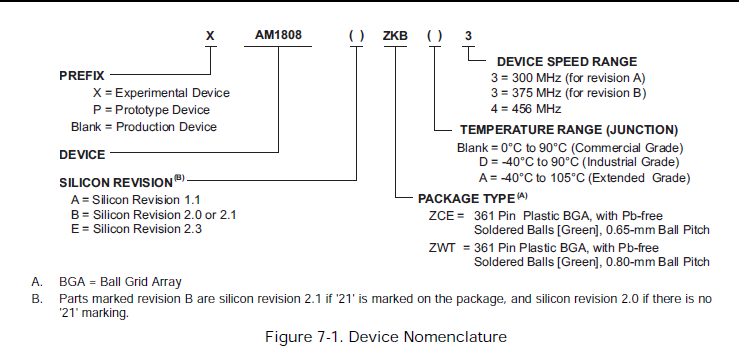
AM1808B ZWT chip here "B" denotes silicon revision 2.0 or 2.1 

TI-SDK version : ti-sdk-omapl138-lcdk-01.00.00 

Linux version   :  linux-3.1.10

u-boot version :  u-boot-2010.12-psp03.21.00.04.lcdk

Where is the problem 

1. Do we need to change the boot switch for AM1808 boot from SD card ?

2. Do we need to use any other version of u-boot or PSP ?

3. Do we need to do any hardware changes ?

Please let me know the issue for boot from SD card.

Thanks

Sangily.

  • Hi,

    We have 2 types of SD boot mode for different boards.

    1. pseudo SD boot for OMAPL138 EVM board (Boot switch to SPI)

    http://processors.wiki.ti.com/index.php/OMAP-L138_Preparing_SD_Card_for_Boot

    RBL will expect UBL binary from SPI and UBL will init and boot the u-boot from SD card

    2. SD boot for OMAPL138_LCDK (Boot switch to SD card)

    http://processors.wiki.ti.com/index.php/How_to_boot_OMAP-L138_LCDK_from_SD_card

    In OMAPL138 LCDK, board will boot the u-boot from SD card itself.

    Refer the old posts

    http://e2e.ti.com/support/dsp/omap_applications_processors/f/42/t/327050.aspx

    http://e2e.ti.com/support/dsp/omap_applications_processors/f/42/p/327704/1142337.aspx

    http://e2e.ti.com/support/dsp/omap_applications_processors/f/42/t/314721.aspx

    1. Do we need to change the boot switch for AM1808 boot from SD card ?

    3. Do we need to do any hardware changes ?

    For hardware queries, Please refer OMAPL138 LCDK schematics.

    2. Do we need to use any other version of u-boot or PSP ?

    Please refer the OMAPL138 LCDK TI SDK sources and make the workarounds for your AM18x

  • Hi Mr.Titus

            Thanks for your reply and my understanding from this response is,

    Point 1. AM1808 will not take UBL from SD card like OMAPl138 because AM1808's ROM code not support this.

        We need to bring UBL to processor from SPI flash / NAND/ UART then we can bring the u-boot and uImage which one is residing in SD card and it was created by this procedure 

    http://processors.wiki.ti.com/index.php/GSG:_OMAP-L138_DVEVM_Additional_Procedures#Creating_bootable_SD_card_for_OMAP-L138_EVM_board 

    Point 2. But later 2.1 version AM1808 support  SD boot from ROM code like OMAPl138. So we can store UBL , uboot and uImge in SD card.

    In my case my AM1808 is v2.0 or v2.1 part number is AM1808BZWT  so we need to try both points. But 2nd point didn't work so there is only one choice we need to try 1st point.

    I've the SD card with two partitions that was created from following link. 

    http://processors.wiki.ti.com/index.php/GSG:_OMAP-L138_DVEVM_Additional_Procedures#Creating_bootable_SD_card_for_OMAP-L138_EVM_board

    How to bring the UBL to AM1808 processor ?

    I've UART and NAND option. My NAND part is 16bit NAND (MT29F4G16ABADAH4). 

    i refer this link for flash http://processors.wiki.ti.com/index.php/AM18x_Flash_Tool_User%27s_Guide

    Shall i use the UBL_AM1808_NAND.ais instead of UBL_AM1810_SPI.ais?


    Or i can use UART boot?

    Please correct me if wrong and guide me.

    Thanks

    Sangily

  • Hi,

    In my case my AM1808 is v2.0 or v2.1 part number is AM1808BZWT  so we need to try both points. But 2nd point didn't work so there is only one choice we need to try 1st point.

    How did you confirm?

    From 2nd point,

    Do you have SD boot switch option is available on your board?

    Have you compared the OMAPL138 LCDK, OMAPL138 EVM  and your custom board?

  • Hi

    Titusrathinaraj Stalin said:
    How did you confirm?

    My part number written in chip top view is 

    AM1808B

    ZWT

    08ACS6W GI 456

        .  527  ZWT

    I hope here "B" denotes silicon revision is 2.0 or 2.1

    Titusrathinaraj Stalin said:
    Do you have SD boot switch option is available on your board?

    Ya we have proper 0ohm DNI for all BOOT pins so there is no issue in BOOT switch configuration. Its working very well in OMAPl 138 custom board 

    Titusrathinaraj Stalin said:
    Have you compared the OMAPL138 LCDK, OMAPL138 EVM  and your custom board?

    Ya we refer and compared these boards and  our board's reference board is OMAPl 138 LCDK kit. 

    I guess it will be fix if i bring the UBL into AM1808 via UART and flash into the 16bit micron NAND. 

    But the issue is how to do it and i'm trying myself and please guide me.

    I hope you understand the situation and problem.

    Thanks

    Sangly. 

  • Hi,

    I hope here "B" denotes silicon revision is 2.0 or 2.1

    What I'm trying to ask is that how did you confirm/finalize the silicon rev is 2.0 instead 2.1 and why not 2.1?

    I also don't know how to confirm 2.1 or 2.0,

    Simply i asked, better to try 2nd option as you said,

    If you are trying to boot in pseudo method having UBL code in NAND flash.

    Detailed Procedure for(SPI) pseudo SD boot (It worked in OMAPL138 SDI board):


    U-boot binary preparation
    ---------------------------

    I) Building u-boot source

    host$ make distclean CROSS_COMPILE=arm-none-linux-gnueabi-
    host$ make da850sdi_mmc_config CROSS_COMPILE=arm-none-linux-gnueabi-
    host$ make all CROSS_COMPILE=arm-none-linux-gnueabi-

    SD card preparation
    -----------------------------

    1) Format the SD card into SD partition (you have to leave first ~600KB free for flashing u-boot image)

    2) u-boot-source$ tools/uflash/uflash -d /dev/sdb -b u-boot.bin -p OMAPL138 -vv

    LOG
    ----
    ti-e2e/OMAPL138_SDI_EVM/DaVinci-PSP-SDK-03.22.00.06/src/u-boot/u-boot-davinci# tools/uflash/uflash -d /dev/sdb -b u-boot.bin -p OMAPL138 -vv

    OMAPL138
    U-Boot Size 186595
    First partition starts at 32130(16450560)
    U-Boot Magic Number     : a1aced66
    U-Boot Entry Point      : c1080000
    U-Boot Number of Blocks : 0000016d
    U-Boot Starting Block   : 00000075
    Load U-Boot Address     : c1080000
    Writing U-Boot Signature
    Writing U-Boot
    Done...


    II)
    Creating u-boot SPL binary (u-boot-spl.ais)

    1) u-boot-source$ tools/mkimage -s -n /dev/null -T aisimage -e 0x80000000 -d spl/u-boot-spl.bin spl/u-boot-spl.ais

    LOG
    ----
    ti-e2e/OMAPL138_SDI_EVM/DaVinci-PSP-SDK-03.22.00.06/src/u-boot/u-boot-davinci# tools/mkimage -s -n /dev/null -T aisimage -e 0x80000000 -d spl/u-boot-spl.bin spl/u-boot-spl.ais
    Image Type:   TI Davinci AIS Boot Image
    AIS magic :   41504954
    Image at  :   0x80000000 size 0x00004e5c

    III)
    Set boot switch settings to SPI boot

    Flash the U-Boot AIS file built for SPI flash

    ./sfh_OMAP-L138.exe -flash_noubl u-boot-spl.ais -targetType OMAPL138_SDI

    3) Connect the SD card to the OMAPL138 SDI board and set boot switch settings to SPI boot for pseudo MMC/SD booting

  • Hi 

    Thanks for understand my problem.

    But i mentioned that i don't have SPI flash i have Micron 16 bit parallel NAND as well as i mentioned the part number above. 

    How to build the UBL/u-boot for NAND and what is the procedure or SPI flash method will work for parallel NAND also?

    Thanks

    sangily. 

  • Hi,

    First understand the procedure for pseudo SD boot.

    How to build the UBL/u-boot for NAND and what is the procedure or SPI flash method will work for parallel NAND also?

    You have to modify the code for flashing UBL binary into NAND flash by taking the reference code from SPI pseudo SD boot which is implemented OMAPL138 SDI board.

  • Hi Mr.Titu

           I tried the to options UART boot and NAND boot. 

    1.UART boot

      built the u-boot with some modification in UART clock sampling and signed the u-boot by AISGen tool then tried to boot from UART boot host tool and i got the U-Boot > string on terminal but after boot the uImage UART clock changed so i cant get the proper log in terminal and i dono how to change the clock bit to adjust the UART sampling clock in Linux kernel source 

    Plese refer this http://e2e.ti.com/support/dsp/omap_applications_processors/f/42/p/62016/1152994.aspx#1152994

    2. NAND boot

    Built the uboot without modify the code for UART clock workaround. And signed the u-boot by the AIS utility and flash the u-boot into NAND by this command

    sfh_OMAP-L138.exe -flash -flashType NAND -p COM48 -targetType OMAPL138_LCDK ubl_OMAPL138_LCDK_NAND.bin u-boot_NAND_ais.bin

    it flashed the NAND successfully without any problem. I boot the device but its bot booting successfully it freeze at

    Jumping to entry point at 0xC1080000. 

    What is the problem and how to fix it ? do we need modify anything like address or something in AIS Gen tool ?

    or do we need to modify the u-boot for NAND ?

    Thanks

    Sangily

  • Hi,

    Have you enabled NAND definition in u-boot source code.

    it flashed the NAND successfully without any problem. I boot the device but its bot booting successfully it freeze at

    Jumping to entry point at 0xC1080000.


    This seems to be the UBL got successfully flashed and u-boot binary had some problem due to lot of reasons such as AIS convertion , u-boot source code for NAND part etc.,

    What are you trying to do?

    Do you want to boot the board from NAND?

    For UART boot case,

    You got successful except kernel image clock (baud rate) issue on UART.

  • Hi


    Titusrathinaraj Stalin said:
    Do you want to boot the board from NAND?

     Ya i want to boot the board from NAND because each and every time i can't connect the board with PC and can't boot from UART so i'm expecting NAND boot.

    Titusrathinaraj Stalin said:
    Have you enabled NAND definition in u-boot source code.

    In u-boot CONFIG_USE_NAND is already defined and what are the other modification need to do in u-boot for NAND booting is there any wiki page for this ,because i couldn't get it.

    Thanks

    Sangly

  • Hi,

    In u-boot CONFIG_USE_NAND is already defined and what are the other modification need to do in u-boot for NAND booting is there any wiki page for this ,because i couldn't get it.

    Can you please attach your board def file located at "include/config",

    What is your SDK & u-boot version?

  • Hi

    Versions

    SDK    : ti-sdk-omapl138-lcdk-01.00.00

    u-Boot: u-boot-2010.12-psp03.21.00.04.lcdk

    Here i've attached the config file. 7701.omapl138_lcdk.h

    Thanks

    sangly

  • Hi,

    What about your NAND data bus  width 8 or 16 bit?

    How about CS signal and connected to which CSx?

    CS2 or CS3 ?

  • Hi 

        Bus width 16 and CS connected with EMA_CSn_3 same as OMAPL138_LCDK kit. All of the connections are same as OMAPL138_LCDK kit.

    And another possibilities is there for failure that is AIS Gen tool configuration but i load the configuration of OMAPL138_LCDK from cfg_files folder. 

    This is my build command for u-boot

    host $ make distclean CROSS_COMPILE=arm-arago-linux-gnueabi-
    host $ make omapl138_lcdk_config CROSS_COMPILE=arm-arago-linux-gnueabi-
    host $ make all CROSS_COMPILE=arm-arago-linux-gnueabi-

    Thanks

    Sangly

  • Hi,

    Your configuration seems good,

    How about UBL binary and where it resides?

    In my understanding,

    I think, You don't want to convert u-boot.bin to AIS format If you are using UBL and able to boot,

    Else, You need to build u-boot with SPL code and then need to convert whole AIS format, then try to boot from single image,

    I will try this and let me update and mean while please update us if you are able to boot successfully,

  • Hi Sangly,

    Can you please give me your u-boot modified files if any,

    I will build it and share the u-boot.ais file for NAND flashing,

    I am able to build u-boot source, convert to AIS format and flashing into NAND flash successfully.

    Sangly said:

        Bus width 16 and CS connected with EMA_CSn_3 same as OMAPL138_LCDK kit. All of the connections are same as OMAPL138_LCDK kit.

    Titus said:

    Your configuration seems good,

    How about UBL binary and where it resides?

    If you are using OMAPL138 LCDK u-boot source files then NAND default bus width is 16 bit and CS is 3,

    Also, UBL is not required and we can boot from u-boot directly from NAND flash,

  • Hi Mr.Titu

                Good to know that working fine.

               I didn't modify anything in u-boot just modified the serial driver for UART boot clock OSR bit. 

              Please let me know the procedure how to flash the u-boot in NAND.

    Thanks

    Sangily.  

  • Hi,

    The following procedures and links that i followed for NAND booting as well AIS format convert from u-boot.bin in OMAPL138 LCDK board,

    http://processors.wiki.ti.com/index.php/OMAP-L138_LCDK_Linux_Software_Developer%27s_Guide#Creating_your_own_U-Boot_version_that_can_be_flashed_on_LCDK

    LCDK Config file ----> processors.wiki.ti.com/images/a/a4/LCDK_AISGen_Config.zip

    Load the "LCDK_AISGen_Config.cfg" file in AIS tool,

    + Configure PSC (check the PSC box) and ensure PSC1 value is 13
    + Check the "Specify Entrypoint "0xC1080000" and mention in u-boot bin name like "u-boot.bin@0xC1080000"

    Also, If possible, Share your u-boot.bin and I try to convert to AIS format.

    Best of luck and please update the status.

  • Hi Sangly,

    Have you tried the above steps and what about the results?

    Still any issues!

    Can you please update

  • Hi Mr.Titu

                Was out of office, and will check you now and update you now. 

    Thanks for the followup.

    Thanks

    Sangly

  • Hi Mr.Titu

    Sorry i can't get anything in terminal when i boot from NAND. below i mentioned the procedure.

    1. Opened the the AIS gen tool and followed this procedure http://processors.wiki.ti.com/index.php/OMAP-L138_LCDK_Linux_Software_Developer%27s_Guide#Creating_your_own_U-Boot_version_that_can_be_flashed_on_LCDK

    2. My input u-boot file is /board-support/prebuilt_images/u-boot-lcdk.bin. and generated the u-boot-lcdk-ais.bin

    3. flashed this file into NAND by this command without UBL binary. 

    sfh_OMAPL138.exe -flash_noubl -flashType NAND -p COM48 -targetType OMAPL138_LCDK u-boot_AIS.bin

    ans this process is complete successfully.

    4. changed the boot mode to NAND booting and boot the device but there is no log in terminal. 

    Did i missed anything ? 

    Thanks

    Sangly

  • Hi, Sangly,

    I have OMAPL138 LCDK board,

    So, Could you please send your both the u-boot-lcdk.bin and u-boot-lcdk-ais.bin files to check with my board,

  • Hi,

    Try to flash the "u-boot-lcdk.bin" which is located at pre-built folder,

    No need to convert to AIS, I think it is already converted one because these both the pre built binaries are booting from NAND in my OMAPL138 LCDK board,

    sfh_OMAPL138.exe -flash_noubl -flashType NAND -p COM48 -targetType OMAPL138_LCDK u-boot-lcdk.bin


    root@titus:~/Titus_Linux_Backup/ti-e2e/ti-sdk-omapl138-lcdk-01.00.00/board-support/prebuilt-images# ls
    u-boot-lcdk_ais.bin  u-boot-lcdk.bin  uImage
    root@titus:~/Titus_Linux_Backup/ti-e2e/ti-sdk-omapl138-lcdk-01.00.00/board-support/prebuilt-images#

    If still problem persists then need to modify the u-boot source code,