This thread has been locked.

If you have a related question, please click the "Ask a related question" button in the top right corner. The newly created question will be automatically linked to this question.

AM572x IDK runtime error call stack

Other Parts Discussed in Thread: SYSBIOS, BEAGLEBOARD-X15

Hi,

I'm trying to develop an application on the IDK_AM572X dev board and I'm having several issues. What would help me the most is if I could get a call stack when there's a runtime error or any kind of exception. Right now, I end up in either kill, exit or do_AngelSWI function, but there's nothing else in the call stack and I can't find where the error occurred. Is there a way to get the call stack?

For information, I'm using sysbios 6.45 and PDK 1.0.4 in CCS 6.2.

Also, is it normal that I always have to push the hard reset button before connecting to the A15 core in CCs? If I don't do it, the program will more than likely crash as soon as I start it.

Thanks,

Francis

  • Hi,

    The RTOS team have been notified. They will respond here.
  • Francis Page32 said:
    Is there a way to get the call stack?

    In the the RTOS Object View (ROV) under the Hwi section there is an Exception tab, which should contain the Exception call stack.

    Francis Page32 said:
    Also, is it normal that I always have to push the hard reset button before connecting to the A15 core in CCs? If I don't do it, the program will more than likely crash as soon as I start it.

    The SYS/BIOS start-up code for a Cortex-A15 attempts to invalidate the cache. However, on the Cortex-A15 the cache invalidate instruction actually performs a cache clean which can corrupt the downloaded program if there is any data in the cache from a previous run.

    A hard reset will clear the cache before attempting to download another program with CCS. Debugging Cortex A15 defines an alternate procedure to apply a System Reset from CCS, rather than have to press the hard reset button.

    [See Does the ARM Cortex-A15 treat the invalidate instruction as a clean/invalidate instruction due to a design decision or due to an errata? for some background information]

  • Hi,

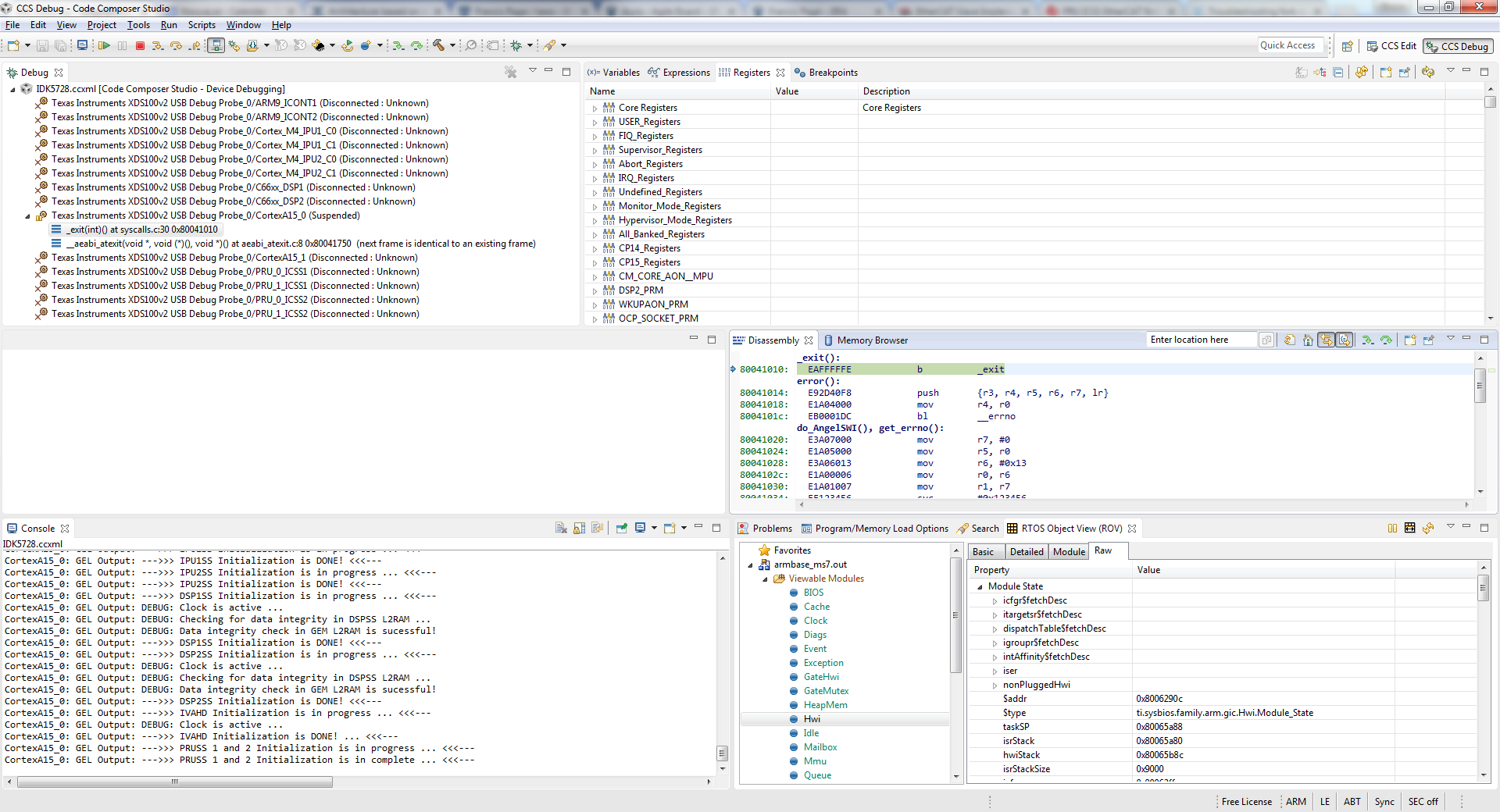
    There's no Exception tab in the Hwi section. Here's a screenshot:

    Also, it's not really the fact that I have to push the hard reset button that's bothering me, it's the disconnect+reconnect part. It takes almost one minute! When you're debugging a crash and I have to reload the program all the time, it's driving me crazy!

  • Francis Page32 said:
    There's no Exception tab in the Hwi section. Here's a screenshot

    I was getting confused with the ROV for Cortex-M targets which has the decoded exception in the "Hwi" section.

    From looking at the SYS/BIOS documentation think that for Cortex-A targets the decoded exception should appear somewhere in the "Exception" section of the ROV, but don't have access to a Cortex-A to check at the moment.

    Francis Page32 said:
    Also, it's not really the fact that I have to push the hard reset button that's bothering me, it's the disconnect+reconnect part.

    Agree that is annoying. Will have a look at if there is any action that could be taken in a GEL script to allow a clean re-load without having to perform a re-connect.

  • Francis Page32 said:
    Right now, I end up in either kill, exit or do_AngelSWI function, but there's nothing else in the call stack and I can't find where the error occurred.

    On investigation:

    1) For a Cortex-A15 there is an "Exception call stack" in the ROV Exception view. However, found a bug which causes the Exception call stack to be incomplete - see SYS/BIOS 6.45.01.29 ti.sysbios.family.arm.exc.Exception reports incorrect SP and LR values, leading to incorrect exception call stack. There is a suggested fix in the thread.

    2) When a SYS/BIOS program terminates due to an error, or BIOS_exit being called, the stack backtrace in the debugger is incomplete and doesn't show the location of the error / exit in the application - see CCS 6.2.0.00050 doesn't display complete stack backtrace when a Cortex-A15 SYS/BIOS program using the GNU compiler terminates due to an error or calling BIOS_exit(). As a work-around setting breakpoints on xdc_runtime_Error_raiseX__E and xdc_runtime_System_exitStd__E seems to halt the program while the stack backtrace is complete enough to show the location of the problem in the application.

  • Francis Page32 said:
    Also, it's not really the fact that I have to push the hard reset button that's bothering me, it's the disconnect+reconnect part. It takes almost one minute!

    I have modified some CCS 6.2 GEL files to try and allow SYS/BIOS program to be re-loaded without needing a disconnect and reconnect.

    To install the GEL files, make a backup of the <CCS_install_root>\ccsv6\ccs_base\emulation\boards\am572x\gel directory, and then save the files in the attached zip file to that directory. AM572x_cortexA15_SYS_BIOS_reload.zip

    The changes consist of a new AM572x_cortexA15_SYS_BIOS_reload.gel file, and the following addition to the existing gpevm_am572x.gel and idk_am572x.gel files:

    menuitem "SYS BIOS"
    hotmenu CortexA15_enable_SYS_BIOS_reload ()
    {	
        GEL_LoadGel("$(GEL_file_dir)//AM572x_cortexA15_SYS_BIOS_reload.gel");
    }

    Usage is:

    1) Start a debug session, which as before will perform a connection which initializes the target.

    2) From the Scripts menu execute the SYS BIOS -> CortexA15_enable_SYS_BIOS_reload script. The loads the new AM572x_cortexA15_SYS_BIOS_reload.gel file, which takes action when a program is downloaded:

    This script only has to be once per debug session.

    3) To re-download the SYS/BIOS program leave the target connected and execute the Run -> Load -> Reload Program menu option. When this is run messages of the following form will appear in the CCS console and the target will be halted at the xdc_runtime_Startup_reset__I function:

    CortexA15_0: GEL Output: Level 1 data cache Write-Back - Cleaning and coherency = 96
    CortexA15_0: GEL Output: Level 2 data cache Write-Back - Cleaning and coherency = 146
    CortexA15_0: GEL Output: **** SYS/BIOS boot.asm has trggered A15 cache write-back which may have corrupted the downloaded program ****
    CortexA15_0: GEL Output: **** Reload the program ****

    Execute the Run -> Load -> Reload Program menu option again, and this time the program should successfully run.

    One limitation is that the run-to-symbol functionality when downloading a program no longer occurs. e.g. if require run-to-main on a re-load then will need to manually set a breakpoint on main.

    I have tested the modified GEL file by re-loading example SYS/BIOS programs multiple times in a BeagleBoard-X15 (don't have an actual AM572x IDK) and with the changes the re-load was successful in that the program didn't crash.

    Reloading the SYS/BIOS program in this way won't change the state of any peripherals, and so if the SYS/BIOS program relies upon the initial state of any peripherals there could still be problems with reloading the program without performing a disconnect+reconnect.

    There are comments in the AM572x_cortexA15_SYS_BIOS_reload.gel which explain why the reload has to be performed twice.

  • Thanks for the scripts, I'll try that!

    For the exceptions, I remember trying to set a breakpoint at xdc_runtime_Error_raiseX__E, but I still had 0x00000000 as previous address in the callstack. My problem is now fixed, but I'll try again next time, maybe I'll be more lucky.

    Are you planning to fix those bugs in CCS? For a software in that price range, it's a bit disappointing...
  • Francis Page32 said:
    Are you planning to fix those bugs in CCS?

    Unfortunately, since I am not a TI employee I can't answer that.

    A bug has now been filed for the SYS/BIOS 6.45.01.29 ti.sysbios.family.arm.exc.Exception reports incorrect SP and LR values, leading to incorrect exception call stack issue, so hopefully the problem of the incorrect SYS/BIOS exception call stack will be fixed.

    Francis Page32 said:
    For the exceptions, I remember trying to set a breakpoint at xdc_runtime_Error_raiseX__E, but I still had 0x00000000 as previous address in the callstack.

    OK, since I don't fully understand what causes the backtrace to be incomplete there could still be some cases where even with a breakpoint at xdc_runtime_Error_raiseX__E the backtrace is incomplete.

    On CPUs, such as the Cortex-A8, where SYS/BIOS supports either the TI or GNU ARM compilers have found that the stack backtrace displayed in the CCS debugger seems more "reliable" when the TI compiler is used. E.g. when using the TI compiler with a Cortex-A8 SYS/BIOS program the stack backtrace after the program was aborted with an error was complete without having to set a breakpoint on xdc_runtime_Error_raiseX__E.

    However, for the Cortex-A15 and Cortex-A9 CPUs SYS/BIOS only supports the GNU ARM compiler and therefore need to understand what causes the stack backtrace to be sometimes incomplete.

  • Hi Chester,

    I did not realize that you were not a TI employee! You probably gave me the best support I ever had here. Thanks a lot!

    Francis