This thread has been locked.

If you have a related question, please click the "Ask a related question" button in the top right corner. The newly created question will be automatically linked to this question.

Linux/TDA2E: HARDWARE CAMERA USAGE AND LCD DISPLAY

Part Number: TDA2E


Tool/software: Linux

HI,

I am using TDA2XX-evm  board .In this board is communicated with lcd interface.but cant get any kind of indication (like no display power on).I have some camera instruction in serial window like pause capture,resume capture.

  • Hi Kalaiventhan,


    Are you trying to run Vision SDK. If yes what is the use case you are trying to run. Do you have any UART logs?

    Regards,

    Rishabh

  • Hi,

    Looks like you need to select the display type. The default is HDMI display. You should be able to see the below default when you boot:

    [IPU1-0]     12.136260 s:  Current System Settings,

    [IPU1-0]     12.136322 s:  ========================

    [IPU1-0]     12.136352 s:  Display Type   : HDMI 1920x1080 @ 60fps

    Before starting the use case can you please set the display selecting option 's' before starting the usecase:

    [IPU1-0]  s: System Settings 

    Select  display settings '1'.

    [IPU1-0] ===============

    [IPU1-0] System Settings

    [IPU1-0] ===============

    [IPU1-0]

    [IPU1-0] 1: Display Settings

    The display options are as below.  Select the type of LCD you have hooked up to your EVM and then re-run the usecase. 

    "\r\n 1: LCD 7-inch 800x480@60fps"
    "\r\n 2: LCD 10-inch 1280x720@60fps"
    "\r\n 3: HDMI 1080P60 "
    "\r\n 4: HDMI 720P60 "
    "\r\n 5: SDTV NTSC "
    "\r\n 6: SDTV PAL "
    "\r\n 7: HDMI XGA TDM mode (TDA3x ONLY) "
    "\r\n 8: LCD 10-inch 1920x1200@60fps"
    "\r\n 9: HDMI WXGA mode (TDA3x ONLY) "

    Thanks and Regards,

    Piyali

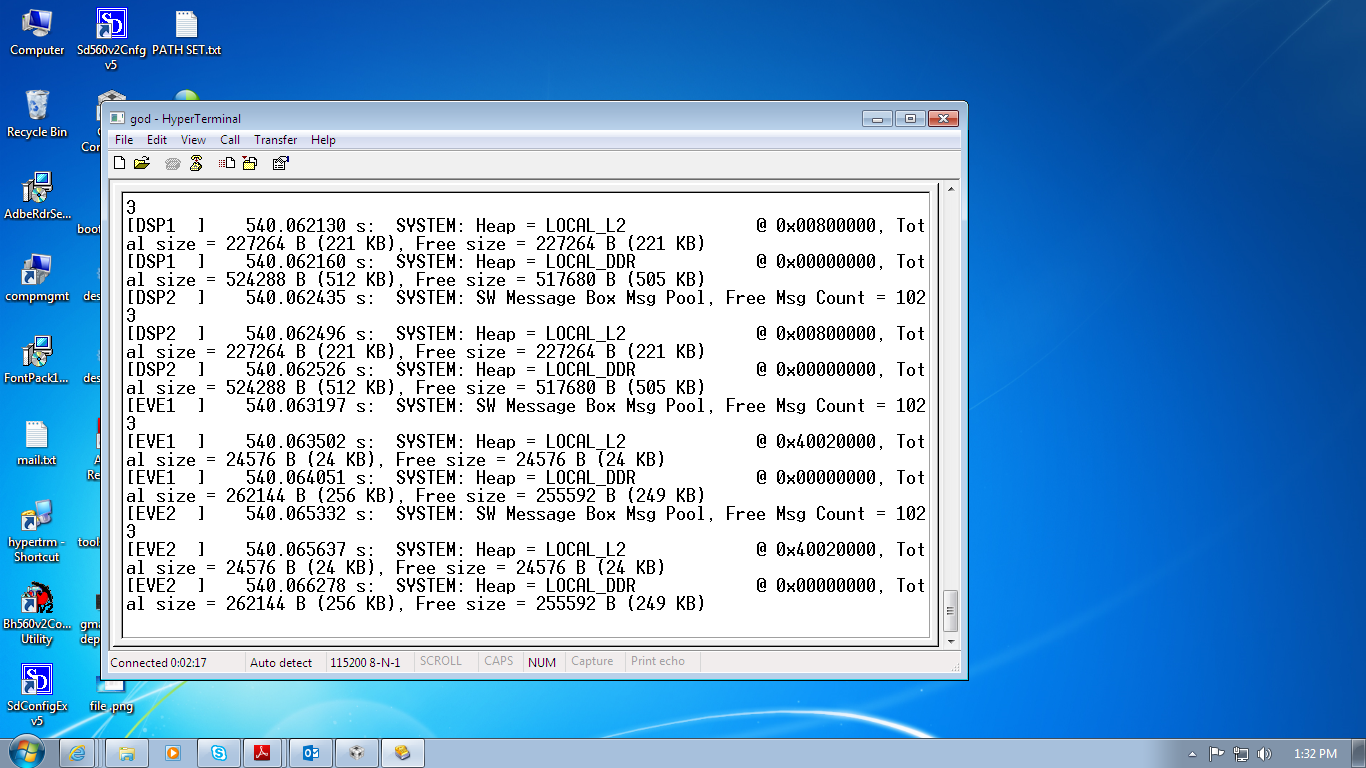
  • I have done above function, after that I choose particular function ,it shows like below image

  • This is the heap allocation status. Can you please save the whole log in a txt file and share the same?
  • hi,

               I attached status in wordfileIPU1 lcd.docx

  • Hi,

    Your point of fail is the sensor initialisation. Do you have a OV10635 1280x720 Camera sensor attached to your EVM?

    [IPU1-0] 540.066918 s: CHAINS: Sensor create in progress !!!
    [IPU1-0] 540.067467 s: VIDEO_SENSOR: INST0 : I2C1 : I2C Addr = 0x30
    [IPU1-0] 541.297810 s: src/bsp_deviceI2c.c @ Line 765:
    [IPU1-0] 541.297901 s: I2C1: DEV 0x30: RD 0x300a ... ERROR !!!
    [IPU1-0] 541.297993 s: src/bsp_deviceI2c.c @ Line 836:
    [IPU1-0] 541.298084 s: I2C1: Error timeout 1230 ms!!!
    [IPU1-0] 541.298572 s: src/fvid2_drvMgr.c @ Line 725:
    [IPU1-0] 541.298664 s: Driver create failed!!
    [IPU1-0] 541.298755 s: src/fvid2_drvMgr.c @ Line 835:
    [IPU1-0] 541.298816 s: EBADARGS: NULL pointer!!
    [IPU1-0] 541.298877 s: CHAINS: Sensor create ... DONE !!!
    [IPU1-0] 541.298938 s: Assertion @ Line: 1512 in C:/VISION_SDK_02_12_00_00/v
    ision_sdk/examples/tda2xx/src/usecases/common/chains_common_vision.c: status ==
    SYSTEM_LINK_STATUS_SOK : failed !!!

    Regards,
    Piyali
  • Hi,,

     thanks lcd display is working .but I cant see any kind of video or image like.IP.docx

  • Hi,

    Which usecase are you running? The 2nd log you have shared does not give complete information, seems to indicate you are running e: 1CH VIP capture (HDMI) + Pedestrian, Traffic Sign, Vehicle Detect 2 (EVE1 + DSP1) + Display but the usecase menu has still not appeared.

    Thanks and Regards,
    Piyali
  • HI..

    I was select use case is 1:enable pedestrian detect


    [IPU1-0] Select use-case options,
    [IPU1-0] ------------------------
    [IPU1-0] 1: Enable Pedestrain Detect (PD)
    [IPU1-0] 2: Enable Traffic Sign Regonition (TSR)
    [IPU1-0] 3: Enable Vehicle Detect (VD)
    [IPU1-0] 4: Enable PD+TSR+VD
    [IPU1-0]
    [IPU1-0] Enter Choice:
    [IPU1-0]

    [EVE1 ] 996.795217 s: IPC_IN_0 : Create in progress !!!
    [EVE1 ] 996.796346 s: IPC_IN_0 : Create Done !!!
    [EVE1 ] 996.796956 s: ALGORITHM: Create in progress (algId = 10) !!!
    [EVE1 ] 996.817391 s: ALGORITHM: Create Done (algId = 10) !!!
    [EVE1 ] 996.818245 s: IPC_OUT_0 : Create in progress !!!
    [EVE1 ] 996.818733 s: IPC_OUT_0 : Create Done !!!
    [EVE1 ] 997.021838 s: IPC_IN_1 : Create in progress !!!
    [EVE1 ] 997.022967 s: IPC_IN_1 : Create Done !!!
    [EVE1 ] 997.023577 s: ALGORITHM: Create in progress (algId = 11) !!!
    [EVE1 ] 997.024095 s: ALGORITHM: Create Done (algId = 11) !!!
    [EVE1 ] 997.024827 s: IPC_OUT_1 : Create in progress !!!
    [EVE1 ] 997.025315 s: IPC_OUT_1 : Create Done !!!
    [EVE1 ] 997.949704 s: SYSTEM: SW Message Box Msg Pool, Free Msg Count = 102
    3
    [EVE1 ] 997.950009 s: SYSTEM: Heap = LOCAL_L2 @ 0x40020000, Tot
    al size = 24576 B (24 KB), Free size = 6040 B (5 KB)
    [EVE1 ] 997.950558 s: SYSTEM: Heap = LOCAL_DDR @ 0x00000000, Tot
    al size = 262144 B (256 KB), Free size = 238336 B (232 KB)
    [EVE2 ] 997.951503 s: SYSTEM: SW Message Box Msg Pool, Free Msg Count = 102
    3
    [EVE2 ] 997.951839 s: SYSTEM: Heap = LOCAL_L2 @ 0x40020000, Tot
    al size = 24576 B (24 KB), Free size = 24576 B (24 KB)
    [EVE2 ] 997.952388 s: SYSTEM: Heap = LOCAL_DDR @ 0x00000000, Tot
    al size = 262144 B (256 KB), Free size = 255592 B (249 KB)
  • Hi,

    Before trying some of the advanced usecases, can you please check at first level if capture and display are working on your setup?

    [IPU1-0] 1: 1CH VIP capture + Display

    Thanks and Regards,
    Piyali
  • Before trying some of the advanced usecases, can you please check at first level if capture and display are working on your setup?
    [IPU1-0] 1: 1CH VIP capture + Display

    ANS : ya I am also trying that but I didn't get any kind of image like that...but no error indication
  • Hi,

    From the first set of logs I see that you are using HDMI display still:

    [IPU1-0]    500.258982 s:  Current System Settings,                                                  

    [IPU1-0]    500.259043 s:  ========================                                                  

    [IPU1-0]    500.259104 s:  Display Type   : HDMI 1920x1080 @ 60fps                                                                  

    [IPU1-0]    500.259165 s:  Capture Source : Sensor OV10635 1280x720  @ 30fps - V                                                                                

    IP, YUV422          

    [IPU1-0]    500.259440 s:  My IP address  : 0.0.0.0                                                  

    [IPU1-0]    500.259531 s:  ISS Settings   : LDC=[OFF] VTNF=[OFF] WDR=[OFF]                                                                          

    [IPU1-0]    500.259592 s:                        

    [IPU1-0]    500.259653 s:  ============                                      

    Can you please confirm you have switched the display settings to use LCD?

    Thanks and Regards,

    Piyali

  • Hi Kalaiventhan,

    It will be great if you share the image of your hardware setup so as to make sure that all connections are proper.

    Regards,
    Rishabh
  • From the log you shared, it also looks like the driver is failing to configure OV10635. The code at Line: 1512 in C:/VISION_SDK_02_12_00_00/vision_sdk/examples/tda2xx/src/usecases/common/chains_common_vision.c configures the sensor, which is failing. Since there is no capture, display won't show anything..

    Have you connected to OV10635 sensor? Please note that OV10635 cannot be connected, you require application board to connect different sensors including OV01635.

    Rgds,
    Brijesh
  •  I am using OV10635 camera and osd 1080 p touch display  I/F board what I will give the settings command?

  • Hi Kalaiventhan,

    You need a VIsion daughter card where you have to connect the sensor. Can you share a picture of your setup as I requested in my previous post.

    Regards,
    Rishabh
  • Hi..

       I  attached my hardware setup.

  • In my css software is display like this..it is necessary to execute.

    Can't find a source file at "/db/ztree/library/trees/xdctargets/xdctargets-l00/src/ti/targets/arm/rtsarm/boot.asm"
    Locate the file or edit the source lookup path to include its location.
  • hi,


    it is possible to send the video frame to lcd from a saved video file for checking display.
    please suggest
  • Hi Kalaiventhan,

    Can you set SW3 Switch settings in Vision App board to "xxxxxxx0" and give it a try.
    You can ignore the message "Can't find a source file ..." for now.

    Regards,
    Rishabh
  • Here the issue is not with display, issue is with capture.
    Capture is not happening and hence you are not getting any display output.

    Regards,
    Rishabh
  • HI,

    thanks .I got the video ..
  • Hi Kalaiventhan,

    Please mark the post that you think answered your question as verified answer and close the thread.
    Thanks.

    Regards,
    Rishabh
  • Regarding video capture:
    Issue was in the “Display setting”. Previously, the resolution selected for the LCD Display was “1280X720 60 FPS”.
    On trying with “LCD 10 Inch Display with 1920X1200 60 FPS”, the video started showing on the display.
  • how I connect any other external camera with tda2xx board and how to get output data.
  • Hi Kalaiventhan,

    Can you please go through Vision SDK userguide i.e. VisionSDK_UserGuide_TDA2xx.pdf.

    Regards,
    Rishabh
  • hi...

    how can I use USB camera with this tda2xx board .
  • Hi,

    USB stack is not supported by Vision SDK.
    This thread was about not getting display output.
    As that query has been answered, please close this thread and start a new one.
    Also provide more details on what you are trying to do and what is the use case.

    Regards,
    Rishabh