This thread has been locked.

If you have a related question, please click the "Ask a related question" button in the top right corner. The newly created question will be automatically linked to this question.

TMDSEVM572X: Android setup script

Part Number: TMDSEVM572X

Hi team,

I am working with the AM572x EVM, TMDSEVM572X, and I am going through the Getting Started Guide here: http://processors.wiki.ti.com/index.php/Processor_SDK_Android_Getting_Started_Guide 

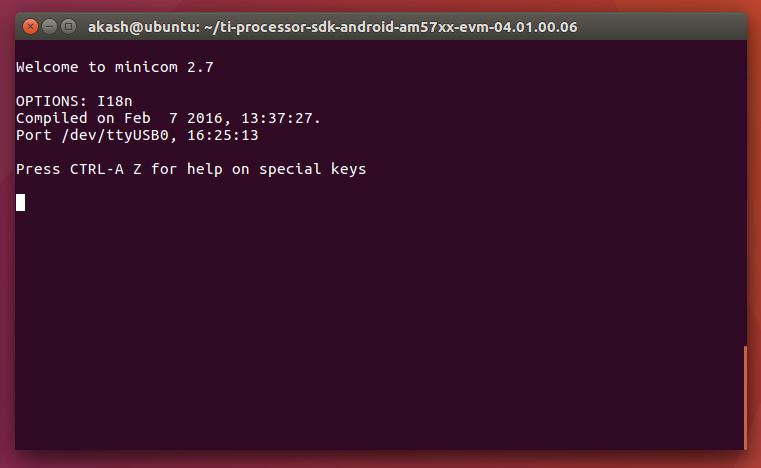
I've following steps 1-4 and working on step 5 to run the setup script. After running the setup script, I power cycle the board and nothing seems to happen. The screen turns on momentarily and then turns off and below is what my terminal looks like. How can I get past this step to boot Android?
Regards,

Akash Patel

  • Akash,

    Did you try power cycling the board? as mentioned at 

    http://processors.wiki.ti.com/index.php/Processor_SDK_Android_Setup_Script#Detailed_description_of_what_the_script_is_doing 

    i just tried latest images, full log : https://pastebin.ubuntu.com/p/RCfhSWGF7X/ 

    power cycle at line-72 as shown in the log 

  • Hi Praneeth,

    Thanks for the response. That is the Wiki page that I was trying to follow. I tried power cycling the board but I don't see anything happen. Any other ideas what might be going on?

    By the way, I am doing this in VMWave running Ubuntu 16.04 LTS.

    Regards,
    Akash
  • Hello Akash,

    Just to double check: How are you power cycling the board?

    For example, if I unplug and re-plug the power cable into the AM57xx GPEVM, LED D41 lights up, but I won't get serial output until I push the POWER button and see LED D3 light up as well.

    Regards,
    Nick
  • Hi Nick,

    I am power cycling the board by unplugging and replugging the power cable into the EVM and pushing the power button as you mentioned. I see that D41 is lit for the whole time the power cable is inserted. When I push the power button, I see D3 lights up and the screen turns on but after 1-2 seconds they both (D3 and the screen) turn off. D41 is still lit during this time.

    Regards,
    Akash Patel
  • VM might cause issue especially in USB communication ( Fastboot flashing) between Host and device side.

    I am using standalone ubuntu 16x machine.

    lsusb from terminal shows the following
    Bus 002 Device 001: ID 1d6b:0003 Linux Foundation 3.0 root hub
    Bus 001 Device 002: ID 0403:6001 Future Technology Devices International, Ltd FT232 USB-Serial (UART) IC

    showing the connection of serial and micro usb .

    --

    Do you see something similar on your host machine ?
  • Hi Praneeth,

    Here is the output from lsusb. I can definitely see the FTDI connection but the microUSB, I'm not sure about. I get the same below output whether or not the microUSB wire is connected. Is there another way to verify that connection?

    akash@ubuntu:~$ lsusb
    Bus 001 Device 001: ID 1d6b:0002 Linux Foundation 2.0 root hub
    Bus 002 Device 006: ID 0403:6001 Future Technology Devices International, Ltd FT232 USB-Serial (UART) IC
    Bus 002 Device 004: ID 0e0f:0008 VMware, Inc.
    Bus 002 Device 003: ID 0e0f:0002 VMware, Inc. Virtual USB Hub
    Bus 002 Device 002: ID 0e0f:0003 VMware, Inc. Virtual Mouse
    Bus 002 Device 001: ID 1d6b:0001 Linux Foundation 1.1 root hub

    Regards,
    Akash

  • the ftdi is the serial debug port,

    try lsusb before and after connecting the microusb cable.

    check, if you see a new device detected.

    ____

    Any Case, for a better android build and development environment it is recomended to have a supported  standalone ubuntu host machine.(14.x or 16.x) rather than a vm instance.

  • Hi Praneeth,

    As I mentioned in my previous post, I get the same output from lsusb whether or not I have the cable connected, i.e. I don't see a new device detected. What should the microUSB cable connection show as in my lsusb output?

    Unfortunately, I don't have access to a standalone machine.

    Regards,
    Akash
  • that means your virtual box is not able to establish usb connection. hence the setup.sh (proc sdk method) will not work .
    This explains the problem you are seeing.

    the only difference comparing to my setup is i am doing from a standalone machine and my usb ports are detected and connection established correctly. as you can see from the logs : e2e.ti.com/.../2465317
    i was able to successfully run setup script and boot android on TMDSEVM572X.

    Try the tips recommended in ubuntu forum and ensure your vm is configured correctly.
    some refs
    help.ubuntu.com/.../USB
    askubuntu.com/.../ubuntu-16-04-virtualbox-5-1-win-7-vm-usb-not-working

    hope it helps
  • Hi Praneeth,

    Should I be seeing something in Device Manager if I connect the microUSB wire to my Windows environment? I am not seeing anything show up there indicative of the connection. Also, when I push the power button, why does my screen turn on and then turn off about 2 seconds later? Is this the normal behavior at this step in the process?

    I also just tried connecting the EVM to a colleague's standalone Linux machine (no VM) and had the same issue. I'm not seeing anything different in the lsusb print before and after connecting the microUSB wire. Can you show your lsusb output before and after connecting the microUSB wire?

    Regards,

    Akash Patel

  • Hello Akash, 

    If your D3 LED turns on for several seconds, then turns back off, that makes me suspect the processor can't find a bootable media and the watchdog timer is shutting power back off to protect the processor.

    1) Did you format and populate an SD card using the bin/create-sdcard.sh script and insert it into the board before trying to run setup.sh?

    2) setup.sh assumes the FTDI cable is at ttyUSB0. Could you run dmesg | grep tty after unplugging and replugging the FTDI cable to ensure that is the correct location?

    Once we can see the u-boot screen on the serial port, then we can go back to USB debugging if setup.sh still isn't working. 

    Regards, 

    Nick

  • Hi Nick,

    That could very well be the issue as the processor is turning off moments after I turn it on.

    I formatted and populated the SD card following the instructions here: http://processors.wiki.ti.com/index.php/Processor_SDK_Android_create_SD_card_script 

    Here is the log for this script running: /cfs-file/__key/communityserver-discussions-components-files/791/createSDcard_5F00_log.txt

    I then inserted this card into my EVM. I confirmed that my FTDI cable is connected to ttyUSB0.

    Here is the log for the setup script running: /cfs-file/__key/communityserver-discussions-components-files/791/setup_5F00_log.txt

    Nothing happens after I power cycle (unplugging and plugging the barrel jack connector and then pressing the power button) after the Minicom part is running.

    Regards,

    Akash

  • It looks like Akash's board is broken - the board cannot find its boot media, so the watchdog timer is shutting the board off at 8 seconds.

    The issue does not seem to be the code on the SD card, the Android SDK itself, the hardware setup of the board, the VMWare communication between the host and the virtual Linux, or the terminal setup.

    I am closing this thread, please respond if there is a new development!

    Regards,
    Nick
  • Hi Nick,

    Looks like the issue was related to my SD card creation using the createSDcard.sh script and I was able to get my EVM running Android successfully (didn't need to get new hardware).

    Below are the steps I did to fix my issue.

    1. Select no when asked to install the file system on SD card during script (this should create 2 empty partitions on SD card)
    2. Copy MLO-am57xx-evm and u-boot-am57xx-evm.img from .../ti-processor-sdk-android-am57xx-evm-04.01.00.06/board-support/prebuilt-images to ~73MB partition on SD card
    3. Rename MLO-am57xx-evm to MLO and u-boot-am57xx-evm.img to u-boot.img
    4. Plug SD card into EVM and run setup.sh from .../ti-processor-sdk-android-am57xx-evm-04.01.00.06 

    Thanks for all the help!

    Regards,

    Akash Patel

  • Hello Akash,

    Glad to hear it!

    To clarify, setup.sh was able to install the entire android filesystem and kernel to the EMMC of the board, as long as you manually placed MLO and u-boot.img in the ~73MB partition and left the other partition blank? I did not have trouble using the Android SDK 4.1 create-sdcard.sh on my Ubuntu 14.04 64 bit linux machine, so it would be interesting to see if the issue was related to the VMWare or the version of Ubuntu.

    Regards,
    Nick
  • Hi Nick,

    Yes, that is correct. I just placed MLO and u-boot.img in the ~73MB partition and left the other partition blank.

    I was able to successfully have setup.sh install the entire android file system and kernel the eMMC of the board thereafter.

    I was able to successfully create this blank SD on both my VMWare setup and my Linux machine, both running Ubuntu 16.04 64-bit LTS.

    I don't think the issue was with regards to VMWare but potentially has to with installing the file system on the SD card. If you select that yes to that option when creating the SD card, do you have any issues?

    Regards,
    Akash
  • Hi Akash,

    No, I did not have any issues when selecting yes on all options in the create-sdcard.sh script for Android SDK 4.1 on my machine.

    Regards,
    Nick